Icon Finder Plus
- By
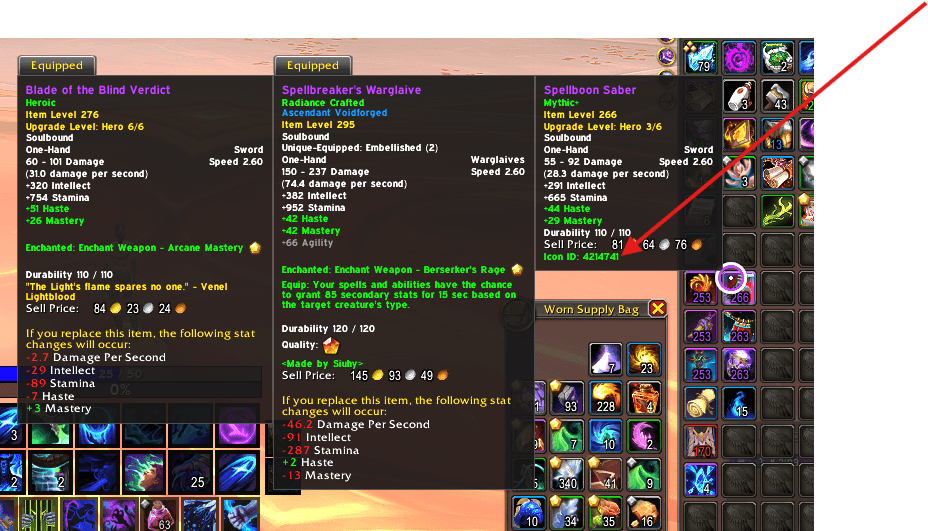
image.png
Screenshot 2026-06-13 171209.png
Screenshot 2026-06-13 171128.png
Description
Icon Finder Plus enhances Blizzard's default icon picker by adding fast and convenient Icon FileDataID searching, spell name searching, and Icon ID tooltip support.
Designed for addon developers, macro enthusiasts, transmog collectors, UI designers, and power users, Icon Finder Plus makes it easy to locate specific icons without manually scrolling through thousands of entries.
Features
Direct Icon ID Search
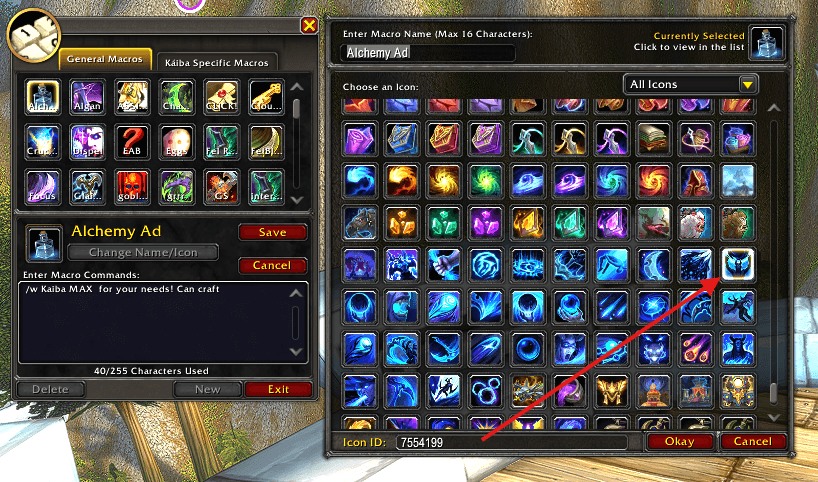
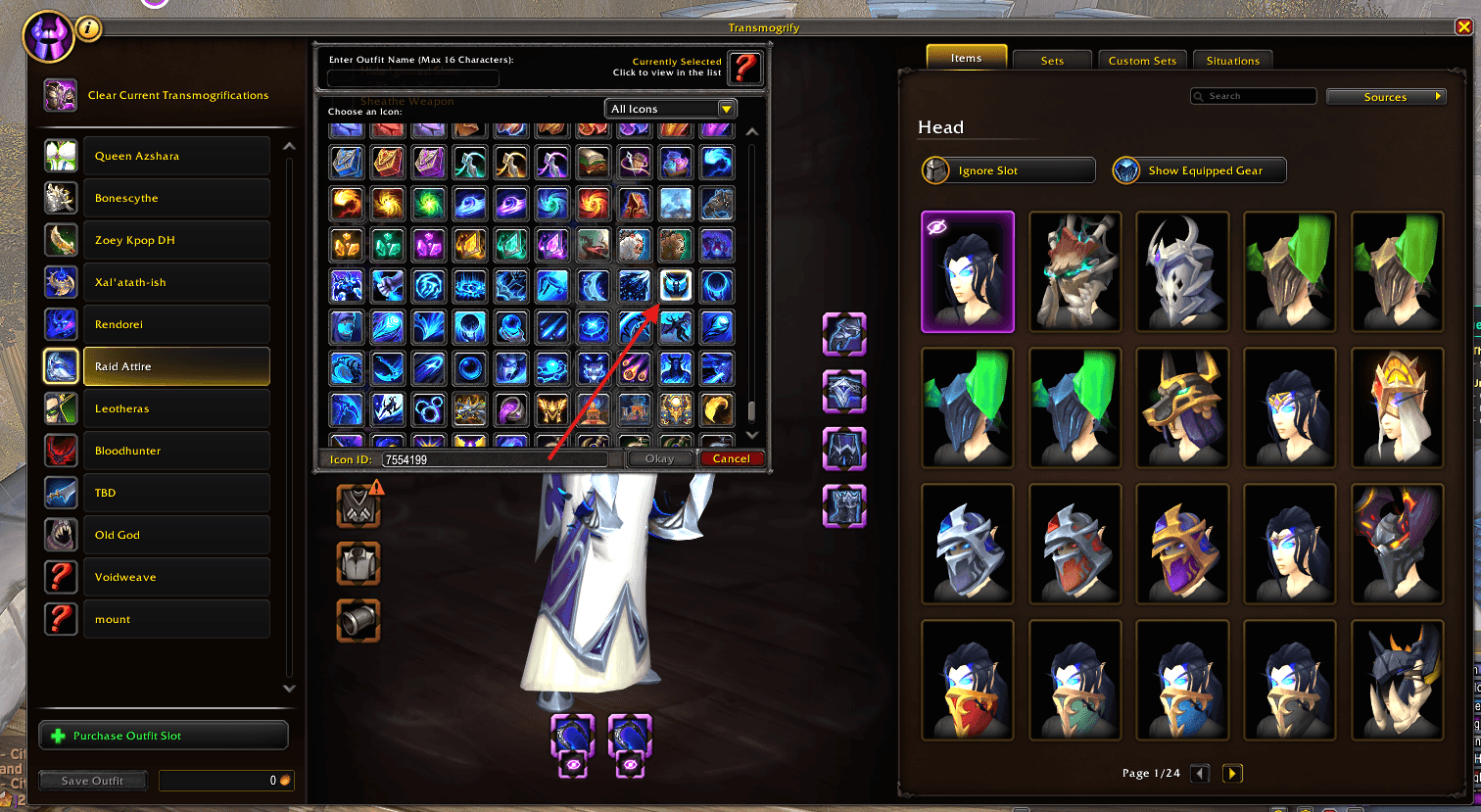
Enter any valid Blizzard FileDataID and press Enter to instantly jump to the corresponding icon within Blizzard's icon picker.
Examples:
- 1305159 → Throw Glaive
- 7554199 → Collapsing Star
Exact Spell Name Search
Search for icons using exact spell and ability names.
Examples:
- Regrowth
- Bestial Wrath
- Throw Glaive
- Eye Beam
- Moonfire
- Chaos Strike
Once the spell cache has been generated, Icon Finder Plus can resolve thousands of spells and abilities directly from Blizzard's spell database.
Icon ID Tooltips
Icon Finder Plus displays Icon FileDataIDs directly within item and spell tooltips.
This makes it easy to discover icon IDs without needing to visit external websites or search manually through databases.
Seamless Blizzard Integration
Icon Finder Plus works directly inside Blizzard's existing icon selection window without replacing or redesigning the default interface.
Supports Multiple Icon Pickers
Works with Blizzard icon picker windows used by:
- Macros
- Transmog Outfits
- Other Blizzard systems that utilize the standard icon selector
Lightweight and Fast
No external databases required.
No custom icon browser.
No performance-heavy icon scanning.
Simply enter an Icon ID or spell name and jump directly to the icon you're looking for.
Perfect For
- Addon Developers
- Macro Creators
- UI Designers
- Transmog Enthusiasts
- WeakAura Authors
- Players who regularly use Wowhead icon IDs
Notes About Spell Name Searches
Spell and ability name searching is provided as a convenience feature and relies on Blizzard's spell database.
In some cases:
- Multiple spells may share the same name.
- Legacy spell records may be returned.
- A spell may resolve successfully but reference an icon that is not currently available within Blizzard's icon picker.
When this occurs, the addon may report that the icon could not be found even though the spell name itself was successfully resolved.
If a spell name search does not locate the desired icon, use the icon's FileDataID instead.
Direct Icon ID searches are the most accurate and reliable way to locate specific icons and will always provide the best results when available.
Example
Spell Search:
Collapsing StarMay resolve to a legacy or alternate spell icon.
Icon ID Search:
7554199Jumps directly to the correct icon.
Finding Icon IDs
Icon IDs can be obtained from:
- WoWHead
- Item and Spell Tooltips (via Icon Finder Plus)
- Blizzard API resources
For the best results, use exact Icon FileDataIDs whenever possible.
Supported Features
- Icon FileDataID Search
- Exact Spell Name Search
- Item Tooltip Icon IDs
- Spell Tooltip Icon IDs
- Macro Icon Picker Support
- Transmog Outfit Icon Picker Support
- Large Spell Cache Support
- Patch 12.0.7 Compatible
Patch 12.0.7 Compatibility Update
New Features
- Added Spell Name Search support for Blizzard icon pickers.
- Added automatic spell cache generation for improved spell lookup coverage.
- Added Icon ID display to item and spell tooltips.
- Added support for searching icons using exact spell names.
- Expanded spell cache range to improve compatibility with newer abilities and future content updates.
Improvements
- Improved icon search reliability and matching accuracy.
- Improved support for Blizzard Macro Icon Picker.
- Improved support for Blizzard Transmog Outfit Icon Picker.
- Enhanced compatibility with newly added spells and abilities.
- Increased spell cache coverage to support future game updates.
Fixes
- Fixed various icon search edge cases.
- Fixed issues with spell name resolution failing for certain abilities.
- Fixed tooltip integration inconsistencies.
- General stability improvements and code cleanup.
Supported Features
- Search by Icon FileDataID.
- Search by Exact Spell Name.
- Item Tooltip Icon IDs.
- Spell Tooltip Icon IDs.
- Macro Icon Picker Support.
- Transmog Outfit Icon Picker Support.
Known Limitations
- Some icons may not be discoverable through spell name searches due to Blizzard API limitations. In these cases, searching by Icon FileDataID will still locate the icon successfully.
- Some Spells will return as different icons, this is currently a bug and it is being looked at, if you need the correct spell Icon, refer to the tooltip Icon ID
The Icon Finder Plus Team