HunterGod
- By
Quality of life for hunters: range to your target, aspect, ammo and pet warnings, and ammo and pet food vendors on the map.
2.png
3.png
4.png
5.png
1.png
Description
HunterGod
Quality of life for hunters in WoW Forever. HunterGod keeps an eye on the things a hunter forgets: how far the target is, when your next shot or swing comes, which aspect and tracking you're in, when your procs are up, how much ammo and pet food you have left, and where to buy more.
Everything is set up from the minimap button (or /huntergod) in one options window, with a live preview of the range number, and every display can be dragged wherever you want it.
Range to your target
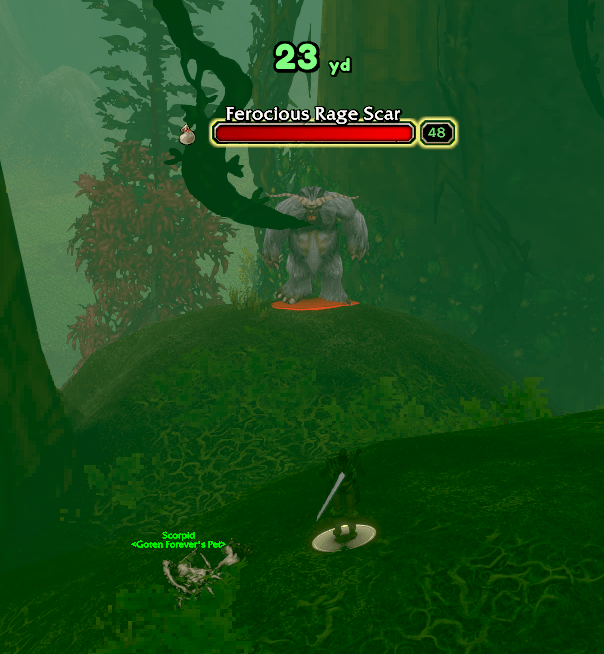
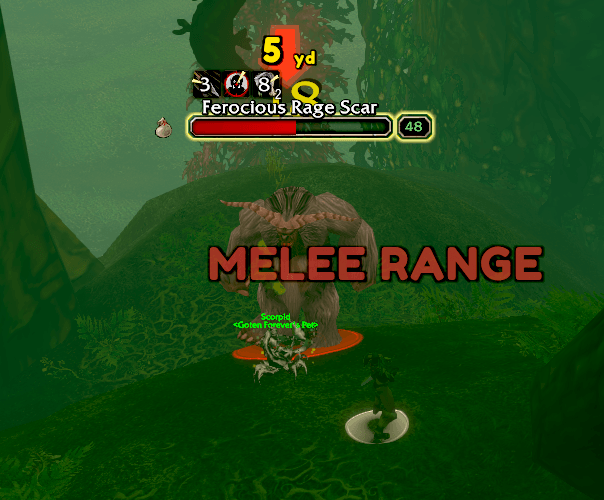
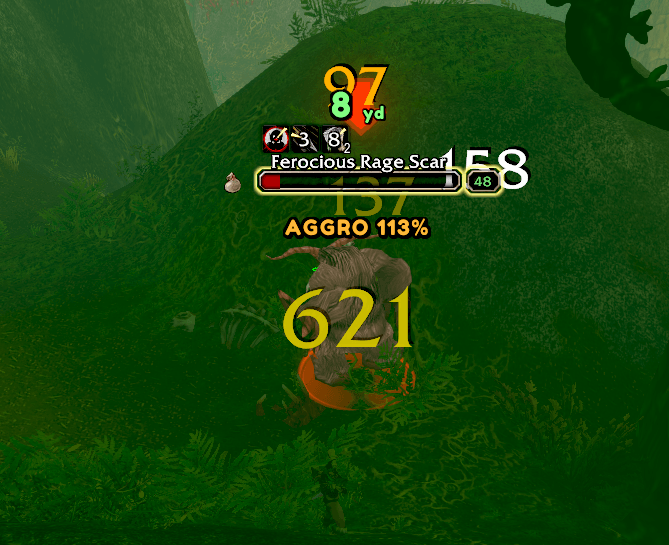
- The distance as one number (for example "32", in yards or metres), coloured by whether your target is in Auto Shot range, in melee, in the dead zone or out of range. In melee it just says Melee, and in the dead zone Dead zone.
- The game only tells addons whether a target is within a few fixed distances; the number is estimated from when your target crosses them and how fast. You can show the range between checks instead ("30-35").
- A big, round font with a thick black outline (Fredoka, or Changa, or the game's font).
- A blinking red MELEE RANGE warning when you're in melee of your target, as see-through as you like, that you can move anywhere.
- Survival: with melee talents (or by choice in the options) the range turns around: green in melee, yellow "Get closer" further out, no blinking warnings, and the aspect warning asks for your melee aspect.
- AGGRO 92% under the target's nameplate when you're about to pull it off your pet (from 90%, or wherever you set it), and YOU HAVE AGGRO! when you do. Only with your pet out or in a group.
- Above the target's nameplate, or anywhere you put it. Pick the size and the colour of each state.
Swing timers
- A bar for each weapon: Auto Shot, main hand and off hand, stacked, with your weapon's icon on its left and the seconds to the next swing.
- Each bar starts dim, lights up as the swing comes and flashes when it goes. Forever tells the game every swing, so they work in combat too.
- Only the bars for where you stand: the melee ones in melee range, Auto Shot's further away. A bar shows while you attack with that weapon, goes a moment after you stop, and turns grey when your target is out of its reach.
- Auto Shot's last half second is marked: moving then holds the shot back.
- They replace Blizzard's swing timers, which HunterGod turns off while its bars are on.
- Width, height, colours, which bars, the seconds and the icon in the Swing timers tab.
Proc animations
- Quick Shots and Quick Strikes (Deadly Aspects: 30% faster shots or swings for 12 seconds): wind rushing up both sides of you.
- Rapid Killing (your next Shot deals 20% more): a target turning on the ground at your feet.
- A burst as each procs, then a calmer version while it lasts, with the seconds it has left. The game itself draws them, so they work in combat too.
- Colour, size, place and strength in the Procs tab.
/huntergod procsshows them.
Reminders above your character
- Your aspect, Trueshot Aura and tracking reminders side by side above your character, always centred whether one, two or three show. Drag the row wherever you want it.
- A reminder when you're in combat with Aspect of the Cheetah or the Pack on, and when your combat aspect (Hawk, Monkey, Wild or any) is missing, out of combat too. Below level 10 Monkey counts as Hawk.
- Click them out of combat: the aspect reminder puts on the right aspect for how you fight, and Trueshot Aura casts it. The aspect reminder also shows when you target an enemy before a pull, so you can click it.
- Trueshot Aura: its icon with a countdown in its last 2 minutes, grey once it's gone. It keeps counting in combat.
- Tracking in dungeons and raids: when you're tracking herbs, minerals or nothing instead of a creature type. Click it for your creature trackings and pick one. Only with points in Improved Tracking (an option).
- Herbs and minerals out in the world: if you're a herbalist or a miner and have neither Find Herbs nor Find Minerals on, its icon joins the row (the one you had on last), and a click puts it on. Not in dungeons, on a flight or in a fight.
Traps
- TRAPS READY when your traps are back after you used one in a fight (Feign Death and trap included).
- Freezing Trap time left beside the frozen mob's nameplate, counted down by the game itself (it works in combat).
Ammo
- A warning when you have fewer than 1000 arrows or bullets (you choose the number), or none at all.
- A reminder in chat when you talk to a vendor that sells the ammo you're running out of.
Your pet
- A bar with the food in your bags that your pet eats, best first. Click one to feed your pet.
- Knows your pet's diet and leaves out food that's too low level for it.
- Tells you when you're out of food or running low, and which food a vendor sells that your pet eats.
- Growl reminder: in dungeons and raids, a warning when your pet's Growl is on autocast, so it doesn't take the aggro off the tank.
- Growl Miss: floats up when Growl doesn't pull the mob onto your pet.
- NOT HAPPY blinks over your pet's portrait when it isn't happy, and HEAL YOUR PET! shows when its health drops below the line you choose.
- Bestial Wrath on your pet's portrait with the seconds it has left.
- Level ups: a toast with your pet's portrait when it levels up or earns training points, and how many it has to spend.
Vendors, trainers and stable masters on the map
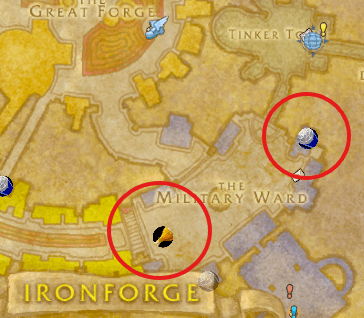
- 132 arrow and bullet vendors, 35 hunter trainers and 51 stable masters on the zone map, the continent map and the minimap.
- Pet food vendors: only the ones that sell food the pet you have out eats, at a level it still likes.
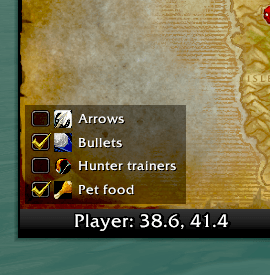
- Checkboxes in the corner of the world map to show or hide arrows, bullets, trainers, stable masters and pet food.
- Vendors that only sell ammo below your level are greyed out. Click a pin to set a waypoint (TomTom too).
/ammo nearestsets a waypoint to the closest vendor that is still useful at your level.- Learns as you play: open a merchant that sells ammo and isn't on the map, and it gets added. This is how the new Forever zones fill in.
At your class trainer
- A note under your trainer's window: when you last reset your talents, what it costs now and when the price drops, and to what. It shows under the trainer's price too.
- The game doesn't tell addons when you last reset or when the price drops, so HunterGod writes down each reset you pay for from now on and counts from there: a step up with each reset (1, 5, 10, then 5 g more up to 50 g) and a step down for each week since the last one, as players report it. The price the trainer asks always wins.
- Class and legacy talents, each with its own price.
/huntergod respecsays it anywhere.
Commands
| Command | What it does |
|---|---|
/huntergod |
Opens the options |
/huntergod unlock, /huntergod lock |
Move the displays (or right-click the minimap button) |
/huntergod meters, /huntergod yards |
The range in metres or yards |
/huntergod style |
Ranged or melee (Survival), and why |
/huntergod swing |
Shows the swing timer bars swinging |
/huntergod respec |
When the talent reset price drops |
/huntergod procs |
Shows the proc animations |
/huntergod tracking |
Shows the tracking reminder |
/ammo arrows, /ammo bullets, /ammo both, /ammo weapon |
Which ammo the map shows |
/ammo nearest |
Waypoint to the nearest useful vendor |
/ammo trainers, /ammo stables, /ammo food, /ammo faction, /ammo minimap, /ammo continent, /ammo class |
Toggle each map option |
/ammo button |
Show or hide the minimap button |
About the data
The vendor, trainer and stable master lists come from QuestieDB and the pet food list from the cmangos Classic database, both under the GPLv3.
Found a vendor that's missing or in the wrong place? Leave a comment with its name and coordinates.
Credits
- Vendor, trainer and stable master data: QuestieDB by the Questie team (GPLv3).
- Pet food data: cmangos classic-db (GPLv3).
- Range-check items: from LibRangeCheck-3.0 (MIT). The distance estimate follows the idea of Good Range.
- Fonts: Fredoka One by Milena Brandão and Changa by Eduardo Tunni, both under the SIL Open Font License 1.1 (included).
- Map pins: HereBeDragons by Nevcairiel.
- LibStub and CallbackHandler-1.0.
HunterGod is licensed under the GNU GPL v3 or later.
Español
HunterGod son mejoras para cazadores en WoW Forever. Todo se configura desde el botón del minimapa (o /huntergod) en una ventana de opciones con vista previa de la distancia, y cada aviso se puede arrastrar donde quieras.
- Aviso de cuerpo a cuerpo: un CUERPO A CUERPO rojo que parpadea cuando estás a melee de tu objetivo; se puede mover.
- Supervivencia: con talentos de cuerpo a cuerpo (o eligiéndolo en las opciones) la distancia se da la vuelta: verde a melee, amarillo "Acércate" más lejos, sin avisos parpadeantes, y el aviso de aspecto pide tu aspecto de melee.
/huntergod estilodice en qué modo estás y por qué. - Aviso de agro: AGRO 92% bajo la placa del objetivo cuando estás a punto de quitarle el bicho a tu mascota (desde el 90%, o desde donde lo pongas), y ¡TIENES EL AGRO! cuando se lo quitas. Solo con la mascota fuera o en grupo.
- Distancia al objetivo: un número en yardas o metros (por ejemplo "32") con letra redondeada y contorno negro, del color de a distancia, cuerpo a cuerpo, zona muerta o fuera de alcance, encima de la placa del objetivo o donde lo pongas. A melee pone "Cuerpo a cuerpo" y en la zona muerta "Zona muerta". Eliges el estilo, el tamaño y los colores.
- Animaciones de procs: viento subiendo a los dos lados con Quick Shots y Quick Strikes (Deadly Aspects), y una mira girando a tus pies con Rapid Killing. Las dibuja el propio juego, así que salen en combate.
/huntergod procslas enseña. - Avisos sobre el personaje: aspecto, Aura de disparo certero y rastreo, juntos y centrados. Fuera de combate se pueden clicar: el de aspecto te pone el que toca y el de Aura de disparo certero la lanza.
- Aspectos: te avisa si estás en combate con el Aspecto del guepardo o de la manada, o si te falta tu aspecto de combate, también fuera de combate.
- Rastreo: en mazmorras y bandas te avisa si no rastreas un tipo de criatura (con hierbas, minerales o nada puesto); con un clic eliges uno de la lista. Fuera de mazmorras, si eres herborista o minero y no llevas su rastreo, te lo recuerda y con un clic lo pones.
- Trampas: TRAMPAS LISTAS cuando vuelven tus trampas después de usar una en una pelea, y lo que le queda de Trampa congelante al bicho congelado, junto a su placa (funciona en combate).
- Munición: te avisa cuando te quedan menos de 1000 flechas o balas (el número lo eliges tú) y te lo recuerda en los vendedores que la tienen.
- Comida de la mascota: una barra con la comida de tus bolsas que come tu mascota; haz clic para darle de comer. Te avisa si te queda poca, y en el mapa marca los vendedores con comida que le guste.
- Gruñido: en mazmorras y bandas te avisa si tu mascota tiene Gruñido en automático, para que no le quite el aggro al tanque.
- Gruñido falla: un aviso que sube y se desvanece cuando Gruñido no le atrae el bicho a tu mascota.
- NO ESTÁ CONTENTA parpadea sobre el retrato de tu mascota si no está contenta, y ¡CURA A TU MASCOTA! sale cuando le baja la vida del porcentaje que elijas.
- Cólera de las bestias en el retrato de tu mascota, con los segundos que le quedan.
- Subidas de nivel: un aviso con el retrato de tu mascota cuando sube de nivel o gana puntos de entrenamiento, y cuántos tiene para gastar.
- Barras de golpe: una barra por arma (Disparo automático, mano principal y mano izquierda) con el icono del arma y los segundos hasta el siguiente golpe. Empiezan apagadas, se encienden según llega el golpe y destellan al soltarlo. A melee solo las de cuerpo a cuerpo, más lejos solo la del Disparo automático. Sustituyen a las de Blizzard.
- Reinicio de talentos: bajo la ventana de tu instructor, cuándo reiniciaste por última vez, cuánto cuesta ahora y cuándo baja el precio. El juego no se lo dice a los addons, así que HunterGod apunta cada reinicio que pagas y cuenta desde ahí: un escalón más con cada reinicio (1, 5, 10 y luego 5 g más hasta 50 g) y uno menos por cada semana desde el último, según cuentan los jugadores.
- Mapa: vendedores de flechas y balas, instructores de cazadores, maestros de establos y vendedores de comida para tu mascota, con casillas en la esquina del mapa del mundo para elegir qué se ve.
- Comandos:
/huntergod(opciones),/huntergod desbloquear | bloquear,/huntergod golpes,/huntergod talentos,/huntergod procs,/huntergod rastreo,/municion flechas | balas | ambas | arma | instructores | establos | comida | cerca | faccion | minimapa | continente | clase | boton.
HunterGod Team