
Hunter Shooting Sound (HSS)
- By
Make your Hunter's bow, crossbow or gun sound like any other. Pick any sound per ranged weapon, with random variants. Works for Auto Shot and instant shots. Settings: /hss
Description
Hunter Shooting Sound (HSS)
Change what your Hunter's bow, crossbow or gun sounds like. Pick any sound for each ranged weapon: make your gun sound like a bow, your crossbow sound like a rifle, or give your bow a different release sound. Works for Auto Shot and instant shots (Arcane Shot, Multi-Shot, Steady Shot, Aimed Shot and more).
Keywords: hunter, bow, crossbow, gun, rifle, ranged weapon, shot sound, auto shot, sound replacement, sound change, audio, SFX, mute, weapon sound, WoW Forever, Classic.
Features
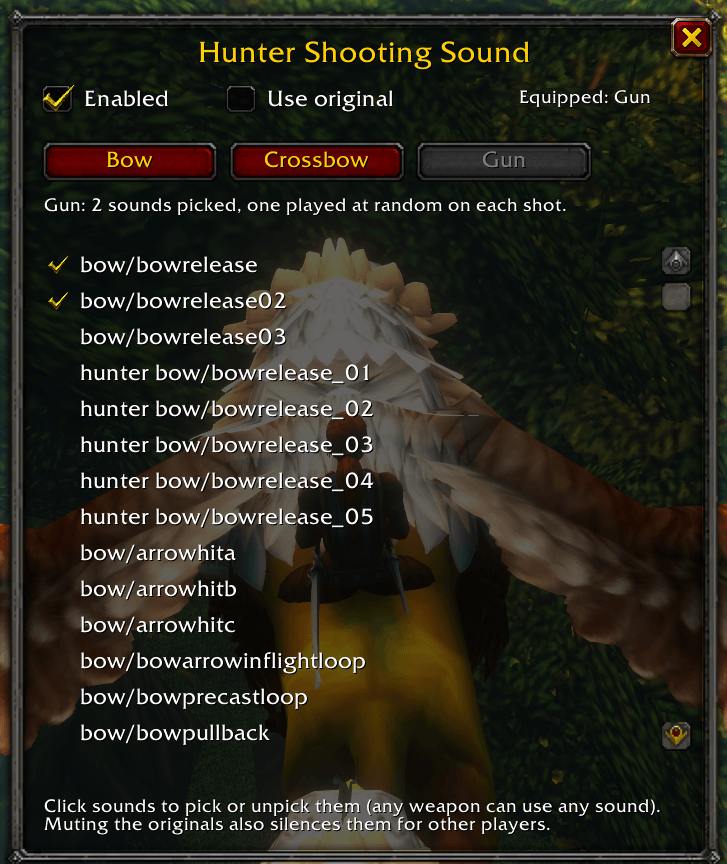
- Per-weapon redirect. Separate Bow, Crossbow and Gun tabs. Whichever ranged weapon you have equipped uses its own picks, and switching weapons switches sounds automatically.
- Any sound for any weapon. Every tab lists all the sample sounds (bow, hunter bow, hunter crossbow, gun). Click one to hear it and pick it; click again to unpick.
- Random variants. The original weapon sounds use up to 3 variants. Pick 1 sound and all 3 variants point to it; pick 2 and they alternate; pick 3 or more and you get a random mix.
- Use original toggle. One checkbox per weapon to go back to the game's own sound. Your picks are remembered when you turn it off again.
- Mute built in. The weapon's original sound files are muted while a redirect is active, and restored when you switch weapon or turn the addon off. No other addon needed.
- Opens with
/hssor from Options > AddOns > Hunter Shooting Sound.
Commands
| Command | Effect |
|---|---|
/hss |
Open or close the settings window |
/hss on / /hss off |
Turn the addon on or off (off restores all original sounds) |
/hss debug |
Print every spell you cast and whether it counts as a shot |
Notes
- Game sound files can't be replaced by an addon, so HSS mutes the originals with
MuteSoundFileand plays your picks when you shoot. Muting is global, so while a redirect is active the original sounds are also silent for other players' shots with the same weapon type. - Sounds come from the game's own files. Nothing is bundled with the addon.
- Made for WoW Forever (Classic-style client). Bug reports with the
/hss debugoutput are welcome.
Install
Unzip so the hunter_shooting_sound folder sits in World of Warcraft\_forever_\Interface\AddOns\, then /reload or restart the game.
Hunter Shooting Sound (HSS) Team
