
HUD Color Changer
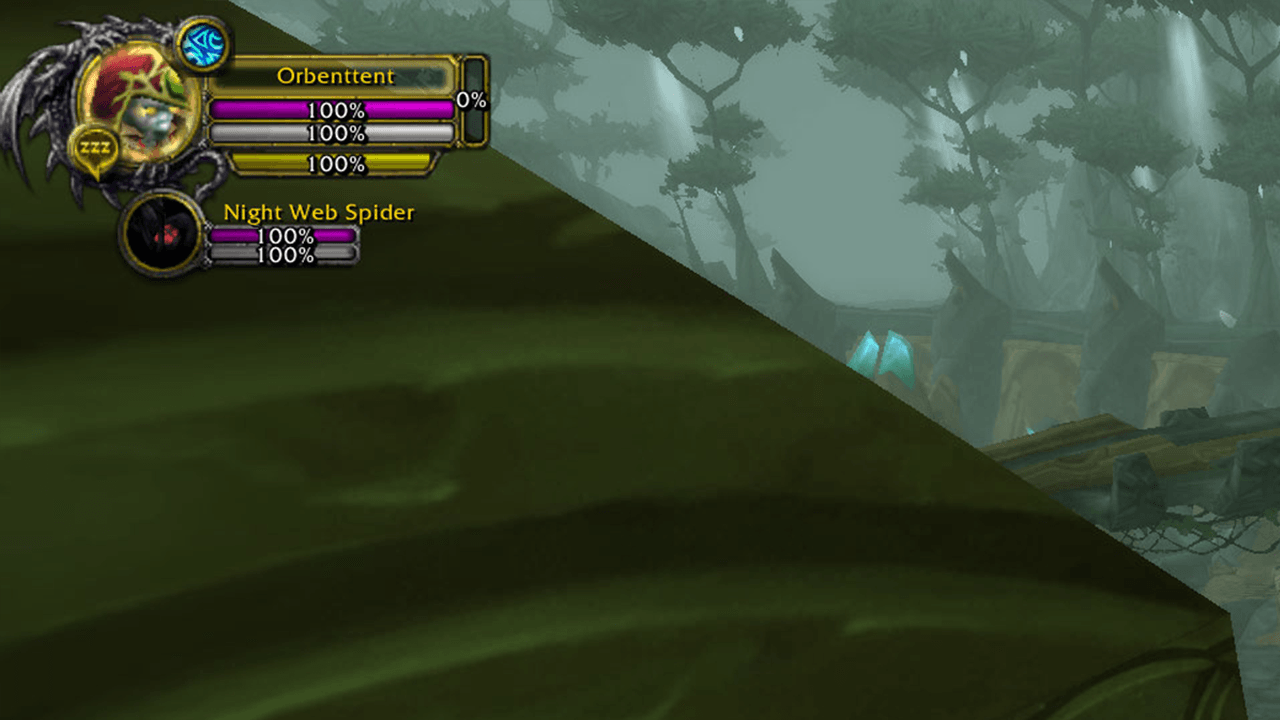
Pink Health Bar and White Mana Bar Example.png
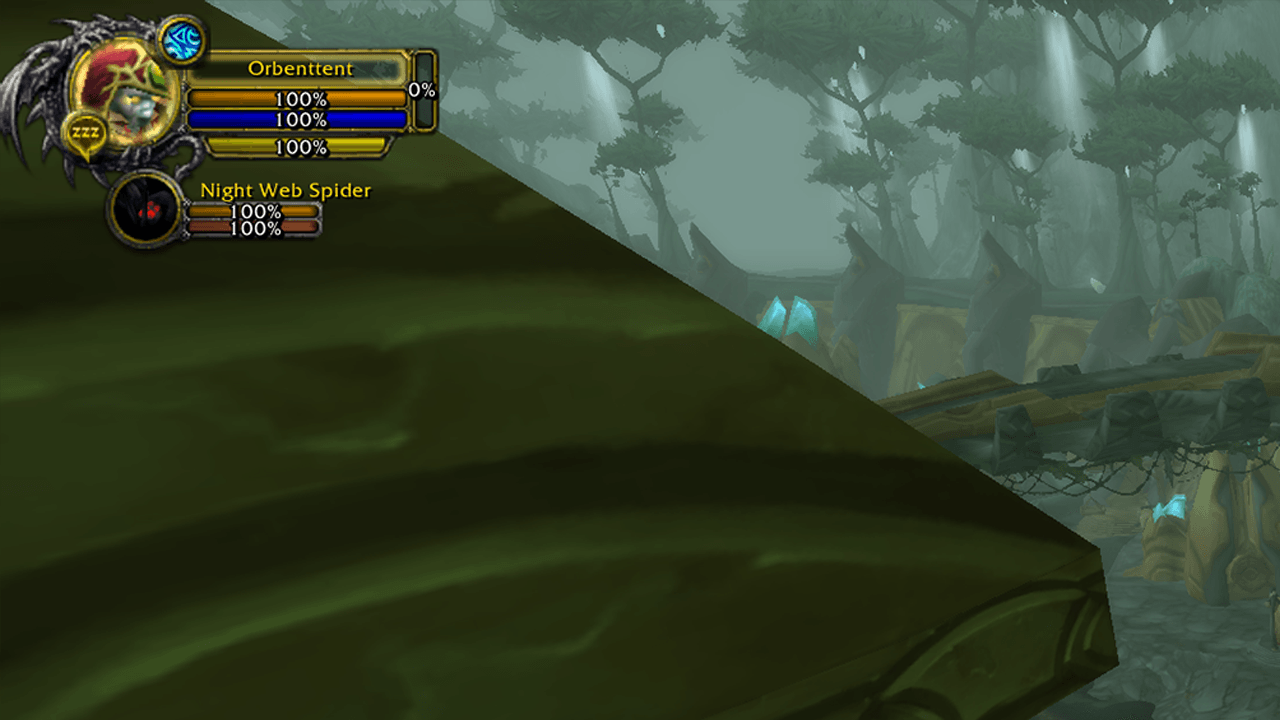
Orange Health Bar Blue Mana Bar Example.png
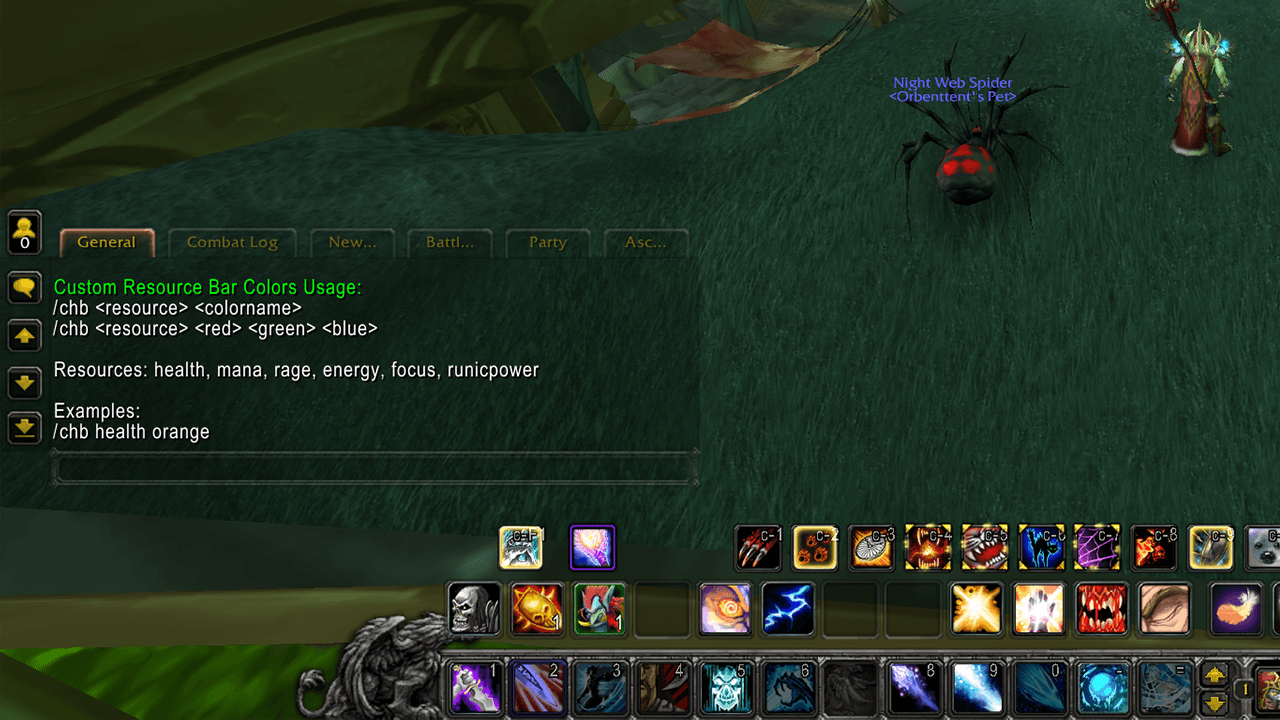
Getting started with CHB command.png
Description
Transform your World of Warcraft interface with personalized health and resource bar colors using simple chat commands. This lightweight addon gives you complete control over your unit frame appearance without any performance impact.
Features
Complete Resource Support
- Health bars for all unit frames (player, focus, pet)
- Mana bars for casters
- Rage bars for warriors and druids
- Energy bars for rogues and druids
- Focus bars for hunters
- Runic power bars for death knights
Simple Command System
- Type
/chb health orangeto instantly change your health bar color - No complex menus or configuration screens
- Changes apply immediately without UI reload
- Type
/chbto see all available options
Flexible Color Options
- 20 preset colors for quick changes (red, blue, orange, purple, gold, cyan, etc.)
- Full RGB support for unlimited customization (0-255 values)
- Create any color imaginable with
/chb health 255 128 0format
Smart Settings Management
- Per-character settings that save automatically
- Settings persist through logout and game restarts
- Each character can have unique color schemes
Wiki
https://gamer-guides.com/wow-ascension/custom-resource-bar-colors/
How to Use
- Install - Place the CustomHealthBar folder in your Interface\AddOns directory
- Enable - Check the addon in your character select AddOns menu
- Customize - Log in and type
/chbto see all commands - Apply - Use
/chb health orangeor any other command to change colors
Example Commands
/chb health gold        - Golden health bars
/chb mana purple       - Purple mana bars
/chb rage red          - Red rage bars
/chb energy lime       - Lime green energy bars
/chb focus orange      - Orange focus bars
/chb health 255 0 128  - Custom pink health (RGB)
Perfect For
- Raiders wanting better resource visibility during encounters
- PvP players needing quick resource identification
- UI enthusiasts matching bars to custom themes
- Streamers creating unique visual identities
- Anyone tired of default green health bars
Why Choose This Addon?
Unlike complex UI overhauls, Custom Resource Bar Colors focuses on doing one thing perfectly: giving you instant, easy control over your bar colors. No bloat, no complicated settings, no performance hit - just simple commands that work.
Technical Details
- Version: 3.0.0
- Game Version: 3.3.5a (WotLK)
- Dependencies: None
- Performance Impact: Zero
- Compatibility: Default Blizzard unit frames
- Private Server Support: Fully tested and working
All Preset Colors
red green blue yellow orange purple pink cyan magenta white black gray silver brown lime teal navy maroon olive gold
Quick Start Guide
Change your health bar to orange:
/chb health orangeMake your mana bar purple:
/chb mana purpleCreate a custom teal energy bar:
/chb energy 0 255 200See all your current settings:
/chbImportant Notes
- Works only with default Blizzard unit frames
- Does not affect party or raid frames
- Colors are client-side only (other players see default colors)
- Compatible with WotLK 3.3.5a private servers
Support
Having issues? Type /chb in-game for complete usage instructions, or check the addon comments section for help.
Make your interface truly yours with Custom Resource Bar Colors - the simple, lightweight way to personalize your WoW experience!
HUD Color Changer Team
