
How Many Mobs
Captura de pantalla 2026-05-08 111141.png
Description
How Many Mobs
A World of Warcraft: Classic Era addon designed for grinding - tracks how many mobs you need to kill to level up.
What is Grinding?
In World of Warcraft, grinding is the process of repeatedly killing mobs (enemies) of a similar level to gain experience points and level up your character. It's a straightforward, mechanical approach to leveling where you:
- Find mobs at or near your level
- Kill them repeatedly in the same area
- Gain steady, consistent XP until you level up
This addon is specifically built to optimize your grinding sessions by showing you exactly how much longer you need to grind.
Features
- Mob Counter: Automatically calculates how many more mobs you need to kill at your current grinding rate to reach the next level
- Session Statistics: Tracks kills per hour and XP gain per hour during your grinding session to monitor your progress
- Minimap Button: Quick access to grinding stats with a convenient minimap button
- Drag-and-Drop UI: Move the display frame and minimap button wherever you want
- Real-time Tracking: Updates instantly as you grind and gain experience from kills
- Efficiency Rating: Shows you how efficient your current mob choice is for grinding
Usage
Minimap Button
- Click the minimap button to toggle the main information display
- Right-click to close the window
- Drag the button to reposition it on your minimap
Main Window
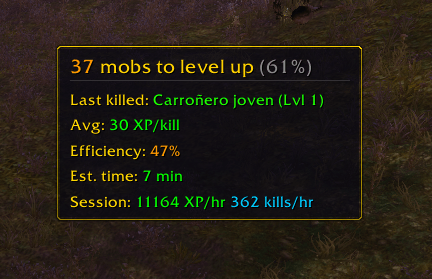
The addon displays grinding-specific stats:
- Mobs Needed: Exactly how many more kills at your current grinding rate are needed to level
- Last Killed: The mob you just killed (helps verify you're grinding the right mob)
- Estimated Time: How long your current grind will take at your observed pace
- Efficiency: Whether this mob choice is a good grind spot for your level (green = excellent, yellow = okay, orange = slow)
How It Works
This addon is optimized for your grinding sessions. It monitors your combat log to:
- Detect when you kill a mob during your grind
- Track the real experience gained from that kill
- Calculate how many kills at your current rate are needed to reach the next level
- Display session statistics (XP/hr, kills/hr) to measure your grinding efficiency
- Estimate time to level based on your actual grinding performance
The addon learns from your grinding pace and adjusts estimates as you continue.
Understanding Efficiency
Efficiency Rating shows you how optimal your current mob choice is for your level (0-100%).
How It's Calculated
The addon compares the XP you gain from your current mob to the maximum XP you could get from a mob at your exact level:
Efficiency = (XP from current mob / XP from same-level mob) × 100%
Example:
- Level 20 character grinding Level 20 mobs = 100% efficient
- Level 20 character grinding Level 18 mobs = ~50% efficient (takes twice as long)
- Level 20 character grinding Level 16 mobs = ~0% efficient (too low level, little to no XP)
Color Coding
- 🟢 Green (80-100%): Excellent grind spot! Mobs are within 1-2 levels of you
- 🟡 Yellow (50-79%): Good grinding, but you could find higher-level mobs for faster leveling
- 🟠 Orange (1-49%): Poor efficiency - mobs are too low level. Find harder mobs to level faster
- 🔴 Red (0%): Gray mobs give no XP. Find mobs closer to your level
Pro Tips
- Best grinding efficiency: Mobs at your exact level (100%)
- Diminishing returns: Each level below you significantly reduces XP gains
- Challenging content: Group dungeons might give lower efficiency mobs but faster killing = same or better XP/hr
Compatibility
- World of Warcraft: Classic Era (Season of Discovery and Vanilla)
Tips for Effective Grinding
- Grind consistent mobs: Kill mobs that are all the same level for the most accurate predictions
- Grind in one location: Avoid switching mobs mid-grind for best results (spawn time consistency helps)
- Let the addon learn: The estimated time gets more accurate the longer you grind in a session
- Monitor efficiency: Use the efficiency rating to verify your mob choice is good for your level
- Session stats matter: Check your XP/hr to compare different grinding spots
- Session resets on level: When you level up, your stats reset for the new level so you can track that level's grind separately
Troubleshooting
Addon not showing?
- Type
/reloadto reload your UI - Check that the addon is enabled in your AddOns list
Minimap button missing?
- Reset its position by deleting the SavedVariables or repositioning it through the UI
Display not updating?
- Make sure you're actively killing mobs and gaining experience
How Many Mobs Team
