
HouseXP Tracker
- By
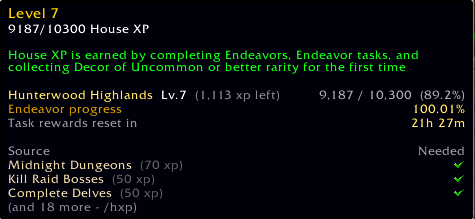
Never do the mental math again. House XP Tracker extends the Housing Dashboard's built-in XP tooltip to show exactly how many Endeavors and new Decor pieces you need to reach the next House level - right where you're already looking!
newLayout.png
NewTracker.png
NewTracker2.png
Description
Tracks your Housing XP and Neighborhood Endeavor progress — directly inside the tooltip you already use, plus a full task window at your fingertips.
How It Works
Hover the XP ring in the Housing Dashboard. The existing tooltip is extended with:
- Your active neighborhood name, current House Level, and exact XP remaining
- Live Endeavor progress percentage for your active neighborhood
- A greedy task breakdown showing the minimum tasks needed to reach the next level
- A weekly reset countdown, color-coded by urgency
No new windows cluttering your screen by default. No configuration required. It lives inside the tooltip you already use.
Features
Tooltip (always on)
- Shows your neighborhood name and House Level XP (current / cap, percentage, XP left)
- Endeavor progress % in a distinct color so it stands out at a glance
- Up to 3 recommended tasks from a greedy path calculation — the shortest route to your next level
- New Decor fallback (10 XP each) calculated automatically if tasks alone won't cover the gap
- Weekly reset timer, turning yellow under 24 hours and red under 2 hours
Task Popup (/hxp)
- Type
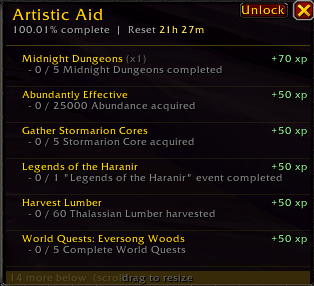
/hxpto open a draggable, lockable task window - Shows all open tasks sorted by XP value, with live progress sub-lines pulled directly from the game (e.g. "- 150 / 5000 Honor earned", "- 3 / 5 Mythic+ Dungeons completed")
- Tasks that have been repeated show a completion count (x2, x4, etc.)
- Greedy optimal-path tasks are highlighted in a brighter gold so you know what to prioritize
- Tracked tasks show a checkmark so you can see your active tracking at a glance
- Shift-click any task to track or untrack it — the window updates automatically
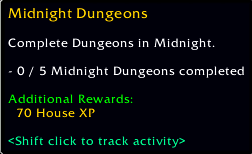
- Hover any task for a full tooltip: description, live progress, repeatable badge, House XP reward
- Drag the bottom bar to resize the window to however many rows you want — the size is saved across sessions
- Scroll wheel moves through tasks when there are more than fit the window
- Lock / Unlock button prevents accidental dragging
- Drag the title bar to move it anywhere on screen — position is saved
Slash Commands
/hxp— open the task popup/hxp refresh— manually re-request XP and task data/hxp reset— reset the popup position and size back to defaults
Zero Configuration
- Install and hover. Everything works immediately after opening the Housing Dashboard once per session.
HouseXP Tracker Team


![[MT] Mythic Tracker project image](https://media.forgecdn.net/avatars/thumbnails/1731/147/256/256/639101737144005570.png)
![[RIS:R] Raid Invite Suite: Raider project image](https://media.forgecdn.net/avatars/thumbnails/1725/914/256/256/639098088971131980.png)
![[RIS] Raid Invite Suite project image](https://media.forgecdn.net/avatars/thumbnails/1725/523/256/256/639097897682745264.png)