Description
# HoochUI
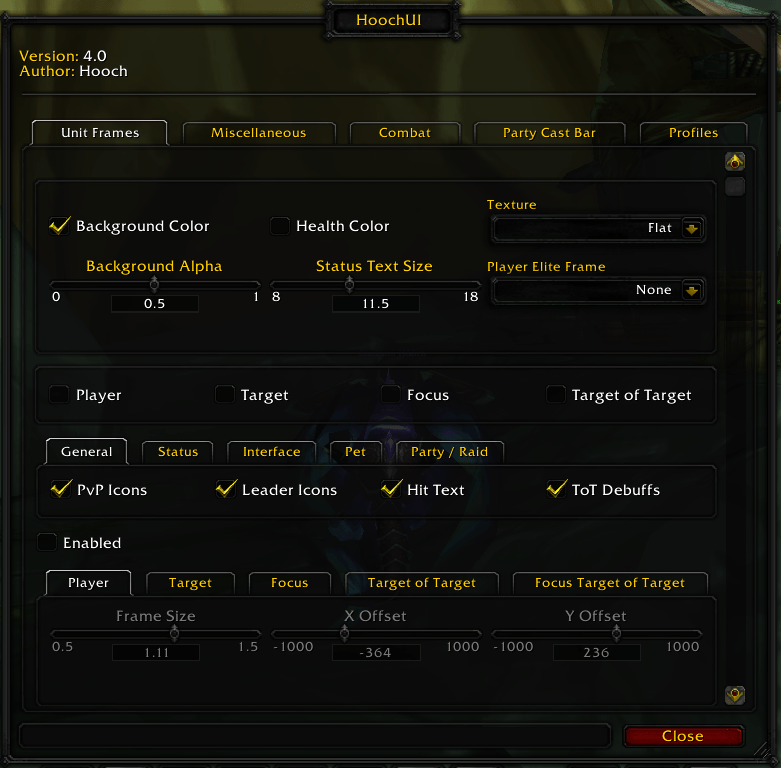
**HoochUI** is a custom PvP-focused UI addon, built with a modular architecture that covers unit frames, cast bars, pet UI, crowd control tracking, and other gameplay-focused utilities.
## Installation
1. Copy the `HoochUI` folder into:
`World of Warcraft\_classic_\Interface\AddOns\`
2. Restart the game or run:
`/reload`
## Quick Start
1. Open the settings with:
`/hh`
2. Configure the core modules first:
- Frames
- Castbar
- PartyCastbar
- PetUI
3. Review test/debug options and disable anything unnecessary before arena, battlegrounds, or raids.
## Main Modules
- Frames — unit frame appearance and behavior.
- Interface — hides or restores Blizzard UI elements.
- Castbar — enhanced cast bar.
- PartyCastbar — cast bars for party.
- PetUI — pet cast bar and pet effect duration tracking.
- Losecontrol — crowd control effect display.
- At — attack and cooldown icon tracking.
- Improvedstance — enhanced warrior stance logic.
- Overpower — Overpower proc/window tracker.
- Combattext / Combatindicator — combat feedback and visual indicators.
- Classportraits — class-based portraits.
- Buffs — aura and buff handling.
- Keybindings — keybinding support.
- Micromenu — micro menu adjustments.
- Xpbar — enhanced XP/REP bar.
- Junk — automatic junk selling and item price.
## Commands
- /hh — open settings
- /hoochui — open settings (alias)
- /reloadui — reload the interface
- /rc — ready check
- /fs — FrameStack (debug)
- /ea — alignment tool (debug)
- /hhlist — show command list
- /hhframesperf — show frame performance counters (debug)
- /hhframesreset — reset frame performance counters (debug)
## Known Issues
- In arena, PartyCastbar may rarely attach incorrectly to frames.
- Some test/debug options are still exposed in the settings UI.
## Troubleshooting
- If a module does not apply correctly, run /reload.
- If frame anchors or positions become incorrect after an update, disable and re-enable the affected module in settings.
- If arena behavior becomes unstable, make sure only one type of party frames is enabled and that no other UI addons are conflicting with HoochUI.
- If the issue persists, try resetting the addon's SavedVariables.
## Roadmap
- Improve PartyCastbar stability in arena.
- Final cleanup of debug options.
- Refine the settings tab UX.
- Prepare a stable public release.
## Bug Reports
When reporting a bug, please include:
- a short description of the issue
- where it happens (arena, bg, raid, or open world)
- reproduction steps
- a screenshot or video, if available
- the addon version or commit
- a list of other UI addons that may affect frames