
banner.png
screenshot_assignements.png
screenshot_flyout.png
screenshot_buttonbar.png
Description
HolyOrders
Paladin blessing coordination for WoW Classic (TBC Anniversary, 2.5.6) — assign, sync, and cast raid blessings without wasting raid time.
Features
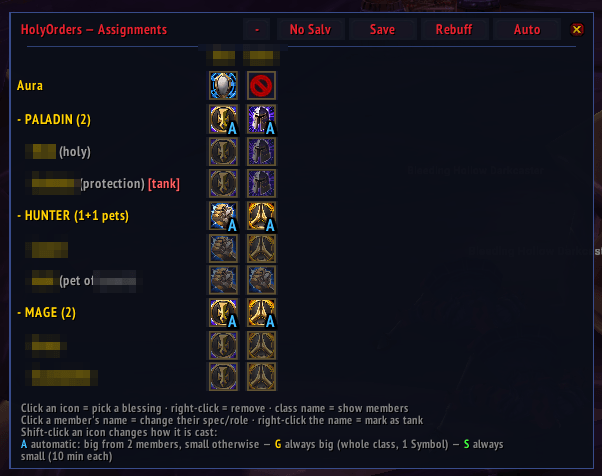
- Remembers your plans. Blessing assignments are stored per raid roster and re-applied automatically when you raid with the same people again.
- Remembers each member's wishes. Give someone a specific blessing once and HolyOrders remembers it by name — permanently, no matter which paladins are in the raid. Auto honors those likings in every future raid, and they sync so every paladin plans the same way.
- Deterministic auto-assign. One click distributes coverage across the paladins present, weighing talents and spell ranks so the stronger buff wins. Same raid, same talents → same plan, every time.
- Pre-plan paladins before they join. Two more palas arriving after the break? Add them with the + button (name autocompletion from friends and guild) and assign their blessings ahead of time — the greyed column becomes real when they join and the pre-planned assignments apply automatically, with a warning if their build can't cast what you planned.
- Lane swap. Click one paladin's name, then another, to swap their complete assignments — handy when the Kings paladin shows up on an alt.
- Solo-paladin mode. Alone as a paladin? Salvation goes on everyone except tanks, automatically.
- Reliable sync. The comm protocol is designed so what you see is what every paladin sees — assignments don't silently revert or get lost, plan broadcasts apply atomically, and out-of-date clients are told to update. By default other paladins may adjust your assignments (turn this off in the options).
- Auras. Assign each paladin an aura and change your own with the mouse wheel; who runs what syncs across the group.
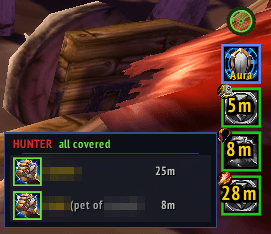
- Class fly-out — works in combat. Hover a class button on the cast bar for a member list showing who has their buff (green), who is missing it (red) and how long each buff still runs; click a member to cast their blessing, mouse-wheel to reassign them inline. Casting keeps working mid-fight.
- Buff requests with priorities. Non-paladins (and anyone) can request
blessings for themselves as a ranked wish list with
/ho request; the paladins covering them see a marker and the auto-planner honors the wishes. - Pets included — properly. Hunter and warlock pets are tracked and buffed; with several paladins covering the owner's class they stack multiple blessings on the pet (Kings, Might, and Wisdom on mana pets) instead of all casting the same one.
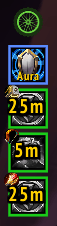
- Secure cast bar. A movable, per-duty cast bar shows exactly what to cast next, with green/red coverage borders. Clicking cycles through everyone who is missing their buff or runs out within 5 minutes — in combat too; right-click casts the greater blessing, mouse-wheel changes the assignment on the fly.
- Force rebuff. One click re-casts everything that isn't fresh before a pull.
- No-Salvation mode. Swap Salvation out for an encounter and restore the exact plan afterwards, raid-wide.
- Skins. Four looks — the golden default, a nostalgic legacy, the flat forga, and the rally-styled biker with a spinning wheel handle. Other addons can register their own skins through a small adapter API.
- German localization in addition to English.
Usage
/ho— open the assignment window/ho auto— compute assignments for the paladins present/ho request— request a blessing for yourself (non-paladins too)/ho expect <name>— pre-plan a paladin who has not joined yet (same as the window's + button; right-click their greyed name to remove them)/ho aura— set or show your paladin aura/ho help— list all commands (/ho help debugfor diagnostics)- Options: Interface → AddOns → HolyOrders (or
/ho opt)
In the assignment window, click a class or member cell to set a blessing, right-click to clear, and shift-click to change the cast mode; the button on the left of the header expands or collapses every class at once. Set a member's blessing by hand once and it becomes a remembered preference for every raid.
Routine sync/auto status lines are quiet by default — enable "Show status messages in chat" in the options if you want to see them.
HolyOrders Team