


Hole Helper
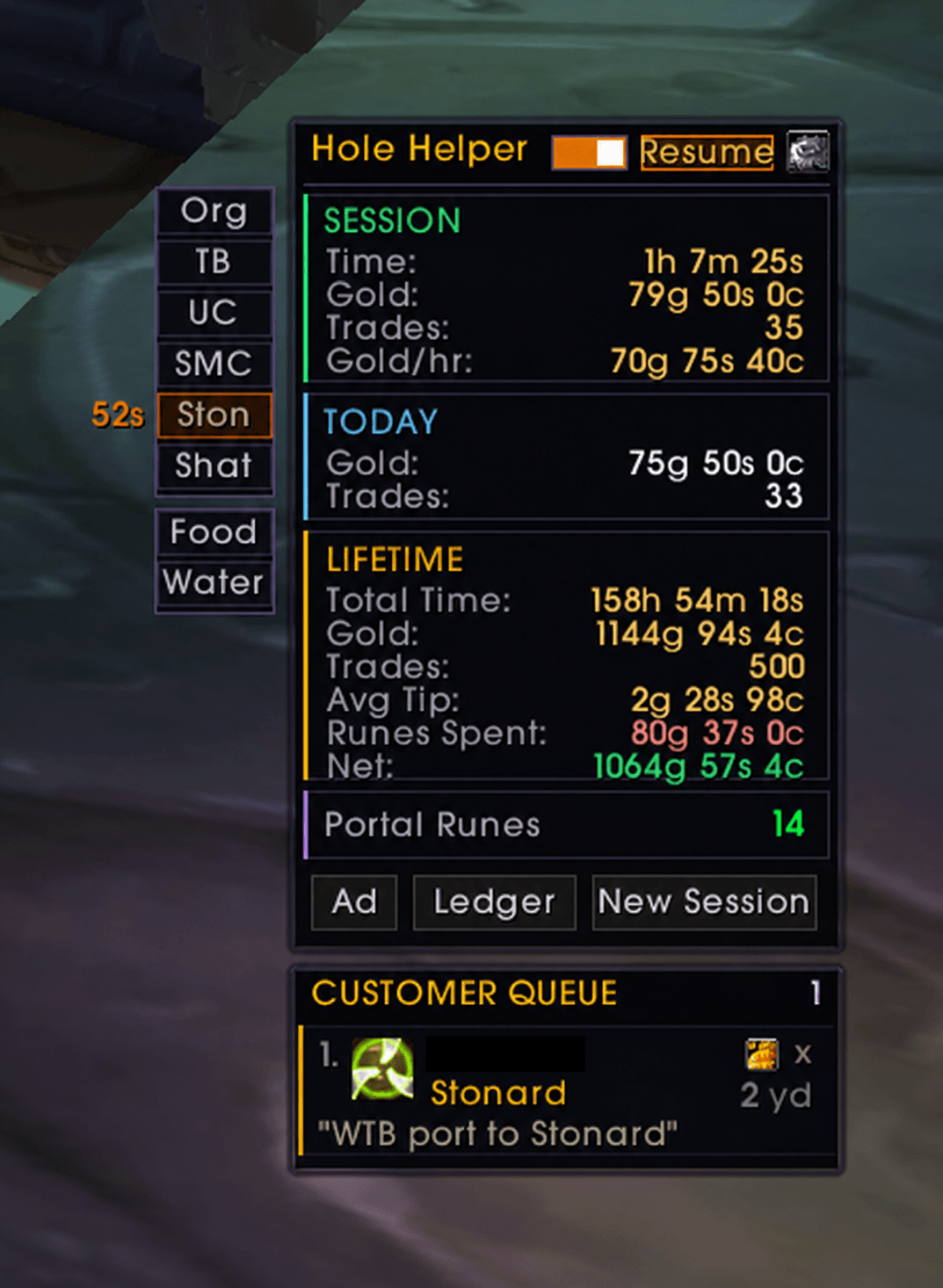
Full gold tracking, queue, portals, food and tables all in one place.
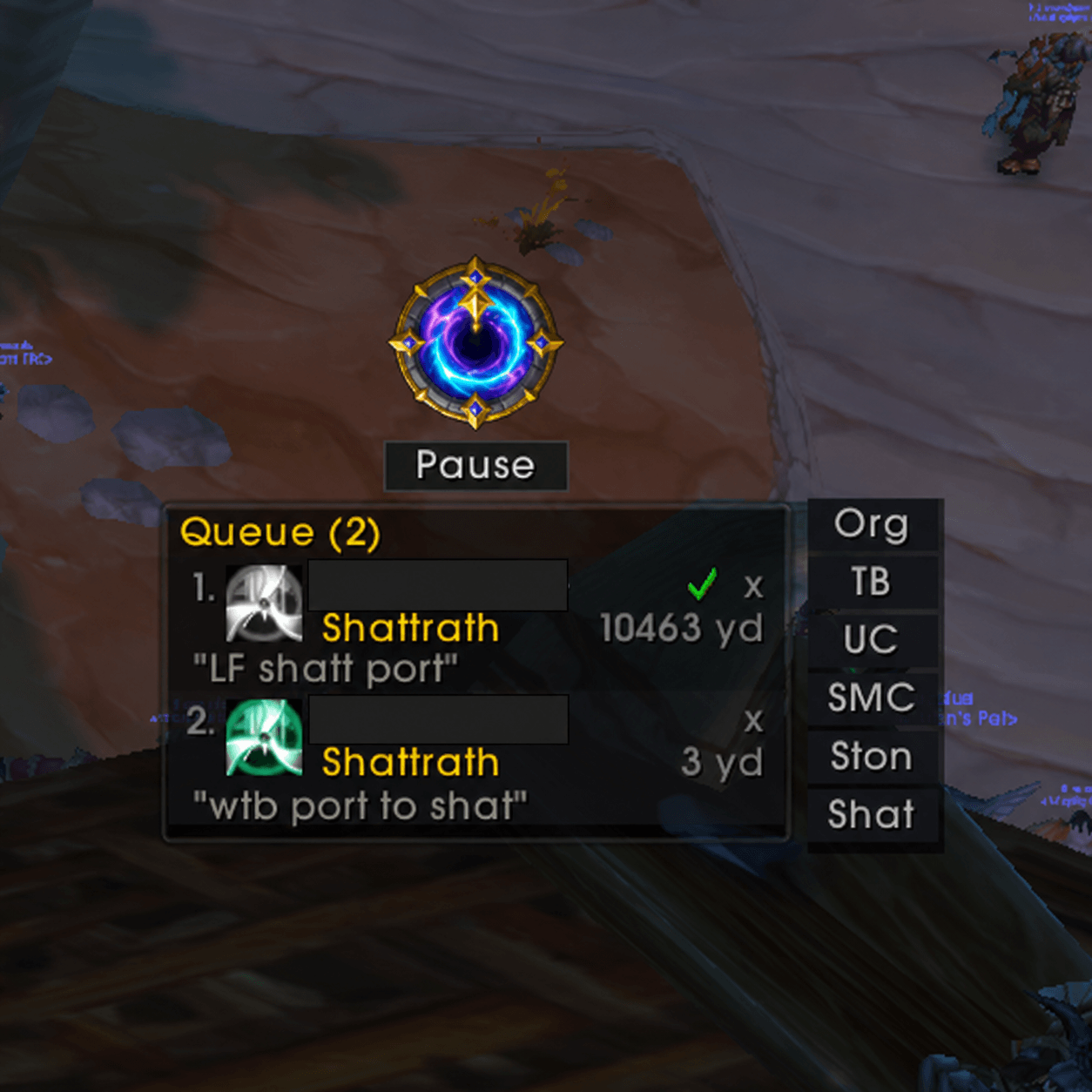
If you don't care about the gold stats, you can hide it and just use the button.
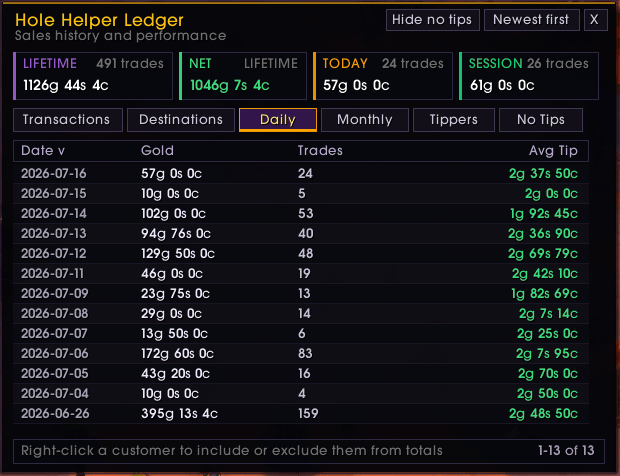
Daily Totals
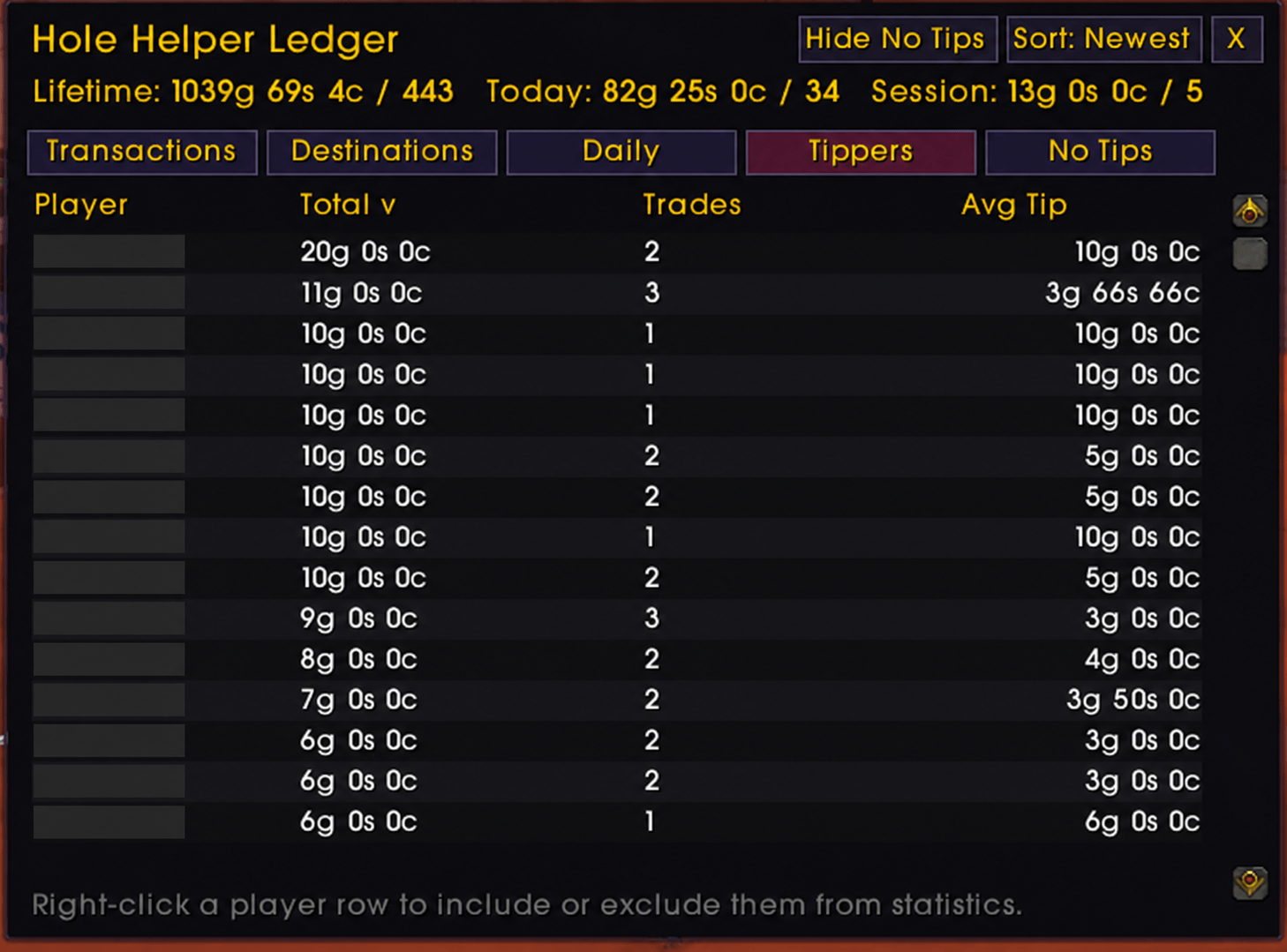
Tipper stats
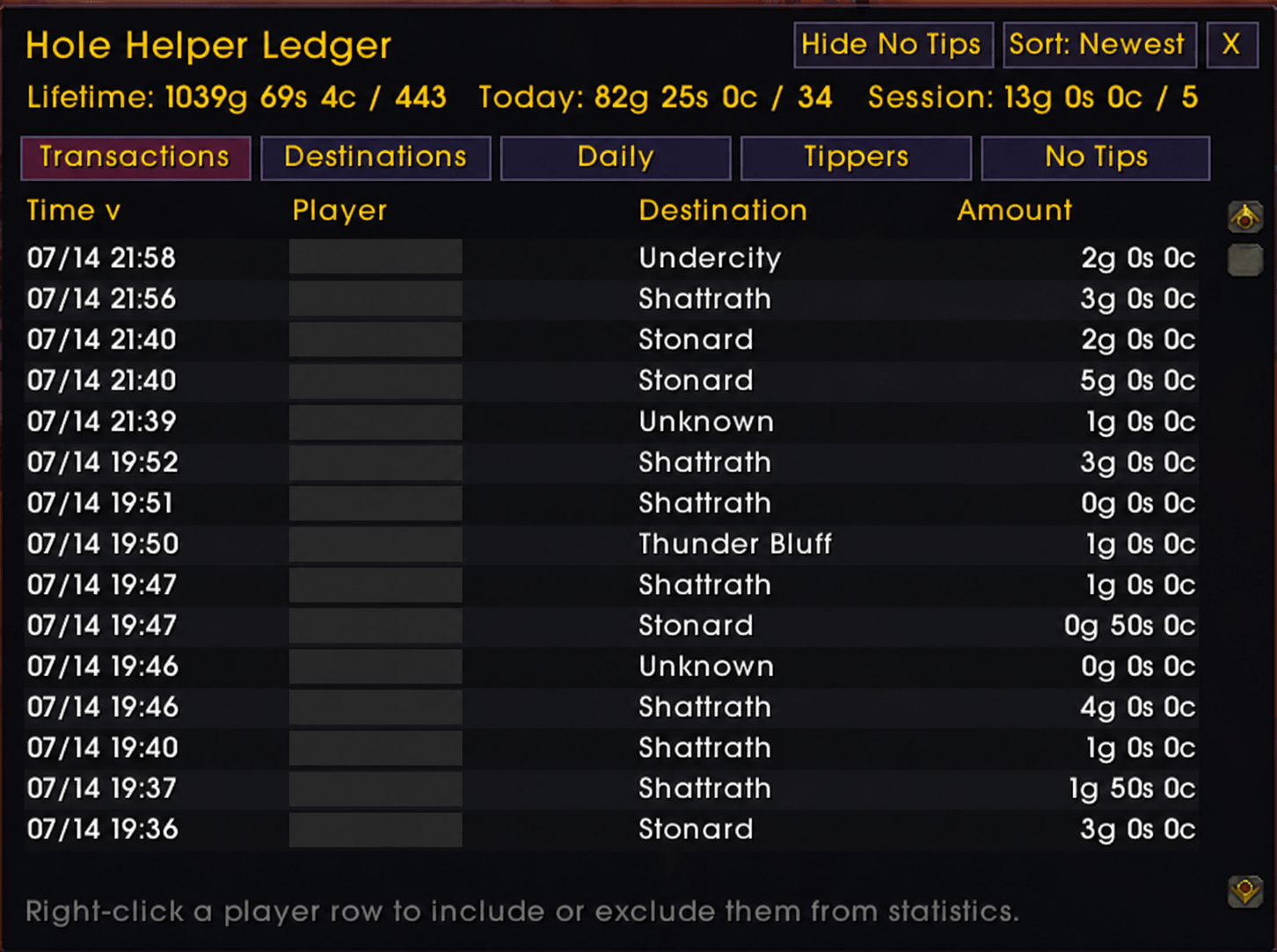
Transaction Log
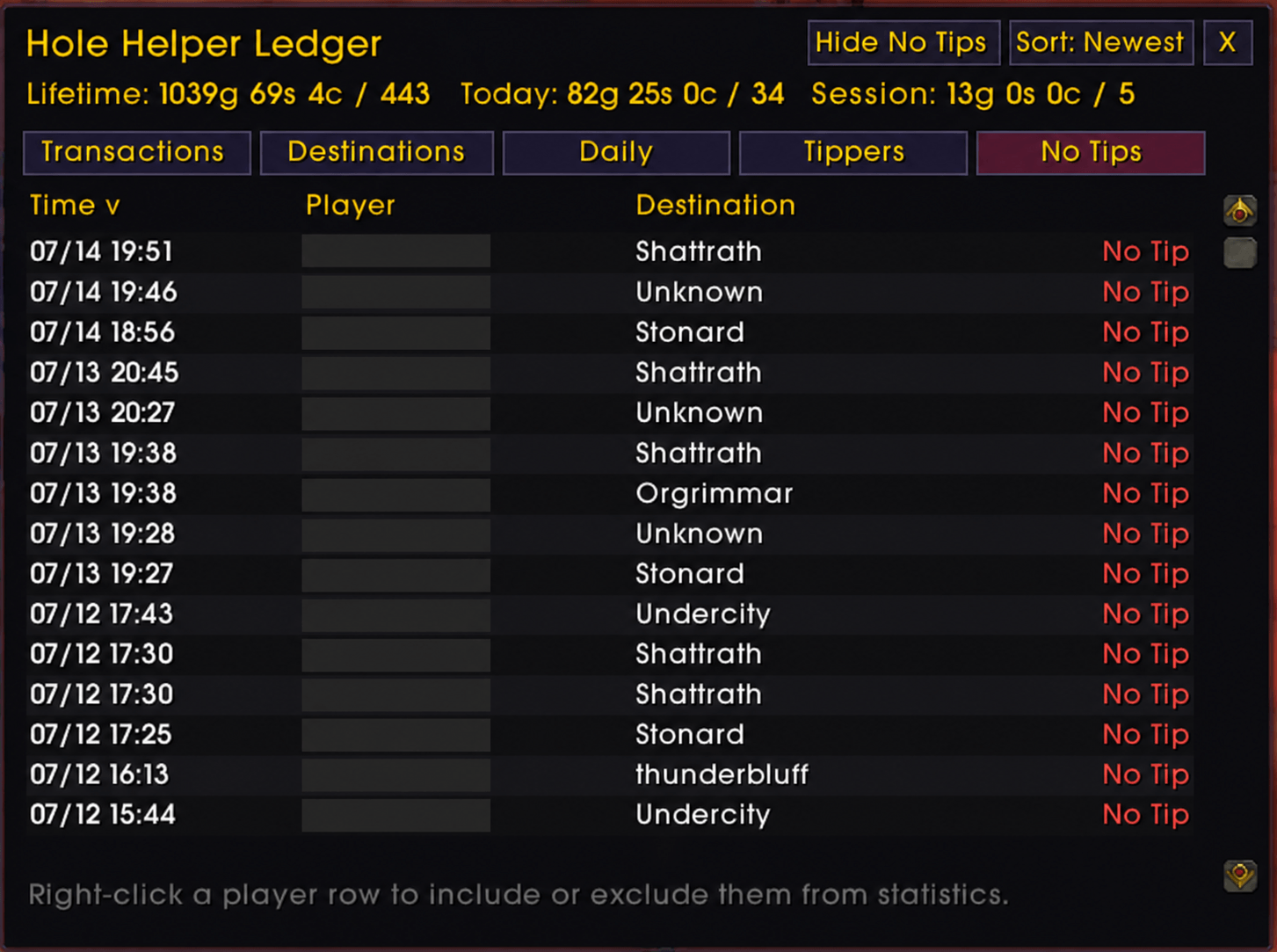
Loser detector
Description
Hole Helper is a portal-shop assistant built for World of Warcraft mages. It watches your selected chat sources for portal requests, identifies the requested destination, invites the customer, and places joined customers into a compact queue attached to the stats widget.
## The Hole Helper widget
The compact widget is the heart of Hole Helper. It is draggable, remembers its position between sessions, and can be shown or hidden. It normally appears only for mages, with an optional force-show setting for configuration or testing on another class.
### Header controls
- **Shop switch** - Opens or closes customer intake directly from the widget.
- **Pause / Resume** - Stops accepting new customers while leaving the selling session and current queue active. This lets you finish serving everyone already waiting.
- **Settings gear** - Opens the complete configuration window.
- **Advertise** - A dedicated button beside the widget sends one randomly selected enabled advertisement to the configured chat destinations.
### Live selling statistics
The two-column display keeps important sales information visible at a glance:
- **Session:** elapsed selling time, gold earned, completed trades, and gold per hour.
- **Daily:** gold earned today and today's completed trades.
- **Total:** lifetime selling time, lifetime gold, lifetime trades, average tip, portal-rune expenses, and net earnings after rune costs.
- **Portal Runes:** current rune inventory with color changes to warn when stock is low or empty.
The widget grows when its text requires additional room while preserving clear spacing between Session, Daily, Total, and Portal Runes. **Ledger** and **New Session** buttons remain anchored at the bottom for quick access.
### Portal and conjure sidecars
Compact spell buttons attach directly to the side of the widget:
- Known portal destinations are displayed with short city labels.
- Portal cooldowns appear directly on the affected button with the remaining seconds.
- Food, water, and a known refreshment-table spell are available from the conjure sidecar.
- Food and water tooltips show the detected item, configured price, and current stock.
- The sidecars remain available whenever the widget is visible, even when the shop is closed.
- Spell actions use secure World of Warcraft buttons and follow normal combat restrictions.
### Attached customer queue
The customer queue appears after a detected customer joins your group. Each customer row provides:
- Customer name and original request text.
- Current distance when the group APIs can provide it.
- Requested or corrected destination.
- A destination selector for fixing ambiguous or changed requests.
- A secure button for casting the selected portal.
- One-click targeting and customer removal controls.
- Visual status for destination readiness, portal casting, and completed payment.
## Main features
- Detects portal requests from say, yell, whispers, and configured chat channels.
- Recognizes Classic and Burning Crusade portal destinations, abbreviations, and common misspellings.
- Automatically invites matching customers with configurable messages and retry behavior.
- Detects the mage's highest castable food and water ranks and supports individual prices.
- Supports configurable portal-shop advertisements with an unlimited message pool.
- Tracks session, daily, and lifetime gold, trades, selling time, average tips, rune costs, and net earnings.
- Includes a sortable, scrollable ledger for transactions, destinations, daily totals, top tippers, and no-tip customers.
- Includes optional no-tip filtering and per-player exclusion from ledger statistics.
- Provides configurable invite sounds, including bundled CC0 notifications and custom sound files.
- Includes a movable branded shop launcher, minimap button, widget, settings window, and ledger.
## Getting started
1. Install Hole Helper and log in on a mage.
2. Open settings with `/hh settings` and select the chat sources you want monitored.
3. Configure your invite messages, advertisements, keywords, and optional food/water prices.
4. Open the shop with the floating button or `/hh on`.
5. Use `/hh pause` when you want to finish the current queue without accepting new customers.
The shop can also be opened or closed from the branded minimap button. Right-click the launcher or minimap button for widget, ledger, and settings actions.
## Common commands
- `/hh` or `/hh show` — show or hide the widget
- `/hh on` — open the shop
- `/hh off` — close the shop
- `/hh pause` — pause new customer intake
- `/hh resume` — resume customer intake
- `/hh settings` — open settings
- `/hh ledger` — open the sales ledger
- `/hh ad` — send an enabled advertisement
- `/hh reset` — begin a new statistics session
- `/hh diagnostics` — run compatibility and listener checks
- `/hh help` — list available commands
## Compatibility
Hole Helper is built for Burning Crusade Classic Anniversary. Secure spell buttons follow World of Warcraft combat restrictions.
## Custom sounds
Place an OGG, MP3, or WAV file in `Interface/AddOns/HoleHelper/Sounds` before restarting or reloading the game. Select **Custom file** in Widget settings and enter the filename, such as `my-invite.ogg`.
## Feedback
If something fails, run `/hh diagnostics` and include the reported failure lines with your bug report. Please include the game client/version and a description of what happened.
## License and sound credits
Hole Helper is distributed under the MIT License. Bundled notification sounds are selected from Robin Lamb's CC0 "UI Sound Effects" collection. The release archive includes the applicable license and third-party notice.
Hole Helper Team
