Hg Unit Frames
- By
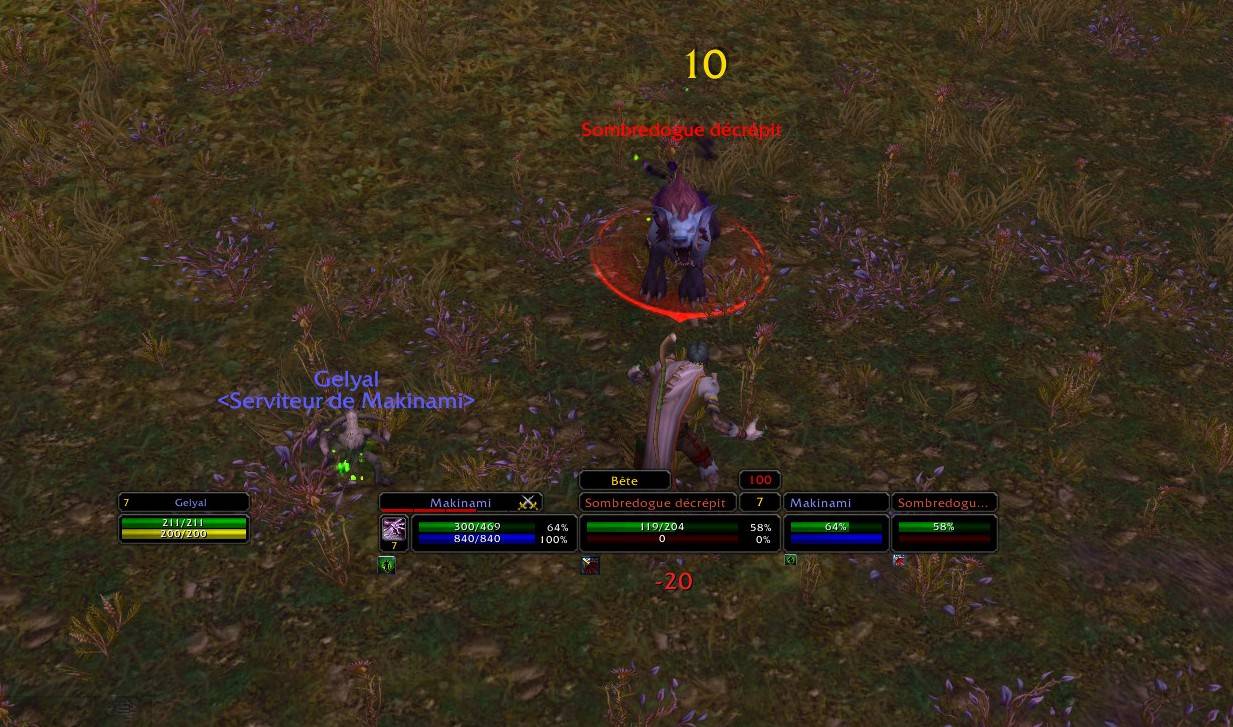
Hg Unit Frames brings the familiar look of Perl Classic Unit Frames to modern World of Warcraft, with a fresh implementation built from scratch around the Mainline API.
Description
Hg Unit Frames brings the familiar look of Perl Classic Unit Frames to modern World of Warcraft, with a fresh implementation built from scratch around the Mainline API.
Designed for Retail and Forever. Classic clients will never be not supported.
Hg Unit Frames is young and might still have few issues!
Please report any issue or request any feature here :)
Please also note that most localizations have been google-translated and might need corrections. Pull requests are welcome!
Features: some old, some new
- Familiar Perl-style unit frames, with compact layouts and customizable health and power text.
- Adjustable frame positions, scales, portraits, colors and visibility.
- Positioning mode with sample frames, plus sticky links to keep related frames together.
- Configurable buffs and debuffs, with filters, timers and cooldown displays.
- Per-character settings, character copying, built-in and custom presets.
- Optional automatic preset switching for solo play, groups and different instance types.
- Modular design: enable only the displays you want.
Note: Not all features could be ported to Mainline API.
Supported unit frames & displays
- Player: Your health, power and class resources, with experience or watched reputation.
- Player Aura: Configurable player buffs, debuffs and weapon enchants.
- Player Pet: Your pet's health and power, with an optional pet-target frame.
- Target: Your selected target's vitals and identity, with classic and alternative layouts.
- Target Aura: Configurable buffs and debuffs around the target frame.
- Target of Target: Compact displays for your target's target and the next target in the chain.
- Focus: A dedicated frame for keeping track of your focus.
- Focus Aura: Configurable buffs and debuffs around the focus frame.
- Focus Target: A compact display for your focus's current target.
- Party: Party-member frames with horizontal or vertical layouts and optional embedded pet health bars.
- Party Target: Separate target frames for each party member.
- Party Pet: Dedicated frames for party members' pets.
- Cast Bars: Casting and channeling displays integrated into Player, Target, Focus and Party frames.
Configuration
All options are available under Settings > AddOns > Hg Unit Frames.
Open configuration with /hguf, the minimap button, or the AddOn compartment entry. Each display has its own settings panel, while common settings and presets make it easy to configure the whole interface together.
Use Positioning mode to arrange frames and preview their layouts without needing a target, pet or group. In this mode, the tooltip hover each element will list which settings can affect it.
You can toggle in and out of it using right-click on the minimap icon.
Hg Unit Frames Team

Owner