


HeritageUI
A night elf-themed UI overhaul for World of Warcraft — custom header bar, redesigned minimap footer, and a clean micro-menu experience.
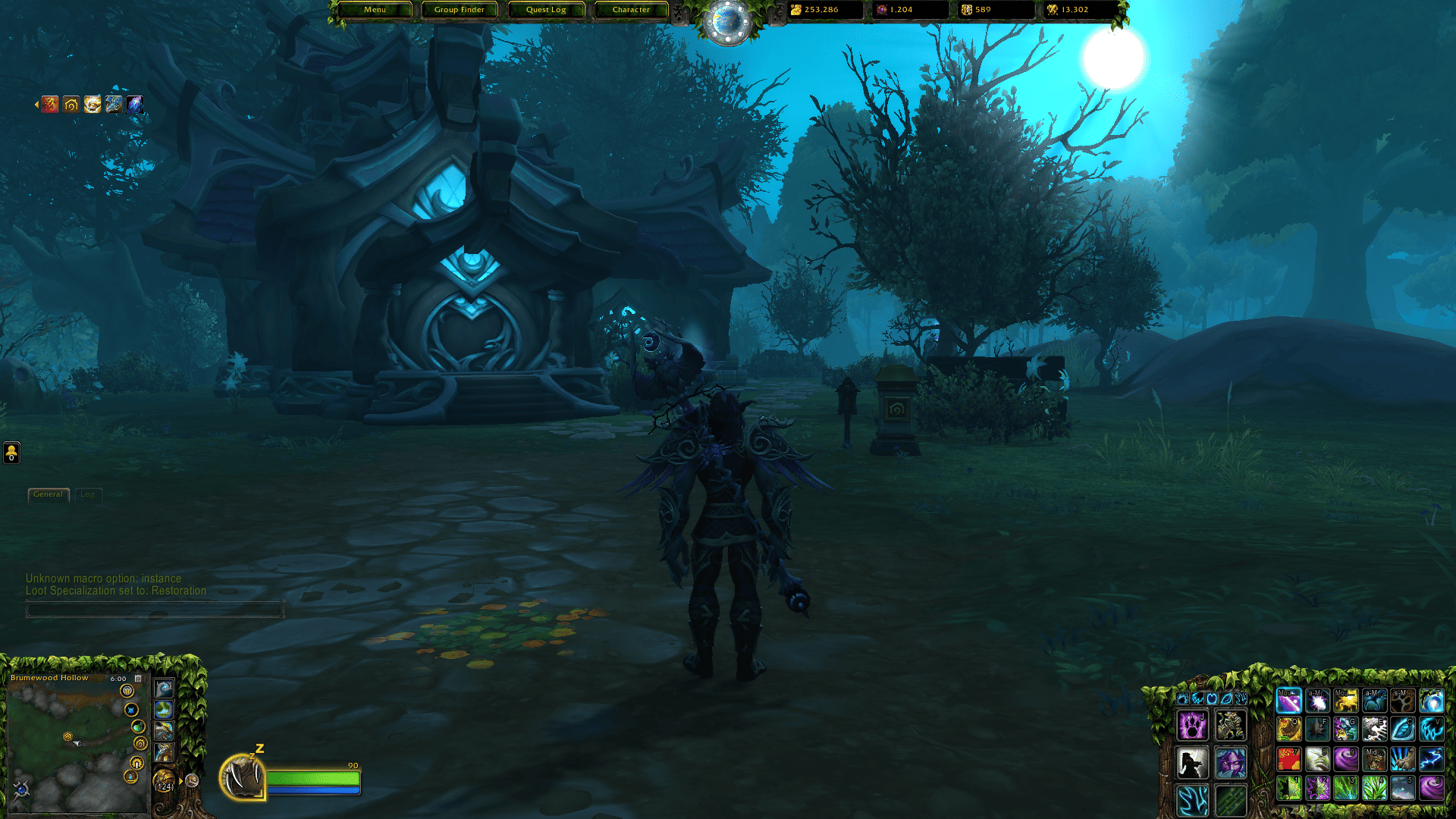
Screenshot 2026-06-19 180043.png
Description
HeritageUI is a complete interface overhaul for World of Warcraft, inspired by the ancient aesthetics of night elf heritage.
INSTALLATION
1. Install **HeritageUI** (this project).
2. Download **HeritageUI Assets** from my Discord channel.
3. Extract the Assets archive so the **HeritageUI_Assets** folder sits **next to** HeritageUI in your AddOns directory:
```
World of Warcraft\_retail_\Interface\AddOns\
HeritageUI\
HeritageUI_Assets\
```
Do not nest one inside the other — both folders must be siblings under `AddOns`.
FEATURES
Header
• Custom top bar with four configurable shortcut buttons
• Three configurable currency slots with live values
• Time indicator with a clock dial and LFG queue eye integration
• Phase markers around the clock
• Compact character micro-menu that replaces the default action bar
Footer
• Decorated minimap frame with left and right panel ornaments
• Zone name, clock, and calendar overlay row above the minimap
Chat
• Smooth fade-in/fade-out for chat frames — active when hovered or a new message arrives, idle otherwise
Edit Mode
• In-game panel to adjust header and footer scale
• Horizontal anchor offset for the header bar
• First-run setup wizard on fresh install
Slash commands
/hui edit — open the edit panel
/hui scale [value] — set header scale (0.65–1)
/hui footerscale — set footer scale
/hui anchor <px> — shift header horizontally
/hui help — full command list
REQUIREMENTS
• **HeritageUI Assets** (required) — download from my Discord channel, extract the archive next to this addon in `Interface\AddOns\` (see Installation above).
NOTES
• Designed for 1920×1080 and higher resolutions
• Tested on World of Warcraft 12.x (Midnight era builds)
The HeritageUI Team
