HealKit: Healing Frames
- By
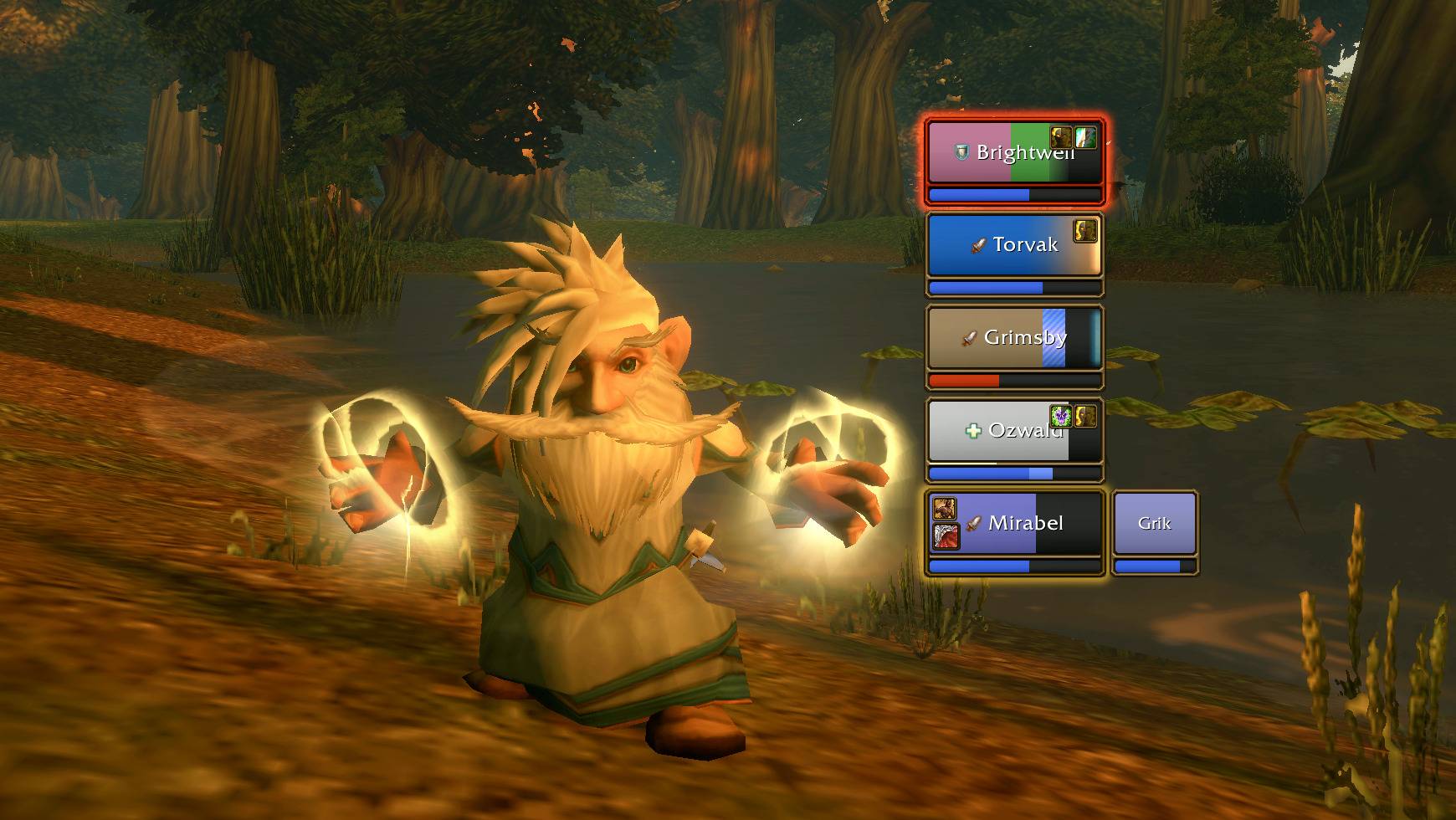
Five players in the bronze trim of Blizzard's new player frame: aggro on the tank, your heal on its way, a shield, a HoT and a debuff you can dispel, with a warlock's pet beside her.
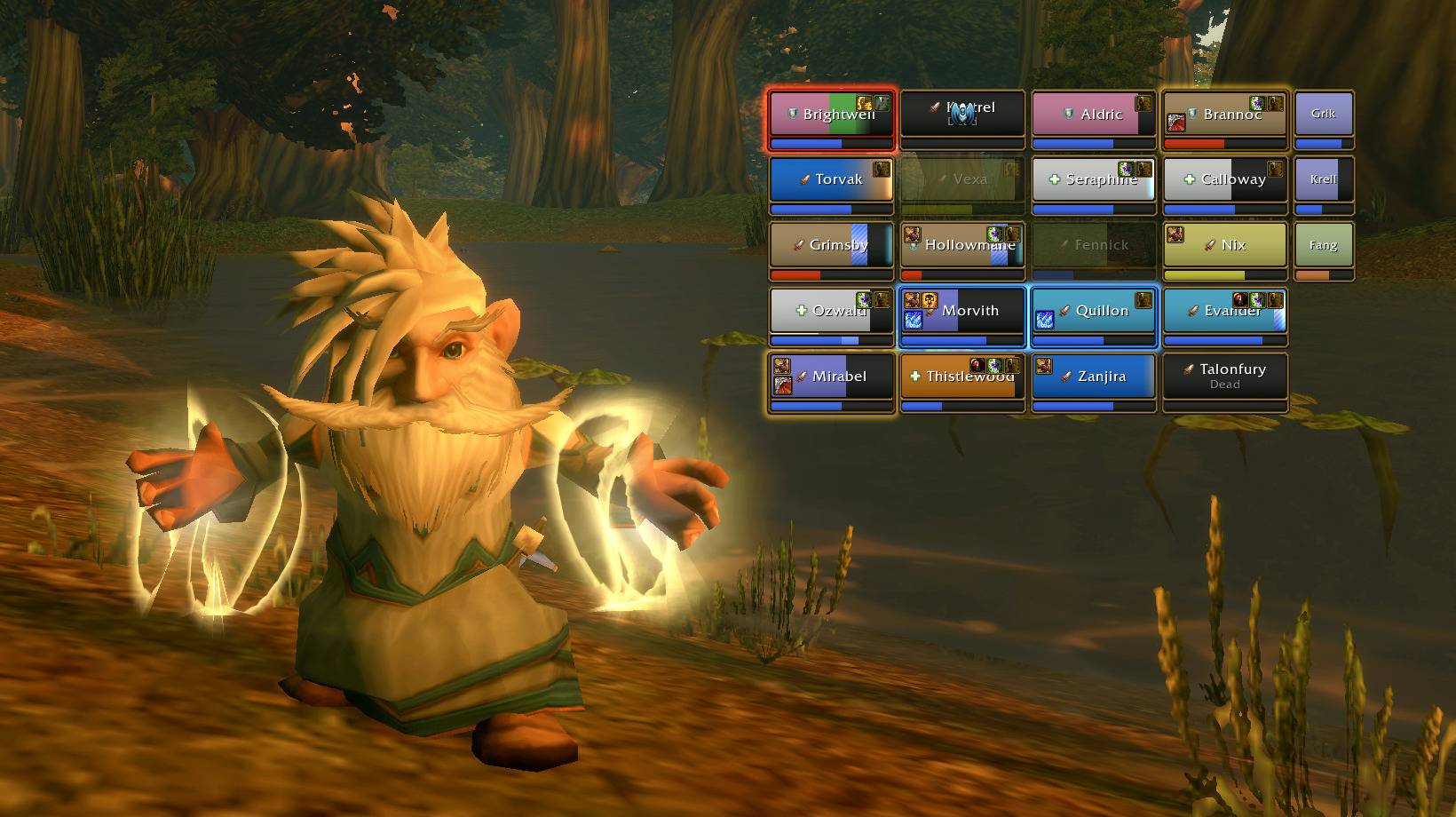
Groups side by side in class colors. Aggro and dispels light up the trim and glow around the frame, out-of-range players fade, and pets get their own column.
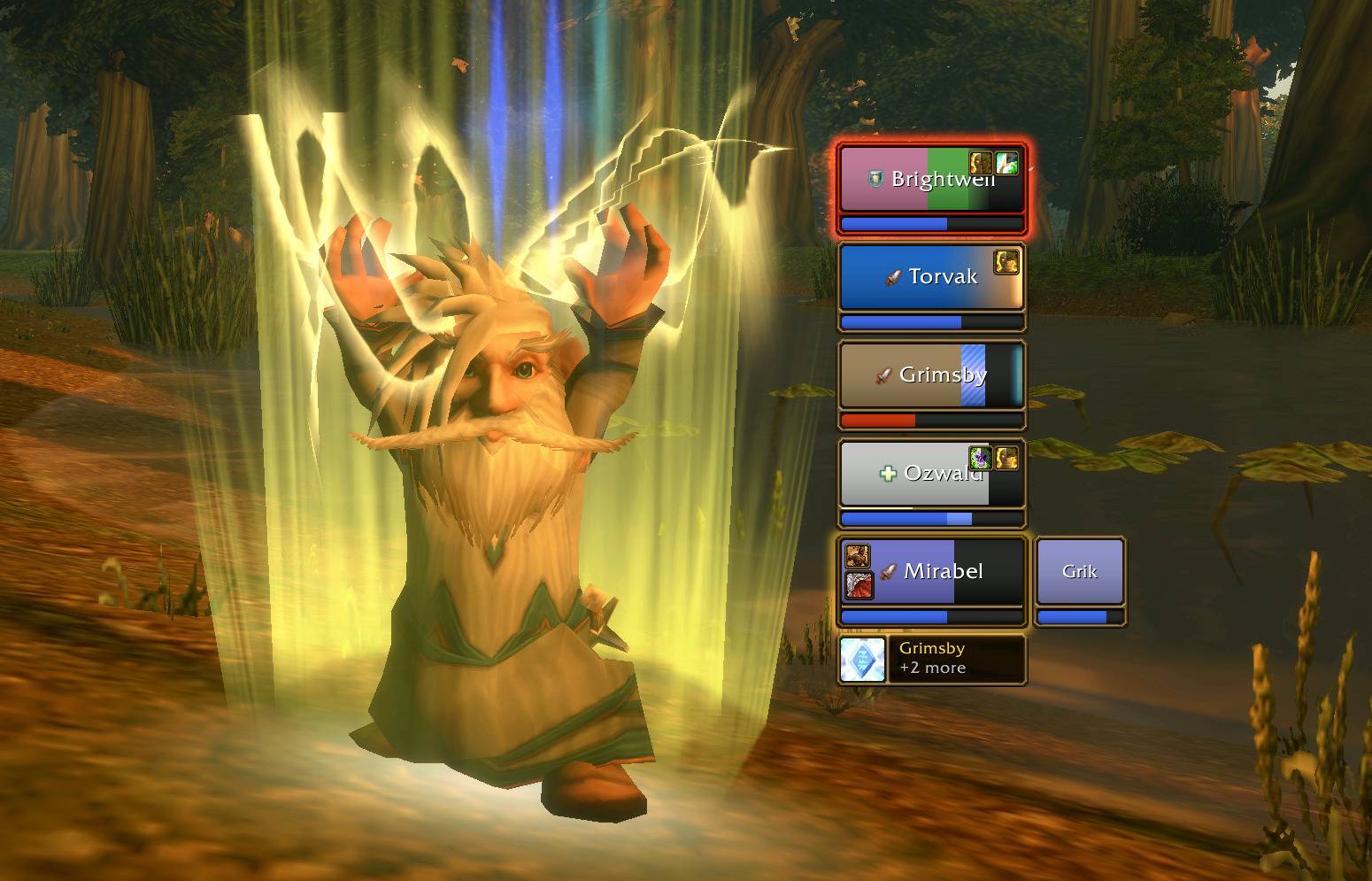
One button casts the next missing buff: it shows the buff, who gets it, and how many people are still waiting.
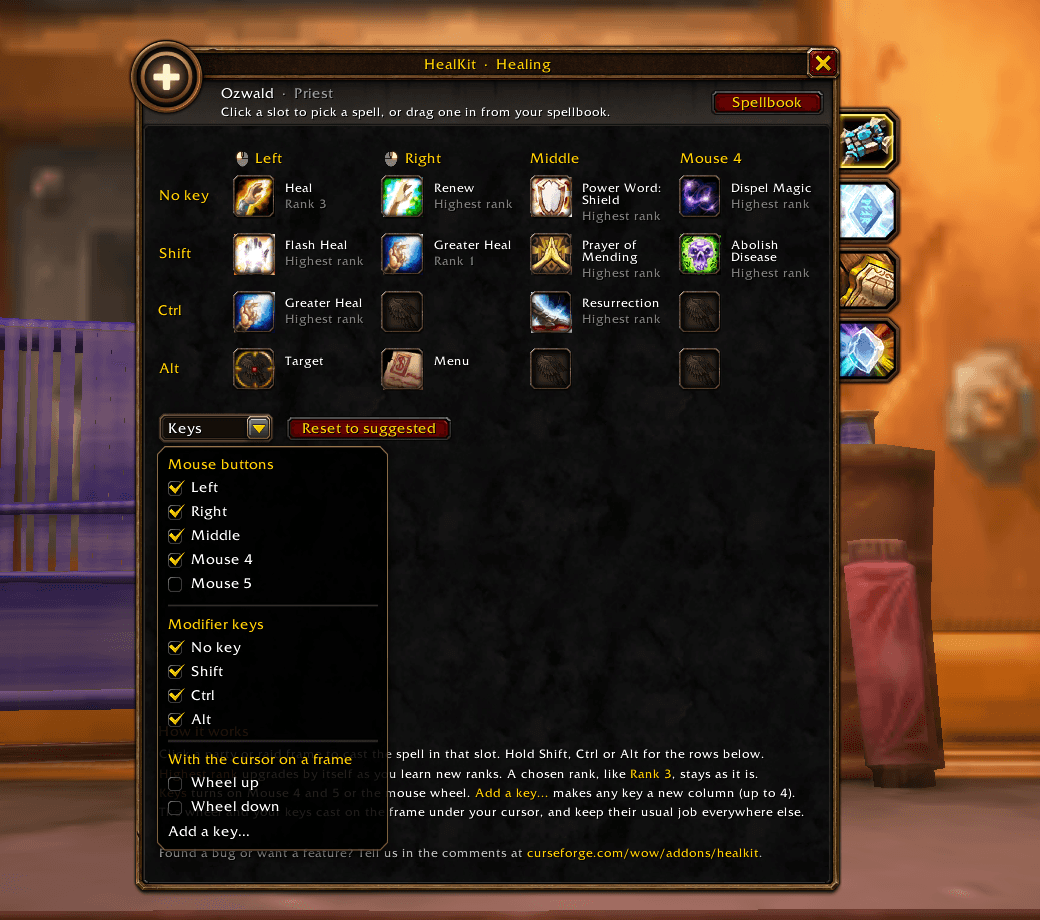
Open Keys to add Mouse 4 and 5, the mouse wheel or any key you want. The wheel and your keys cast on the frame under your cursor.
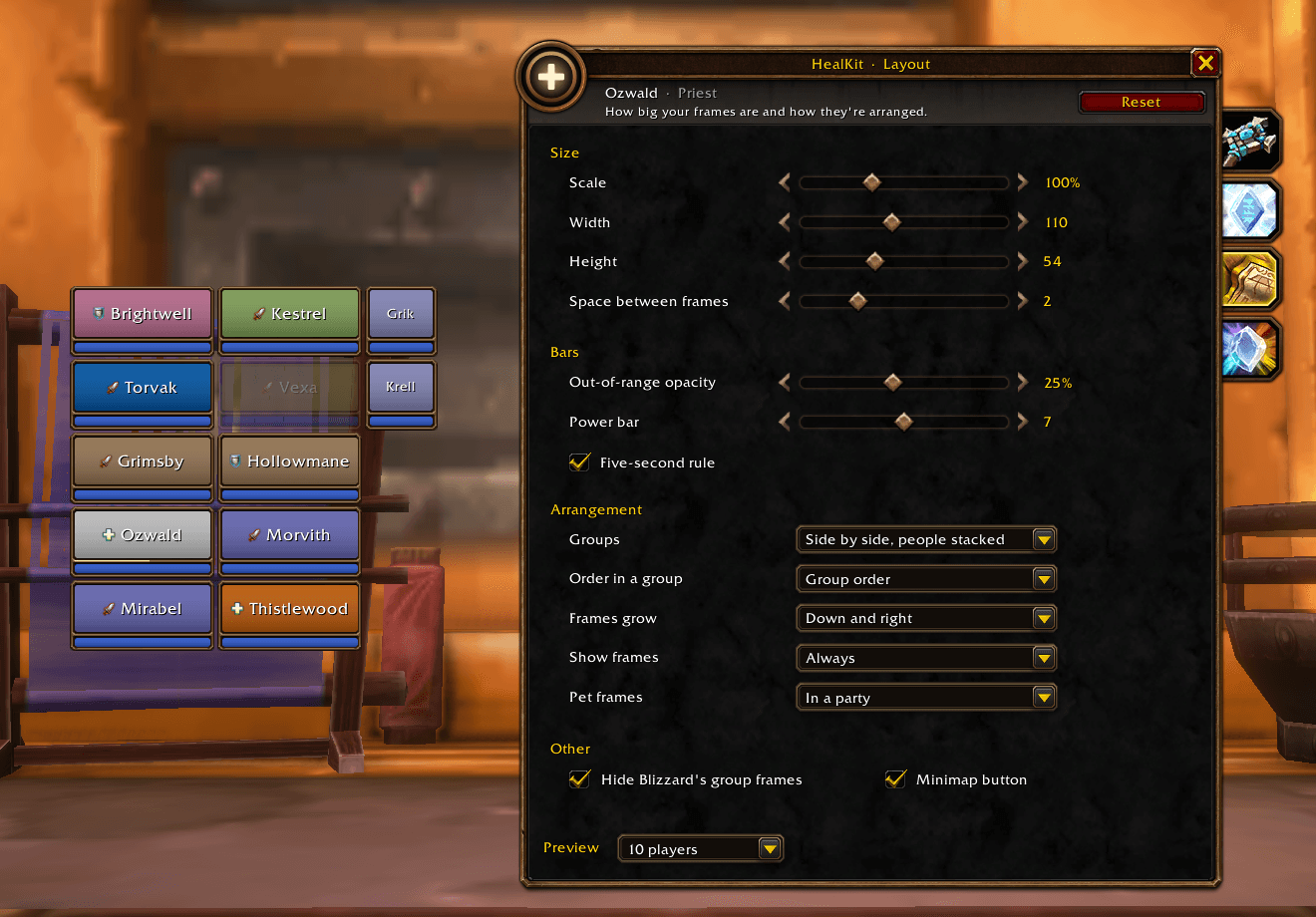
Scale, size and spacing, the power bar and the five-second rule, how groups are arranged and which way they grow, and where pets show, with a live preview of 5 to 40 players.
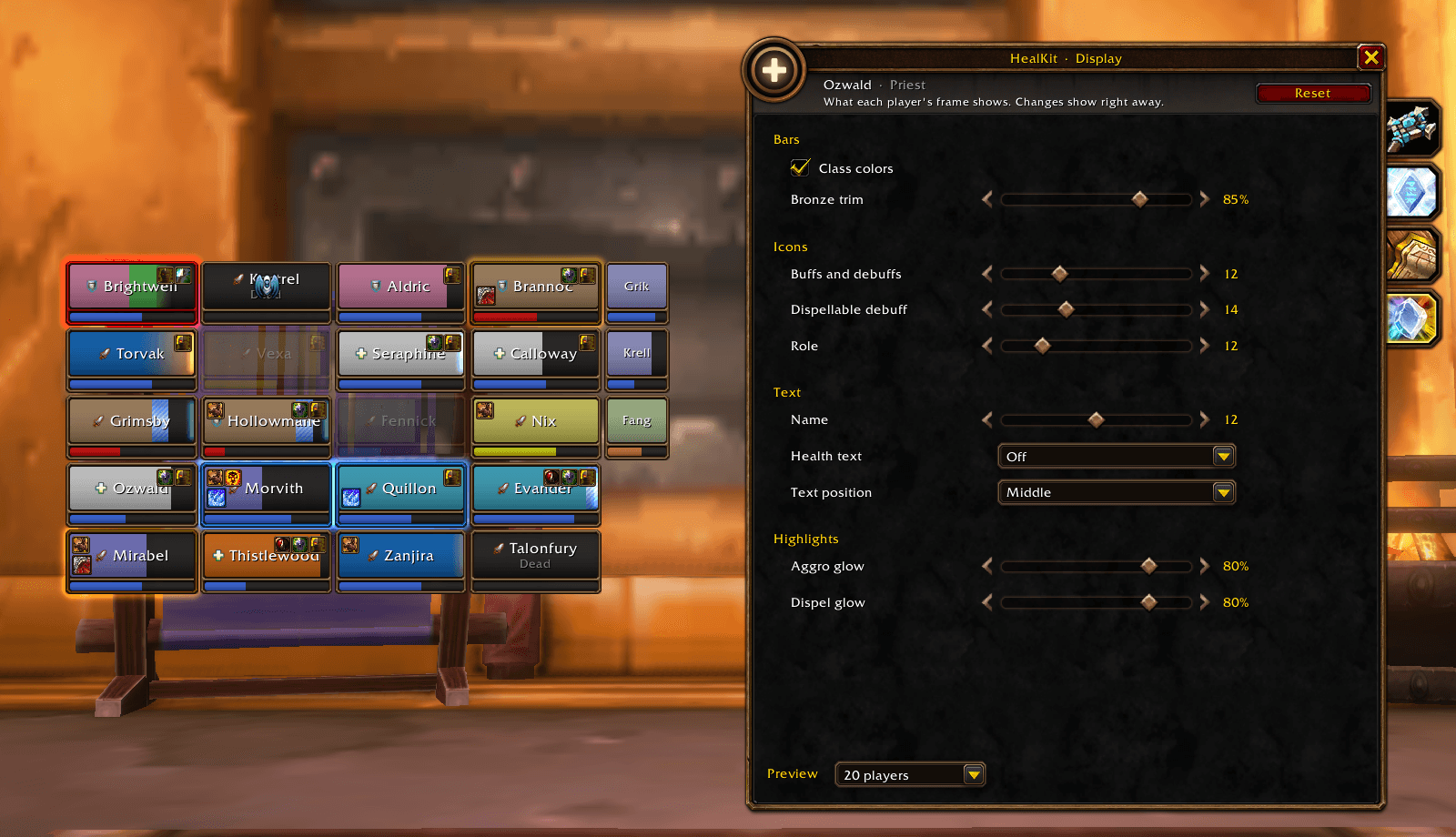
Class colors, trim brightness, icon sizes, health text and glows, previewed on a raid as you change them.
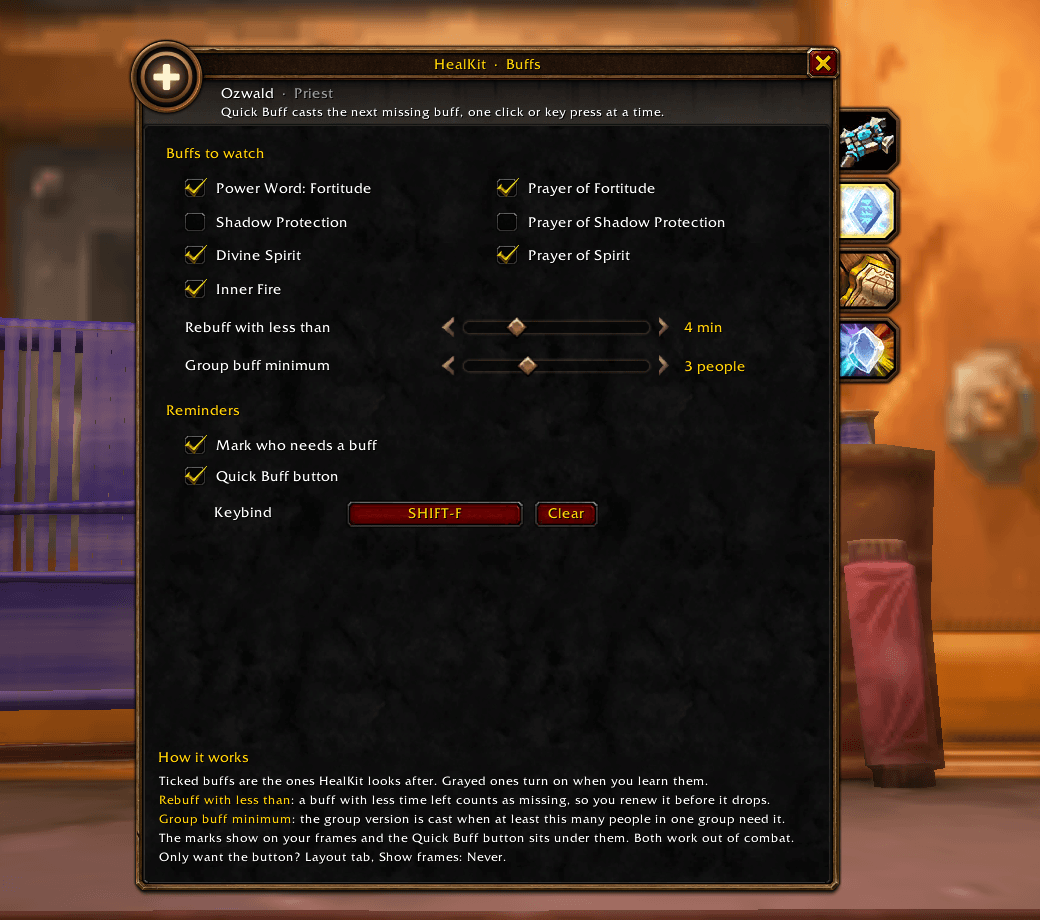
Pick which buffs HealKit tracks, when they count as running out, and your Quick Buff key.
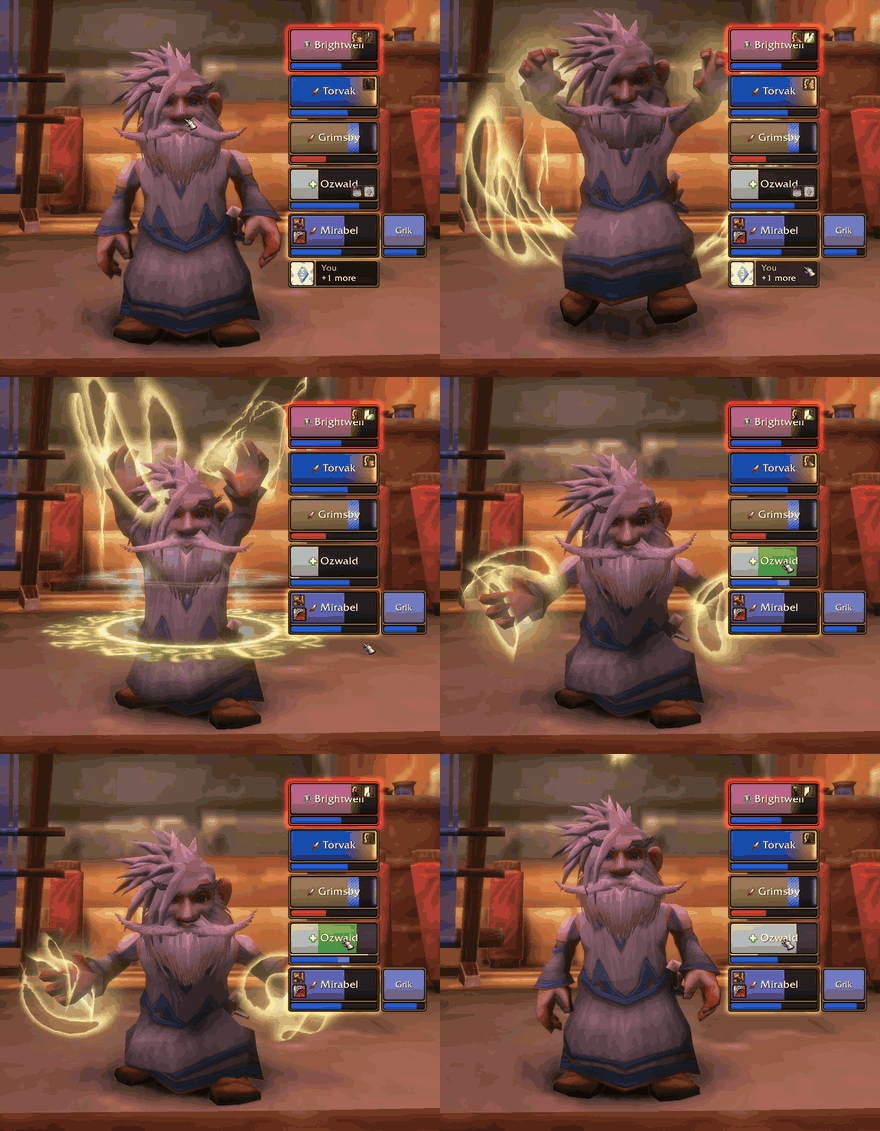
Buff, then click your frame: the heal's cost shows on your mana while you cast, the incoming heal in green, and the bar fills when it lands.
Description
HealKit gives healers party and raid frames, up to 40 players, in the bronze trim of WoW Forever's new player frame, so they look like Blizzard made them. Your class's healing spells are already on your mouse buttons when you log in, so click-casting works from the start: click a frame, and that player gets the heal. Changing anything takes a few minutes.
Ready to heal in minutes
- Set up for you: priests, paladins, druids and shamans start with a suggested setup that upgrades by itself as you learn new ranks.
- One window, four tabs: Healing (your clicks), Buffs, Layout (scale, size, spacing, groups, order, pets) and Display (trim, icons, names, health text, glows). Open it with /kit or the minimap button.
- See every change as you make it: Layout and Display show a live preview of 5 to 40 players.
- Settings that each do one thing, with sensible defaults. Bindings are saved per character.
The Display tab with a live preview of a raid.
Click to heal
Your heals on your mouse buttons, with Shift, Ctrl and Alt, plus the wheel or any key you add.
- One click per heal: put a spell on each mouse button, plain or with Shift, Ctrl, Alt (Option on Mac) or Cmd. Click a frame and that spell lands on that person. No targeting.
- Ranks your way: an exact rank to save mana, or "Highest rank" to always cast your best.
- Resurrect with the same click on a dead player, out of combat.
- Mouseover healing (optional): turn on the mouse wheel or add up to 4 keys. With your cursor on a frame, they cast on that person; everywhere else they keep their normal job.
Buff, then click your frame: the heal's cost shows on your mana while you cast, the incoming heal in green, and the bar fills when it lands.
What each frame shows
- Health in class colors, mana underneath, names and roles. People out of range fade, so you know who you can reach.
- Health text (optional): as a percentage, or as missing health (like -354) to pick the right heal rank.
- Incoming heals show in green on the bar, so two healers don't land on the same target.
- Your HoTs show the healing they still have to give, as a green segment at the end of the bar.
- Your mana: while you cast, the spell's cost shows lighter at the end of your own mana bar. Turn on the five-second rule (Layout tab) and the line between your bars lights up after each spell, until your mana regeneration is back.
- Shields use Blizzard's own striped look, with a soft white light at the edge when the shield goes past full health.
- Overheal in steps: when your heal would be wasted, the end of the bar warms up, from a faint bronze to deep copper. One glance tells you to wait, or to pick a smaller heal.
- Debuffs you can remove: a glow around the frame and its trim in the debuff's color (Magic, Disease, Curse, Poison), with its icon in the corner. Only for the types your class can dispel.
- Aggro: a glow around anyone a monster is attacking, and their trim turns red.
- Your HoTs and debuffs in the corners, like Renew and Weakened Soul, with their timers.
- Dead, offline, rez on the way, summon pending: all shown on the frame.
- Pets: hunter and warlock pets get a narrower frame next to their owner, in their owner's class color, a step lighter. In a raid they get their own column after the groups. Choose where they show on the Layout tab.
Buffs in one button
Quick Buff (a button and a keybind) casts the next missing buff on the right person: Fortitude, Arcane Intellect, Mark of the Wild and more, and the group version when enough people need it. Small marks on the frames show who is missing what.
Not a healer? On the Layout tab, set Show frames to Never to keep only Quick Buff: it works for any class that buffs (mages, druids, priests, paladins), with Blizzard's own group frames. You can also put Remove Curse or any dispel on a click: the frame glows when there's something you can remove.
Priests: Fortitude, Divine Spirit and Shadow Protection on everyone, with the Prayer version when a group needs it, and your own Inner Fire.
Paladins: pick one blessing per class (Wisdom for casters, Might for warriors and rogues…), and one for tanks and one for healers by their group role. Quick Buff then gives every player the right blessing, one click at a time, and tells you who is next.
Druids: Mark of the Wild on everyone, Gift of the Wild for a group, and choose who gets Thorns: only you, your tanks or everyone.
Shamans: keeps your Water Shield or Lightning Shield up, and your weapon enchant (Flametongue, Rockbiter, Windfury or Frostbrand: pick yours on the Buffs tab).
Feels like part of the game
- Blizzard's look. The bronze trim from Forever's new player frame, cut from Blizzard's own art, plus Blizzard's art for shields and icons, and a setup window built from the game's own windows, tabs and menus. It sits next to the default interface as if it shipped with it.
- Your size, your place. One Scale setting makes everything bigger or smaller at once, and your frames can grow from any corner of the screen.
- Calm, not cluttered. Each frame shows what a healer needs and nothing more, so it suits Forever's pace.
- Works within Forever's rules. Forever hides combat numbers from addons, as Midnight does. HealKit is built on the methods the game allows, so everything on the frames keeps working in combat.
What Forever doesn't allow
Because Forever hides combat numbers, some things older healing addons did are not possible here, for any addon: sorting players by health, an "emergency" view of the lowest player, showing other healers' HoTs, or an exact overheal percentage (HealKit shows overheal in steps instead). Quick Buff works out of combat only.
Commands
- /kit or /healkit: open or close the setup window
- /kit minimap: show or hide the minimap button
- /kit reset: move the frames back to their default spot
FAQ
Which classes is it for? Priests, paladins, druids and shamans get a ready-made setup on their first login. Any class can put its own spells on the clicks.
Which languages? English and French.
Does it work in combat? Yes. Clicks, keys, glows and icons all work in combat. Setting changes apply when the fight ends.
Can I keep Blizzard's party and raid frames? Yes: on the Layout tab, untick "Hide Blizzard's group frames".
I already use another addon for click-casting or hover keys. Turn its bindings off for the keys you give HealKit, or the two will compete.
My settings reset after logging out (beta). Some players on the Forever beta see their addon settings not load after a relog. It's a known Blizzard bug in the beta that affects every addon, not just HealKit.
A spell is missing from the picker. The picker lists the healing and support spells you know. Learn it from your trainer and it appears; suggested slots upgrade by themselves.
Does it show pets? Yes: in a party next to their owner, in a raid in their own column. Layout tab, Pet frames: In a party, Party and raid, or Off.
Which HoTs show on the bar? Your own Renew, Rejuvenation, Regrowth and Riptide, on the people in your group. Wild Growth can't: the game doesn't tell addons who it lands on.
Can I make the frames bigger without stretching them? Yes: Layout tab, Scale, from 50% to 200%.
Found a bug?
Install BugSack and BugGrabber, make the problem happen again, and paste the error it shows into the comments, with your HealKit version (shown in the AddOns list) and what you were doing (class, party or raid). No BugSack? Type /console scriptErrors 1 to see errors on screen, and /console scriptErrors 0 to turn them off afterwards.
Have an idea? Feature requests are just as welcome: leave them in the comments. Thanks to everyone who reports a bug or suggests something, it makes HealKit better for every healer.
HealKit: Healing Frames Team