


Heads Up Gathering
- By
A transparent gathering HUD for Retail WoW, with live minimap icons, native hover tooltips, optional combat hiding, compass guides, and three themes.
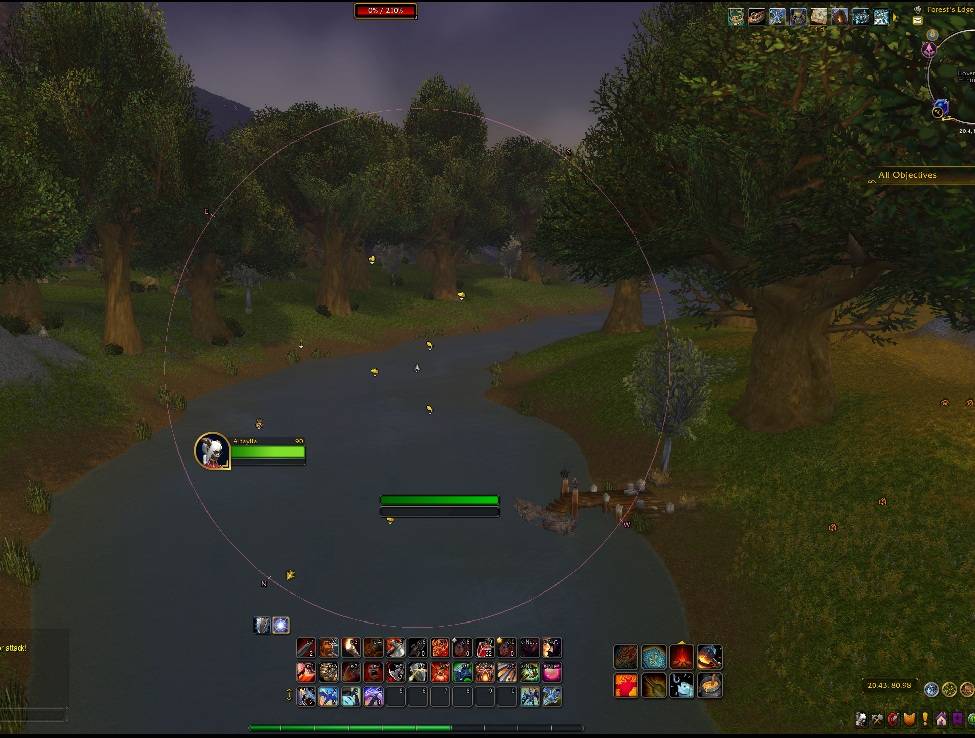
hud display.jpg
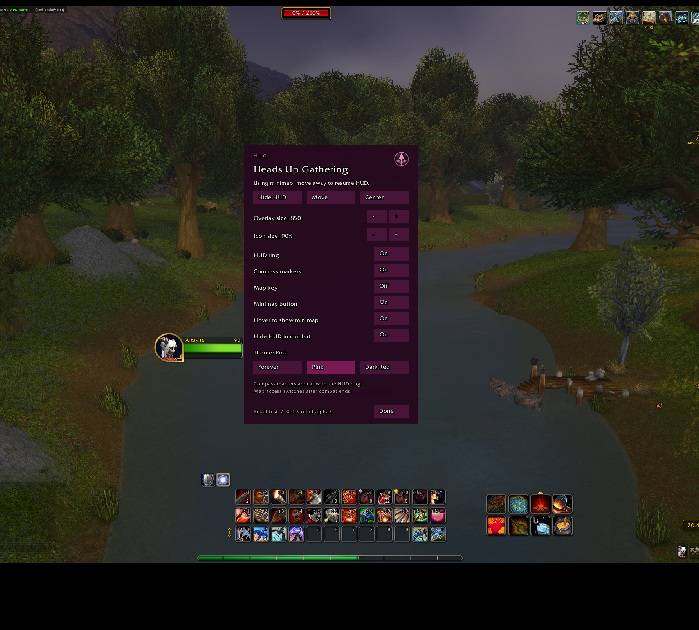
hud options.jpg
Description
Heads Up Gathering
Keep your gathering icons close to the action.
Heads Up Gathering (HUG) brings your live minimap icons into a transparent overlay for Retail World of Warcraft. See the icons over the game with the map terrain hidden, and adjust the layout to suit your screen.
Features
-
Live minimap icons: display the native tracking icons available to your character, with game-provided tooltips on hover when supported.
-
Optional combat hiding: hide the HUD during combat and bring it back afterward. Turning HUG off yourself keeps it off.
-
Minimap button: left-click to toggle the HUD; right-click for settings.
-
Normal minimap access: hover over the map’s usual position to restore it and its controls, then move away to resume the HUD outside combat.
-
Optional guides: a thin ring, N/E/S/W compass markers, and a map key.
-
Three appearances: Forever, Pink, and Dark Red.
-
Adjustable layout: change overlay size, position, icon scale, and zoom.
-
Saved preferences: keep your choices between sessions and updates.
Getting started
Enable Heads Up Gathering in the AddOns list, then left-click the compass-and-sprout minimap button. The HUD starts off on a fresh Retail installation. Right-click the button to open settings, choose a theme, or enable Hide HUD in combat.
Defaults are size 750, map key off, ring off, combat hiding off, and hover minimap access on. Existing preferences are preserved.
Use Move in settings to position the overlay, then right-click the move handle to lock it. You can also drag the minimap button around its corner position. Commands are optional: /agh toggles the HUD and /agh options opens settings. A toggle binding is available in the game’s keybinding menu.
How it works
HUG uses the native minimap, so the HUD and corner map take turns. Combat hiding makes the overlay disappear without moving the map. Corner-map switching and other layout changes wait until combat ends. A corner minimap you were already using remains visible during combat.
The game determines which resources you can track, their detection range, and the tooltips it provides. Enable the appropriate tracking for your character. HUG does not record gathered nodes or show previously collected locations, and enlarging the overlay does not extend detection range.
Quest-area outlines follow your game settings. The native player arrow remains visible. Restricted game-owned markers are left untouched. Edit Mode and locations with special hybrid maps can pause the HUD. Other addons that replace or reposition the minimap may need a compatibility check.
Compatibility and support
This release is for Retail WoW 12.1.5. No additional addon or library is required. Install the AltayliaGatherHUD folder in your Retail client’s Interface/AddOns directory; the folder name preserves existing settings.
For bug reports, include the full error, your HUG and client versions, where it happened, whether you were in combat, and any other minimap addons you use. /agh status prints version details.
Heads Up Gathering Team

