Hated Games
- By
War Games UI like it meant to be part of the game - Challenge others to War Games
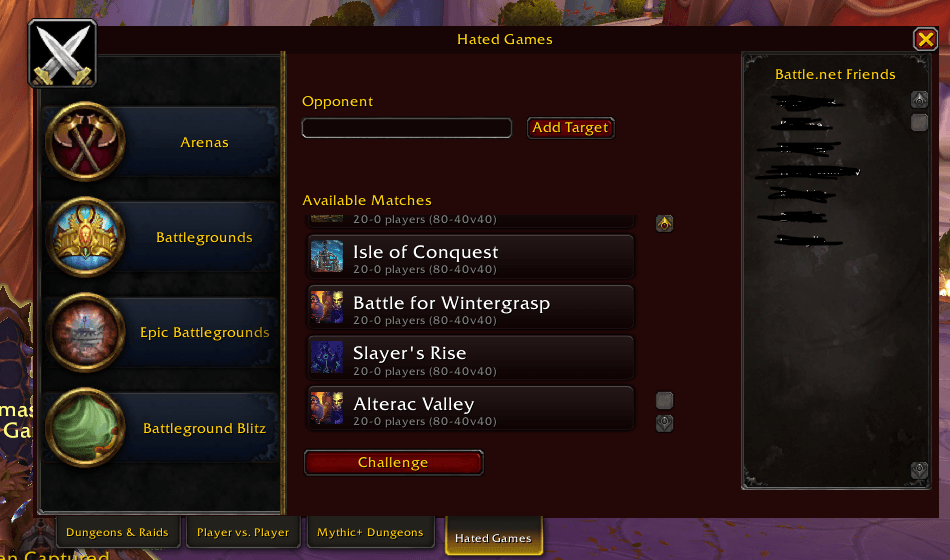
Built to look like it is part of the game.
Description
HATED GAMES
Your Direct Line to Blizzard's Real War Games
"When you need to be Rdy, be Hated."
Developed by Rdy — Guild Leader of Hated Gaming


🏴☠️ About the Addon
Hated Games puts Blizzard's real War Game system one click away. Challenge a target, respond to an incoming challenge, and browse every Arena, Battleground, and Epic Battleground available to fight in — all from a real tab built directly into the game's own PvP window, right next to Dungeons & Raids, Player vs. Player, and Mythic+ Dungeons. No separate popup cluttering your screen, no digging through menus — it looks and feels like Blizzard built it themselves.
This isn't a queue simulator or a guesswork addon. Every action goes straight through Blizzard's own War Game API — the same system behind the /wargame slash command and the "Request War Game" player-menu option. If your group wants a faster way to set up a private Arena or Battleground match against another premade, this is it.
🎯 Key Features Dashboard
| 🗂️ Category Browsing | 🎯 Target-Based Challenging | 📬 Real Accept/Decline Popup |
|---|---|---|
| • Arenas, Battlegrounds & Epic Battlegrounds each get their own list • Built from Blizzard's own real PvP button & row templates • Random Arena included for a quick pick | • Target the enemy leader, hit Add Target • Pick a category, then a specific match type • One click sends the real challenge | • Incoming challenges show a genuine Blizzard-style dialog • Accept or Decline exactly like any other real prompt • No custom window to learn |
| ✅ Precondition Checks | 🔄 Always Current | 🎨 Native Blizzard Look |
|---|---|---|
| • Confirms you're leading your own group • Confirms your target leads a different group • Confirms group size matches the match type | • Match list is read live from the client every time you open the tab • Never goes stale when Blizzard rotates a map • Zero manual upkeep | • Lives inside the real PvP window as its own tab • Draggable minimap button, no external libraries |
🎛️ Slash Commands
| Command | Functionality |
|---|---|
/hg | Toggles the Hated Games hub tab open or closed. |
/hg config | Opens the settings panel (theme, minimap icon, debug logging). |
📊 Pro-Tips & How-To
⚔️ Sending Your First Challenge
- Target the leader of the group you want to fight.
- Open the Hated Games tab (click the tab, or use
/hg) and click Add Target — this fills in the Opponent field from your current target.- Pick a category on the left: Arenas, Battlegrounds, or Epic Battlegrounds.
- Click a specific match from the list on the right — the subtitle shows exactly how many players it needs, both sides.
- Hit Challenge. If something's blocking it (wrong group size, target isn't a leader, etc.), the status line tells you exactly what to fix instead of just failing silently.
🗂️ Picking the Right Category
- Arenas: every specific arena map, plus Random Arena if you just want Blizzard to pick one for you.
- Battlegrounds: every normal-sized battleground, from small skirmishes up to 15v15.
- Epic Battlegrounds: the big 40v40 maps like Alterac Valley and Isle of Conquest, for when a full raid wants to throw down.
👥 Group Requirements
A real War Game challenge only goes through if you're leading your own group, your target is leading a separate group, and both group sizes actually match what the match type needs (an exact 2/3/5 for Arenas, a min-max range for Battlegrounds). Hated Games checks all of this before sending, so you'll know immediately if your raid needs to trim down first instead of wondering why nothing happened.
🖱️ Minimap Button
Left-click opens the hub. Right-click jumps straight to settings. Drag it anywhere around the minimap ring you like.
🤝 Community, Credits & Support
No more alt-tabbing to Discord to arrange a fight or fumbling through Blizzard's menus mid-raid — Hated Games keeps the whole challenge flow exactly where you already are.
Explore more addons published under the Hated Gaming suite on CurseForge!
Hated Games Team
Owner