
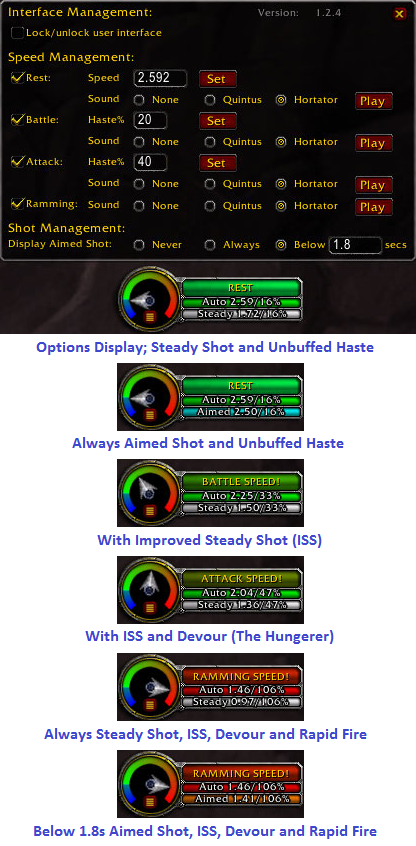
Options & Display Stages
Description
Synopsis
Hastometer displays range attack haste for Hunters. It uses a dial to indicate haste speed, and optionally it can announce levels of haste speed.
Features
- Ability to display Steady Shot or Aimed Shot and it's hasted speed. Aimed Shot can be shown never, always or only below a hasted speed.
- Set normal weapon speed and two levels of haste, which define Rest, Attack, Battle, Ramming and Slowed speeds.
- Rest speed is defined as the normal weapon speed, while Attack and Battle speeds are defined by cummulative haste percentages.
- Current cummulative haste calculation, showing both Auto and Steady Shot speed and percentage hasted.
- Haste speed dial indicating relative level of haste.
Bug Reporting
Please use a good error catcher like Bugsack (requires !BugGrabber), and provide the entire error text with as much information on how to recreate the problem. Report the problem via the CurseForge ticket system to ease tracking.
Slash Commands
- /ho - toggle display of Hastometer window
- /ho show - show the main Hastometer window</li>
- /ho hide - hide the main Hastometer window</li>
- /ho resetui - reset the position of Hastometer windows
Language Support
Hastometer should be able to work in any language, though the prompts and messages are in English. If you would like to contribute a translation for this addon, let me know via private message on this site. You will be given credit for the translation.
Installation
Unzip into <WoW Directory>\Interface\Addons.
User Interface
This addon is for Hunters. You will not be able to display the UI if you are any other class - see Future Versions.
The user interface is used to perform all functions, and call be toggled (shown/hidden) through two methods:
- Using the command line via the
/hastometeror/hocommand; - Using the minimap button that can be used to toggle the user interface;
To reset the window positions if they are dragged offscreen, use the command line /ho resetui to reset their positions.
The user interface can be moved anywhere on the screen via dragging the Hastometer dial window. The Hastometer options provide a Lock toggle to prevent the UI from being dragged.
Recent Version History
Version 1.3.1 - 12/03/12
- Updated ToC for 5.1.0 patch
Version 1.3.0 - 09/13/12
- Ported for the WoW Mists of Pandaria 5.0.4 patch
Version 1.2.4 - 01/15/12
- Added Aimed Shot display capability
Version 1.2.3 - 11/29/11
- Fixed possible taint issues
- Updated ToC 4.3.0 patch
Version 1.2.2 - 06/28/11
- Updated ToC 4.2.0 patch
Version 1.2.1 - 04/26/11
- Updated ToC 4.1.0 patch
Version 1.2.0 - 10/12/10
- Ported for the WoW Cataclysm 4.0.1 patch
Version 1.2.Beta1 - 10/8/10
- Ported for the WoW Cataclysm 4.0.1 patch
Version 1.1.1 - 10/14/08
- Fixed Rest speed prompt not displayed
Version 1.1.0 - 10/12/08
- Fixed Rest speed deterimnation by using an epsilon
- Changed dial needle to swing through full range of dial
- Changed Battle speed and Attack speed to haste percentage of rest speed
Version 1.1.Alpha1 - 08/08/08
- Ported for the WoW Wrath of the Lich King 3.3.0 patch
Complete Version History
See the version history document in the Hastometer download for a complete version history of Hastometer.
Known Issues
None currently known.
Future Versions
I have contemplated handling other classes, but I need input from those classes on the spells that count toward base haste measurement.
License

Hastometer 1.x.x+ by Mackenz is licensed under a Creative Commons Attribution-Noncommercial-No Derivative Works 3.0 United States License.
The Hastometer Team


