Haste's Super Tweaks
- By
01-tweaks-list-xp-tracker.png
04-loot-window.png
07-better-tooltips.png
11-chat-spam-filter.png
08-better-scrolling-combat-text.png
Description
Type /hst in game to open the settings. Each tweak has its own switch and can be turned on or off at any time without a /reload. Tweaks that act for you or replace part of the game's interface start off, so installing the addon changes nothing you didn't choose. Hold Shift to skip any automatic action once.
Highlights
XP Tracker

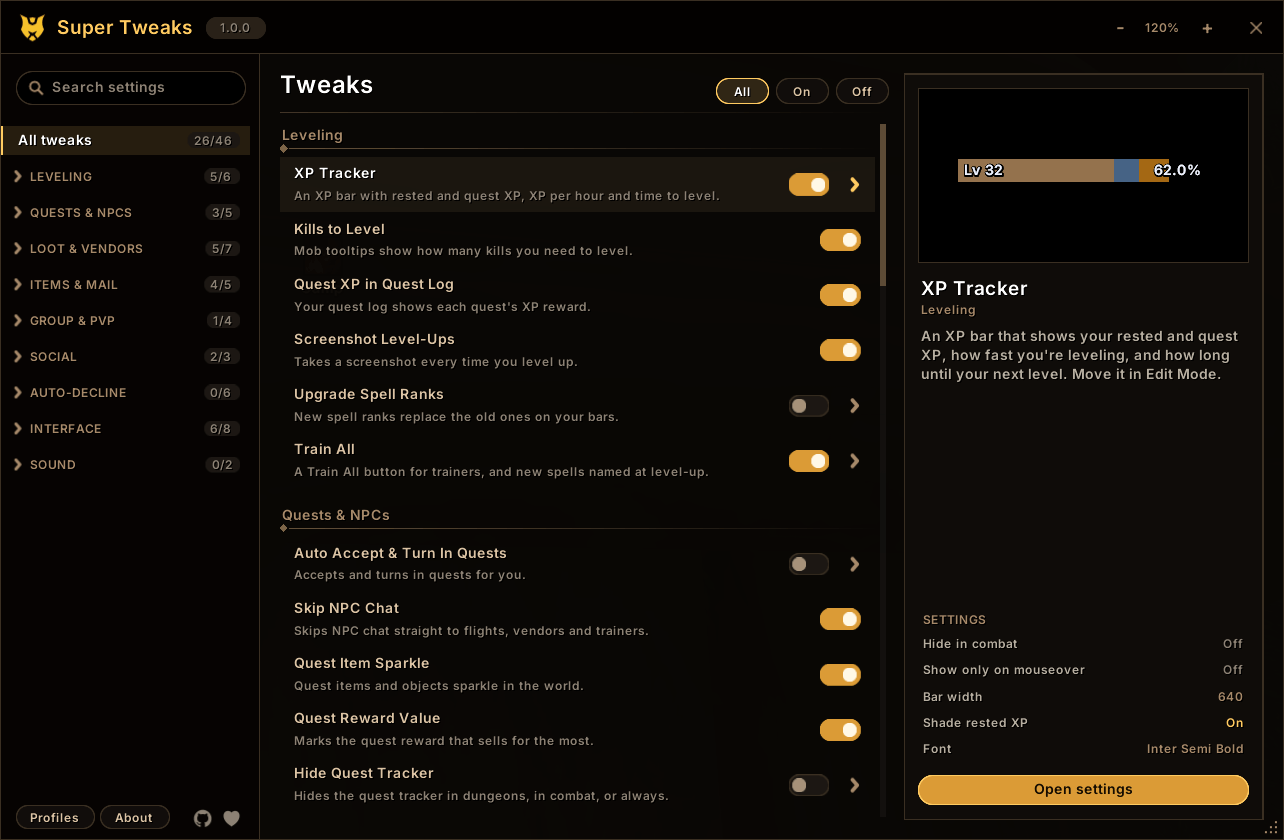
An XP bar with rested XP, XP from completed quests, XP per hour and time to level. Mob tooltips say roughly how many more kills of that mob you need to level, and the quest log shows each quest's XP.
Better Tooltips

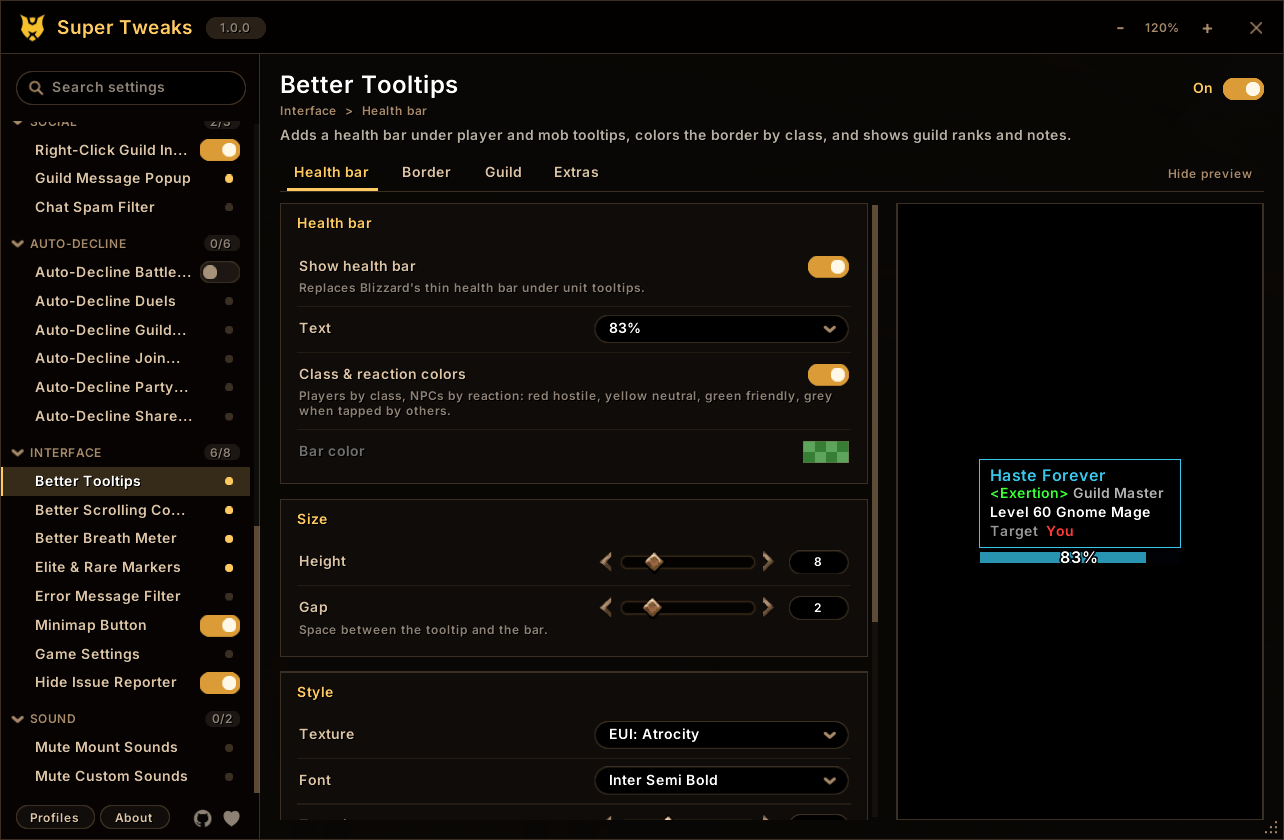
A health bar under unit tooltips, borders in class colors, guild ranks and notes, and who the unit is targeting. Item, spell and NPC IDs are optional. Works with tooltip styles from other addons.
Loot Window and Fast Loot
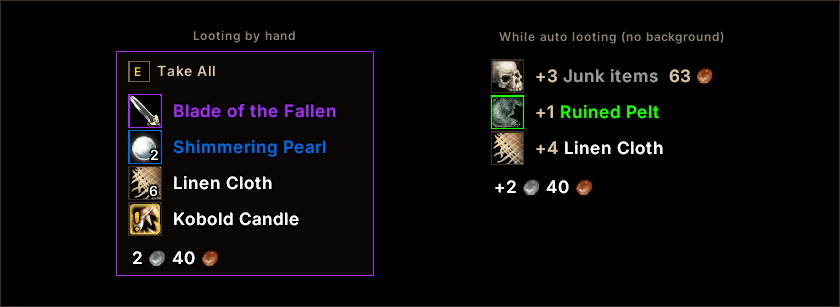
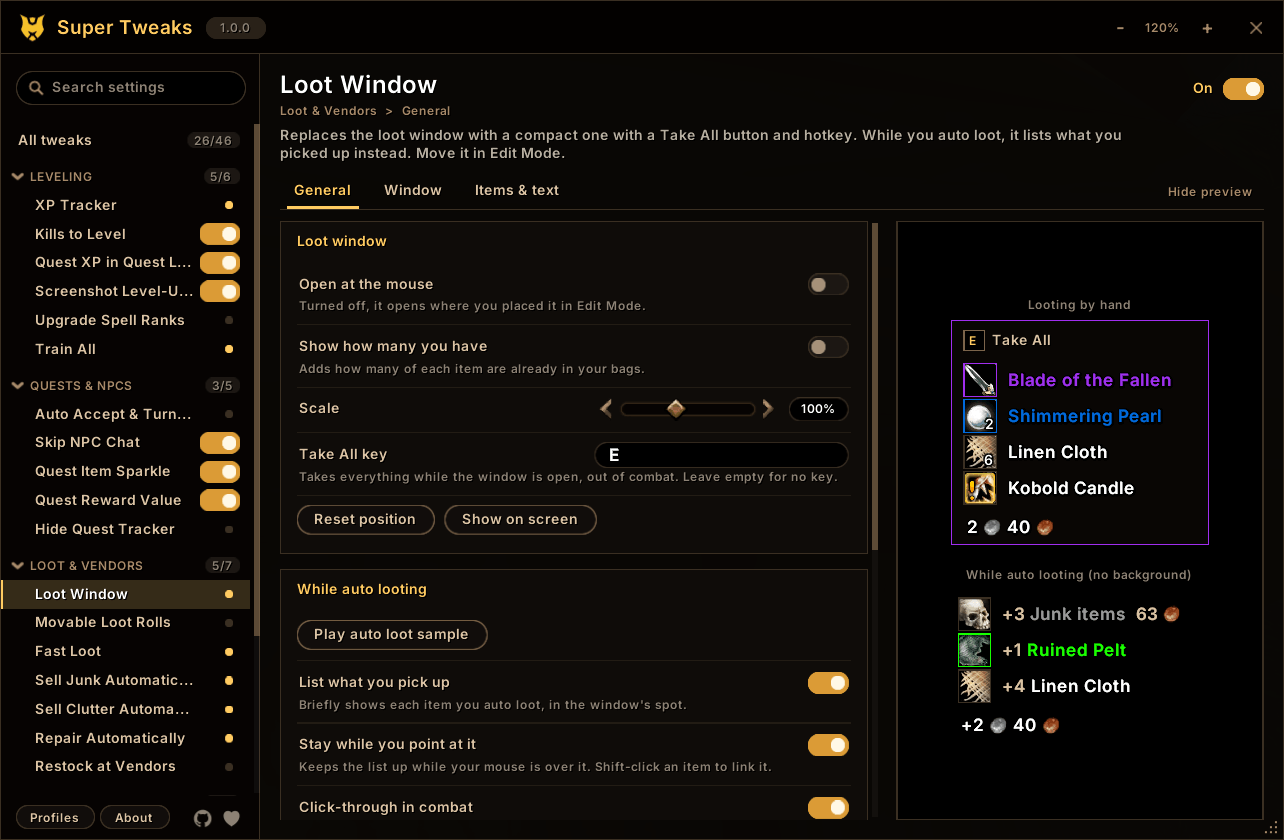
A compact loot list with a Take All button and hotkey. While you auto loot, it lists what you picked up for a few seconds. Fast Loot takes everything at once and still lets gathering trackers see the loot. Items being rolled on stay in the window.
Sell Junk and Sell Clutter

Greys are sold at any vendor. Sell Clutter also sells the items you collect while leveling and won't use:
- cooking ingredients and monster parts that none of your professions use
- other classes' reagents
- gear your class can't use
- food, potions and white gear you've outleveled
It keeps quest items, items your RestedXP guide needs, equipment sets, profession tools, expensive materials and anything that opens. Item tooltips say what will be sold, and /hst clutter list shows the full list before you reach a vendor.
Better Scrolling Combat Text

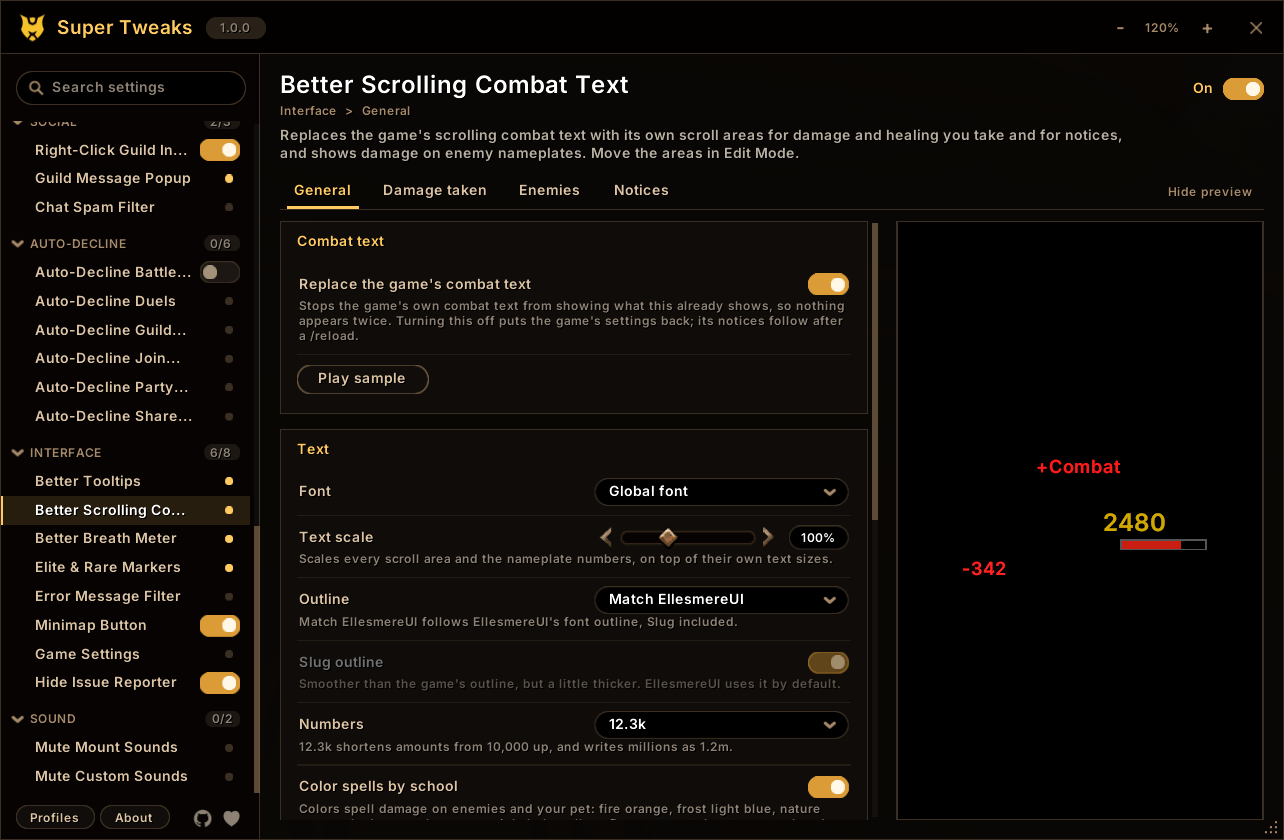
Separate scroll areas for damage and healing you take and for notices: entering and leaving combat, low health and mana, combo points, auras, reputation, honor and skill-ups. Damage numbers can show on enemy nameplates. Fonts, colors, animations and filters are all configurable, and each area moves in Edit Mode.
All tweaks
Leveling: XP Tracker, Kills to Level, Quest XP in Quest Log, Screenshot Level-Ups, Upgrade Spell Ranks (new ranks replace old ones on your bars), Train All.
Quests and NPCs: Auto Accept & Turn In Quests, Skip NPC Chat, Quest Item Sparkle, Quest Reward Value (marks the reward that sells for the most), Hide Quest Tracker (in dungeons, PvP, combat or always).
Loot and vendors: Loot Window, Movable Loot Rolls, Fast Loot, Sell Junk, Sell Clutter, Repair Automatically (guild funds optional), Restock at Vendors (ammo, reagents and poisons, up to a gold limit per visit).
Items and mail: Consumable Macros (always your best food, drink, bandage and potion), Mail Expiry & Alt List, Mail Gold Guard (marks gold mailed by strangers so Open All skips it), Auto-Equip Bags, Bag Tweaks.
Group and PvP: Auto Accept Summons, Auto Accept Resurrection, Auto Release in Battlegrounds, Group Finder Whispers (class, level and race beside each whisper, with click-to-invite).
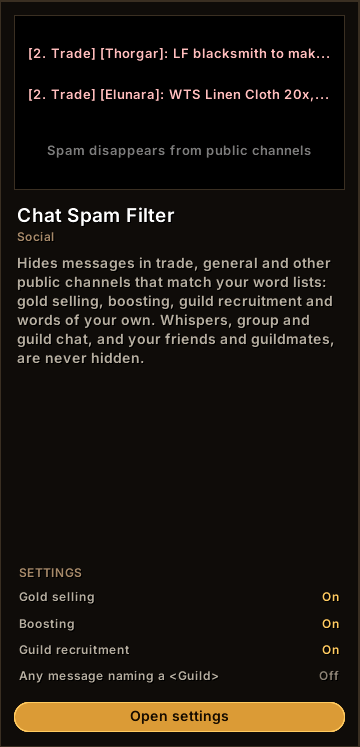
Social: Right-Click Guild Invite, Guild Message Popup, Chat Spam Filter (hides gold selling, boosting and recruitment in public channels; never touches whispers, group, guild or friends).
Auto-decline: Battle.net friend requests, duels, guild charters, join requests, party invites and shared quests. Friends, guildmates and community members can be let through.
Interface: Better Tooltips, Better Scrolling Combat Text, Better Breath Meter, Elite & Rare Markers (dragons on nameplates and a rare alert), Error Message Filter, Minimap Button, Game Settings (camera distance, nameplate range, spell queue window and more, reapplied at login, plus Edit Mode layout backups), Hide Issue Reporter.
Sound: Mute Mount Sounds, Mute Custom Sounds (rain, spell fizzle, or any sound file ID).
Commands
/hstopens the settings. They're also under Options > AddOns and in the minimap addon menu./hst xp,/hst tooltip,/hst sct,/hst clutterand similar open a tweak's settings directly./hst keep <item>and/hst sell <item>add an item to Sell Clutter's never-sell or always-sell list./hst clutter listshows what would be sold right now./hst helplists every command.
Settings window
- Search finds any tweak or setting by name, description or menu choice. Switches work in the results, and Enter jumps to the setting.
- A live preview sits beside each tweak's settings and redraws as you change them: the XP bar at its real size, the loot window, tooltips, combat text and the breath meter.
- Profiles hold every tweak's settings, and you can switch, copy and reset them.
- The XP bar, loot window, loot rolls, combat text areas and breath meter move in the game's own Edit Mode, with a position saved for each layout.
Performance
A tweak that's off registers no events and installs no hooks, so it costs nothing. The ones that are on wait for game events instead of checking every frame, and vendor events are only watched while a vendor window is open. Tooltip redraws, combat text and loot and bag events make no garbage, so they don't add garbage-collection stutter in busy fights.
Every change to the addon is benchmarked against the previous version: game API calls, widget calls, frames created and garbage per event. A change that does more work fails the check.
Source
Open source under MPL 2.0 on GitHub. Bug reports, ideas and pull requests are welcome there.
Haste's Super Tweaks Team