


HarvestProfit
- By
Capture d'écran 2026-05-15 032641.png
Capture d'écran 2026-05-15 032635.png
Capture d'écran 2026-05-15 032705.png
Description
HarvestProfit is a harvesting tracker and Auction House analysis addon for WoW Midnight. It tracks everything you collect in real time, prices your items by scanning the AH, and gives you market insights to know exactly when and how much to sell.
What it does
Open the Auction House, let HarvestProfit scan it (2-3 seconds, 4000+ items), then go harvest. The addon tracks every item you pick up, prices it automatically, and shows you your gold per hour live. When you're done, a session summary tells you what you earned, your best items, and how you compare to your previous sessions.
Session Tracking
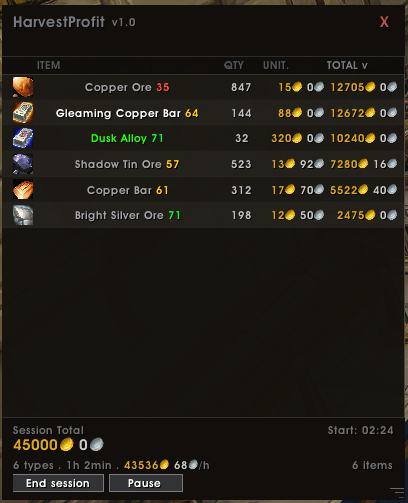
- Tracks all harvested items in real time: quantity, unit price, total value
- Gold per hour calculated live — timer starts on your first harvest, not on login
- Item loss tracking: if you use harvested materials to craft, quantities update automatically
- Session goal with progress bar and estimated completion time
- Session pause that survives /reload
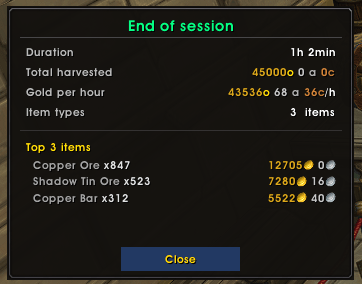
- End-of-session summary popup: duration, total gold, GPH, top 3 items by value
- Last 5 sessions history visible in the minimap button tooltip
Auction House Analysis
Click any item in the AH to open the analysis panel:
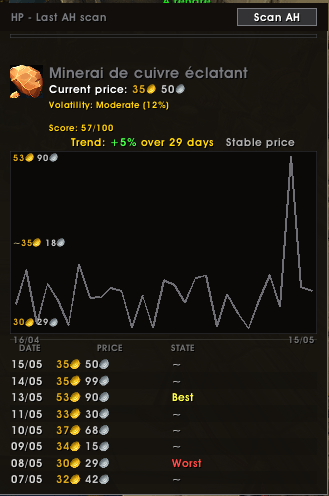
- Price history chart — up to 30 days of data
- Trend — automatic detection with advice: Good time to sell or Wait, price is falling
- Volatility — Stable / Moderate / High
- Best time of day — based on your scan history, shows which hour typically has the highest prices
- Profitability score — 0 to 100, combining current price position, stability, and trend direction. Green (70+) means great time to sell. Yellow (40-69) is average. Red (below 40) means wait.
Alerts on Favorites
HarvestProfit syncs automatically with WoW native AH favorites (the star icon in the AH).
After every scan:
- Alerts you when a favorite item hits its all-time best price (with a sound)
- Shows price change alerts: +14% Copper Ore: 1g 72s
- Detects market manipulation: [FLOOD] when a price drops 25%+ vs the historical average, [BUYOUT] when it spikes 40%+
Scan Settings
- Auto scan when the AH opens
- Configurable scan cooldown in minutes to prevent rescanning every time you reopen the AH
- Compatible with TSM and Auctionator — uses their prices automatically if installed, no scan needed
Interface
- Resizable and movable main window
- Columns sortable by item name, quantity, unit price, or total value
- Minimap button with full session stats in the tooltip
- Configurable accent color (5 presets)
- Available in English and French (frFR)
Commands
/hp scan — Scan the AH (must be open)
/hp pause — Pause or resume the current session
/hp reset — Reset the session
/hp show - /hp hide — Toggle the window
/hp status — Print current stats in chat
/hp changelog — Show the welcome popup
/hp resetpos — Recenter all windows
Installation
- Download and extract the HarvestProfit folder into: World of Warcraft/retail/Interface/AddOns/
- Reload the game or type /reload
- Open the Auction House — HarvestProfit will scan automatically if the option is enabled
Notes
- Trend analysis and the profitability score require at least 2 days of scan history to be meaningful. The more you scan, the better the data.
- Market manipulation alerts require at least 3 days of history for a given item.
- The best time of day feature requires at least 2 scans at the same hour to show a result.
- All data is stored account-wide and shared across all your characters.
Feedback & Bug Reports
Found a bug or have a suggestion? Leave a comment on this page!
When reporting a bug, please include:
- A description of what happened
- The steps to reproduce it
- Any Lua error message you got (the BugSack addon can help capture them)
For feature requests, just drop a comment too. All feedback is welcome — this addon is actively maintained!
The HarvestProfit Team
