
Happy Camper - Camp Finder and Camping Assistant
- By
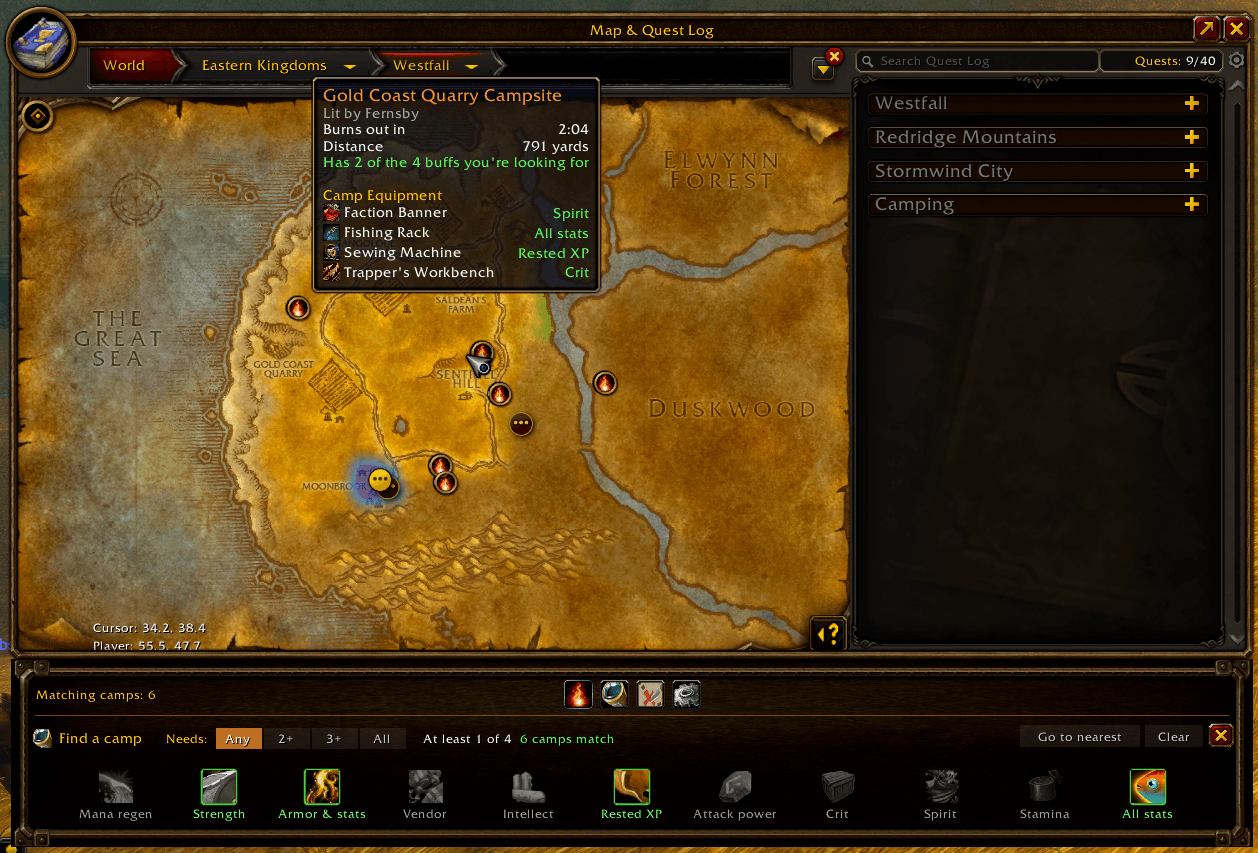
Map integration
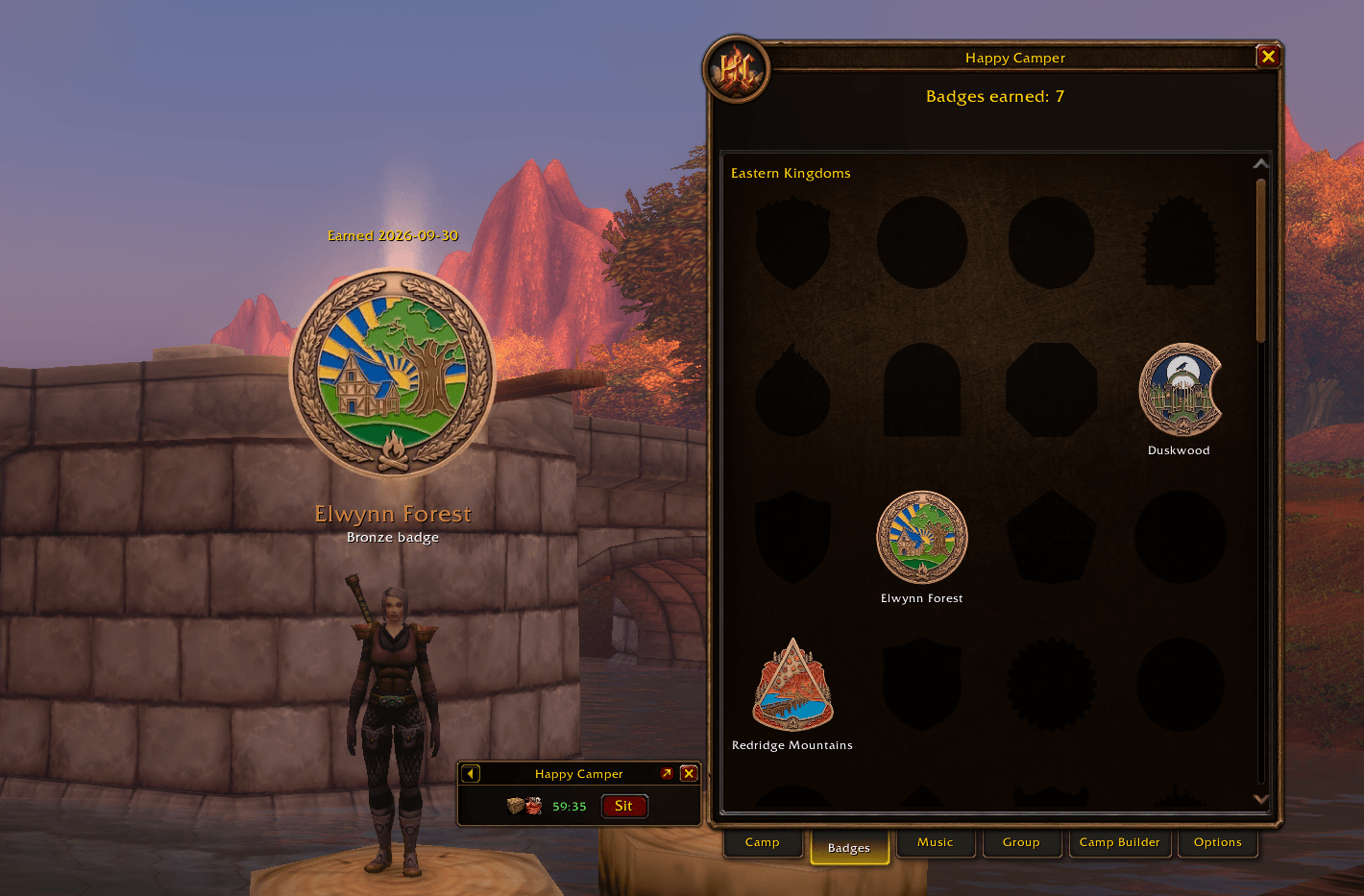
newss2.png
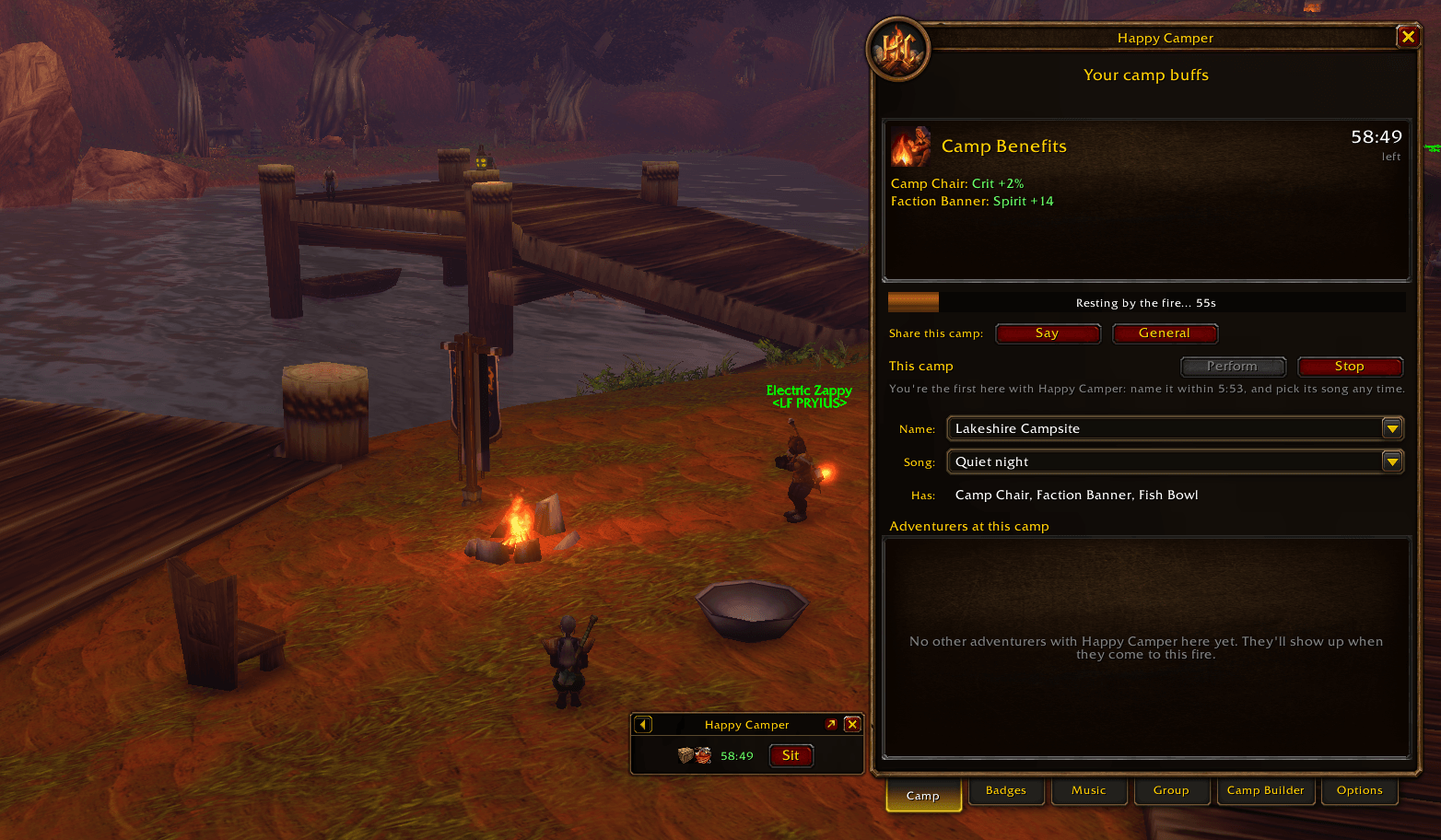
newss1.png
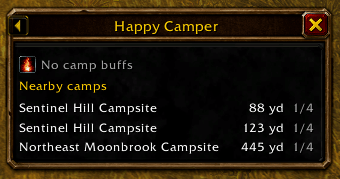
Small onscreen widget shows current buffs and the closest camps matching your requirements, in case of a quick top up.
Description
Happy Camper
Camping in WoW: Forever is better together. Happy Camper shares campfires between players who have the addon, puts them on your map, tracks the buffs you get from them, and helps you find (or build) the camp with the buffs you want, and the people to sit around it with. It speaks English, German, French, Spanish, Portuguese, Simplified Chinese, Korean and Polish.
Beta: Happy Camper is in beta, so you may run into bugs. Please report them, and send ideas, from Options → Send feedback in the addon (or type
/hc feedback). They go straight to the developer.Happy Camper works with everyone else who has it: the more people use it, the more camps you'll see. Tell your friends!
What it does
Standard or Enhanced
- The first time you log in, pick how much Happy Camper shows you. Standard keeps it simple: camps on the map as smoke, badges, camp music and songs to find, the on-screen panel. Enhanced adds what each camp has, Find a camp, the Camp Builder and group planning.
- Either way it shares camps with everyone, and you can switch any time in Options.
Camps on your map
- Every campfire a player with Happy Camper has rested at shows as a fire on your world map and minimap, for everyone running the addon on your realm. Camps past the minimap's edge sit on its rim, pointing the way.
- Someone posted a map pin in chat saying they've made camp? It shows as a faded unconfirmed camp until someone with the addon rests there, with any camp objects the post names.
- Camps from other camping tools show too, the same way, whether shared over their channels or posted in chat. Happy Camper only listens to them, so more camps reach your map while the community grows.
- Hover a camp to see its name, how long the fire will burn, its distance, the camp equipment placed there and the buff each item gives at your level, how many of its object slots are used (Basic fires hold 3, Journeyman 5, Expert 10), and whether it's on your layer.
- Each camp's pin is ringed in its quality, in item colours: grey and white for a few basic objects, up through green, blue and purple to orange for a full fire of top-tier objects.
- In Standard mode a camp shows as a patch of smoke with a clear edge: you can see roughly where it is, then go and find the fire.
- Camps show on the map of any zone you look at, wherever you are, up to the 25 nearest, so the map never gets cluttered.
- Continent and world maps can show camps grouped, one pin per zone (or continent) with its count (click it to open that map), every camp as a smaller pin, or none. Pick in Options.
- Entering a zone asks the players already there for its burning camps, so you see them straight away.
- Camps on another layer are faded (or hidden, if you prefer), and only your faction's camps are shown.
- A camp bar under the map shows how many camps are on it, your camp buffs and object cooldown, and buttons to show or hide camps, find a camp and open the Camp Builder.
Your camp buffs
- The Camp tab shows the buffs from the camp you rested at, what each object gives, and how long they last.
- Most camp buffs grow with your level, and every buff tooltip shows the size at yours.
- A rest bar follows the Welcoming Campfire countdown and flashes when you're rested.
- An alert (the ready-check bell) warns you before your camp buffs run out; pick how early in Options, or turn it off. Another tells you when your camp object is off cooldown.
Find a camp
- Right under the world map: pick the buffs you're looking for (Strength, Spirit, crit, rested XP and more), or a quick pick for Melee, Caster or Balanced, and how many a camp must have, and only matching camps show on the map. Click a buff again to look for its tier 2 or tier 3 object.
- Hover a buff for its value at your level, which objects give it, and which class buff it doesn't stack with.
- Camp tooltips mark in red any object whose buff you already get from a class buff (a Fish Bowl when you have Blessing of Kings), since they don't stack.
Camp Builder
- Want a camp with certain buffs? Post a request with the benefits you want and a meet-up point.
- Laid out like the Group tab: one row per buff, with its icon, what you want, and who's bringing it.
- Each buff's Request menu names its items by tier and says what each one does (higher tiers add a workspace or service, like an anvil or repairs). Ask for buffs your own class gives too, or a bigger campfire than the one you're bringing.
- Say what you're bringing: your camp object and campfire kit, plus the class buffs you can give.
- Players in your zone who can bring one of them get a heads-up and can sign up; your request shows who's bringing each buff and at what tier.
- Each request shows who posted it, where, and what they want, with buttons to Join, put a waypoint on the meet-up, or Whisper them.
- A request closes by itself when a fire is lit at the meet-up, or after 30 minutes.
Group planning
- The Group tab plans a camp with your party or raid: who carries which camp object and who can place one now, and which buffs would add nothing because a class buff someone has already gives the same stat.
- Who has it lists everyone who carries or can make each object, best first; tick group members without the addon who say they have one.
- Camp Setup shows where each buff will come from and at what tier, worked out from the camp recipes each player knows.
- Melee, Caster and Balanced fill in a plan in one click; paladins pick the blessing they keep up.
- The leader picks who places what, sees Ready, Cooldown and Applied for each, can whisper someone to place their item, and can post the plan to Say, party or raid with one click.
This camp
- The Camp tab shows the camp you're at, the objects placed there, and the other Happy Campers at the fire, with their level, class and professions, plus Inspect and Whisper buttons.
- Say and General buttons post a short note about your camp with a clickable map pin, so anyone can find it, with or without the addon. Turn on roleplay announcements in Options for an in-character version.
- Whoever set the camp up can name it in its first 15 minutes (from a list of names that fit the place, like "Lakeside Camp" or "Goldshire Wayside Camp"), and pick its camp song any time. Anyone can mute the song for themselves.
- Layer invites (opt in, in Options): while you're at a camp, players with the addon on another layer can click your camp on their map to ask you for a group invite, so they can join your layer. You get a small window with Invite and Not now; nothing happens unless you click Invite.
Camp music
- Camp tracks: the game's own tavern and race music, picked by the camp's owner, looping for everyone with the addon at the fire.
- Found songs: original songs written for Happy Camper, each hidden at a special place in the world. Rest at a camp there to find it, with a card and a few bars of the song the moment you do.
- The Music tab collects them: where and when you found each one, and a riddle for each song you haven't found yet. Listen to one there, just for you, while you're at a camp.
- Perform a found song from the Camp tab, once every 5 minutes: it plays in place of the camp's song for everyone at the fire, whether they've found it or not. Songs from several players play one after another, then the camp's song comes back.
- The pirate shanty and the Darkmoon Faire's music are found songs too: find them at the goblin ports, and in Elwynn Forest or Mulgore while the Faire is in town.
- Found songs are shared by all your characters and kept in backup codes.
On-screen panel
- A small three-row window, mostly for when you're away from camp: your camp buffs with the time left, and the 2 nearest camps that match what you picked in Find a camp. Fold it down to just its buff row.
- Your camp buffs show as each object's icon, with a tooltip for what it gives.
- Click a camp to open the map on it and make its marker ping. Move it, lock it, pick its size, start it hidden, or turn it off.
- A Campfire icon (your biggest campfire kit), and near a fire your camp object icon and a Sit button. The icons stand you up first, since items can't be used sitting down.
Badges
- A challenge coin for every zone, earned by camping there: bronze for resting at a fire, silver for resting at 15 different camps (yours or anyone's), gold for 50.
- A coin for every profession, earned by placing its camp objects, with gold needing its best ones.
- Collection badges for earning the rest, ending with Summit: every zone and profession badge in gold. They stay hidden until you earn the first. (There's a little extra waiting at the top.)
- Hidden landmark badges to discover by camping in special places.
- Earned coins drop onto your screen with a glow and a fanfare; click one in the Badges tab to see it again. Unearned coins are dark outlines, their names kept secret.
- Badges are shared by all your characters.
Your progress is safe
- Deleting, updating or reinstalling the addon keeps everything: the game saves it outside the addon's folder.
- Options → Backup turns your badges, found songs and settings into a code you can keep anywhere and restore from on any PC.
- Each character also keeps a copy, so if the saved file goes missing, logging in restores it.
And more
- Tooltips in the world: hover a camp object for the buff it gives at your level, or a campfire for how many objects it holds.
- A Campfire nearby notice when you come near a fire, with the camp's name and buffs.
- A short guided tour the first time you log in (and any time from Options).
- An optional cinematic camera that slowly pans around the camp while you rest, and can hide player names.
- A minimap button: click for the Happy Camper window, right-click for Options, Shift-click for the panel.
- Help tips on hover explain buttons and menus; turn them off in Options once you know your way around.
How it works
- Happy Camper talks to other copies of the addon over a hidden chat channel. You never see it in your chat, and it waits for General before joining so it never takes General's channel number.
- Only players with the addon see shared camps. Nothing is posted in public chat unless you click a button to say it.
- Which layer you're on is read from the NPCs around you, so camps on other layers can be faded or hidden.
- If someone locks the channel on a realm, Happy Camper moves everyone to a backup channel and carries on.
- You're told in chat when a newer version is out.
- Group planning uses your party or raid's addon channel, so it works even with the camp network off.
- Everything shared is IDs and keys, never text, so players on different languages share camps and each sees them in their own language.
- Turn the whole camp network off in Options at any time.
Fair play and safety
- No automatic chat: everything you say or emote is sent only when you click it.
- Camp names come from a fixed list, so nobody can put words of their own on your map.
- Camps from chat map pins and other camping tools stay on your screen only and are never shared. Happy Camper never sends anything on their channels.
- Only a camp's creator can move, change or remove it, and only players at a camp can report what's placed there.
- Flood limits: each player can add one new camp and one request every 10 minutes.
/hc block <name>hides a player's camps, requests and presence, and your ignore list counts too.
Commands
/hc: the Happy Camper window/hc camp,/hc badges,/hc music,/hc finder,/hc options: open a tab/hc backup: back up or restore your badges and settings/hc search: Find a camp/hc panel: show or hide the on-screen panel/hc feedback: send a bug report or an idea/hc guide: the guided tour/hc cinematic: start or stop the cinematic camera/hc block <name>,/hc unblock <name>,/hc blocked/hc camps: list known camps in chat/hc minimap: show or hide the minimap button
Feedback and bug reports
Use Options → Send feedback (or /hc feedback) in game. Your note, the addon's version and (if you tick it) its recent errors are sent privately to the developer, and delivered the next time they're online. You can also leave a comment on this page.
Requirements and notes
- For WoW: Forever only. No other addons are needed.
- Camp buff values come from the Forever beta's game data and may change. Most grow with your level; tooltips show yours.
- Camp tracks and emote sounds are the game's own music and sounds, played by the game. The found songs are original music composed for Happy Camper, and its emblem, badges and pictures are original art made for it.
- Languages: English, German, French, Spanish (also Latin-American clients), Portuguese, Simplified Chinese and Korean, following your game's language; Options → Language can pick another, including Polish (WoW has no Polish client). Translation corrections are welcome through Send feedback.
- Copyright © 2026 Torridon. All rights reserved: free to use for play, but not to copy, change or redistribute.
Happy Camper - Camp Finder and Camping Assistant Team
