HandyNotes: Forever Flights
- By
Every active WoW Forever flight point on your maps, colored by what each character has discovered.

cover_848.png
01_azeroth.png
02_kalimdor.png
03_settings.png
Description
HandyNotes: Forever Flights
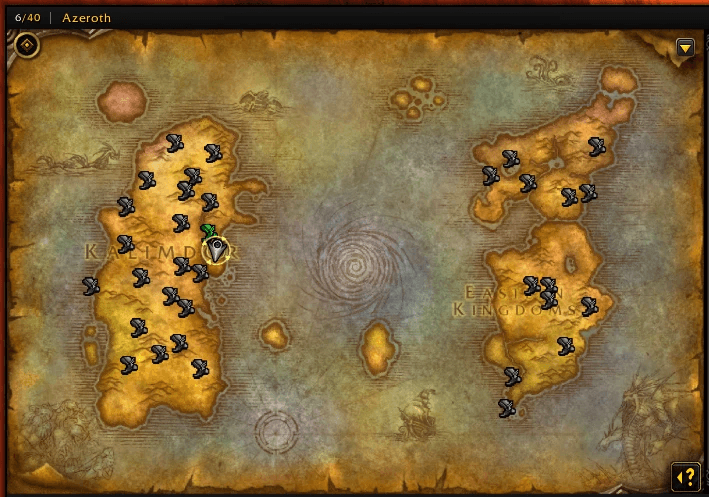
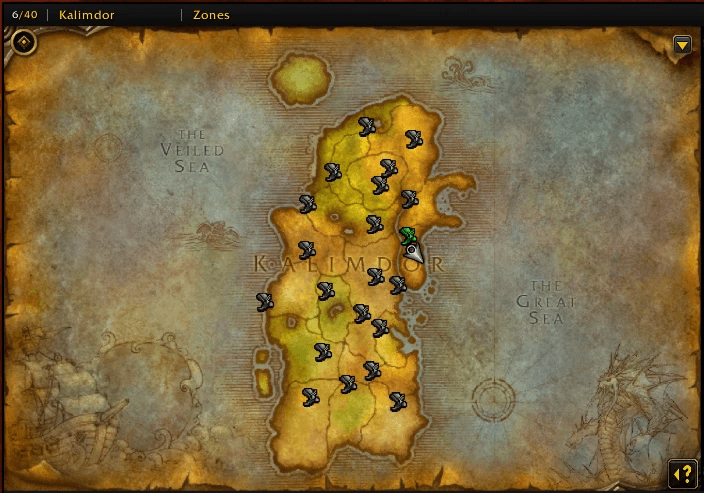
Every active, discoverable WoW Forever flight point on your maps, including the ones your character has not unlocked yet. See where to get your next flight path without visiting every flight master first.
Source code on GitLab · Support on Discord
Why Use Forever Flights?
Flight points are shown on Azeroth, the continent, the surrounding zone and city maps, plus the minimap when you are nearby. Each point is colored for the current character, so you can tell at a glance which flights you already know and which ones are still waiting for you.
Colors
| Color | Meaning |
|---|---|
| Green | Explicitly discovered by this character |
| Orange | Explicitly undiscovered by this character |
| Grey | No reliable discovery information yet |
| Grey, "Opposing faction" in the tooltip | Enemy faction flight, when enabled |
Open a flight master's map and the addon records which flights are really reachable for that character. Those turn green and stay saved per character. Until a reliable observation exists, a point stays grey: grey does not mean locked. Discovery is never guessed from your level or from a missing response.
Supported Content
| Region | Alliance | Horde | Neutral | Total |
|---|---|---|---|---|
| Eastern Kingdoms, including Riverglades | 17 | 13 | 0 | 30 |
| Kalimdor, including Mount Hyjal | 14 | 17 | 4 | 35 |
| Total | 31 | 30 | 4 | 65 |
The catalogue comes from the exact 1.60.1 client data. Special druid dialogue flights, tower-control taxis and quest transports are not part of the persistent flight network and are left out. This build has no conventional flight point on Zephras Isle or in Shen'dralas, and the addon does not invent one.
Main Features
- World map, continent, zone, city and minimap icons.
- Filters for discovered, undiscovered, unverified and opposing faction flights.
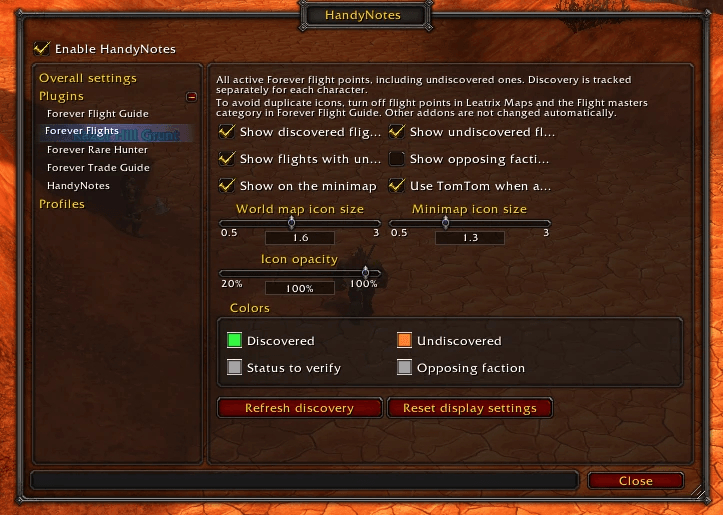
- Separate world map and minimap icon sizes, opacity and colors for all four states.
- Tooltip with name, zone, coordinates, faction and written status.
- Left-click sets a destination (TomTom when available, native waypoint otherwise). Shift-click shares a map link in chat. Right-click opens a menu.
- Discovery saved separately for each character.
- English and French.
Quick Start
- Install HandyNotes for WoW Forever, then this addon.
- Enable both, then
/reload(restart the client if the addon is missing from the list). - Open the map and zoom through Azeroth, a continent, a zone and a city.
- Speak to a flight master and open its flight map to refresh discovery.
- Use
/hnfflightsto adjust filters, size, opacity and colors.
Avoiding Duplicate Markers
In Leatrix Maps, turn off Show flight points. In HandyNotes: Forever Flight Guide, turn off the Flight masters category. Other addons are never changed automatically.
What It Does Not Do
- It does not calculate routes, draw flight connections or automate travel.
- It does not show boats, zeppelins or portals.
- It does not access the internet: everything runs locally.
- It does not run on Retail or Classic. It is made for WoW Forever.
Compatibility
WoW Forever 1.60.1. Requires HandyNotes. TomTom is optional.
Credits
Flight identities and positions come from the TaxiNodes, TaxiPath, UiMapAssignment and UiMap DB2 exports on wago.tools. Coordinates were cross-checked against the Leatrix Maps flight data; no Leatrix Maps code was copied.
HandyNotes: Forever Flights Team

Owner