HaMoK
- By
1.jpg
2.jpg
3.jpg
4.jpg
5.jpg
Description
HaMoK
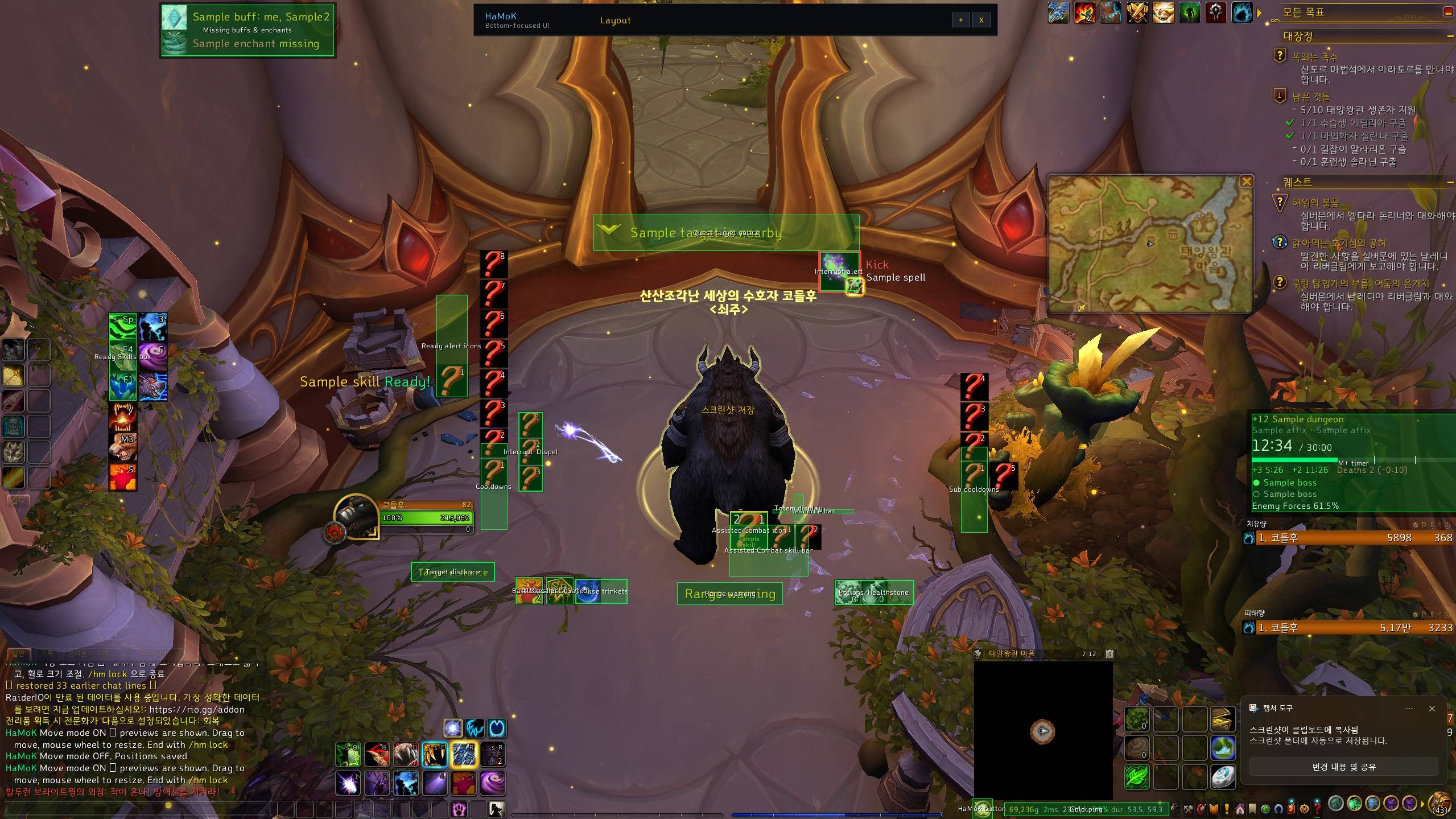
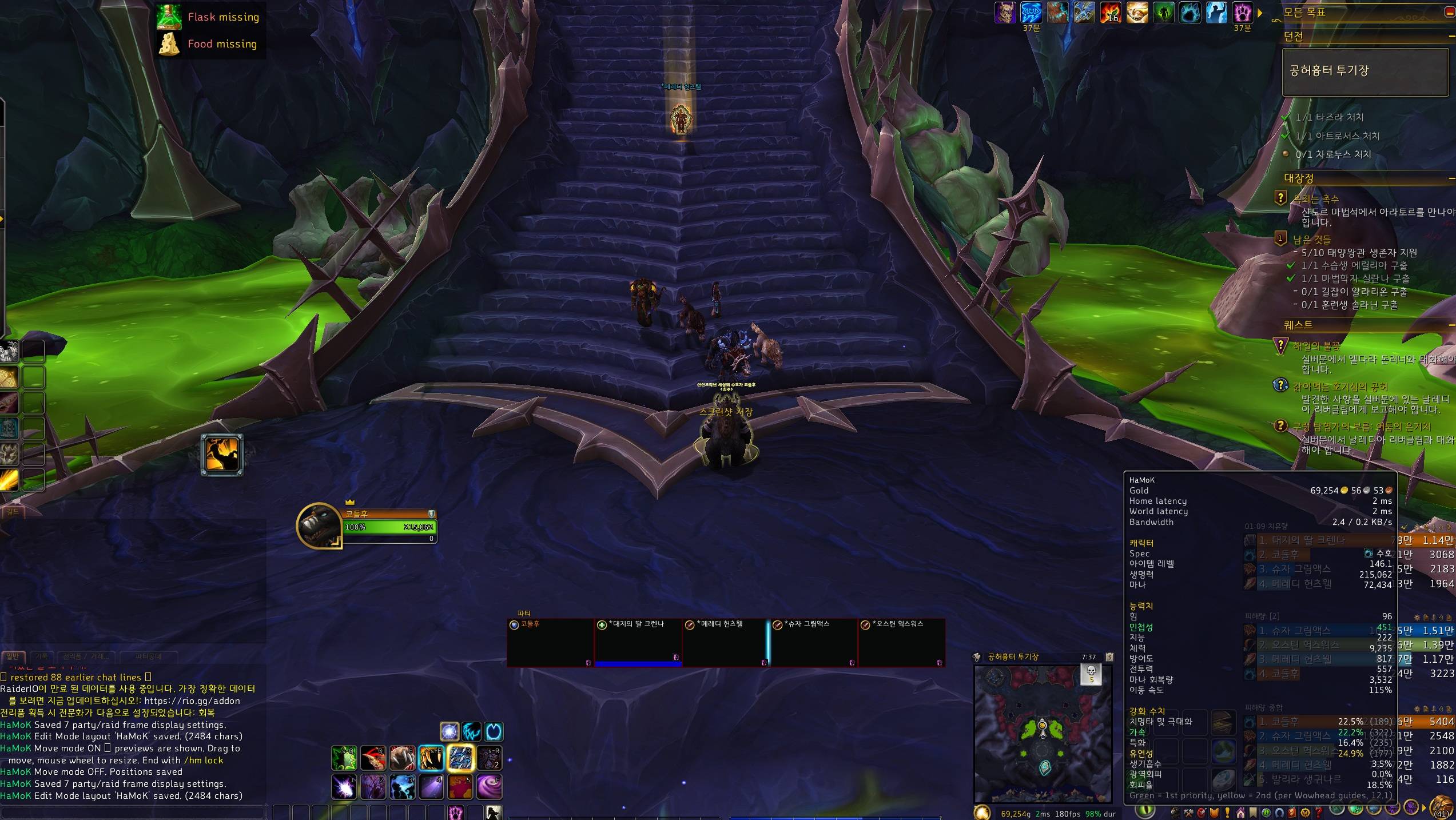
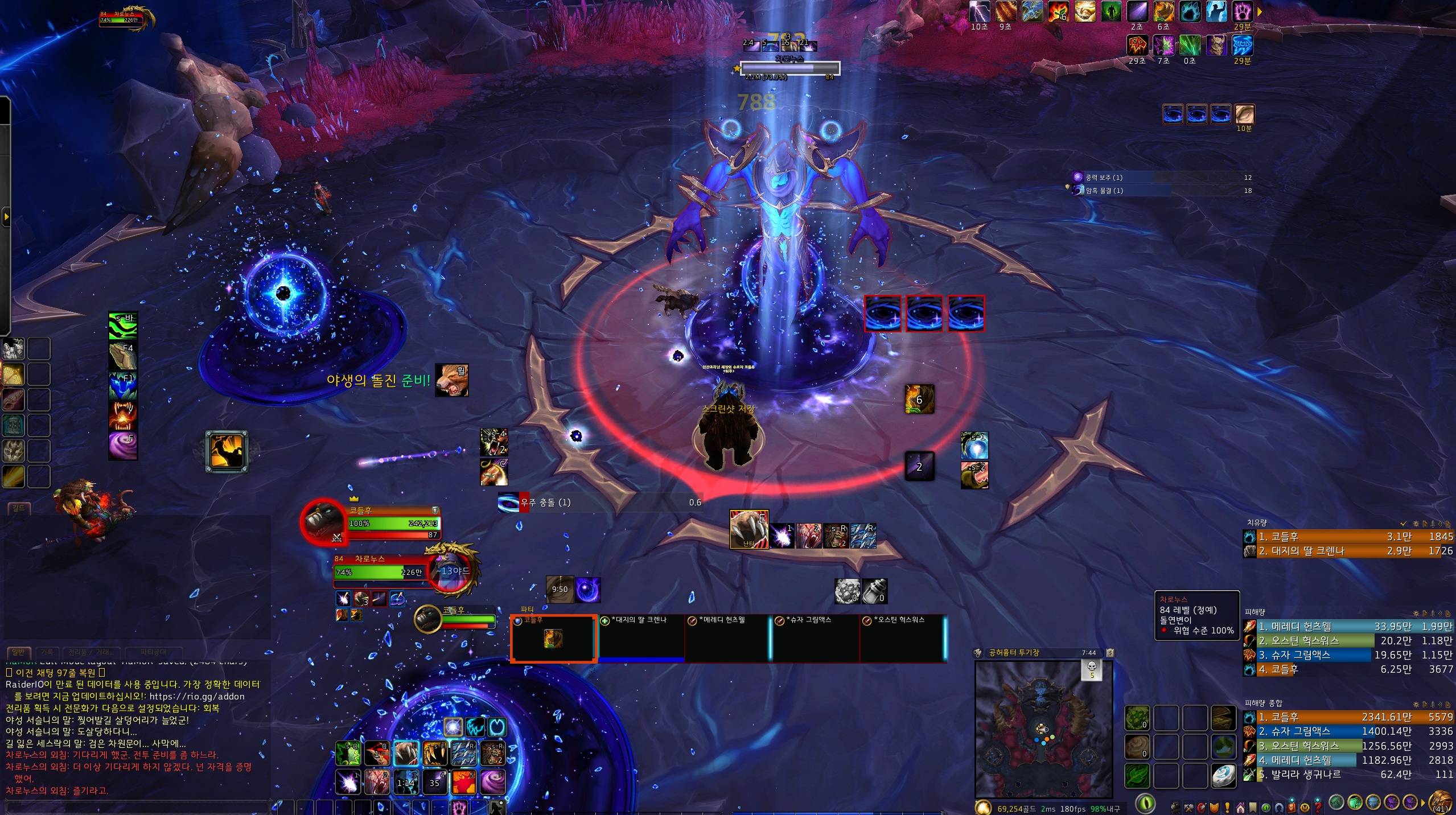
A bottom-focused UI. Everything you need to watch sits around the lower-center of the screen, so your eyes never have to wander far from the fight.
Made for us dad gamers (아저씨, as we say in Korea). For eyes that are not what they used to be and hands that are already busy: only what you can use right now, shown big, in one place.
- Built for Midnight (12.1)
- English / 한국어 — follows your game client; switch any time with
/hm lang enor/hm lang ko - Type
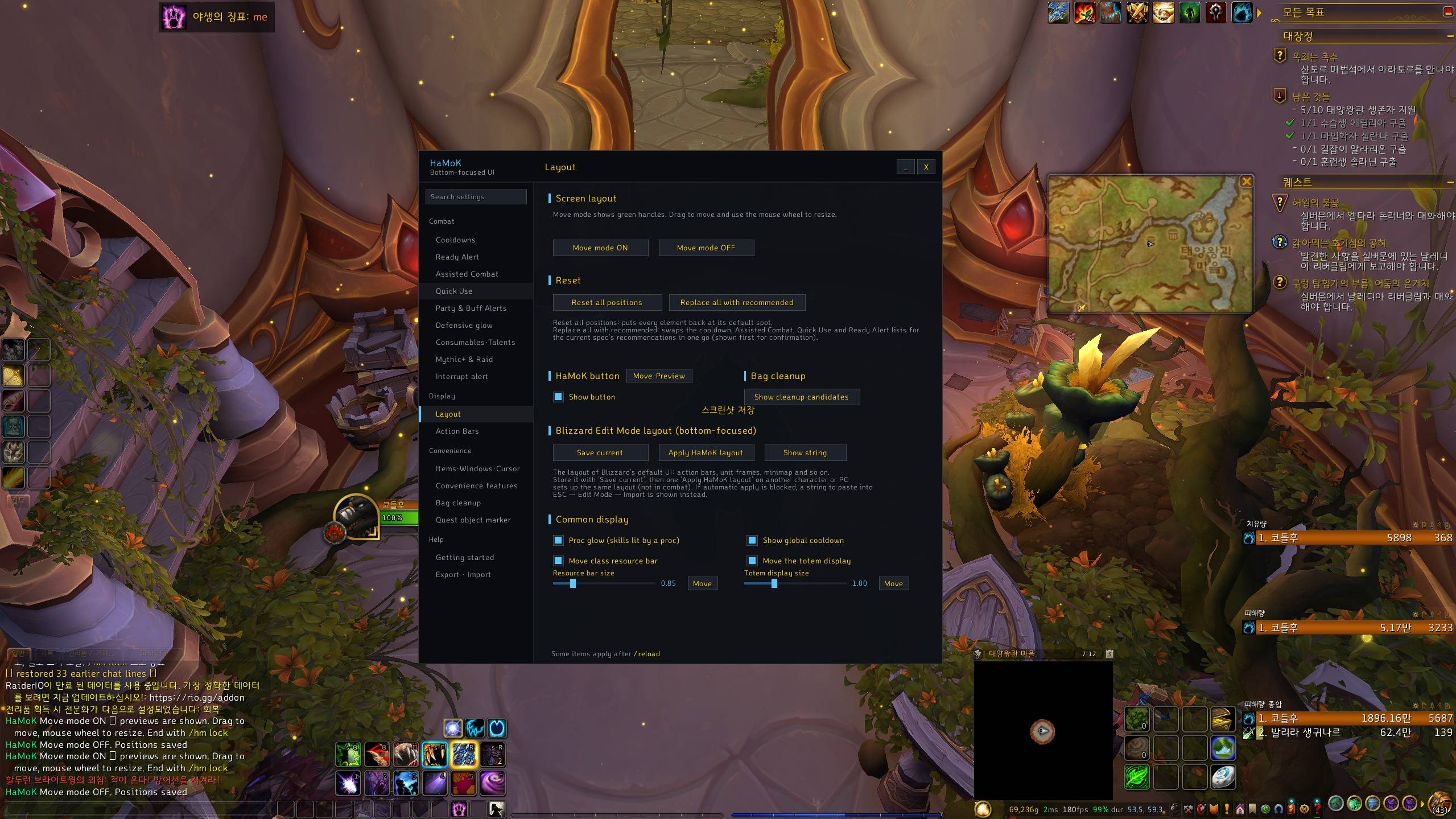
/hmto open settings. A first-time setup screen lets you pick the features you want.
Combat display
- Cooldown bars (Main / Sub) — show only the skills you can use right now. Lists are saved per spec, with hotkeys, charges, proc glow and a GCD sweep.
- Ready alert — an icon and "Ready!" pop up overhead the moment a cooldown finishes, then fly into the Ready Skills box.
- Assisted Combat display — Blizzard's recommended next skill as a large icon, plus a skill bar with the rest of what is usable. Healers can swap the damage rotation for their own main heals.
- Quick Use boxes — clickable buttons for interrupt / dispel, potions / healthstone and on-use trinkets.
- Interrupt alert — shows the cast icon when your target or focus casts something interruptible. Your own interrupt glows in the corner when it is ready.
- Defensive glow — tank defensives glow while usable, optionally only at low health.
- Missing buff & enchant alerts — who lacks the raid buff you provide, your own missing weapon enchant, flask / food / augment rune, and a talent reminder.
- Range & resource warnings — on-screen text when the skill you pressed is out of range or you lack resources, plus a target distance bracket.
- Mythic+ — key timer with +2 / +3 marks, deaths, bosses and Enemy Forces; battle res and Bloodlust icons; party keystone list with dungeon teleport buttons (
/hm keys). - [Recommended] buttons fill the lists for your current spec, so you never start from an empty bar.
Screen & convenience
- Move mode — drag any HaMoK element, mouse wheel to resize. Every settings section also has its own [Move·Preview] button.
- Move the class resource bar and the totem display independently of the player frame.
- Action bar art cleanup; gold · ping · coordinates readout (optional clock, durability, free bag slots, FPS).
- Stat summary on hover — hover that readout to see your spec, item level, health / mana and all primary and secondary stats, with your spec's top two secondary stats highlighted (green = 1st, yellow = 2nd).
- Layout save / apply — store your Blizzard Edit Mode layout together with the party / raid frame display settings (health bar colors, class colors…) and apply them on another character in one click.
- Item level on character, inspect, bags, bank, loot and the equipment flyout; missing enchant / gem markers; upgrade arrow.
- Move Blizzard windows, cursor trail, a nicer zone map (Shift+M).
- Quest object marker — a large arrow above nearby objects named in your quest objectives.
- Bag cleanup — lists junk, far lower gear and old-expansion items, and sells only what you check.
- Convenience features — 30+ small toggles: auto repair, auto-sell junk, faster auto loot, chat copy window, square minimap, tooltip styling and more.
- Export / import all settings as a single string.
Good to know
- Midnight hides a lot of combat data from addons. HaMoK works within those limits: when something cannot be read, it stays quiet instead of guessing.
- Features that overlap with another addon pause themselves while that addon is loaded (Leatrix Plus, BlizzMove, Simple Item Level, Cursor Trail).
- Party / raid frames are not replaced — use Cell, Grid2 or the default frames.
- The English translation is new. If you find untranslated or clipped text, please report it.
Inspired by
HaMoK grew out of addons I used and liked. Thanks to their authors.
- EllesmereUI — the sidebar settings window and the first-time setup screen
- Leatrix Plus — the convenience toggles
- BlizzMove — moving Blizzard windows
- Simple Item Level — item level on gear icons
- Cursor Trail — the cursor effect
If you prefer the original of Leatrix Plus, BlizzMove, Simple Item Level or Cursor Trail, just keep it enabled — HaMoK's version of that feature pauses itself.
Addons I use alongside HaMoK
HaMoK does not replace nameplates, boss timers or damage meters. This is what I run with it:
- Details! Damage Meter
- BigWigs + LittleWigs
- Plater
- GTFO
- Raider.IO
- Auctionator
- Pawn
- World Quest Tracker
Commands
/hm— settings window/hm move//hm lock— move mode on / off/hm lang en·ko·auto— language/hm help— all commands, including diagnostics
HaMoK (한국어) - 커스포지에는 영어 번역투가 올라가서 뭐 어쩌질 못하네요;;
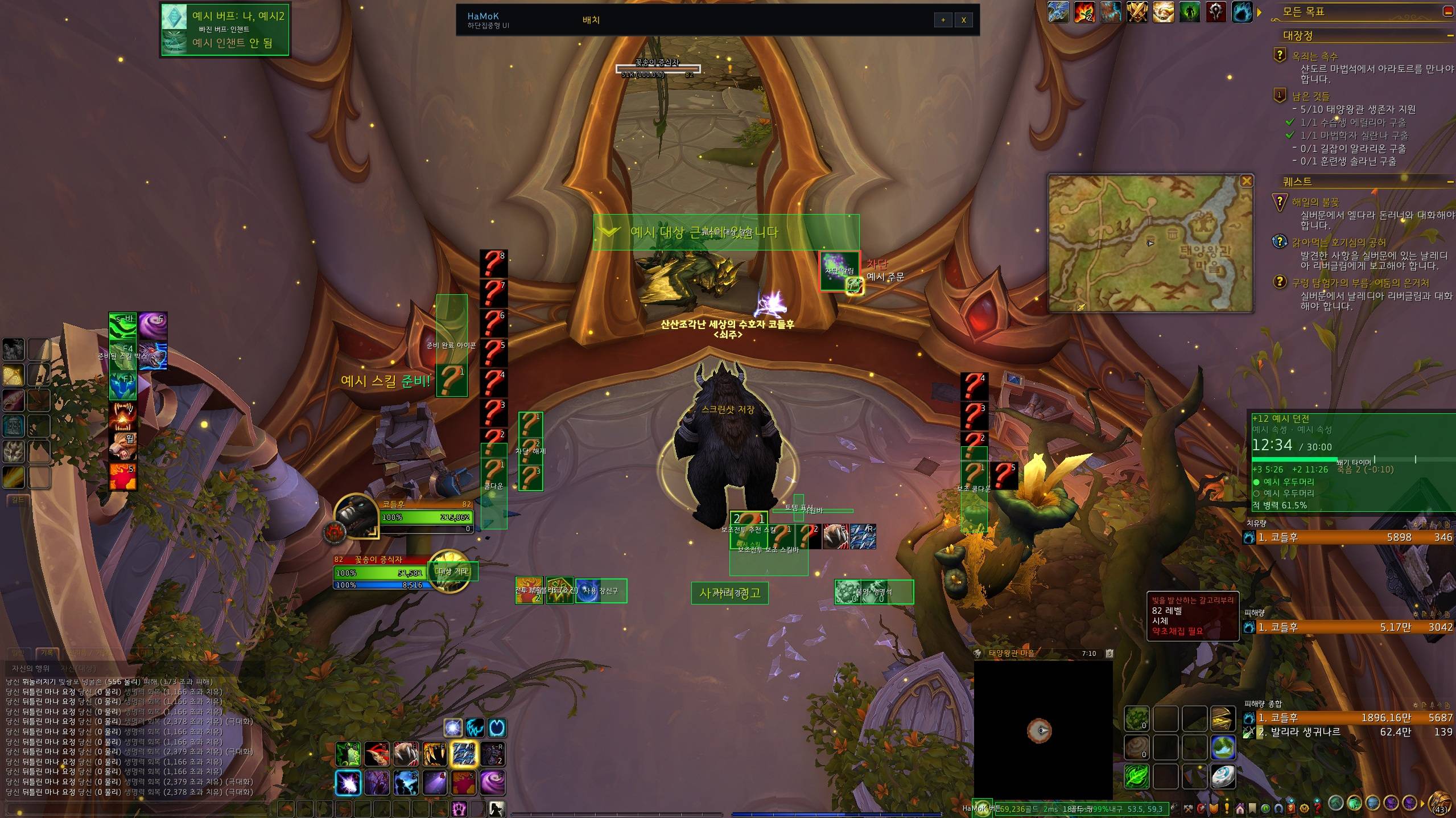
하단집중 UI. 봐야 할 것을 화면 아래쪽 가운데에 모아서, 전투 중에 시선을 멀리 옮기지 않아도 되게 합니다.
아저씨들을 위하여 만들었습니다. 눈은 예전 같지 않고 손은 바쁜 우리를 위해, 지금 쓸 수 있는 것만 크게, 한곳에 보여줍니다.
- 한밤(12.1) 용
- 한국어 / English — 게임 클라이언트 언어를 따르고,
/hm lang ko·/hm lang en으로 언제든 바꿀 수 있습니다 /hm을 입력하면 설정창이 열립니다. 처음 설치하면 쓸 기능을 한 화면에서 고르는 처음 설정 창이 뜹니다.
전투 표시
- 쿨다운 바 (메인 / 보조) — 지금 쓸 수 있는 스킬만 보여줍니다. 특성별로 목록을 따로 저장하고, 단축키·충전 개수·강조효과·전역 쿨다운을 표시합니다.
- 준비 완료 알림 — 쿨다운이 돌아온 순간 머리 위에 아이콘과 "준비!" 가 뜨고, 준비된 스킬 박스로 날아가 모입니다.
- 보조전투 표시 — 블리자드가 추천하는 다음 스킬을 큰 아이콘으로, 나머지 쓸 수 있는 스킬은 스킬바로 보여줍니다. 힐러는 딜 로테이션 대신 주력 힐을 넣을 수 있습니다.
- 빠른 사용 박스 — 차단·해제 / 물약·생명석 / 사용 장신구를 누르는 버튼으로 모아 둡니다.
- 차단 알림 — 대상·주시 대상이 차단 가능한 주문을 시전하면 아이콘이 뜹니다. 내 차단기를 쓸 수 있으면 구석의 차단기 그림이 빛납니다.
- 생존기 강조 — 탱커 생존기가 쓸 수 있는 동안 빛납니다 (체력이 낮을 때만 빛나게 할 수도 있음).
- 빠진 버프·인챈트 알림 — 내 유지 버프가 없는 파티원, 안 걸린 무기 인챈트, 영약·음식·강화 룬, 특성 알림.
- 사거리·자원 부족 경고 — 누른 스킬이 사거리 밖이거나 자원이 모자라면 화면에 글자로 알려주고, 대상까지의 거리 구간도 보여줍니다.
- 쐐기 — +2·+3 기준·죽음·우두머리·적 병력을 보여주는 타이머, 전투 부활·블러드 아이콘, 파티 쐐기돌 목록과 던전 순간이동 버튼 (
/hm keys). - [추천 셋팅] 버튼이 지금 특성에 맞는 목록을 채워 주어서, 빈 바에서 시작하지 않아도 됩니다.
화면·편의
- 이동 모드 — HaMoK 요소를 끌어서 옮기고 휠로 크기를 바꿉니다. 설정 항목마다 [배치·미리보기] 버튼이 있습니다.
- 자원바와 토템 표시를 체력창에서 떼어 따로 옮기기.
- 액션바 장식 제거, 골드·핑·좌표 표시 (시계·내구도·가방 빈칸·FPS 선택).
- 능력치 요약 — 골드·핑 창에 마우스를 올리면 특성, 아이템 레벨, 생명력·마나, 주 능력치와 2차 능력치가 나오고, 내 특성의 1·2순위 2차 능력치는 색으로 표시됩니다 (초록 = 1순위, 노랑 = 2순위).
- 배치 저장·적용 — 블리자드 편집 모드 배치와 파티·공격대 프레임 표시 설정(체력바 색, 직업 색상 등)을 담아 두었다가 다른 캐릭터에서 한 번에 적용합니다.
- 아이템 레벨 표시 (캐릭터 창·살펴보기·가방·은행·전리품·장비 교체 팝업), 빠진 마법부여·보석, 업그레이드 화살표.
- 블리자드 창 옮기기, 커서 효과, 보조 지도(Shift+M) 다듬기.
- 퀘스트 물건 강조 — 퀘스트 목표에 이름이 나오는 물건이 가까이 있으면 그 위에 큰 화살표를 띄웁니다.
- 가방 정리 — 잡템·한참 낮은 장비·옛 확장팩 물건을 추려 보여주고, 체크한 것만 상점에서 팝니다.
- 편의 기능 모음 — 자동 수리, 잡템 자동 판매, 빠른 자동 줍기, 채팅 복사 창, 사각 미니맵, 툴팁 꾸미기 등 30여 가지.
- 설정 전체를 문자열 하나로 내보내기·가져오기.
알아둘 점
- 한밤에서는 전투 정보 상당수가 애드온에 가려집니다. HaMoK는 그 범위 안에서만 동작하고, 읽을 수 없을 때는 추측하지 않고 조용히 있습니다.
- 다른 애드온과 겹치는 기능은 그 애드온이 켜져 있으면 스스로 쉽니다 (Leatrix Plus, BlizzMove, Simple Item Level, Cursor Trail).
- 파티·공격대 프레임은 바꾸지 않습니다 — Cell, Grid2 또는 기본 프레임을 쓰세요.
참고한 애드온
HaMoK는 제가 쓰면서 좋았던 애드온들을 참고해 만들었습니다. 제작자분들께 감사드립니다.
- EllesmereUI — 왼쪽 목록형 설정창과 처음 설정 화면
- Leatrix Plus — 편의 기능 모음
- BlizzMove — 블리자드 창 옮기기
- Simple Item Level — 장비 아이콘의 아이템 레벨 표시
- Cursor Trail — 커서 효과
Leatrix Plus, BlizzMove, Simple Item Level, Cursor Trail은 원래 애드온을 그대로 쓰셔도 됩니다 — 켜져 있으면 HaMoK의 같은 기능이 스스로 쉽니다.
함께 쓰는 애드온
HaMoK는 이름표, 보스 타이머, 데미지 미터기를 대신하지 않습니다. 저는 아래 애드온과 같이 씁니다.
- Details! Damage Meter
- BigWigs + LittleWigs
- Plater
- GTFO
- Raider.IO
- Auctionator
- Pawn
- World Quest Tracker
명령어
/hm— 설정창/hm move//hm lock— 이동 모드 켜기 / 끄기/hm lang ko·en·auto— 언어/hm help— 전체 명령어 (진단용 포함)
HaMoK Team