Hamingway's HunterTools
- By
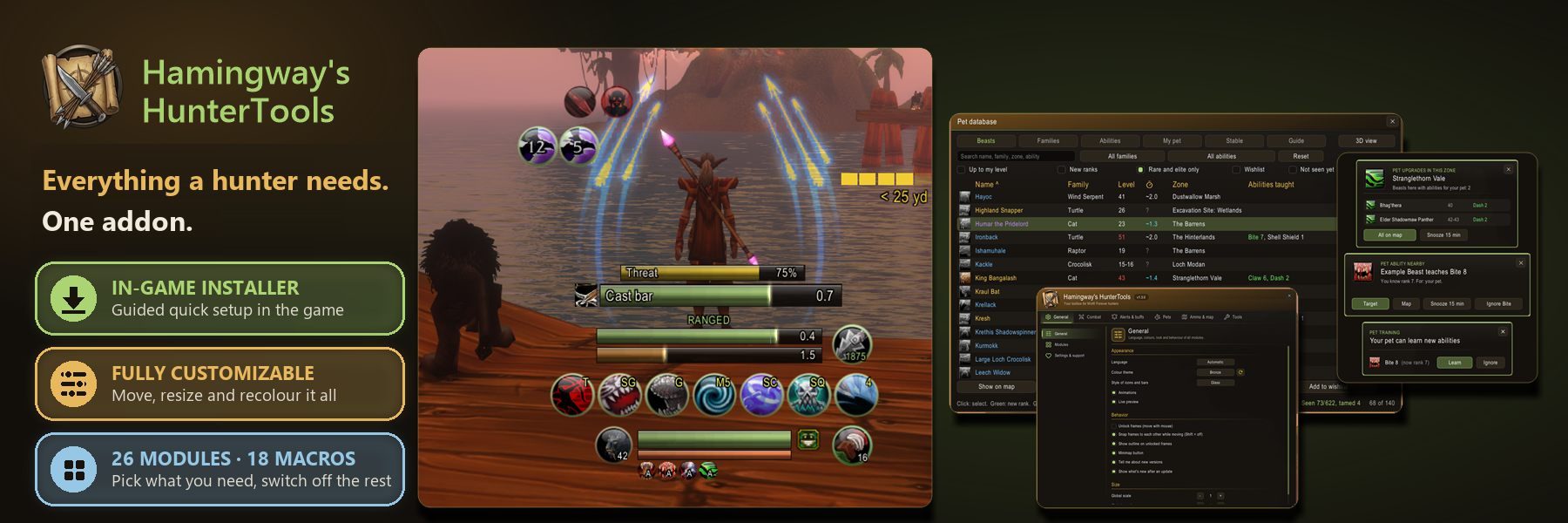
The hunter's Swiss army knife for WoW Forever
 |
Hamingway the Hambringer: "Well met, hunter! Name's Hamingway. Me knees be achin', so I'm handin' ye me tools: everything a hunter needs in one addon for WoW Forever. Switch off what ye don't need, show it only in combat or with a target, and adjust it all freely. No screen clutter!" |
28 modules that you switch on one by one, 18 ready-made macros, fully bilingual (English and German). What you do not need stays off and costs nothing.
New: the in-game installer. On first start Hamingway walks you through every tool, one page at a time: on or off, position, size and look, with a live preview and the same rows as the settings. Skipping it changes nothing, and /hht setup starts it again any time.
- Swing timer, cast bar and cooldowns
- Warnings, aspect and tracking keys
- Debuffs and procs
- Threat and distance
- Pet and feeding, one-click taming, pet stance and Claw on a key
- Ammo, quivers and one-click ammo restock
- Beast database and pet popups
- Map and minimap
- 18 macros
- In-game installer and profiles
- and many more
Overview page (also in German) | Source and bug reports | All changes | Buy me a coffee
Screenshots use sample data from the test mode (test beasts, frozen values). In the game you see your own data.
New in 1.8: Pet Claw, a bigger pet database
- Pet Claw (new module): a button that shows when your pet has enough focus for Claw. Left-click or your key casts Claw. Below the limit you set it dims or hides, it shows the global cooldown and your key, and an optional ring around it fills with the focus of your pet. On by default and part of the quick install.
- Easy mode: pick up to 10 attacks, for example Arcane Shot. Their keys then also fire Claw, so Claw does not eat the focus Growl needs. Off by default, mouse clicks on the bar stay unchanged.
- Pet database: new abilities (Sonic Blast, Mine!, Pinch, Savage Rend, Tendon Rip, Web) and ranks, 32 more beasts, more teaching beasts, the speed of 631 beasts, and Trickster's Dance fixed. Leftovers of other game versions (Fire Breath, Poison Spit, Warp, Gore) are removed, and Screech and Dash match the beasts of Forever.
- Map: clicking the same beast or the "All on map" button again takes the pins off the map.
- Reagent bag: the extra reagent bag of Forever is searched, so pet food and ammo in it are found.
- Fixes: the pet release window has its own confirmation with a note that it cannot be undone (this also avoids a blocked-action error after releasing), and the pet frame no longer overrides the fading of UI addons like ForeverImmersion.
New in 1.7: Pet stance on one key
- Pet stance (new module): one button and key that switches your pet between Aggressive, Defensive, Assist and Passive, also in combat. Pick a main stance and a second one to toggle with, and give Shift, Ctrl and Alt their own stances on the same key. A right-click on the icon lists the four stances, and the icon shows the active one and your key (or the key of the pet bar button). On by default and part of the quick install.
- Placed safely: stances that are not on your pet bar are placed once on an unused action slot (115-120, or a slot you choose in the advanced settings). A slot in use is never replaced.
- Warnings: new option "Warn when ammo is low" (off by default), checked out of combat.
- Summons: new option "Hide the default summon timers" (on by default), like the cast bar option.
- AddOns list: the addon now sorts under "Hunter".
New in 1.6: Easy tame, distance arcs, smarter pet warnings
- Easy tame (new module): with no pet and a tameable beast in range, a click-icon appears. The first click lays your Freezing Trap, the second casts Tame Beast, in combat too. It skips steps you cannot do yet, stays hidden while you have a pet in the active slot or all 3 pets, shows the trap cooldown and your action bar key, and can have its own key. On by default and part of the quick install.
- Distance: segments can run left to right, right to left, bottom to top or top to bottom, and there are two new layouts, Arc (narrow) and Arc (wide).
- Swing timer: optionally hides the game's own swing timer (on by default); your original setting comes back when you switch it off.
- Warnings: the missing pet warning can stay quiet with Lone Wolf or when no pet can be called, appears right after you take your pet out of the stable, and the warning sound no longer repeats when a warning flickers.
- Fixes: the aspect toggle key starts with the primary spell when no aspect is active, no blocked-action error when combat starts with the settings open, and the Restock ammo button keeps a gap to its neighbours.
New in 1.5: the in-game installer, rebuilt settings, one look
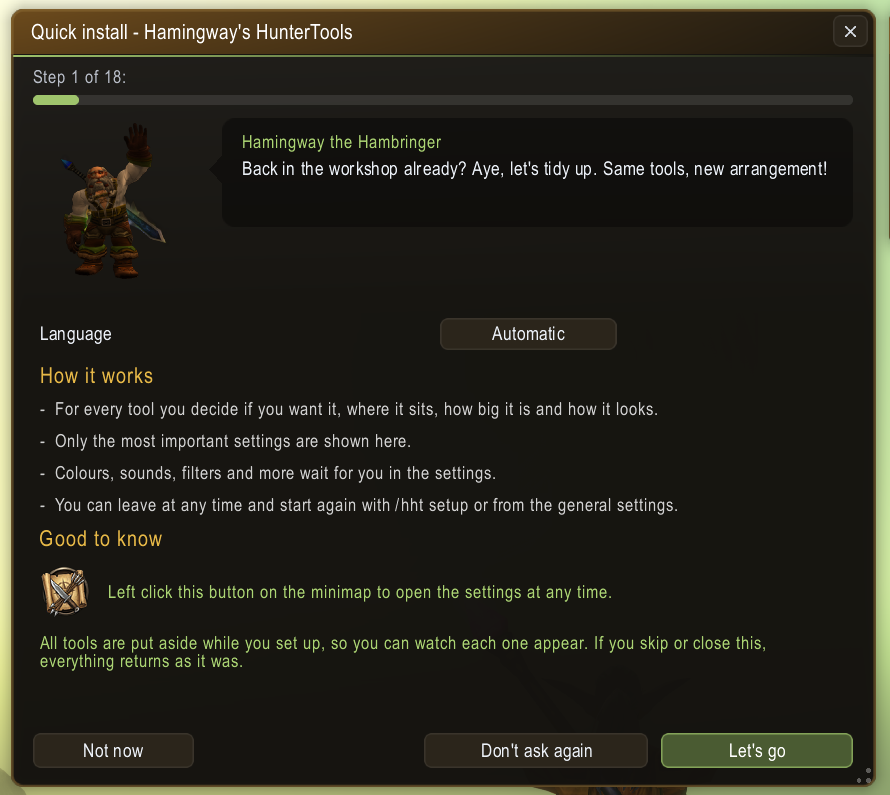
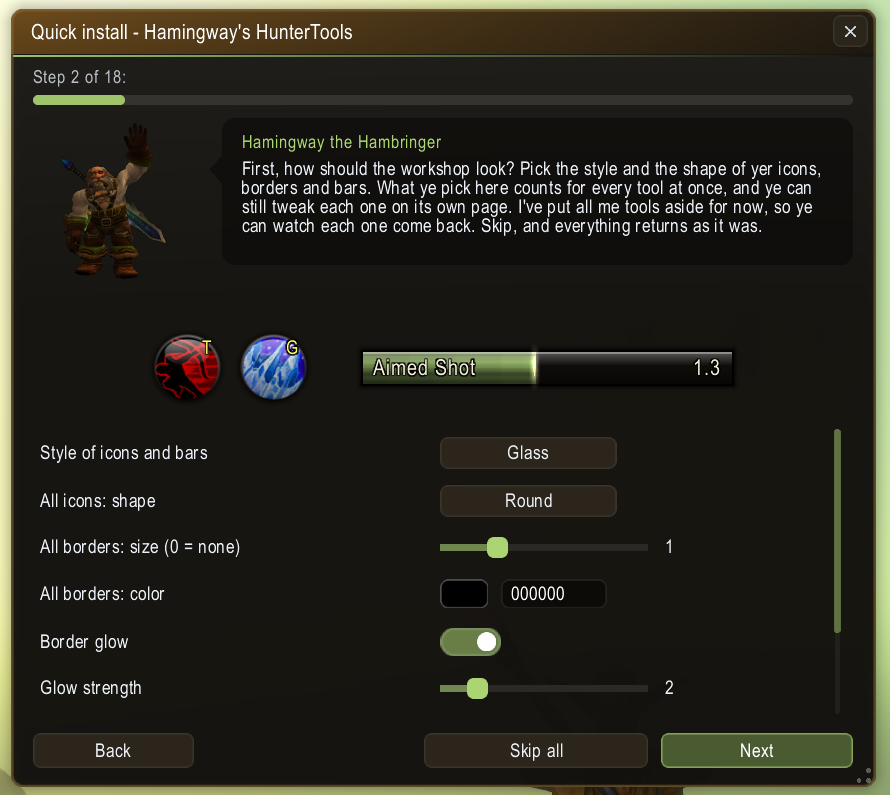
- In-game installer: shows the same rows as the settings, so what you set there is what you get later. Modules on one page are separated by a coloured header, and the window can be made taller or shorter by dragging its bottom edge.
/hht setupstarts it any time. The first page can take over the settings of another character or a profile. - Simple and Advanced: every module page was rebuilt. Rows are grouped, and each section has a Simple and an Advanced view.
- One look for everything: icon shape (round or square), border thickness and colour, border glow and its strength, bar texture and rounded bars are set once, in the general settings or in the installer, with an animated preview. Every module page can still change its own.
- Border glow: a soft glow in the border colour around icons and bars, pill-shaped on rounded bars and on the cast bar flash.
- Cast bar: choose the icon shape and the space between icon and bar.
- Pet popups: new header with the pet icon; the pet training hint shows the Beast Training icon.
- Map layers always show only your own faction.
- Fixes: scaling no longer pushes frames out of place, borders stay sharp at every UI scale, and the border glow now shows on cooldowns, aspect and tracking keys and summons.
Everything at a glance
Combat: Swing timer, Distance, Cast bar, Threat, Warnings, Aspect and tracking, Cooldowns, Target debuffs, Proc overlay, Summons.
Gear and tools: Ammo, Pet feeder, Macros, Tranq rotation.
Pets: Pet status, Pet database, Beast watch, Pet ability alerts, Pet training hint, Pet guide, Easy tame, Pet stance, Pet Claw.
Map: Stable masters, Food vendors, Trainers, Ammo vendors, Map button.
Combat
Everything you want to see mid-fight, in view and still tidy.
Always know when the next shot lands
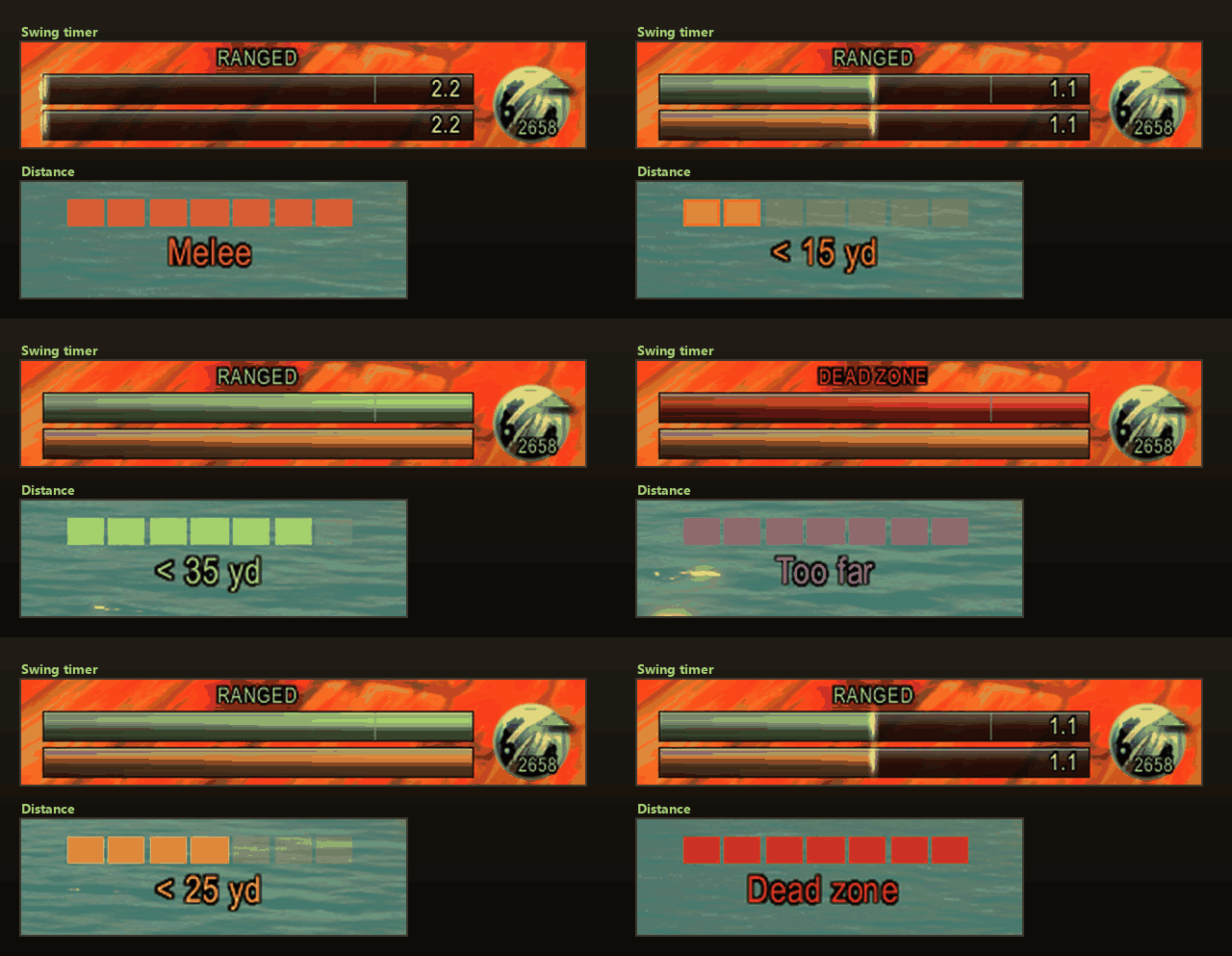
Swing timer
- Auto Shot and main hand bars with label and remaining time
- Range state text: Melee, Ranged, Dead zone, Too far, each with its own colour
- Ranged bar turns red in the dead zone
- Fill or drain mode, spark, border, background opacity
- Width, height, spacing and every colour adjustable
- Can hide the game's own swing timer
Distance
- Target distance in bands: melee, dead zone, near, middle, far, max range, out of range
- Layouts: segments, narrow or wide arc, badge or text only; segments run in any of four directions
- Pulse and sound when entering the dead zone
- Square or round icon, size, a colour for every band
Casts in view, aggro under control
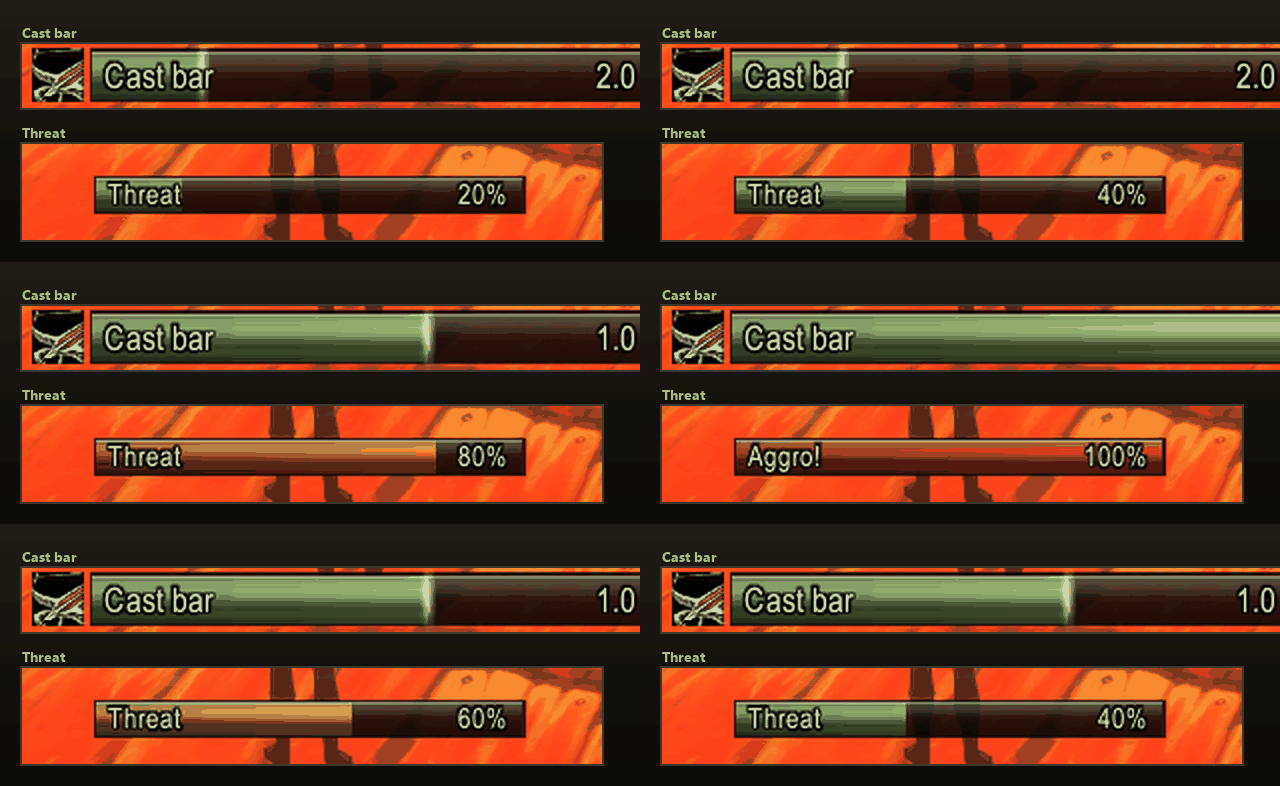
Cast bar
- Spell icon, name, remaining time and spark
- Tells casts and channels apart
- Can hide the default cast bar
- Width, height, border and background adjustable
Threat
- Threat bar with label and percent
- Warns at a percentage you choose, before you pull aggro
- Alert when you gain aggro, sound and blink at high threat
- Only in a group or with pet; hide when there is no threat
Never forget your aspect again
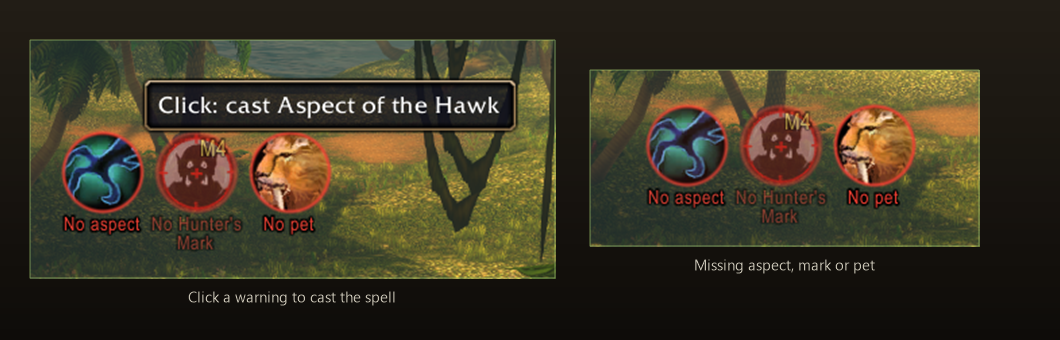
Warnings
- No aspect active, or not your preferred aspect
- Trueshot Aura missing
- Hunter's Mark missing: elites and bosses only, or every enemy
- Pet missing or dead, with the matching spell as icon; click to revive, the key shows on the icon. Optionally quiet with Lone Wolf or when no pet can be called
- Pet hurt (threshold adjustable): click casts Mend Pet; own warning when out of Mend Pet range
- Pet hungry or only content (yellow, optional): click feeds. Food low: tooltip with the count, right-click hides it, it returns when food drops below the limit again
- Growl on autocast: click switches it off. Aspect of the Pack in a dungeon or raid: click switches to your preferred aspect
- Show the active aspect, blink, sound, hide in combat
Cooldowns
- Default: Rapid Fire, Bestial Wrath, Intimidation, Scatter Shot, traps, Feign Death, Deterrence and more; the list is freely editable
- All, only on cooldown or only ready; numbers, grey-out, spell names
- Icons are clickable and can have their own keys (with Shift and Ctrl), which keeps your action bar clean
- Layouts: individual icons or one bar; tooltip, and a tint when a spell is not usable
- Grow direction, icons per row, border and icon size
Aspect and tracking at one keypress
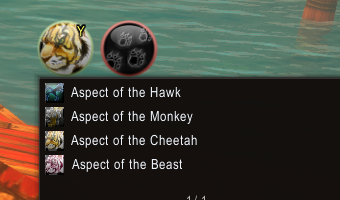
- One button and one key each for aspect and tracking
- Toggles between two spells you choose
- Shift, Ctrl and Alt pick other variants, for both the click and the key
- Right-click opens a list of every aspect or tracking type you know
- Tracking also covers Find Herbs, Find Minerals, Find Fish and Find Treasure; a small X turns it off
See debuffs, procs and summons, even mid-fight
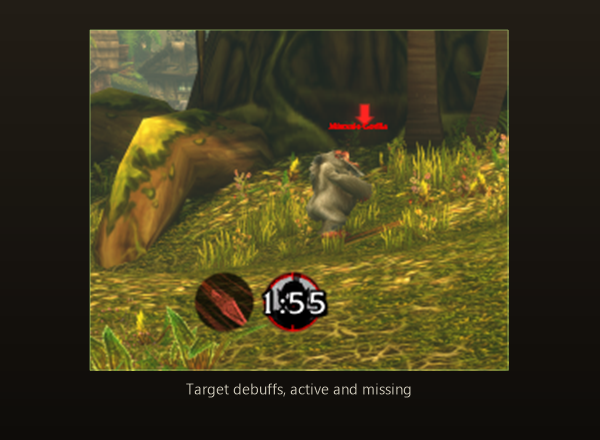
Target debuffs
- Serpent Sting and your other debuffs on the target with icon, timer and stacks, also in combat
- Tracked debuffs get a fixed slot and a red placeholder while they are missing
- Placeholder on all targets, elites and bosses, or bosses only; optionally blinking
- Only your debuffs or all, count, size and border adjustable
Proc overlay
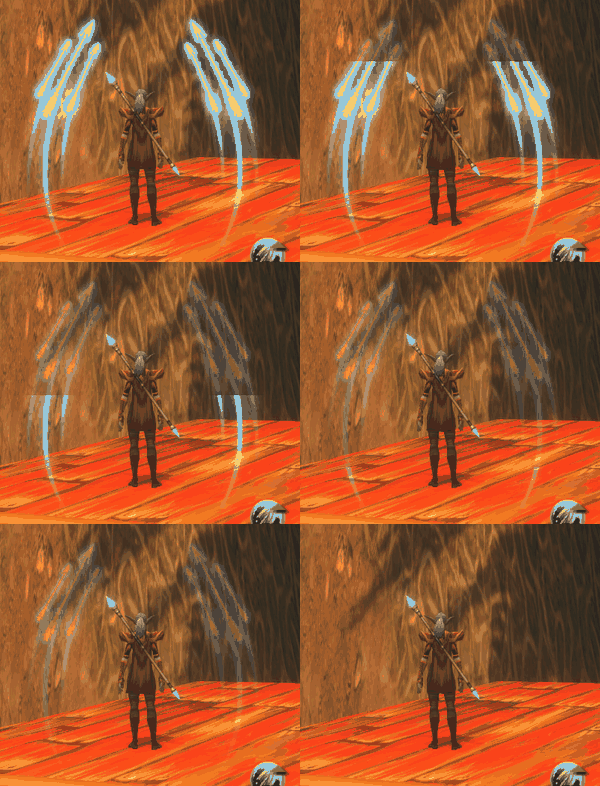
- Big art around your character while a proc or buff is active, also in combat
- Over 150 graphics to choose from in a paged gallery
- Remaining time as a fade: from the top, bottom, left or right
- Per proc: graphic, scale, offset X and Y, preview
- Quick Shots is pre-set; add any buff by spell ID yourself, up to 6
- Sound when it appears; read the ID with
/hht auras - Scan for new procs: short buffs gained out of combat are added to the list switched off
- Each proc has its own On/Off switch
Summons
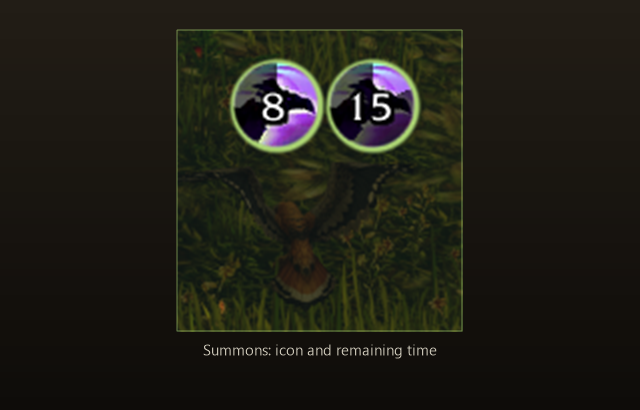
- Active summons such as Summon Hawk with icon and remaining time, also in combat
- The default UI shows them under the player frame; they are not buffs
- Icons close up without gaps and keep their order of arrival
- Can hide the default summon timers under the player frame
Never out of arrows, never out of food
Ammo
- Counts bags, quiver and the ammo slot, arrows and bullets separately
- Show the ammo your weapon needs, or all of it
- Low warning below a limit: red, blink, sound
- Reminder when entering a dungeon and on ready check
- Click: choose and equip other ammo; list of all ammunition
- Show ammo vendors on the map, waypoint to the nearest
- Green arrow when better ammo for your level is in your bags; click to see and equip the upgrades
- Also suggests better quivers (arrows) and ammo pouches (bullets) that match your equipped ammo, with the source: crafted, quest, drop or PvP reputation
- Engineer-crafted ammo can be switched on
Pet feeder
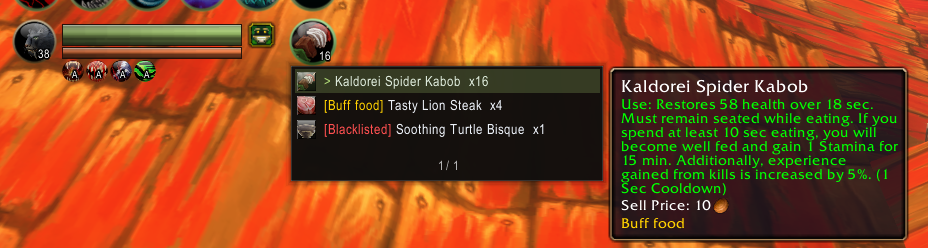
- Click feeds, right-click picks the food, Shift-click blacklists; also works with its own key
- Warns when the pet gets unhappy (optional sound) and when food runs low
- Buff food is never picked automatically
- Food choice and blacklist per pet
- Always show, or only when the pet is not happy
- Keeps the HHT Feed macro up to date
One click and your pet is fit again
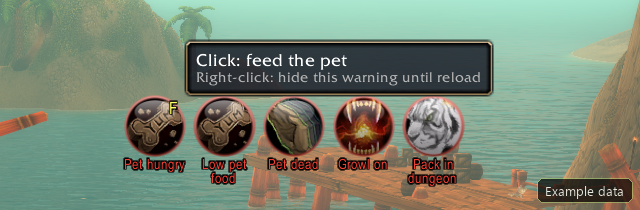
- Hungry: click feeds, the feed key shows on the icon
- Hurt: click casts Mend Pet
- Dead: click casts Revive Pet
- Food low: tooltip with the count, right-click hides it, and it comes back as soon as food drops below the limit again
- Aspect of the Pack in a dungeon: click switches to your aspect
Better ammo, better quivers, one glance
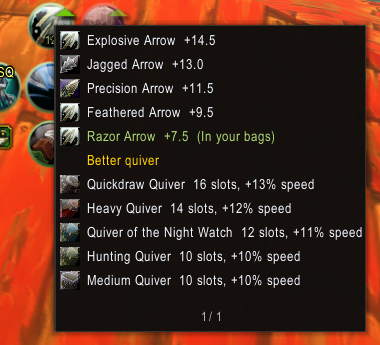
- A green arrow on the ammo counter shows that something better exists
- Quivers for arrows, ammo pouches for bullets, matching your weapon and level
- Shows the source: vendor, crafted, quest, drop or PvP reputation, including the new Forever quests
- Only items for your faction and level, items you already own are marked green
Refill your quiver at the vendor in one click
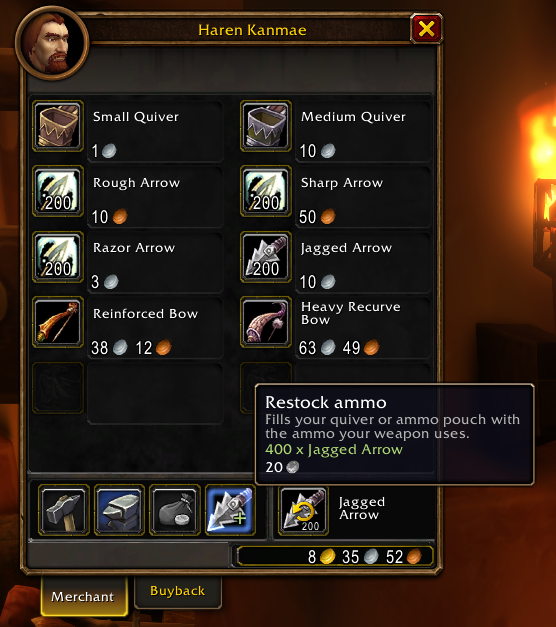
- An icon in the vendor window's button row, styled like the other buttons
- Buys the ammo your weapon uses until your quiver and ammo pouch are full
- The tooltip shows amount and price, and a prompt asks before buying
- Position and spacing can be adjusted if you use another interface
Pets
From taming to the stable: your companion and everything about beasts in one place.
Your companion, always in view
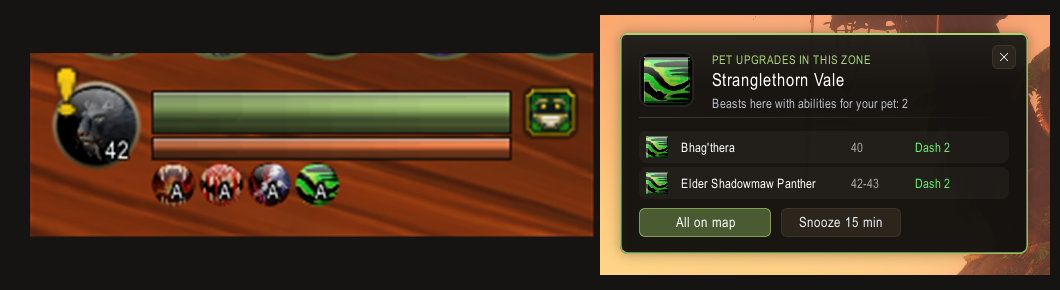
- Portrait with level, health bar with name
- Focus, experience and training points, loyalty
- Happiness indicator: happy, content, unhappy
- Pet abilities with cooldown and auto-cast ring
- Click the portrait to open the pet database
- Yellow "!" on the portrait when beasts in your zone teach a higher rank; click it for the list
- Round or square, size and every bar adjustable; experience, training points and loyalty switch on and off independently, loyalty can hide at max
- Frenzy indicator with adjustable icon size
What there is to know about every beast
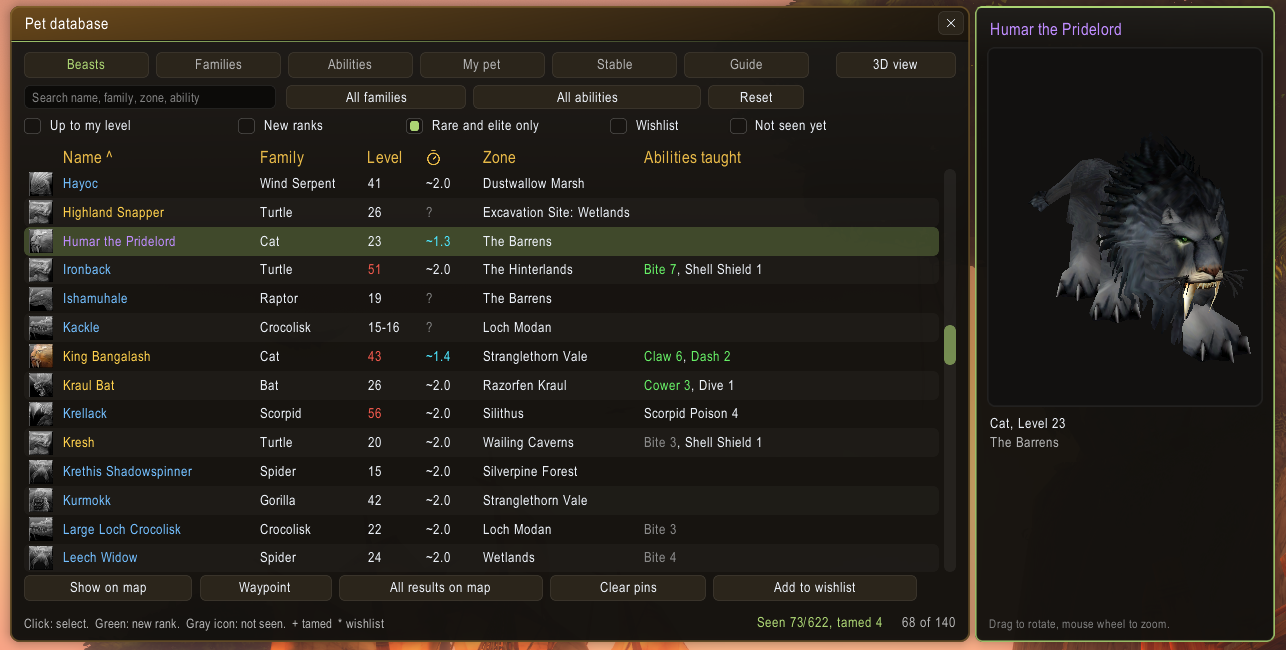
- Six tabs: Beasts, Families, Abilities, My pet, Stable, Guide
- Guide tab: pick a goal (maximum damage, solo survival, balanced), get the best families with the beast to tame, a first-pet section with the hunter trainer on the map and a waypoint
- Families tab: diet, damage, health and armor modifier, family abilities and speed per pet family
- Over 600 beasts with spawns from Huntmaster, OneForAll and Questie
- Family, level, attack speed, zone and taught abilities per beast
- Search by name, family, zone or ability, plus filters
- Marks: tamed (+), wishlist (*), seen
- Attack speed is measured when you tame; a ~ marks the Classic base value
- 3D model preview, show on the map and set a waypoint
- Export and import beast data to share it
Never run past a rare beast again
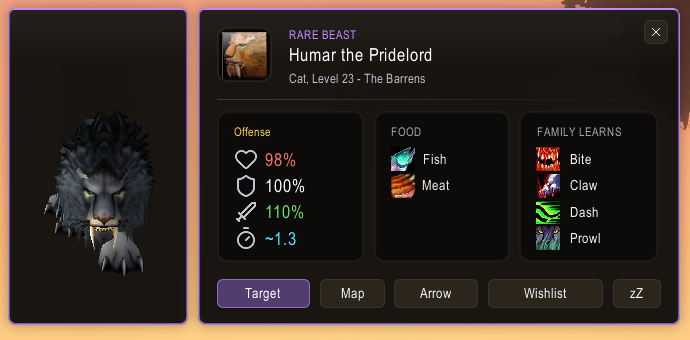
Beast watch
- Tooltip shows tameable info, family, level, speed and taught abilities
- Marks beasts as seen and, after taming, as tamed
- Popup for rare and wishlist beasts; also close to known spawns
- Buttons: target, map, arrow, wishlist, pause
- Direction arrow to the rare beast, adjustable size
- The popup is built from cards and shows family, level and zone, the family role with health, armor and damage modifiers, attack speed, diet, the abilities the beast teaches (ranks you can still learn in green) and the family abilities
- Optional 3D model of the beast in the popup
- Only beasts up to your level, sound, inside dungeons, repeat delay
Pet ability alerts
- Popup when a nearby beast teaches a higher rank your pet can learn
- For the active pet only, or every pet you have used
- On entering a zone: a list of all beasts there that give a pet of yours an upgrade; click shows the beast on the map, right-click sets the arrow, Shift-click a waypoint, one button shows all on the map
Pet stance on one key
- One button and key for Aggressive, Defensive, Assist and Passive, also in combat
- A main stance, a second one to toggle with, and Shift, Ctrl and Alt variants
- Right-click lists the four stances; the icon shows the active one and your key
- Stances that are not on the pet bar go on an unused action slot (115-120 or your choice); a slot in use is never replaced
Pet Claw: Claw at the right moment
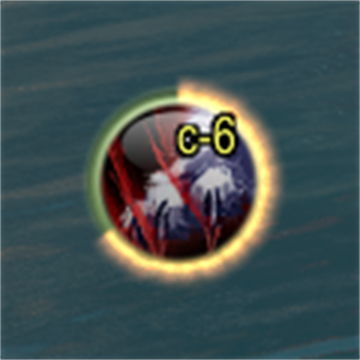
- A button that shows when your pet has enough focus for Claw; left-click or its key casts Claw
- Dims or hides below the focus you set; shows the global cooldown and your key; optional ring with the pet's focus
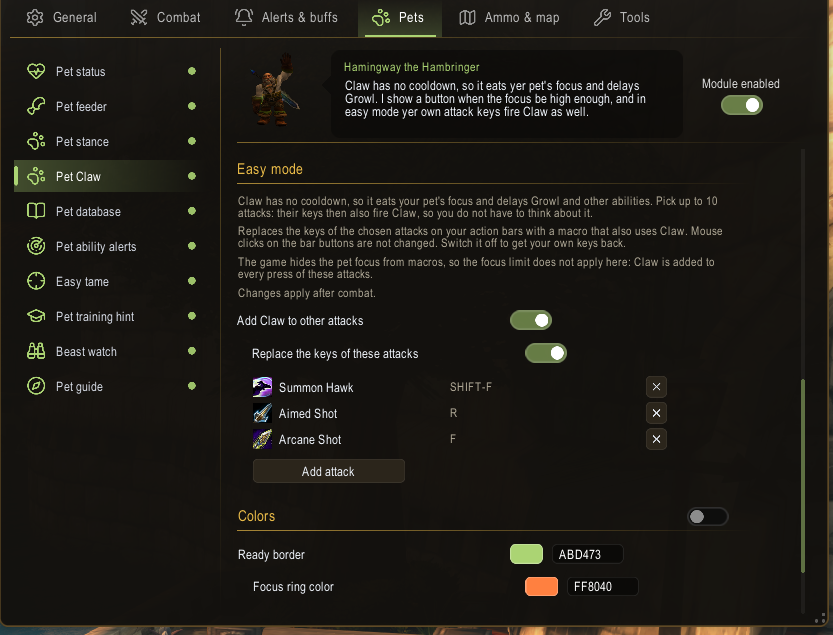
- Easy mode: pick up to 10 attacks and their keys also fire Claw, so it does not eat the focus Growl needs
- Position, size, shape and colours adjustable; the button can be switched off on its own
New ranks for your pet, one click to learn
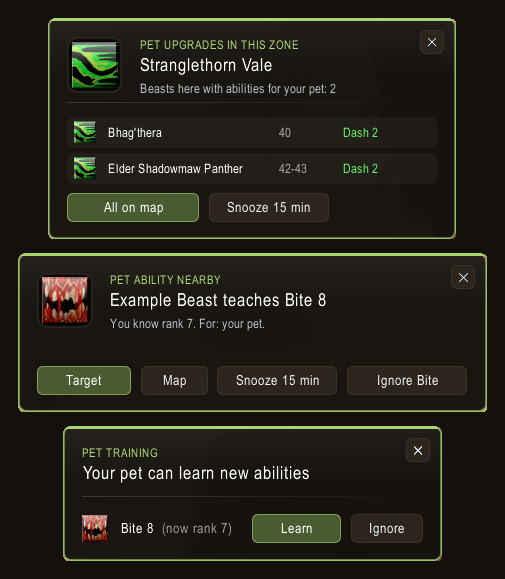
- Popup when your pet can learn ability ranks you already know
- A Learn button per ability trains the rank right away
- Abilities can be ignored; display time, sound, test hint and border colour adjustable
Which pet suits you, and where to get it
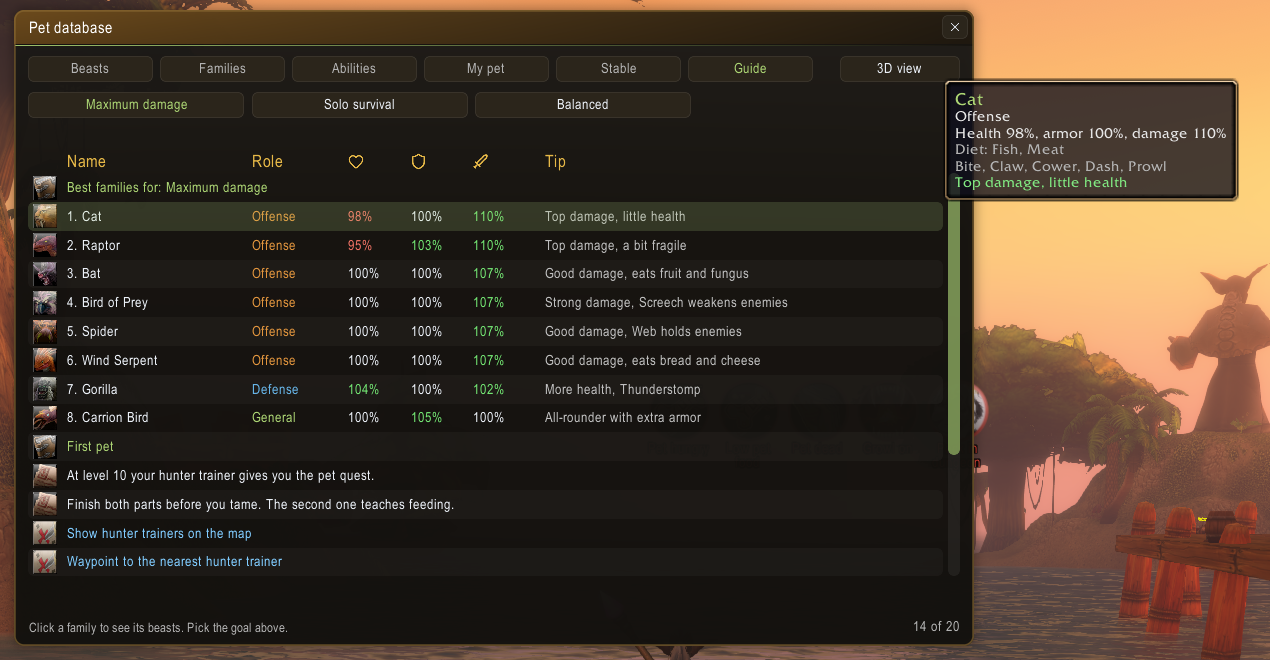
- One-time popup at level 10 with buttons for the trainer on the map, a waypoint and the guide
- Pick a goal: maximum damage, solo survival or balanced
- Basics of training and feeding, any time with
/hht guide
Map
The places that matter on the world map, one click to a waypoint.
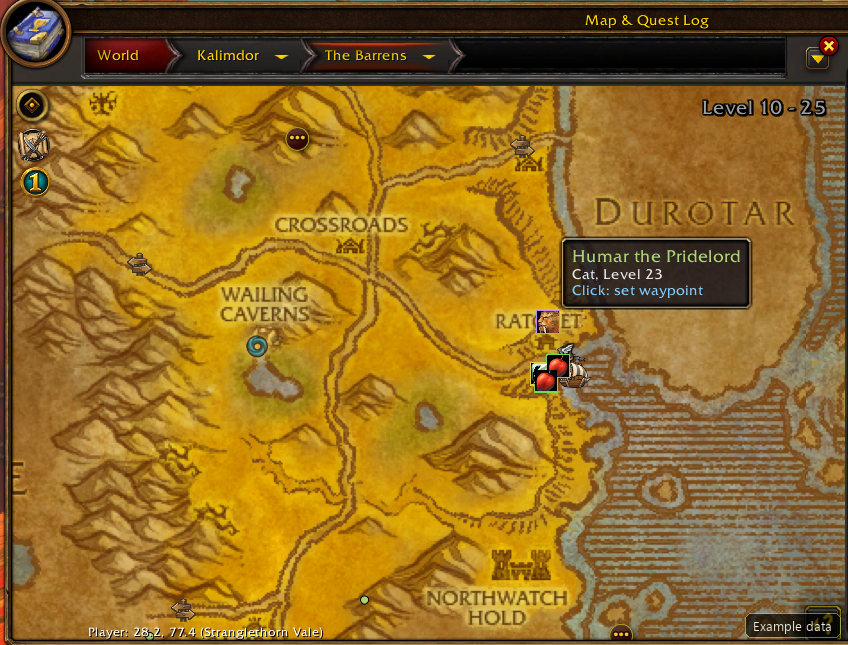
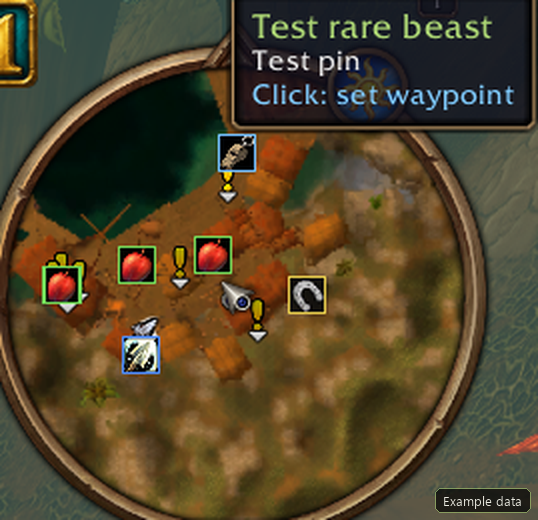
- Map button at the top left with switches for the layers
- Ammo vendor layer, by ammo kind and own faction only
- Stable master layer from a built-in list; missing ones are learned when you visit them
- Food vendor layer: only vendors that sell food for your current pet's diet; missing ones are learned when you open their merchant window
- Trainer layer: hunter trainers and pet trainers together in one category, own faction only if you like
- Waypoint to the nearest vendor, stable master, food vendor or trainer
- Active layers, beasts from the pet database and the rare the arrow points to also show on the minimap (on by default)
- Every layer can be switched off on its own
Tools
18 ready-made macros, one drag to the bar
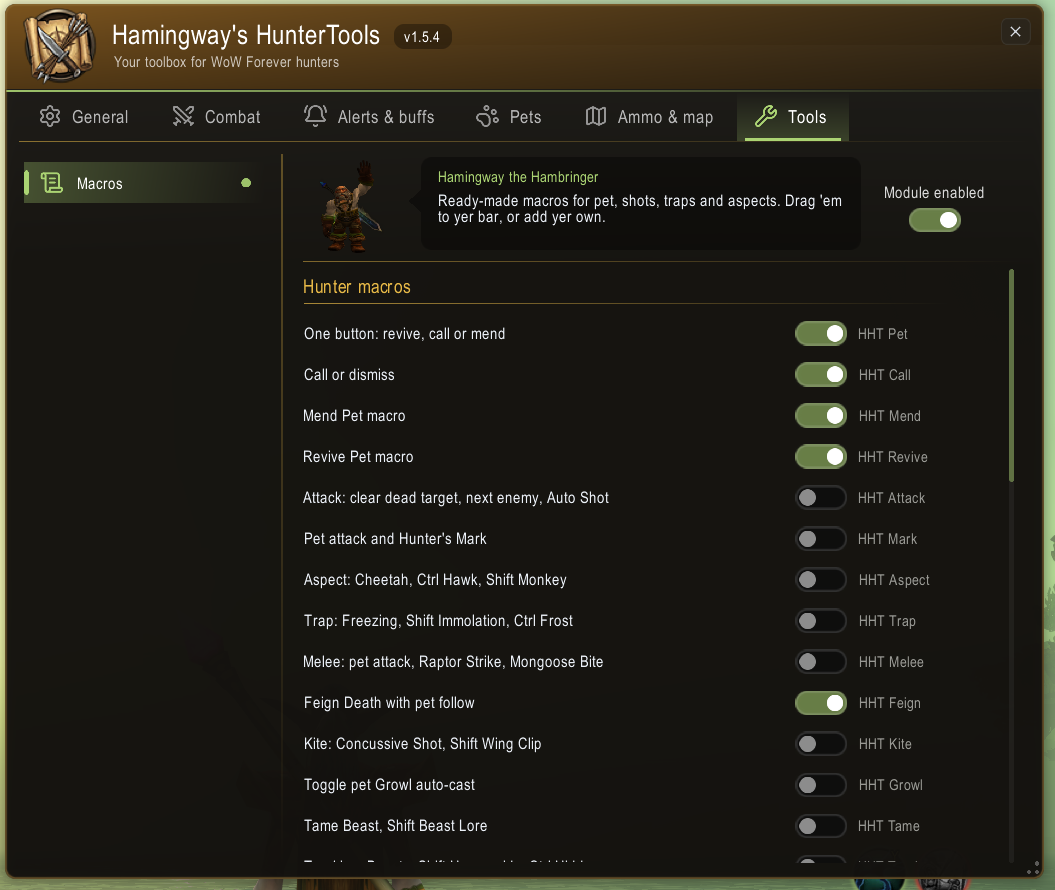
- 5 pet macros: one-button (revive, call or mend), call or dismiss, mend, revive, feed
- 13 hunter macros: attack, mark, aspect, trap, melee, feign, kite, growl, tame, track, burst, ammo, stable
- Shift and Ctrl pick variants, for example other aspects or traps
- Drag macros straight from the list onto your bar
- The feed macro stays in sync with the pet's food choice
- Tranq rotation: hunters of the group with cooldown, order and backup set by the raid leader, missed shots in red, a notice when you are next, test mode; plus an announcer for your own shot
Add your own, or let the addon learn it
Enter it yourself
- Procs: add any buff by spell ID, even several IDs for one entry. Read the ID with
/hht auraswhile the proc is active - Target debuffs: add your own debuffs by spell ID, several ranks separated by commas
- Cooldowns: add spells from your spellbook, unknown spells stay hidden automatically, the default list can be restored
- Aspect and tracking keys: your own spells per key, plus Shift, Ctrl and Alt variants
- Feed key: Shift-click blacklists or allows a food per pet
Learned automatically
- Procs: "Scan for new procs" adds short buffs you gain out of combat to the list switched off, then you switch them on
- Stable masters and food vendors: missing ones are learned as soon as you open their window. The built-in list stays the base
- Pet database: known ranks are read from Beast Training and the pet spellbook, "Scan now" starts it by hand
- Seen and tamed beasts are counted for you
- Everything learned can be forgotten again per module
No screen clutter: you decide what you see
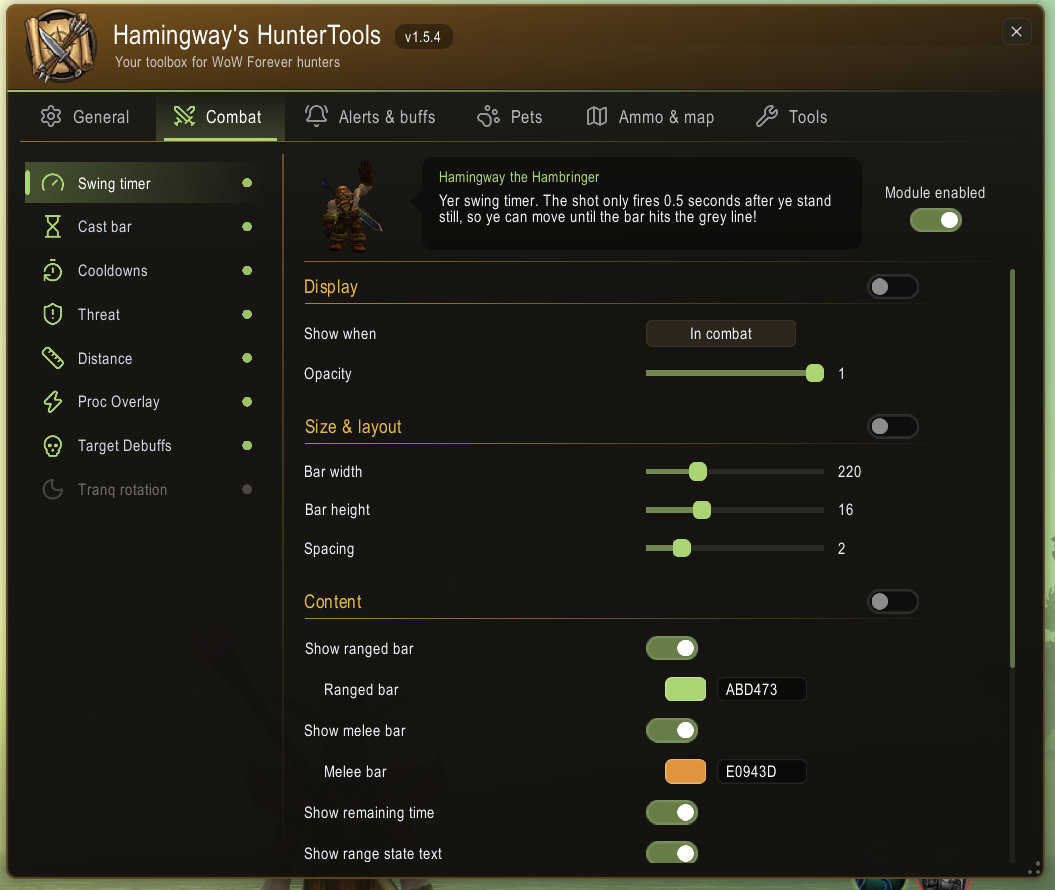
- Every module has its own switch and its own page
- Own scale and opacity per module, plus global values for all
- Show always, in combat, with a target, or both
- All bar colours adjustable
- Icons per row for cooldowns, target debuffs, warnings and summons
- Rounded windows and popups, colour themes (Bronze, Blue, Graphite), look of icons and bars (Flat, 3D frame, Glass), soft fade-in of windows, optional animations; one look (icon shape, borders, glow, bar texture, rounded bars) for all modules
- Simple and Advanced view per section; the in-game installer shows the same rows
- Collapsible sections, icons in the module list, text style per module
- Live preview: a module's page shows it with demo data so changes are visible at once. The window remembers its position
- Glass bar texture, smooth bar movement, flash when a cooldown is ready or a warning appears
- Unlock frames, move them with the mouse, lock again; a single module can be unlocked right on its page; frames snap to each other (Shift = off)
- Flash glow strength and size, position of label and time per bar, ammo count and key binding position adjustable
- Reset positions or single modules
- Language: automatic, English or German
- Export and import all settings as one line of text
- Minimap button; the module list scrolls with the mouse wheel
Install
- Install via the CurseForge app, or copy the
HamingwaysHunterToolsfolder toInterface\AddOns. - Type
/reloador start the game. The in-game installer opens by itself; you can skip it any time. - Type
/hhtto open the settings, or/hht setupto run the in-game installer again. Every module has its own page with a switch and a live preview.
Commands
/hhtopen the settings/hht setupstart the in-game installer/hht unlock//hht lockunlock or lock the frames/hht newsopen the window with what is new in this version/hht resetreset the positions/hht testdemo output,/hht test zonebeast list of the current zone/hht aurasprint the IDs of your active buffs/hht shotscreenshot scenes with sample data,/hht shot offends them/hht petinfoprint the active pet's abilities/hht petsopen the pet database,/hht pets namesearches it/hht guideopen the pet guide/hht ammo,/hht stable,/hht food,/hht trainershow the layer on the map, addgofor a waypoint to the nearest one
FAQ
Which game version is the addon for?
For WoW Forever (interface 16001). It is not meant for other versions.
How do I open the settings?
Type /hht or click the minimap button (left or right click). Shift + left click opens the pet database, Shift + right click locks or unlocks all frames. Every module has its own page there with a switch and a live preview.
Support
|
Hamingway: "Me knees be done, so I'm retirin' by the fire. A hot coffee would suit this old dwarf fine! And I promise, it won't go on ale. Well... not all of it." Buy me a coffee |
How do I move the windows?
Unlock with /hht unlock, drag them with the mouse, lock again with /hht lock. Frames snap to each other, hold Shift to turn that off.
How do I reset my settings?
Every module page has a reset button, and /hht reset resets the positions. Settings are stored per character. Under Support you find profiles: save, load, rename, copy and delete them, and export or import them as text. The in-game installer can take over the settings of another character or a profile.
Can I change the language?
Yes: automatic, English or German, in the general settings.
It clashes with another addon. What now?
Every module can be switched off on its own. Turn off the overlapping module, for example the cast bar or ammo, if another addon covers it.
Where do I report bugs or suggestions?
On GitHub as an issue, or in the comments here. Please include the addon version (shown at the bottom of the settings) and, if there is one, the Lua error message.

<small>Licensed under GPL-3.0-or-later. Pet and ammo vendor data from Huntmaster (MIT), beast lists extended from OneForAll (GPL-3) with spawns from Questie. Stable master, food vendor and trainer positions partly from Questie, pet family stats from wow-petopia.com (via OneForAll).</small>
Hamingway's HunterTools Team