Hail Forever
- By
An EverQuest-inspired hail hotkey for WoW Forever. Greet targeted players with their name, class, and guild or hometown, or hail NPCs by name and level. Assign H or any key you prefer.
Wow_2026-11-13_05h59m23s036ms_521-421.png
Wow_2026-11-13_05h59m54s549ms_422-137.png
Wow_2026-11-13_06h01m34s660ms_501-402.png
Description
Hail Forever
Bring classic EverQuest-style hailing to World of Warcraft Forever!
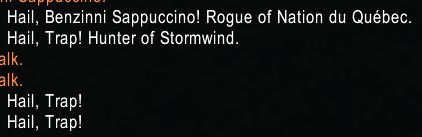
Hail Forever lets you greet players and NPCs with a single keypress. Target someone, press your assigned Hail key, and your character performs a Hail emote with a personalized greeting in /say.
Simple, customizable, and true to the classic MMO experience.
Features
- One-Key Hailing — Greet targeted players and NPCs instantly.
- Personalized Greetings — Include player names, surnames, classes, and guilds.
- Race-Based Hometowns — Uses a character's racial hometown when no guild is available.
- NPC Hailing — Displays NPC names and levels, including unknown levels (??).
- Customizable Options — Toggle the Hail emote, player surnames, and additional title information independently.
- Custom Keybinding — Assign any preferred key without overriding existing bindings.
- Lightweight — No dependencies, automatic targeting, or unnecessary complexity.
Example Greetings
Players:
Hail, Grizz Stonefist! Warrior of Iron Brotherhood.
Hail, Jay! Hunter of Old School Gamers.
Players Without a Guild:
Hail, Gizmo! Mage of Gnomeregan.
Simple Greeting (Optional):
Hail, Grizz!
NPCs:
Hail, Thistle Bear! (11)
Hail, Defias Bandit! (15)
Setup
-
Open Esc → Options → Key Bindings → AddOns.
-
Find Hail targeted player or NPC.
-
Assign your preferred key (H recommended).
-
Target a player or NPC and press your Hail key.
Settings
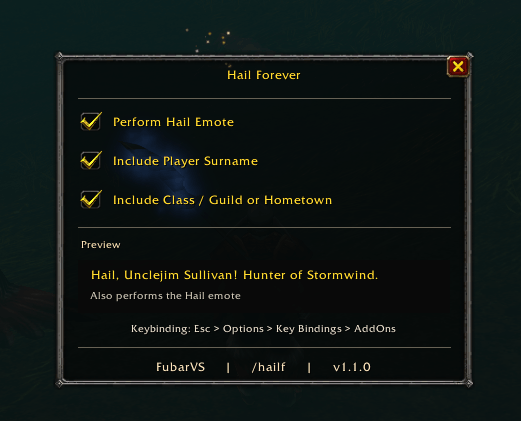
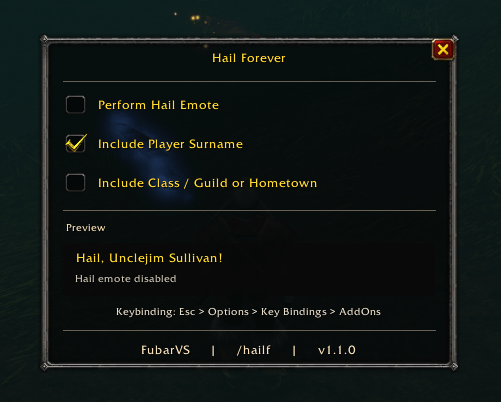
Type /hailf to open the settings window.
Customize your greetings with three options:
-
Perform Hail Emote
-
Include Player Surname
-
Include Class / Guild or Hometown
All options are enabled by default. Disable anything you prefer to leave out. Your settings are saved automatically.
Hail Forever requires a selected target and never automatically targets nearby characters.
Target. Press H. Say Hail!
Game: World of Warcraft Forever
Author: FubarVS
Version: 1.1.0
Category: Other / Social
Dependencies: None
Hail Forever Team