GzLevelUp
- By
example_messages_panel.jpg
example_auto_reply_panel.jpg
example_death_reply_panel.jpg
example_death_reply_resurrections_panel.jpg
Description
GzLevelUp
Never miss a "gz" again. GzLevelUp automatically posts a congratulations message to your party or raid chat the moment a group member levels up — so you can keep questing, fighting, and looting without breaking your flow.
Lightweight, fully configurable, and built for WoW Classic / Anniversary realms — and for the World of Warcraft: Forever beta.
Features
- Automatic level-up congratulations — when someone in your group gains a level, GzLevelUp posts your message to party chat.
- Smart detection — congratulations are only sent for real level-ups, never when a member simply joins the group or comes into range.
- Three independent categories — group members, your own level-ups, and pets/companions. Each has its own switch, its own message and its own delay.
- Customizable messages with placeholders:
{name}— who levelled up{level}— the new level{owner}— the pet's owner (pet message only)
- Per-category delay (0–60 seconds) so a message feels natural instead of
instant.
0sends immediately. - Auto reply (opt-in) — after your own level-up, wait for people to say "gz" and then thank them all in one "ty", naming everyone who congratulated you.
- Death reply (opt-in) — say something when a group member dies, when you die, or when the group wipes. Deaths are collected for a moment and answered with one message, and a wipe gets its own line instead of a flood of them — or nothing at all, if you leave that line off.
- Rez reply (opt-in) — the counterpart: a "wb" when group members are back
on their feet, collected into one message the same way. The line about your
own resurrection is only sent when somebody actually got you up, and it names
them, so
ty {name}thanks the right person. - Settings profiles — keep more than one set of settings and switch from a dropdown on the Settings tab. Every character remembers which one it uses and switches to it on login, so a healer can run different messages from a hunter.
- Movable quick-button panel (opt-in) — a small floating panel whose buttons post to your group with a single click. Two sliders set how many there are (rows × columns, up to 4 × 4) and each one has its own text — gz / ty to start with. The panel remembers its position and can be resized from 50% to 200%.
- Raid-safe — raid chat is opt-in, so the addon stays quiet in a 40-man raid unless you allow it.
- Minimap button (opt-in) — drag it anywhere around the minimap; left-click for the settings, right-click for the quick panel.
- In-game config window — set everything up with
/gz, including a live preview of your messages. Everything saves itself. - Localization — English by default, with German included automatically on German clients.
- Tiny footprint — no dependencies, minimal memory use, no background polling.
Getting started
- Install and log in.
- Type
/gzto open the configuration window. - Customize your messages, or just leave the defaults and play.
That's it — the addon works out of the box.
Configuration window (/gz)
Six tabs, and every change is saved automatically — there is no Save button. The window is movable and reopens wherever you last dragged it.
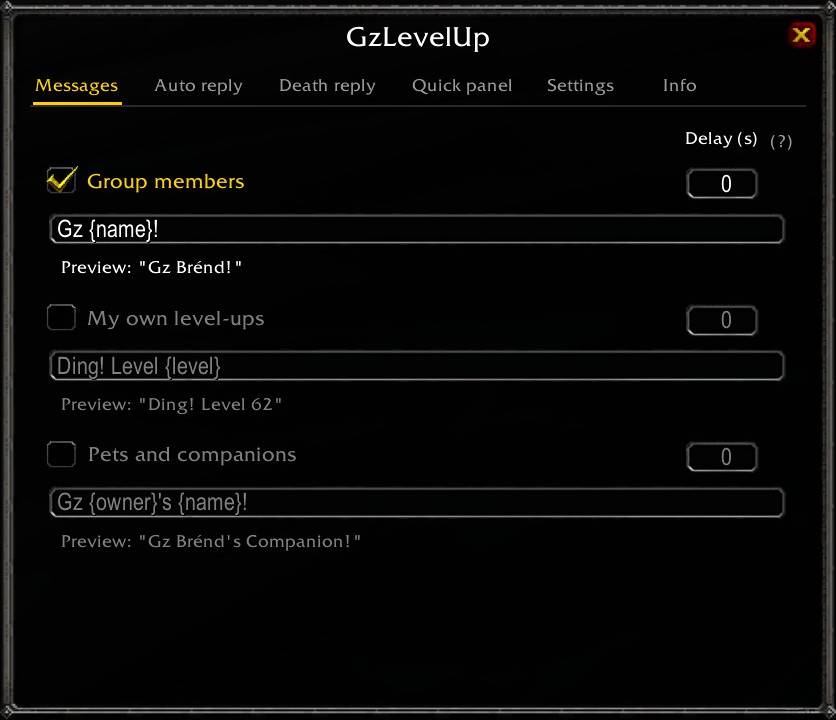
Messages
Three independent categories, each with its own switch, message and delay:
- Group members — when someone else levels up.
- My own level-ups — when you level up.
- Pets and companions — when a group member's pet gains a level. Adds the
{owner}placeholder. Your own pet additionally follows the "my own level-ups" switch.
Each row has a delay field on the right: seconds to wait before sending,
0 sends immediately. A live preview sits under every message.
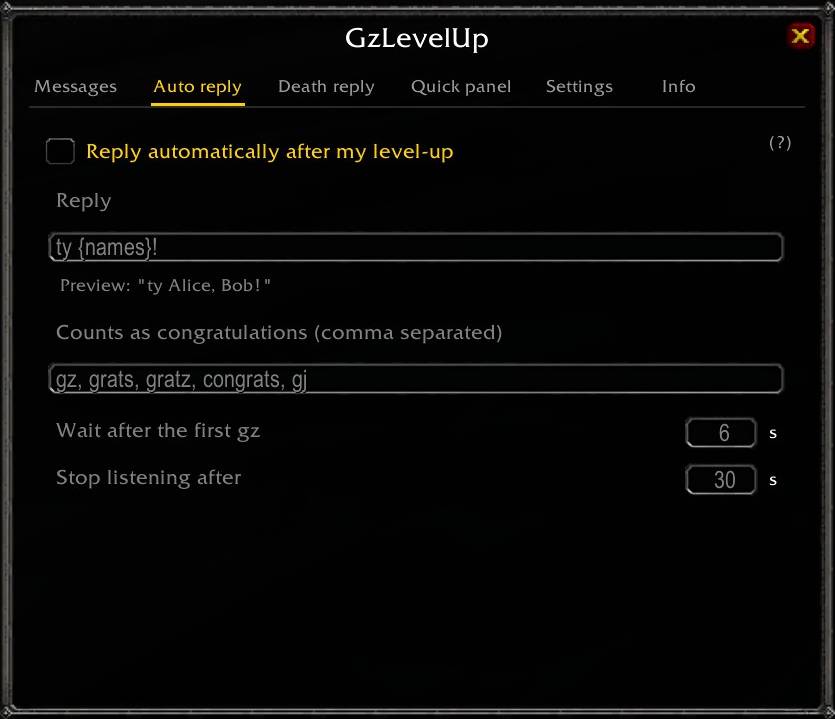
Auto reply
Opt-in. After your own level-up the addon listens to group chat. The first matching message starts a short collection window, then a single reply thanks everyone who congratulated you — so three people saying "gz" get one "ty Alice, Bob, Carol!" instead of three separate messages. Nobody congratulates you? Nothing is sent.
- Reply — the message, with
{names},{name}and{count}. - Counts as congratulations — comma separated word list. Matching is on word
starts, so
gzalso catches "gzzz" but not "Bugzapper". - Wait after the first gz — how long to keep collecting (default 6 s).
- Stop listening after — give up if nothing arrives (default 30 s).
Death reply
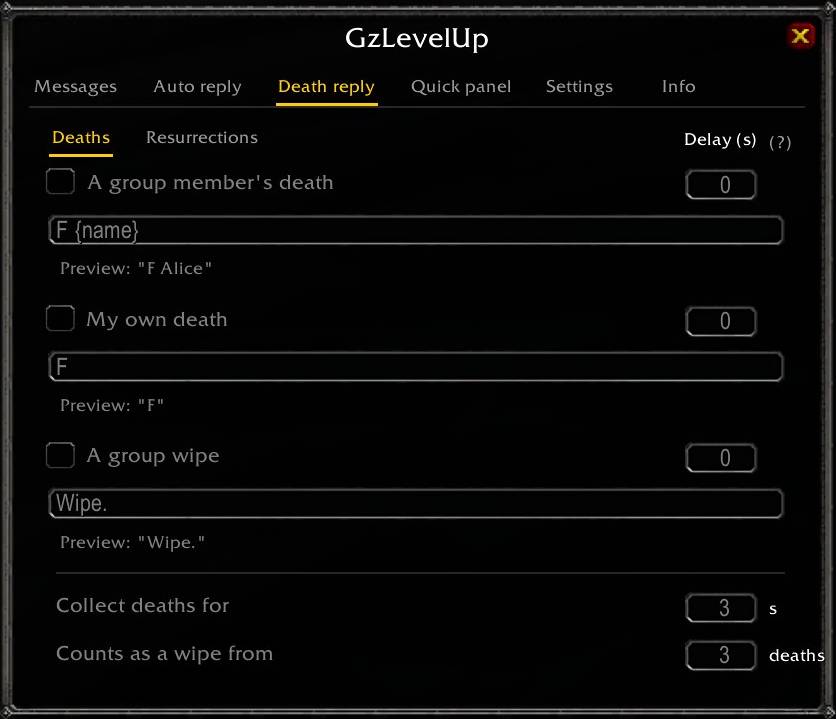
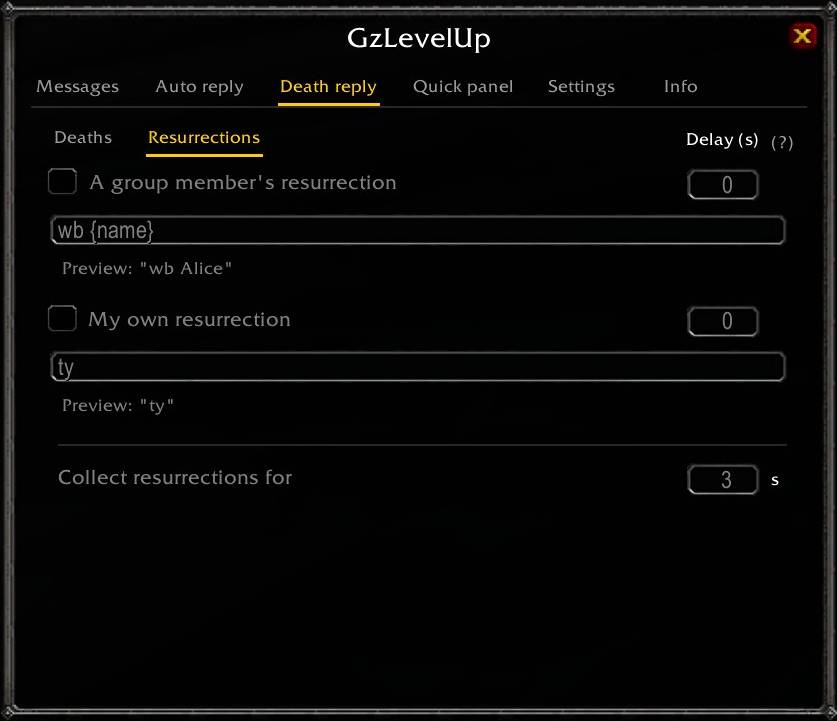
Opt-in, all five of them. Same layout as Messages: a switch, a message and a delay per line. The tab is split into two sub-pages, so the window stays the size it was.
Deaths
- A group member's death — someone else in the group dies.
- My own death — you die.
- A group wipe — enough people die at once to call it a wipe.
Resurrections
- A group member's resurrection — someone else is back on their feet.
- My own resurrection — somebody got you back up.
Deaths rarely come alone, so they are collected for a moment and answered with a single message rather than one line per corpse.
- Collect deaths for — how long to keep gathering (default 3 s).
- Counts as a wipe from — how many deaths make it a wipe (default 3). Reach
that many and only the wipe line is sent — or nothing, if you left it off. Set
it to
0to never treat anything as a wipe. - Collect resurrections for — the same window for the two rez lines (default 3 s), on the Resurrections page. There is no threshold here: coming back is never bad news.
A hunter feigning death is not a death, and a corpse that was already on the floor when you joined is not announced either.
Getting a group member back up counts however it happened, corpse run included.
Your own line is the exception: it is only sent when another player actually
resurrected you and is still in range when you get up, and {name} is that
player. A corpse run or the spirit healer leaves nobody to thank — the spirit
healer drops you at the graveyard, far from whoever offered, which is exactly
what the range check notices.
Quick panel
- Show the floating panel, size its button grid with the Rows and Columns sliders (up to 4 × 4), give every button its own text, and adjust the panel size with the third slider.
- The text fields are arranged the way the panel will be, so what you type is where it ends up. Making the grid smaller only hides fields — the texts come back when you make it bigger again.
Settings
- Addon enabled — the master switch.
- Also use raid chat — off by default. In a 40-man raid an automatic "gz" per level-up is spam for most people, so the addon stays silent in raids until you switch this on. Applies to everything it sends.
- Show minimap button — opt-in. Left-click opens the settings, right-click toggles the quick panel, and you can drag it around the minimap.
- Settings profile — a dropdown with all your profiles plus New and Delete. A profile is one complete set of settings; switching binds the character you are on to it, so logging in on that character picks it up again. When you create one, a checkbox decides whether it takes the current settings over or starts from the addon's defaults. Window positions are not part of a profile — they belong to the character, so nothing jumps around when you switch and each character can place the panel where it suits.
- Restore defaults — resets the profile you are on, after a confirmation prompt.
Upgrading from an older version needs no action: your existing settings become a profile called Default on the first login.
Info
Version, author and links to CurseForge and GitHub. WoW cannot open a browser, so the link fields are there to be selected and copied with Ctrl+C.
Slash commands
| Command | Description |
|---|---|
/gz |
Open / close the configuration window |
/gz on | off |
Enable or disable the addon |
/gz msg <text> |
Set the message for group members |
/gz selfmsg <text> |
Set the message for your own level-up |
/gz self |
Toggle announcing your own level-up |
/gz petmsg <text> |
Set the message for a pet's level-up |
/gz group |
Toggle announcing group members |
/gz pets |
Toggle announcing pets and companions |
/gz raid |
Toggle using raid chat (off by default) |
/gz reply |
Toggle the auto reply after your own level-up |
/gz death |
Toggle announcing a group member's death |
/gz selfdeath |
Toggle announcing your own death |
/gz wipe |
Toggle the wipe message |
/gz deathmsg <text> |
Set the message for a group member's death |
/gz selfdeathmsg <text> |
Set the message for your own death |
/gz wipemsg <text> |
Set the wipe message |
/gz rez |
Toggle announcing a group member's resurrection |
/gz selfrez |
Toggle announcing your own resurrection |
/gz rezmsg <text> |
Set the message for a group member's resurrection |
/gz selfrezmsg <text> |
Set the message for your own resurrection |
/gz delay <sec> |
Set the delay for every category (0 = immediately) |
/gz delay <group|self|pets|death|selfdeath|wipe|rez|selfrez> <sec> |
Set the delay for one category |
/gz profile |
List the settings profiles, marking the active one |
/gz profile <name> |
Switch to that profile and bind this character to it |
/gz profile new <name> |
Create a profile from the current settings |
/gz profile delete <name> |
Delete a profile (not the one you are on) |
/gz panel |
Toggle the floating quick-buttons panel |
/gz minimap |
Toggle the minimap button (off by default) |
/gz scale <pct> |
Set the quick panel size in percent (50–200) |
/gz test |
Preview your current messages (nothing is sent) |
Placeholders
In the three level-up messages:
{name}→ who levelled up (player or pet){level}→ their new level{owner}→ the pet's owner — only meaningful in the pet message
Example: Gz {name}, welcome to level {level}!
In the auto-reply message:
{names}→ everyone who congratulated you, comma separated{name}→ the first one{count}→ how many there were
Example: ty {names}!
In the three death messages and the two resurrection messages:
{names}→ everyone in this batch, comma separated{name}→ the first one{count}→ how many there were{level}→ their level
The default is F {name} — a line about one member. Put {names} in instead and
a batch becomes a list: F Alice, Bob. The same goes for wb {name}.
One exception: in the message for your own resurrection, {name} is the
player who resurrected you, not you — that line exists to thank them. Example:
ty {name}!
Compatibility
Built for the WoW Classic / Anniversary client, and it runs on the World of Warcraft: Forever beta (1.60.1) too — same settings, same profiles, same windows. Messages go to party chat; raid chat is opt-in via a setting, because an automatic "gz" per level-up is spam for most 40-man raids. Nothing is sent when you're not in a group.
Feedback
Bug reports, suggestions, and translations are welcome — please leave a comment or open a ticket. Enjoy, and gz!
Author: BrendTM
The GzLevelUp Team