GuildSocials
- By
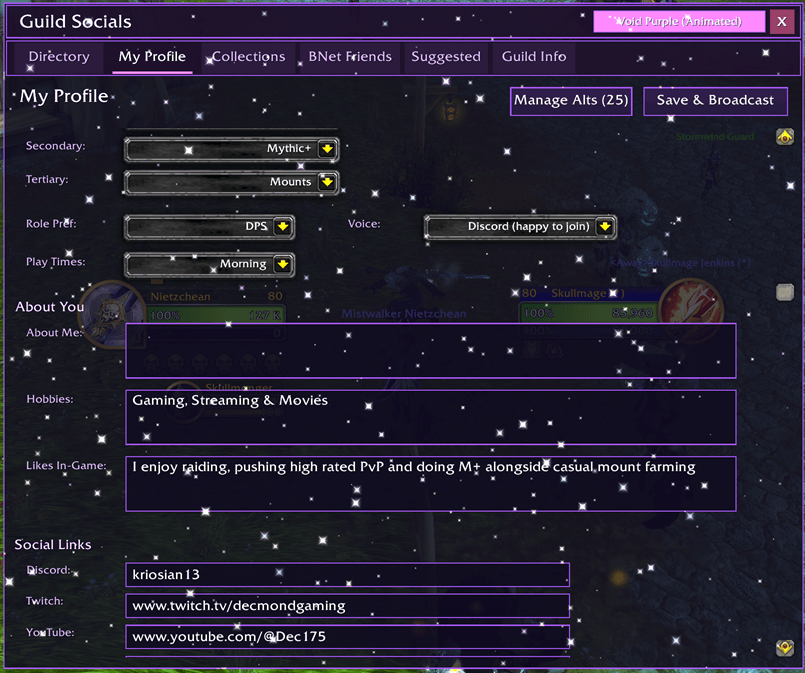
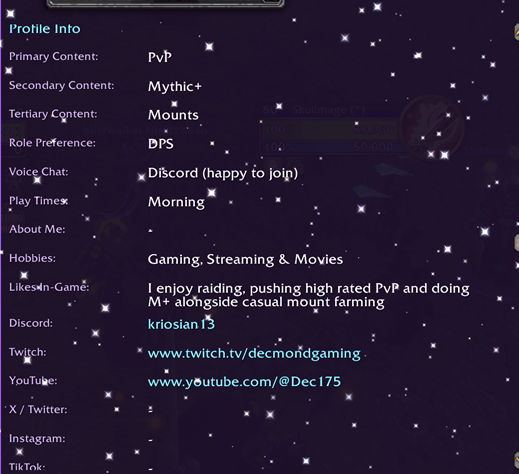
GuildShare: Create a Profile about yourself to share with guildies, share Collections (mounts/pets) and a GuildInfo page
MyProf.png
Prev.png
Description
Guild Socials v3.12.7 - Full Changelog
BattleNet Friends Enhancements
Game Icons
- Added game icons to the left of each friend's name showing what game they're playing
- Supports: WoW, Battle.net App, Diablo III/IV, StarCraft II, Overwatch, Call of Duty, Hearthstone, Heroes of the Storm
Faction Icons
- Added Horde/Alliance faction icons to the right of each friend entry
- Displays based on the character's faction
"Other Games" Filter
- New "Other" filter button shows friends online in other Blizzard games (not WoW)
- Allows messaging friends playing Hearthstone, Diablo, CoD, etc.
- Filter buttons resized to fit: Online | All | Off | Other
Friend Notifications (Toast System)
- Pop-up notifications when BNet friends come online or go offline
- Notifications when friends post new broadcasts
- Displays friend name, status, and character info
- Movable - drag to reposition, position saves between sessions
- Auto-fades after display
- Toggle with
/gs toastor/gs notifications
Guild Directory Enhancements
Faction Icons
- Added Horde/Alliance faction icon to each guild member entry
- Displays in top-right corner of member buttons
Officer Chat Tab
- New "Officer" tab for officer-only chat
- Permission-based visibility (GM and officers only)
- Separate message storage from Guild Chat
- Officer messages also appear in Guild Chat with [O] prefix
Guild Chat Log Improvements
Search with Navigation
- Search box finds and highlights matching text (yellow highlight)
- Up/Down arrow buttons to navigate between matches
- Shows match count (e.g., "3/12")
- Press Enter to jump to next match
- X button clears search
Clickable Names
- Click any player name in chat to open whisper
- Tooltip shows "Click to whisper [name]"
Font Customization
- Font style dropdown with 10 options: Friz Quadrata, Arial Narrow, Morpheus, Skurri, Game Default, Chat Default, Tooltip, Quest Title, Combat, Damage
- Font size dropdown with 6 options: Tiny (8pt), Small (10pt), Medium (12pt), Large (14pt), XLarge (16pt), Huge (18pt)
- Green checkmark indicates current selection
Persistent Chat History
- Chat history now saves between sessions (up to 5,000 messages)
- Loads automatically on login
BNet Broadcasts
Right-Click Menu
- Right-click any broadcast to open context menu
- Options: "Send BNet Message" and "Copy BattleTag"
Broadcast Notifications
- Toast popup when friends post new broadcasts
- Shows full broadcast text with word wrap
- Dynamic height based on message length
- Longer display time (8 seconds) for broadcasts
Keybindings
- 5 customizable keybindings available in WoW's Key Bindings menu (under "Guild Socials")
- Bind keys to toggle the main window, or open specific tabs directly
- ESC key closes the window when open
Commands
/gs- Open Guild Socials window/gs toast- Toggle BNet friend notifications on/off/gs notifications- Same as above/gs stats- Show your current stats/gs debug- Toggle debug mode/gs help- Show all commands
UI Improvements
- Dropdown checkmarks now display correctly (green "v")
- Search navigation arrows use proper up/down arrow textures
- Improved spacing and padding throughout
- Better text wrapping for long game names and locations
- Minimap button with draggable position (saves between sessions)
GuildSocials v3.3.4 - Complete Update Summary
NEW: BattleNet Friends Tab
- Browse all BattleNet friends with Online/All/Offline filter buttons
- Search box to filter by name, BattleTag, or character
- Class-colored character names (Druids orange, DKs red, etc.)
- Status indicators: Green (in WoW), Yellow (online elsewhere), Gray (offline)
- Request profiles from friends across any guild or server
- Auto-detects character switches and refreshes profile automatically
Auto-Tracked PvE/PvP Stats
Stats are now automatically scanned and shared with both guild members and BNet friends:
PvE Stats:
- Item Level
- Mythic+ Score (color-coded by rating tier)
- Raid Progress (Manaforge Omega - shows 6/8M 8/8H format)
PvP Current CR:
- 2v2 Arena
- 3v3 Arena
- Solo Shuffle
- RBG Blitz
PvP Highest Ever:
- 2v2 Highest (all-time from Statistics)
- 3v3 Highest (all-time from Statistics)
UI Improvements
- Theme selector in title bar - Dropdown with color swatches for all 11 themes
- Shadow Black theme now available (plus Void Purple, Blood Red, Fel Green, Frost Blue, Golden Dawn, Horde, Alliance, Rose Pink, Molten Fire, Ocean Depths)
- Login message - Shows "Type /gs to open" on login
- Fixed symbols - Replaced broken Unicode characters with compatible text
Technical
- Stats included in guild profile broadcasts
- Smart caching with character tracking
- Silent auto-sync (no chat spam)
Profiles
Create a guild profile that includes:
-
Interests (Raids, Mythic+, PvP, etc.)
-
Preferred role & voice preference
-
Typical playtimes
-
About Me / Hobbies / Likes sections
-
Social links (Discord, Twitch, YouTube, Twitter/X, Instagram, TikTok, plus an extra link)
Alt linking: alts can be linked to a main profile so you don’t have to maintain multiple copies.
Directory & Sync
-
Browse cached guild profiles in a directory
-
Search by name and filter online-only
-
Request/sync profiles from players who have the addon installed
Suggested Friends
GuildShare can recommend guildmates with similar interests based on the profiles you’ve cached.
Guild Announcements
A dedicated announcements tab for a shared guild message:
-
Edit mode
-
Save & announce
-
Sync so guildies can request the latest message
Mounts & Pets Sharing
Share and browse collections with:
-
Grid/List layouts
-
Search
-
Collected/Missing filters
-
Source categories (raid, dungeon, PvP, vendor, rep, achievements, world events, etc.)
To request data from players, you can use one of 3 methods:
Target a player and click "Request" if they are in front of you
Type a players name/realm (if same faction)
If a player is Cross-Faction, you can type their Battle.net ID and request
Compare Mode
Compare two players’ collections side-by-side:
-
Show everything, both have, or neither have
-
Use category filters + search + grid/list switching
Export/Import
-
Export collections into a portable copy/paste string
-
Import strings to load shared data quickly
-
Can import cached data from CollectionShare if present
Notes
GuildShare only exchanges data with players who also have the addon installed, using standard addon messaging and local SavedVariables.
Update!!
GuildSocials Team