GuildInviter
- By
Allows recruits to whisper a secret phrase to be added to a queue for a guild invite.
guildinviter2.png
guildinviter1.png
Description
GuildInviter
**GuildInviter** is a lightweight, self-contained guild invite assistant designed for World of Warcraft Forever. Instead of manually typing player names in IE /guildinvite name or entering them into the guild panel, let prospective members request an invite by whispering a unique customizable secret phrase to a guild member with invite permission. This does not bypass Blizzard restrictions, one minimap click = 1 guild invite
---
## ✨ Features
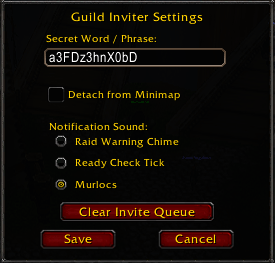
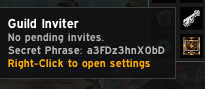
* **First-Launch Randomization:** Generates a unique 12-character alphanumeric secret password automatically on a fresh install so your recruitment phrase stays private, this can be changed at any time by right clicking the minimap icon or typing one of the two commands.
* **Smart Queue Management:** Tracks incoming requests in an ordered FIFO (first-in, first-out) queue and illuminates the minimap icon when players are waiting.
* **One-Click Invitations:** Left-click the minimap button to invite the next player in line automatically and report remaining queue counts.
* **Away / AFK Interception:** So recruits aren't missed while you are flagged AFK.
* **Triple-State Auto Replies:**
* *Queue Position:* Confirms receipt and replies with the player's exact line position.
* *Already in Guild:* Ignores the request and informs players via whisper if they are already in your guild.
* *Duplicate Filter:* Prevents duplicate requests by telling repeat whispers they are already queued.
* **Customizable Alerts & Layout:** Choose from 3 notification sounds (Raid Warning, Ready Check or Murlocs) and detach or reposition the minimap button anywhere on your screen.
* **Zero External Dependencies:** Built with native WoW frame templates—no LibStub or external data broker libraries required.
---
## 🛠️ Slash Commands
* `/secretword` — Opens the configuration settings panel.
* `/guildinviter` — Alternate command to open the settings panel.
---
## ❓ Frequently Asked Questions (FAQ)
### Q: How do I change my secret phrase?
Right-click your minimap icon (or type `/secretword`), type your custom word or phrase into the input box, and click **Save**.
### Q: Why does the minimap icon start grayed out?
The key icon stays desaturated until someone whispers the matching secret phrase. The moment a valid request lands, it lights up and plays your chosen notification sound.
### Q: What happens if I log out or reload?
Your current queue clears on session end, while your custom secret phrase, sound choice, and button position persist safely.
### Q: How do I clear a stuck queue?
Open the configuration window by typing one of the slash commands (/secretword) or (/guildinviter) or by right clicking on the minimap icon and click **Clear Invite Queue** to wipe pending names and reset the icon.
---
*Copyright © 2026 Bloodd. All Rights Reserved.*
GuildInviter Team