GuildHub Forever
- By
Run your whole guild from one window: raid sign-ups, DKP, loot, attendance, boss strategies and gear, shared with your guild automatically.
1-home.png
2-raids.png
3-gear.png
4-companion.png
5-in-game.png
6-phone-home.png
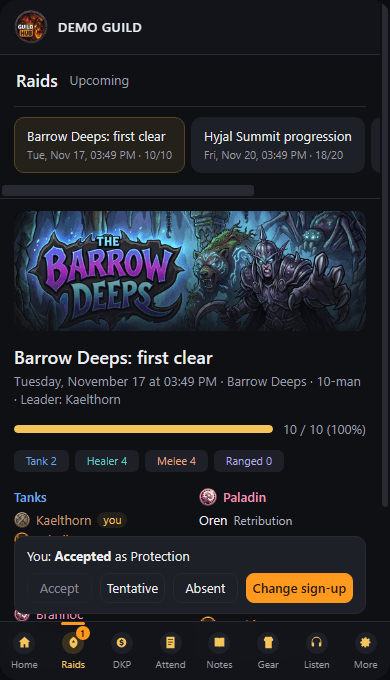
7-phone-raid.png
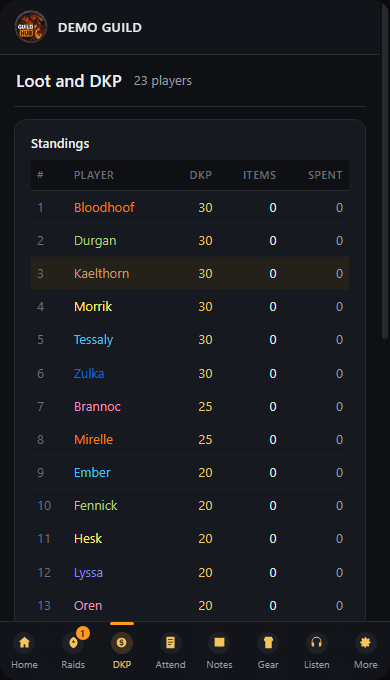
8-phone-dkp.png
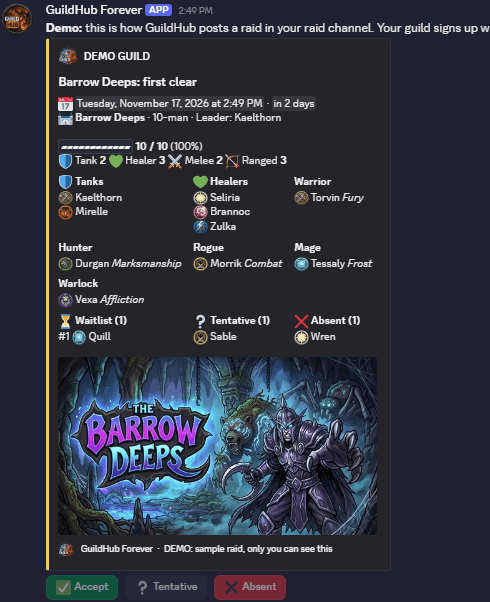
9-discord-raid-post.png
Description
Run your whole guild from one window: raid sign-ups, DKP, loot, attendance, boss strategies and gear, shared with your guild automatically. In game, in Discord and on your phone.
Free, with every feature unlocked. No accounts, nothing to set up. Install it, type /gh, raid.
Help, updates and the Companion download: join the GuildHub Discord.
One addon instead of five
Most guilds juggle a sign-up bot, a DKP spreadsheet, a loot addon, a pinned message with the strats and someone checking enchants by hand. GuildHub does all of it in one window, and every guildmate who installs it sees the same thing:
- One install for the whole guild. No spreadsheets to share, no bot to configure before you can start, no website accounts.
- Everything talks to everything. A sign-up shows on the roster, the soft reserve shows when the item drops, the loot winner is charged in the DKP ledger, attendance feeds the leaderboard, and the boss you just pulled fills in its own Boss facts.
- Built for WoW Forever. Barrow Deeps (10), Hyjal Summit (20) and Onyxia's Lair (40) each get their own page with full artwork, the complete boss list and a turning 3D model of every boss your guild has met.
- Works where your raiders are. In game for everyone, and with the free Companion also in your Discord and on their phones (see below).
- Safe to trust with your DKP. Only officers can change DKP, loot, attendance and raids, and nothing is ever deleted for good.
Your guild, your way
Every guild runs raids differently, so GuildHub bends to yours:
- Your loot rules. Pick DKP bids (highest bid wins and pays it), rolls (soft-reservers first, then the highest roll) or loot council (raiders say they want it, officers vote). Change the cost before you give an item out.
- Your raids. Any raid, any size, any date, with your own title. Choose 0, 1 or 2 soft reserves per raid and split into Group A and B when you run two groups.
- Your officers. The guild master picks which ranks get officer tools.
- Your DKP. Set the on-time DKP when you record attendance, award bonus DKP to one player or the whole raid, and fix any mistake with an undo.
- Your plans. Write your own note for every boss, or start from the built-in templates (Onyxia, 10- and 20-player bosses, raid rules and consumables).
- Your look. Your guild's own banner and logo and a welcome message from your officers at the top of everyone's Home page.
- Your pace. Start loot automatically when you loot a boss, or item by item. Reload reminders every 30, 45 or 60 minutes, or off.
Everything it does
Raids and sign-ups
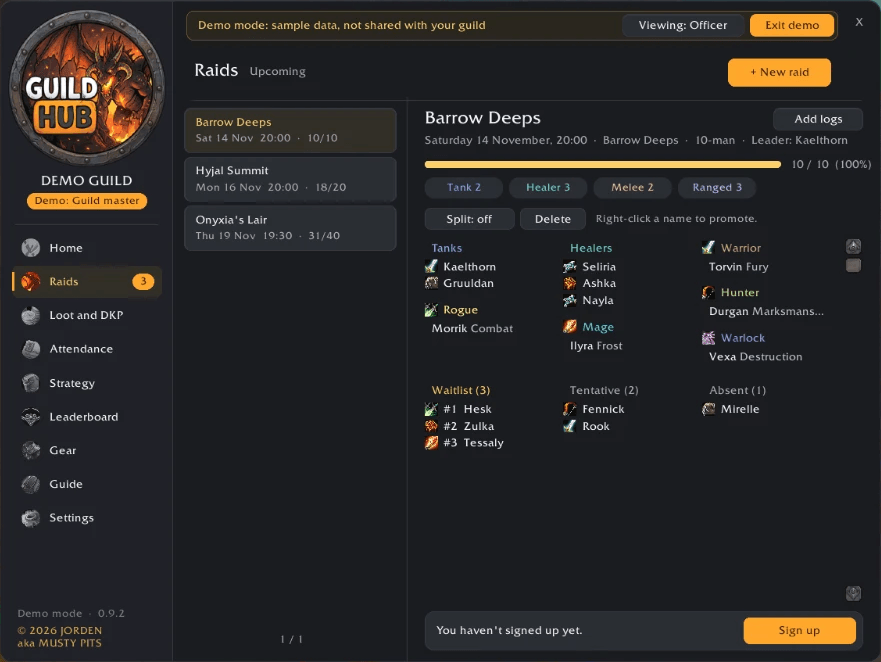
- Post a raid in seconds; raiders sign up with their spec and Accepted, Tentative or Absent.
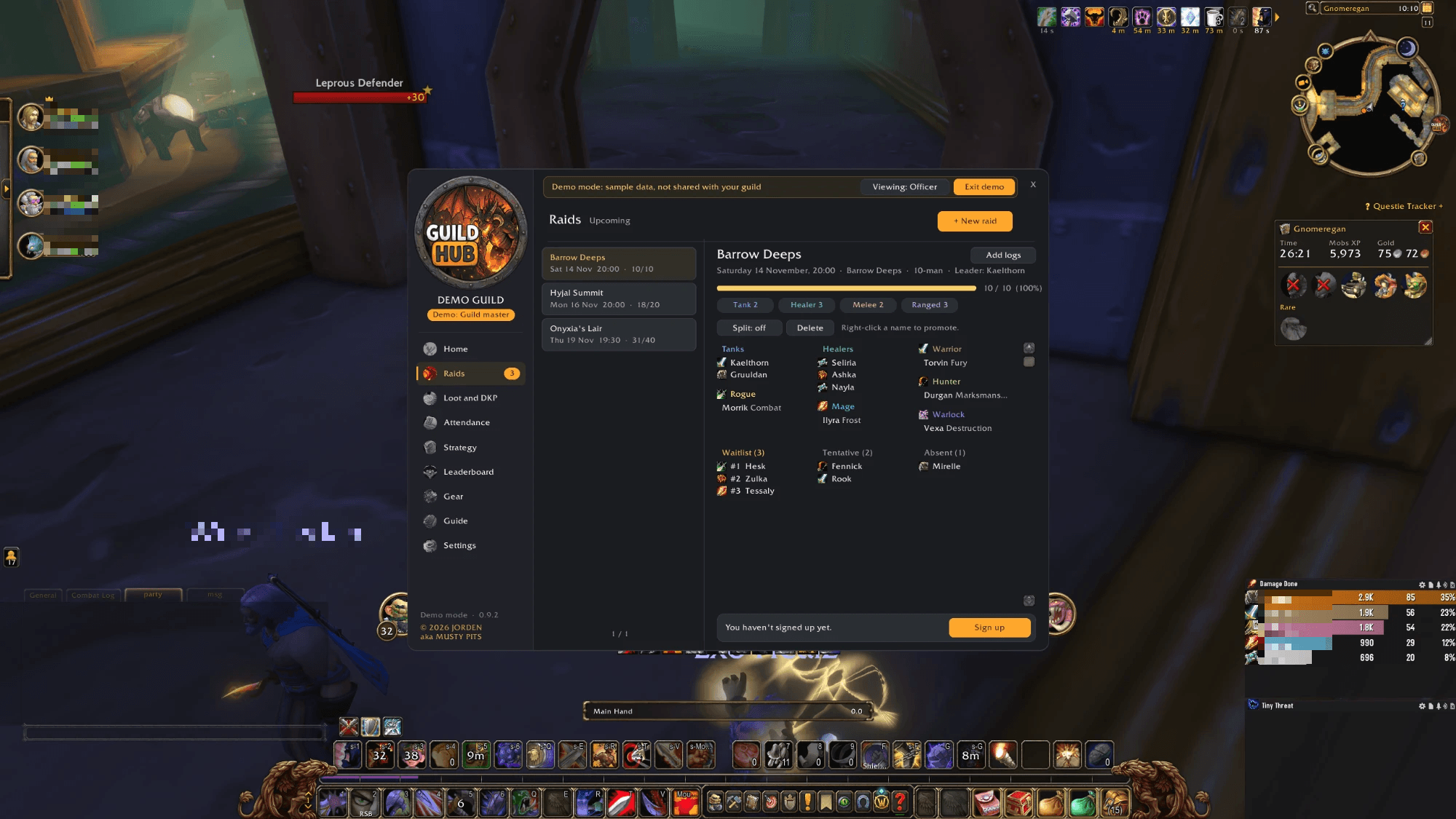
- A live roster by role and class, an automatic waitlist, and promotions with one right-click.
- Soft reserves: raiders pick the items they want most when they sign up, get a gold SR on the roster, and chat says who reserved an item when it drops.
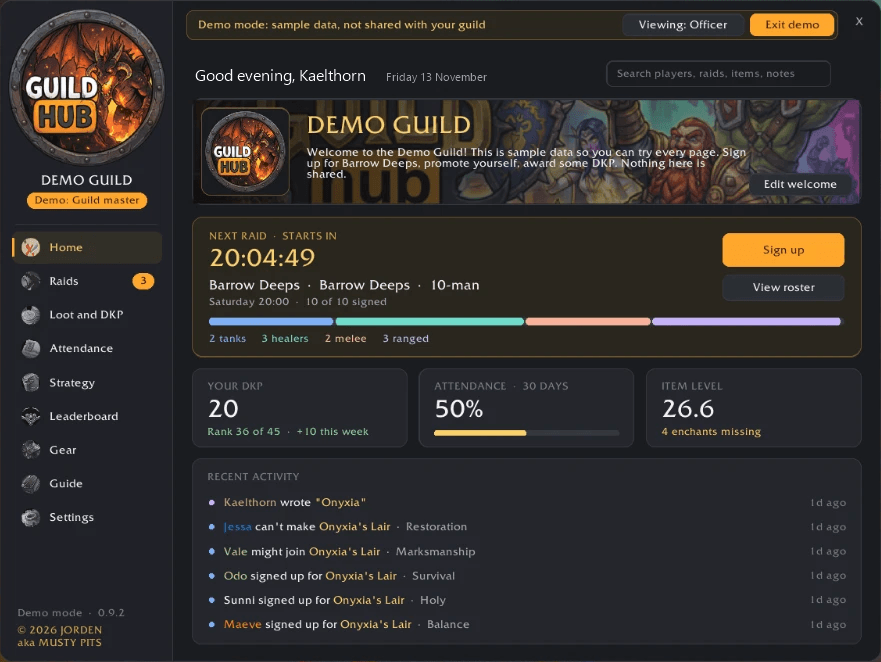
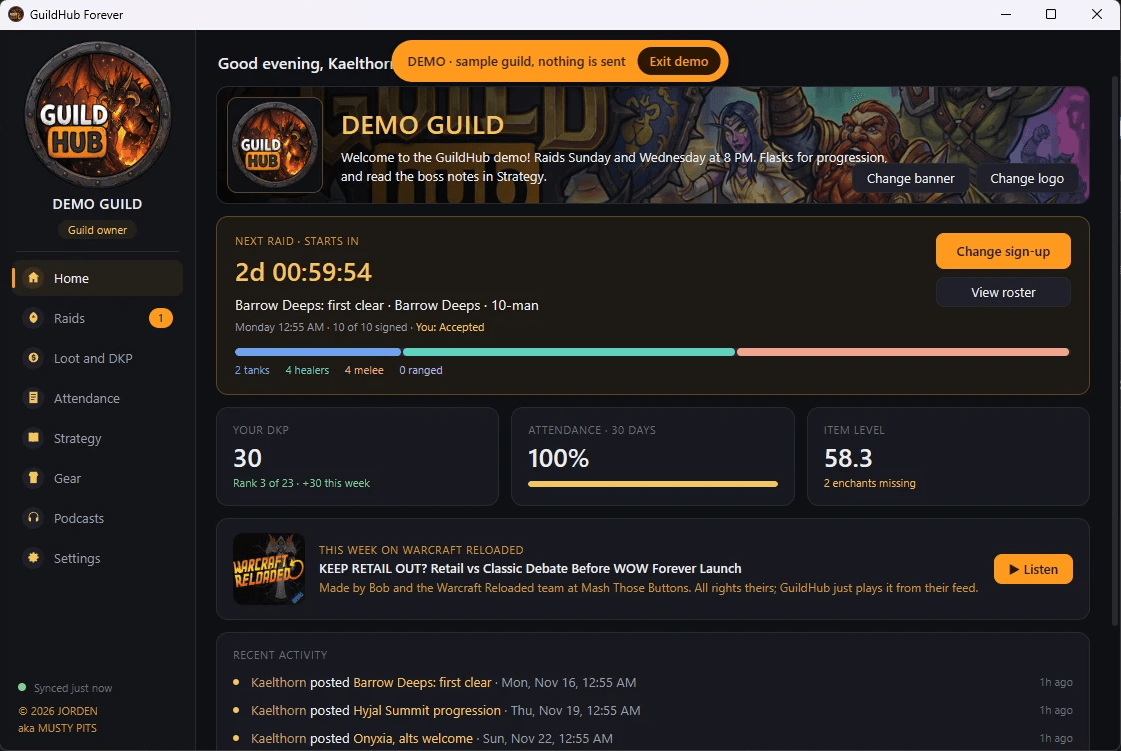
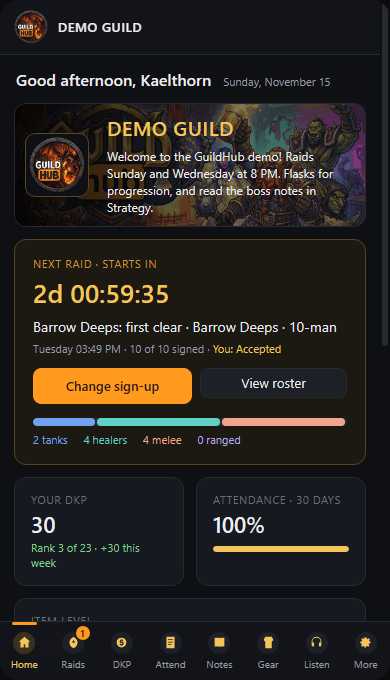
- A countdown on Home shows the next raid and how many tanks, healers and damage are signed.
Loot and DKP
- An officer starts loot and everyone in the raid gets a popup to bid DKP, roll, say they want it or pass, with soft-reservers marked.
- Loot a boss and its epic items line up in the officers' Loot window, ready to go.
- Press Give item and the winner is charged and the loot recorded. Mistakes undo with a right-click.
- Full DKP standings and loot history for everyone to see.
- Onyxia's loot is built in; other bosses' loot is learned the first time it drops, then shared.
Attendance
- Record who came from your current group in one click, with on-time DKP.
- 30-day attendance rates for every raider.
Strategy and Boss facts
- A strategy note for every boss. Anyone can write one; authors and officers can edit.
- Boss facts fill themselves in from your own pulls: health, kills and wipes, fastest kill, best try, and each boss's abilities with when they hit and how hard.
Gear
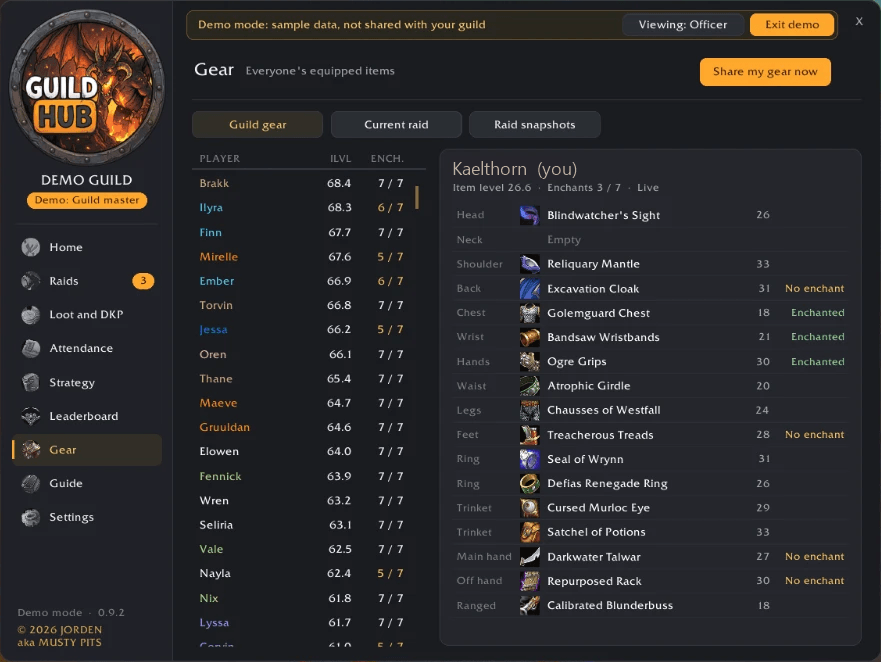
- Every raider's equipped items, slot by slot, with item levels and missing enchants. Your own gear updates by itself.
- Raid gear snapshots at the start and end of each raid, showing exactly who got what.
Your guild at a glance
- Home: next raid, your DKP and rank, attendance, item level, and warnings about missing enchants.
- Recent activity: loot, sign-ups, DKP and new notes as they happen.
- Search any player, raid, item or note, with a player card for every guildmate.
- Leaderboard by DKP, attendance, items received or item level.
- Raid logs: keep your Warcraft Logs (or any log site) links for every raid night in one place.
- Export to CSV: DKP, loot, attendance, sign-ups, gear snapshots and notes, ready for Excel or Google Sheets.
Easy to learn
- An in-game Guide with a step-by-step raid lead checklist, so new officers know exactly what to do.
- Demo mode (
/gh demo): every page full of sample data, and every officer tool to try, even as a regular member. Nothing is sent while it's on. - No guild? No problem. GuildHub shares with your party or raid instead, and the group leader runs it.
In game, on your phone and in Discord
GuildHub keeps your guild's raids, sign-ups, DKP and notes in step everywhere, whether you're logged in or not.
In game (nothing to set up). Everyone with GuildHub shares raids, sign-ups, DKP, loot, attendance, notes and gear with each other within seconds. Were you offline? You catch up from whoever is online the next time you log in.
Away from the game (optional, free). Add the GuildHub Companion for Windows and your guild also gets:
- Discord: new raids post themselves in your raid channel with Accept / Tentative / Absent buttons. One click signs up your character, and the post updates its counts.
/dkpshows standings right in Discord. - Phone app: see upcoming raids, sign up and pick your soft reserves, and check DKP, loot history, attendance and boss notes from anywhere. Log in with Discord; nothing to install.
How it all comes together
- Sign-ups from Discord and the phone are saved on the GuildHub server straight away.
- The Companion runs quietly in your tray and picks them up about every 45 seconds, even while WoW is closed.
- WoW only reads new files when you log in or reload, so they appear in game at your next login, or when you press Reload for updates (GuildHub reminds you gently, never in combat or inside a dungeon or raid).
- When an officer reloads, GuildHub passes everything on to every guildmate who's online, so nobody else has to.
- The other way round: what you do in game (new raids, sign-ups, DKP, loot, notes) is saved when you reload or log out, and the Companion sends it to Discord and the phone app right away.
Two changes to the same thing? The newest one wins, everywhere, and nothing is ever deleted for good.
Who needs the Companion? At least one officer, so raids reach Discord and sign-ups reach the game. Raiders install it once to link their character, then they can sign up from Discord or their phone. Players without it still get everything in game from guildmates who have it. Officers also use it to set the guild's banner and logo.
Get the Companion: guildhub.guildhubforever.workers.dev/companion. The first time you open it, Windows may show "Windows protected your PC". That's normal for new free apps you've downloaded, the same as many tools on GitHub. Click More info, then Run anyway.
Why the warning? GuildHub is a free, one-person project with no funding yet. Removing it means buying a yearly code-signing certificate, which is on the list once the project can pay for it. The warning only means the app isn't signed yet, not that anything is wrong with it.
Fair by design
- Only officers can change DKP, loot, attendance and raids. Every copy of GuildHub ignores those changes from anyone else.
- Sign-ups, reserves and gear only count from the player themselves (or an officer).
- An undo leaves a record behind, so every mistake can be traced.
- Editing your own saved files only changes your own screen.
Getting started
- Install GuildHub Forever and tell your guild to install it too.
- Guild master:
/gh, then Settings, and choose which ranks are officers. - Officers: open the Guide and follow the Raid lead checklist.
- Want to look around first?
/gh demo. - Want Discord and phone sign-ups? Get the Companion (above), then a Discord admin adds the GuildHub bot and runs
/guildhub setup.
Commands
/gh open · /gh guide guide · /gh demo demo mode · /gh loot loot window · /gh sync sync now · /gh dkp your DKP · /gh gear share gear · /gh export CSV export · /gh logs raid logs · /gh status troubleshooting
Made by JORDEN aka MUSTY PITS. © 2026. Not made or endorsed by Blizzard Entertainment.
GuildHub Forever Team