GuildGreeter
- By
Automatically greet your guild, group, and online members — with fully customizable, randomly selected messages.
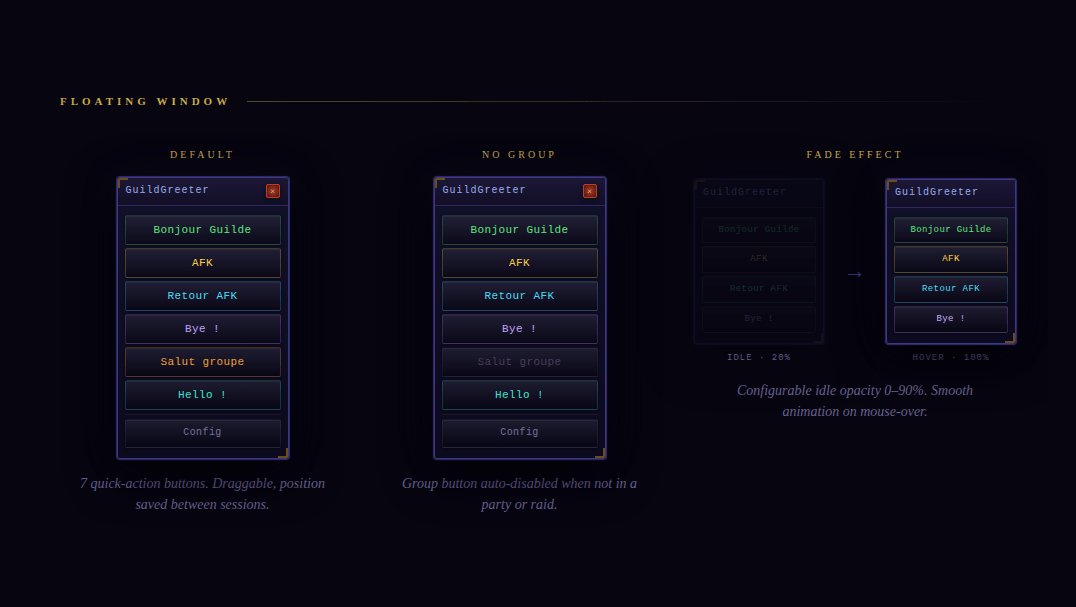
02_floating_window.png
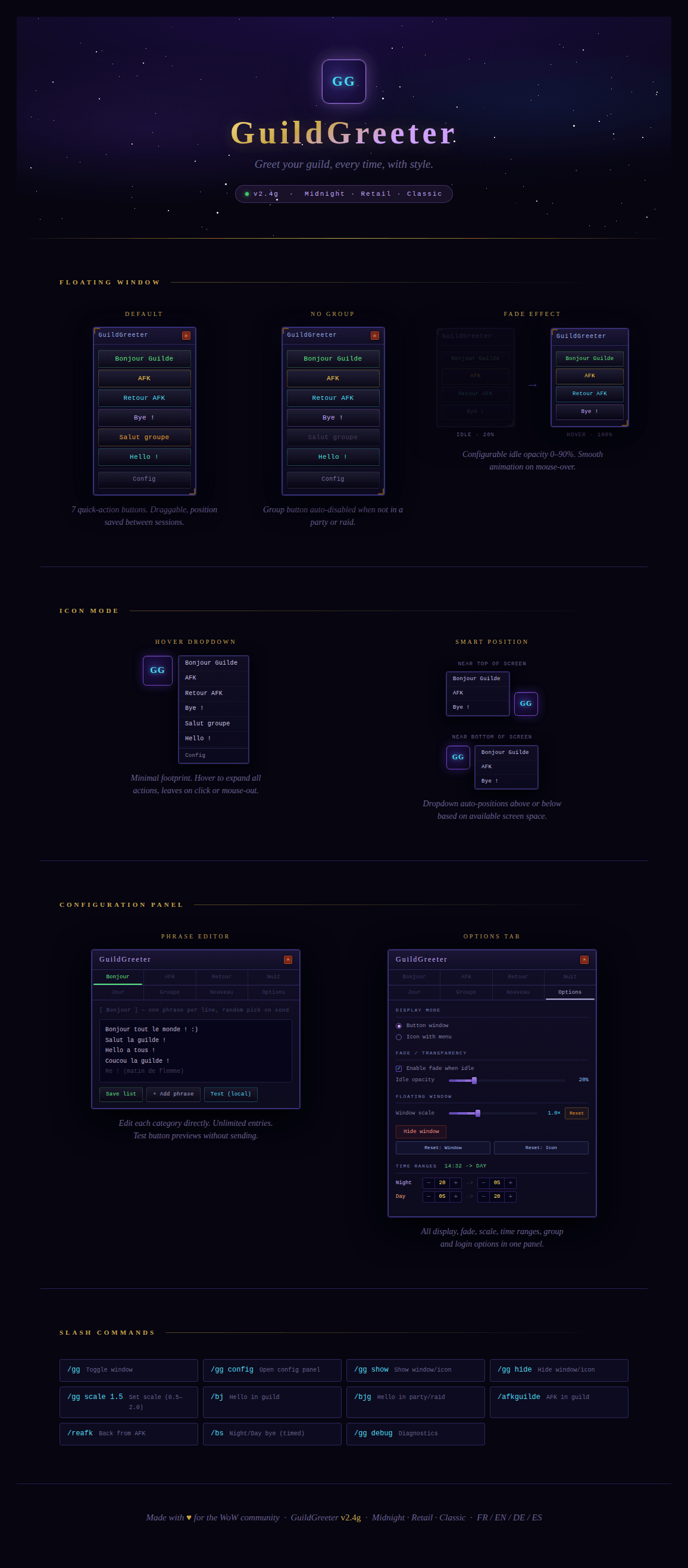
00_full_page.png
Capture d'écran 2026-03-07 231115.png
Capture d'écran 2026-03-07 231136.png
Description

Greet your guild, every time, with style — from a floating window or a compact icon with dropdown menu.




Features
- 9 message categories — Bonjour Guilde, AFK, Retour AFK, Nuit/Jour, Groupe, Hello (nouveau membre), GG (félicitations achievement), Thanks
- Two display modes — full floating window with buttons, or compact icon with hover dropdown
- Configurable button order — reorder with ↑/↓ in Options tab, applies live to both window and dropdown
- Achievement congratulations — automatic GG when a guildie earns an achievement, with
{player}and{achievement}placeholders - Fade in / out — configurable idle transparency, animates smoothly on mouse-over
- Group / Raid greetings — manual or automatic when joining a party or raid
- Guild member online — optional auto-welcome when a guildie logs in
- Thanks in guild channel
- Fully customizable phrase lists — one phrase per line, unlimited entries, random selection
- Time-based Night / Day mode — the Bye! button switches automatically based on configurable time ranges
- Scalable UI — independent scale for the mini-window and the config panel
- Position memory — window and icon positions saved separately between sessions
- Reset position — one-click reset to screen center with forced full opacity
- Slash commands & macro support
- Multilingual — French, English, German, Spanish (auto-detected)
- Theme — Different themes can be applied
- Shortcut — quick shortcut implemented on compact mode, by clicking (right or left) on the Icon
Installation
Manual
- Download and unzip the addon.
- Copy the
GuildGreeterfolder into your WoW AddOns directory:- Retail / Midnight:
World of Warcraft/_retail_/Interface/AddOns/ - Classic:
World of Warcraft/_classic_/Interface/AddOns/
- Retail / Midnight:
- Launch WoW and enable the addon in the AddOns list on the character select screen.
CurseForge App
Install directly via the CurseForge app — no manual steps required.
Usage
Floating Window
| Button | Action | Channel |
|---|---|---|
| Bonjour Guilde | Random hello message | Guild |
| AFK | Going AFK announcement | Guild |
| Retour AFK | Back from AFK announcement | Guild |
| Bye! | Night or Day farewell (time-based) | Guild |
| Salut groupe | Greeting to party/raid (greyed if not in group) | Party / Raid |
| Hello! | Welcome message for a new member | Guild |
| GG! | Congratulations for an achievement | Guild |
| Config | Open the configuration panel | — |
Icon Mode
A compact GG icon. Hover to expand the dropdown centered on the icon. The dropdown auto-positions above or below based on available screen space.
Slash Commands
| Command | Action |
|---|---|
/gg |
Open the configuration panel |
/gg config |
Open the configuration panel |
/gg show |
Show the window / icon |
/gg hide |
Hide the window / icon |
/gg scale 1.5 |
Set mini-window scale (0.5 – 2.0) |
/gg debug |
Show diagnostic info (positions, DB state) |
/bj |
Say hello in guild |
/bjg |
Say hello in party / raid |
/afkguilde |
Announce AFK in guild |
/reafk |
Announce back from AFK in guild |
/bs |
Say Bye! in guild (time-based Night / Day) |
Configuration (/gg)
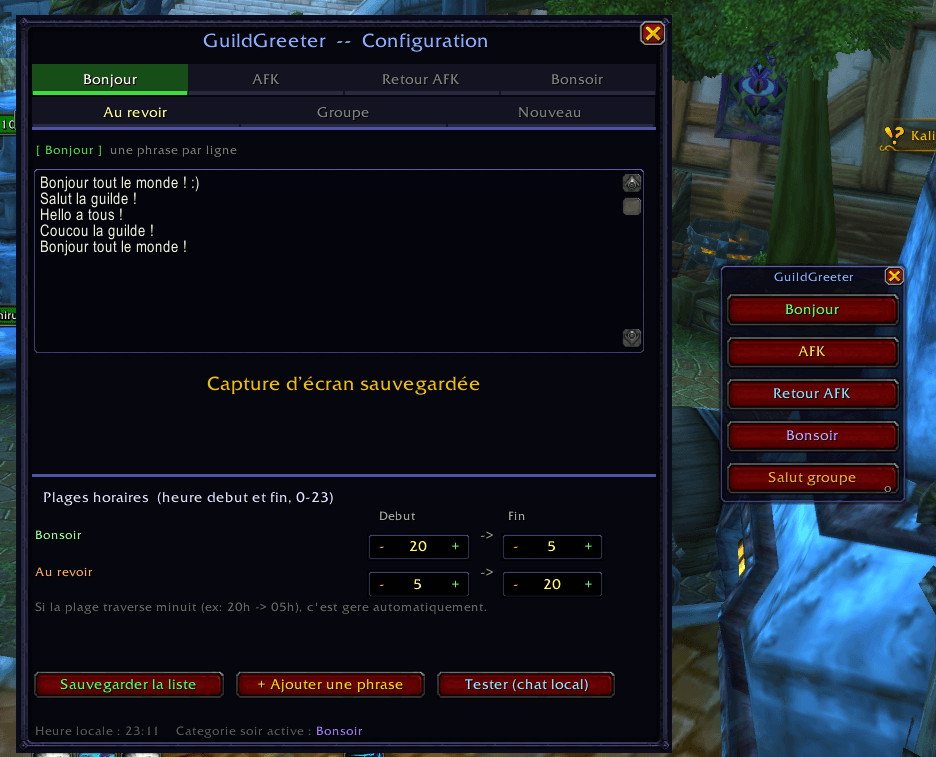
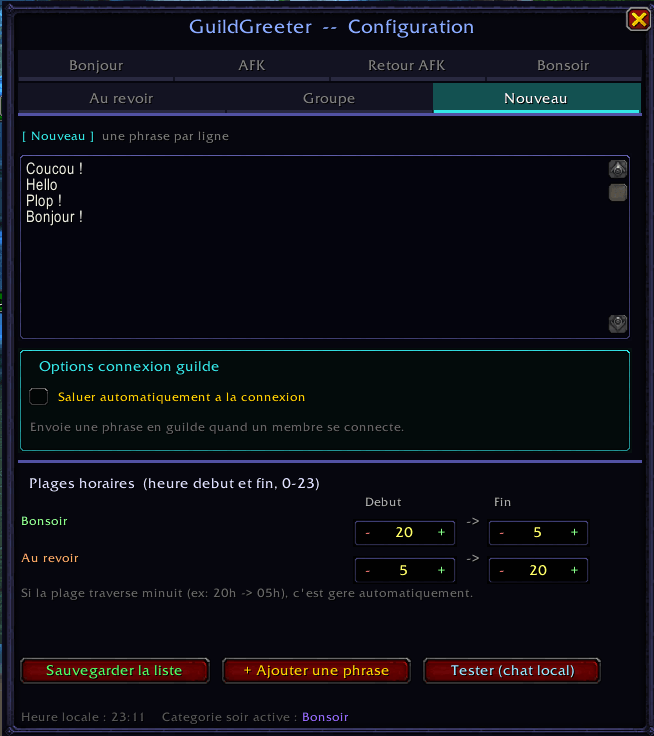
Tabs — 3 rows of 3
| Tab | Description | Channel |
|---|---|---|
| Bonjour | Morning / daytime greetings | Guild |
| AFK | Away messages | Guild |
| Retour AFK | Return messages | Guild |
| Nuit | Late-night farewell messages | Guild |
| Jour | Daytime farewell messages | Guild |
| Groupe | Party / raid greetings | Party / Raid |
| Nouveau | New member welcome messages | Guild |
| GG | Achievement congratulations with {player} and {achievement} |
Guild |
| Options | All display and behavior settings | — |
Achievement Placeholders
In the GG tab, use these placeholders in your phrases:
| Placeholder | Replaced by |
|---|---|
{player} |
The name of the guildie who earned the achievement |
{achievement} |
The name of the achievement |
Example: GG {player} pour [{achievement}] ! → GG Thorminak pour [Conquérant de Naxxramas] !
When used via the manual GG! button (no achievement context), phrases with placeholders are skipped in favor of generic phrases like GG ! or Bravo !.
Options Tab
- Display mode — Button window or Icon with hover dropdown
- Fade / Transparency — Enable/disable, idle opacity slider (0–90%)
- Window scale — 0.5× to 2.0× with Reset
- Config scale — 0.5× to 1.2×, default 0.85×
- Reset position — Window or Icon, recenters and forces full opacity + visibility
- Time ranges — Night/Day start and end hours (cross-midnight supported)
- Group options — Auto-greet on group join, extend to raids
- New member — Auto-welcome when a guildie logs in
- Achievement GG — Auto-congratulate when a guildie earns an achievement
- Button order — Reorder with ↑/↓ arrows, applies live to window and dropdown
Saved Data
All settings stored in GuildGreeterDB via WoW's SavedVariables system.
WTF/Account/<ACCOUNT>/SavedVariables/GuildGreeter.luaLocalization
| Language | Code | Status |
|---|---|---|
| French | frFR |
Full |
| English | enUS / enGB |
Full |
| German | deDE |
Full |
| Spanish | esES / esMX |
Full |
| Other | — | English fallback |
Compatibility
| Version | Status |
|---|---|
| WoW Midnight (Alpha) | Supported |
| WoW Retail (The War Within) | Supported |
| WoW Classic / Anniversary | Supported |
Thanks to Claude AI that help me a lot
The GuildGreeter Team