GuildAssist
- By
Screenshot 2026-07-24 at 1.08.26â¯am.png
Screenshot 2026-07-24 at 1.08.37â¯am.png
Screenshot 2026-07-24 at 1.08.44â¯am.png
Screenshot 2026-07-24 at 1.08.46â¯am.png
Screenshot 2026-07-24 at 1.09.01â¯am.png
Screenshot 2026-07-24 at 1.09.09â¯am.png
Screenshot 2026-07-24 at 1.09.19â¯am.png
Screenshot 2026-07-24 at 1.09.35â¯am.png
Screenshot 2026-07-24 at 1.09.50â¯am.png
Screenshot 2026-07-24 at 1.09.57â¯am.png
Description
GuildAssist
A modern, private, dependency-free guild-management workspace for World of Warcraft Retail.
GuildAssist brings recruitment, roster administration, activity history, applications, events, guild-bank snapshots, member notes, announcements, reports, and backups into one responsive interface.
It is designed for guild masters, officers, recruiters, event organizers, and community leaders who want one practical place to handle everyday guild work. GuildAssist requires no companion application, external account, cloud service, or addon library. Its records stay in World of Warcraft's local SavedVariables until you deliberately copy an export.
Current version: 1.1.1
Game version: World of Warcraft Retail 12.1 — Curse of Ula’tek
Dependencies: None
Highlights
- Recruit efficiently: build a candidate queue manually or with background
/whosearches, personalize outreach, and send a recruitment whisper plus guild invitation from one player click. - Control outreach: persistent whisper spacing, hourly limits, per-character recontact protection, exact-keyword invite requests, contact history, and a blacklist help prevent accidental duplicate messaging.
- Manage the roster: search current members and perform permission-aware promotions, demotions, removals, and guild-note changes.
- Understand local activity: review observed joins, departures, rank changes, level changes, online state changes, and actions performed through GuildAssist.
- Organize the guild: maintain applications, local events, welcome messages, announcements, alt/main links, tags, extended notes, inactivity reviews, and health insights.
- Review the guild bank: retain read-only snapshots of bank tabs that World of Warcraft has exposed during a valid bank interaction.
- Protect your records: create checksum-validated backups, merge or replace imported data safely, export roster CSV, and generate Markdown guild reports.
- Keep data private: no telemetry, advertising, cloud account, automatic uploads, or officer-to-officer synchronization.
Contents
- Installation and updating
- Quick start
- Complete user guide
- Interface and navigation
- Commands and key binding
- How recruitment works
- Privacy and data storage
- Safety and Blizzard restrictions
- Troubleshooting
- Frequently asked questions
Installation and Updating
Install manually
- Exit World of Warcraft completely.
- Extract the downloaded archive.
- Copy the
GuildAssistfolder into:
World of Warcraft/_retail_/Interface/AddOns/- Confirm that this file exists without an extra nested folder:
Interface/AddOns/GuildAssist/GuildAssist.toc- Start World of Warcraft and enable GuildAssist on the character-selection AddOns screen.
- Log in and enter
/ga.
Update
Replace the existing addon files with the new release while World of Warcraft is closed. Your saved records are stored separately in SavedVariables and are not normally removed by replacing the addon folder.
Creating a Full backup from the Import / Export tab before updating is still recommended.
Uninstall
Remove the GuildAssist addon folder. World of Warcraft may retain its SavedVariables in case the addon is installed again later. Removing those SavedVariables permanently erases GuildAssist's local records.
Quick Start
1. Open GuildAssist
/gaYou can also click the GuildAssist minimap button or use /guildassist.
2. Review recruitment safety settings
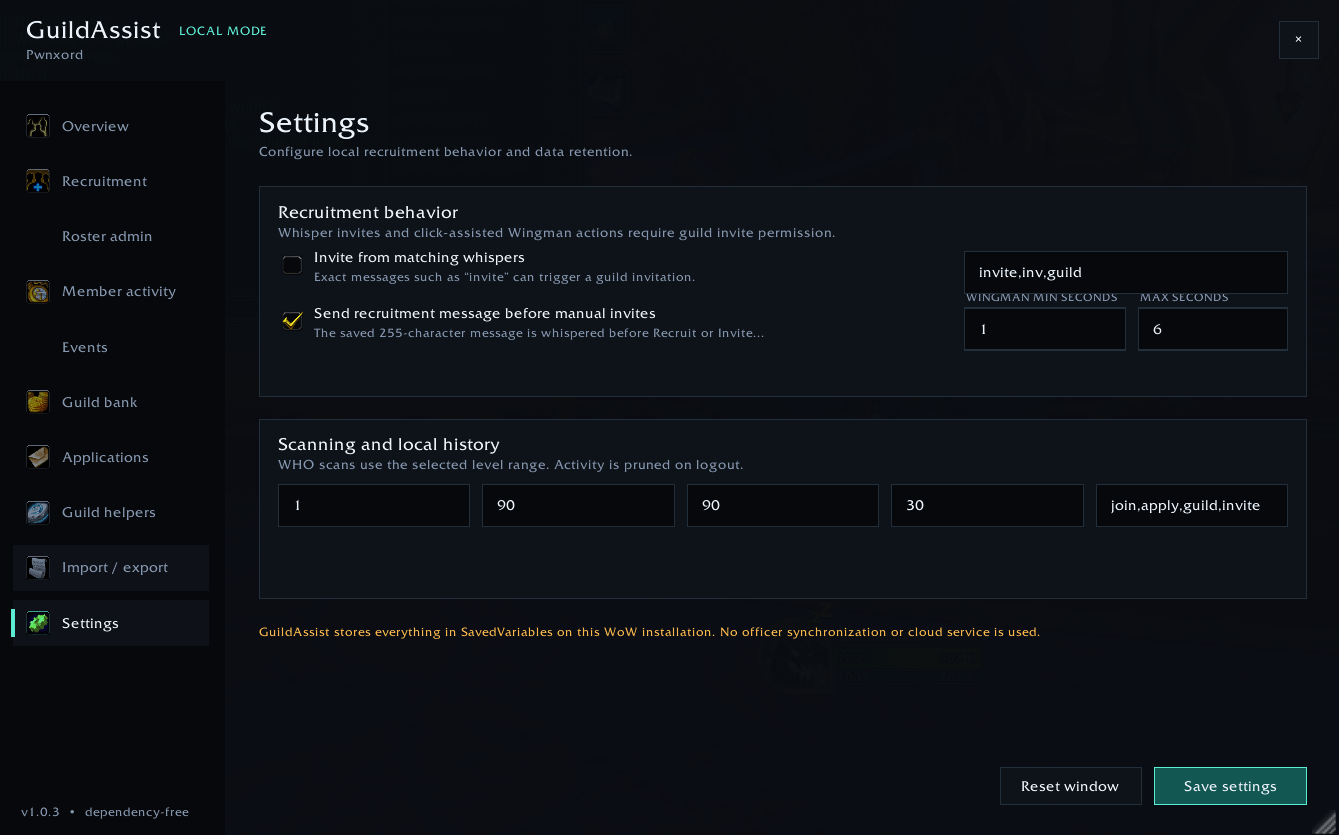
Open Settings and review:
- Message + immediate invite — sends the saved recruitment whisper and immediately requests the guild invitation from the same click.
- Queue matching invite requests — turns exact incoming keywords such as
inviteinto queued, one-click invitations. - Wingman minimum and maximum seconds — controls the randomized delay between successful Wingman steps.
- Minimum between whispers — prevents recruitment whispers from being sent too closely together.
- Whispers per hour — limits recruitment messages within a rolling hour.
- Days before recontact — prevents another recruitment message to a recently contacted character.
- Whisper and application keywords — controls invite-request and application detection.
- Scan level range, activity retention, and inactivity thresholds.
Select Save settings after making changes.
3. Write your recruitment message
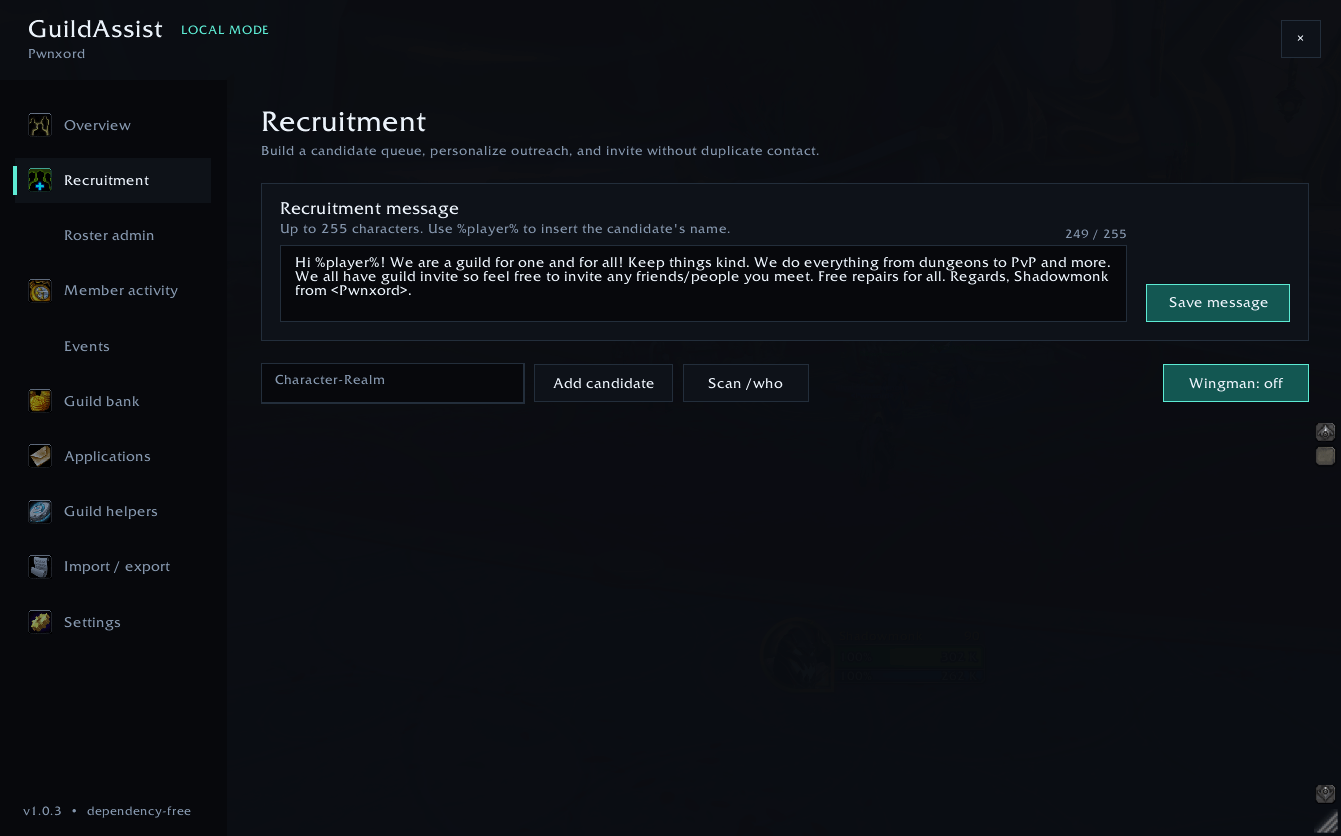
Open Recruitment, enter a message of up to 255 characters, and select Save message.
Use %player% to insert the candidate's short character name:
Hi %player%! We're recruiting friendly players for events, group content, and an active community. We'd love to have you join us!Keep recruitment messages respectful, concise, and appropriate for your realm community.
4. Add candidates
Candidates can be added by:
- Entering
Character-Realmand selecting Add candidate. - Selecting Scan /who.
- Entering
/ga scan. - Receiving an exact configured invite-request whisper.
Select Recruit beside a normal candidate to send the rate-limited message and immediate guild invite. Use Skip to remove the candidate from the active queue or Blacklist to prevent the same normalized character name from being queued again.
5. Create a backup
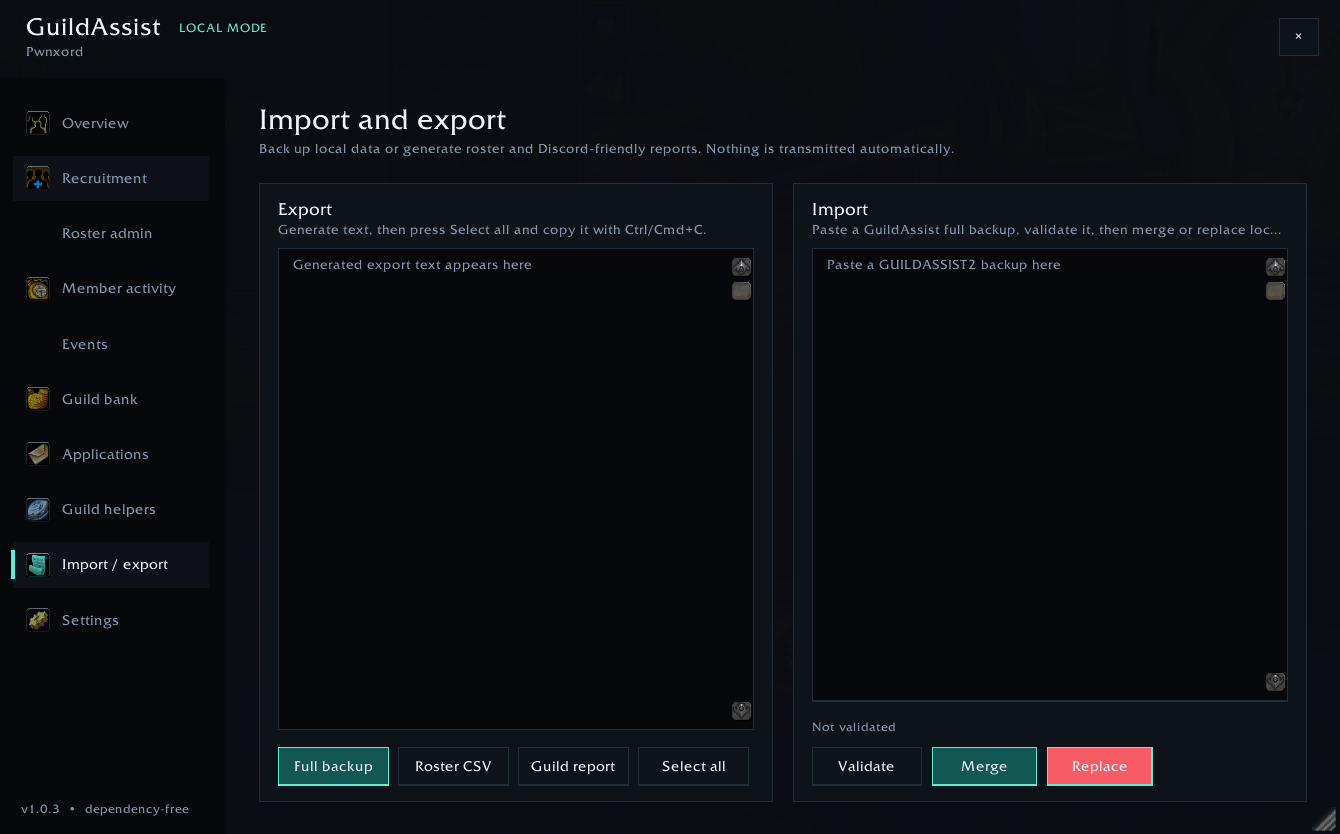
Open Import / Export, select Full backup, choose Select all, and copy the generated text somewhere safe.
Complete User Guide
Overview
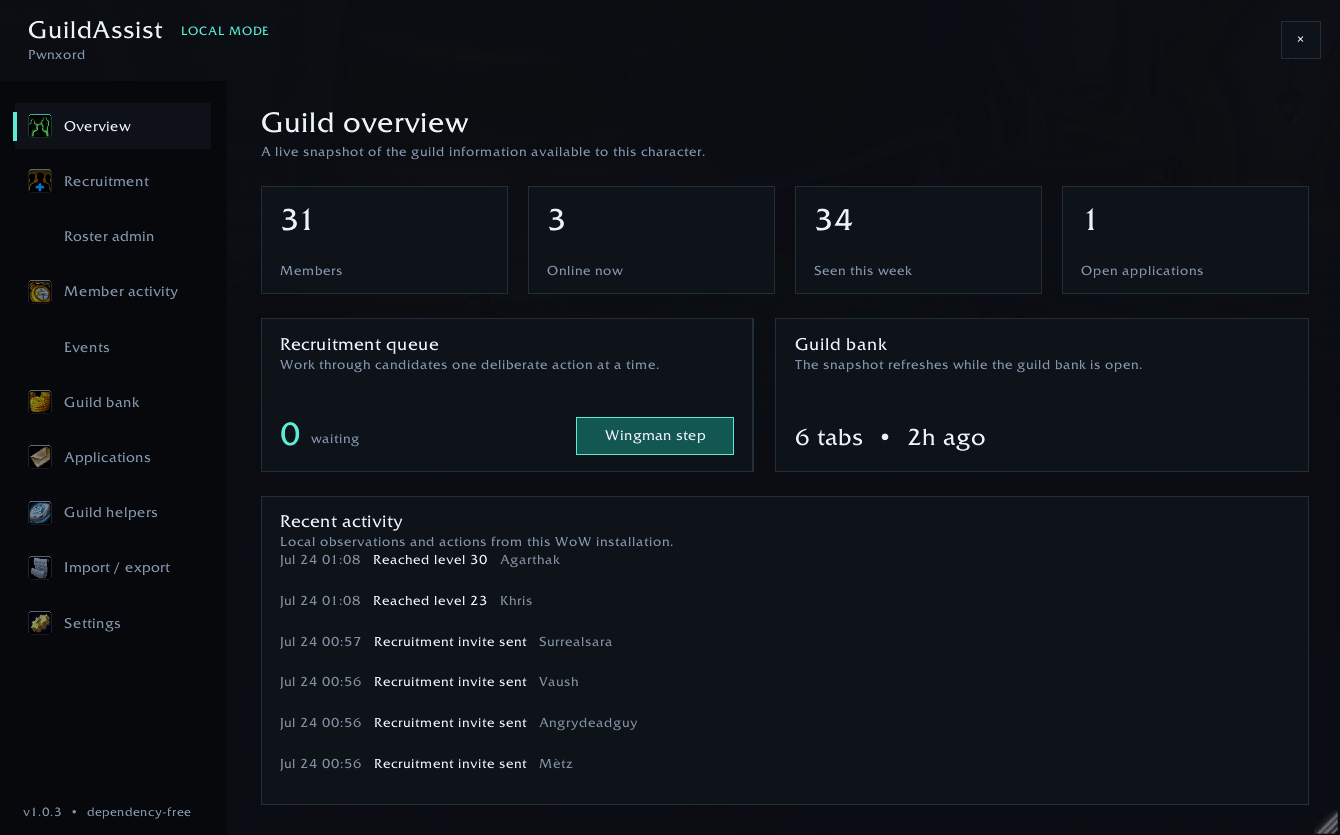
The Overview page provides a compact summary of information available to the current character:
- Total guild members.
- Members currently online.
- Members observed during the last week.
- Open applications.
- Current recruitment-queue size.
- Guild-bank snapshot age and tab count.
- Recent locally recorded activity.
- A manual Wingman step button.
The overview is a convenience dashboard. GuildAssist does not upload or compare these statistics against other guilds.
Recruitment
The Recruitment page is the main workspace for finding and contacting prospective members.
Recruitment message
- Maximum length: 255 characters.
%player%is replaced with the candidate's short character name.- The saved message is used by Recruit buttons,
/ga invite, and Wingman when Message + immediate invite is enabled.
Candidate queue
Each queue entry can contain the candidate's:
- Character name and realm.
- Source, such as manual entry,
/who, or an incoming invite request. - Class, level, and zone when returned by World of Warcraft.
- Added, contacted, requested, and invitation state where applicable.
Queue actions:
- Recruit — sends the saved whisper and immediately requests one guild invitation.
- Invite — shown for someone who explicitly requested an invitation or whose message was already sent; sends only the guild invitation.
- Skip — removes the entry from the active queue without blacklisting it.
- Blacklist — removes the entry and prevents it from being added again under the same normalized character name.
If a whisper succeeds but the invitation API is unavailable, GuildAssist keeps the candidate queued. The next attempt sends only the invitation and cannot repeat the recruitment whisper.
Background /who searches
GuildAssist can request guildless players in the configured level range. Searches are routed away from Blizzard's Social UI when the current client supports that behavior.
GuildAssist also attempts to hide a Friends/Who window opened unexpectedly by its own search. A Friends window that was already open before the request is preserved.
World of Warcraft applies server-side /who throttling. Results may be delayed or may time out, especially when searches are repeated quickly.
Exact-keyword invite requests
When Queue matching invite requests is enabled, an incoming whisper must match a configured keyword after normalization. For example:
invite
inv
guild
The incoming event does not invite automatically. It adds an invitation request to the queue, and the next valid player click can send the protected guild invitation.
This is separate from application detection, which can use broader whole-term keyword matching to create an application record.
Wingman
Wingman is a player-assisted queue runner. It does not use a timer to recruit while you are away.
When enabled, GuildAssist creates a click-through input layer. Normal mouse clicks continue to the game, while eligible clicks can advance at most one recruitment step after the configured randomized delay has elapsed.
A Wingman step does one of the following:
- Processes the oldest valid queued candidate.
- Starts one background
/whosearch when the queue is empty and a search is available. - Does nothing when the queue is empty, the delay has not elapsed, a safety limit applies, or the current game state is restricted.
Enabling and disabling Wingman
Use the Recruitment page or:
/ga wingmanWingman is session-scoped and starts disabled after login or /reload. If its click-through layer cannot be prepared safely during combat, it is shown as armed and starts when combat ends. Toggle Wingman again to cancel an armed session.
To stop Wingman immediately, use /ga wingman again.
Timing
The default randomized interval is 12–20 seconds after each successful step. The configurable range is 5–60 seconds.
Recruitment-whisper limits are checked separately. With the defaults, messages must be at least 15 seconds apart and cannot exceed 20 within a rolling hour.
Restricted content
When World of Warcraft reports chat-messaging lockdown:
- Wingman cannot be enabled.
- An active or armed Wingman is disabled.
- No candidate is consumed or reordered by the refused step.
- The Recruitment control displays Wingman: locked.
GuildAssist reports:
Sorry, wingman mode does not work in certain instanced content.
Incoming whispers may also be hidden from addons in restricted situations. GuildAssist ignores secret message or sender values rather than attempting to process them.
Roster
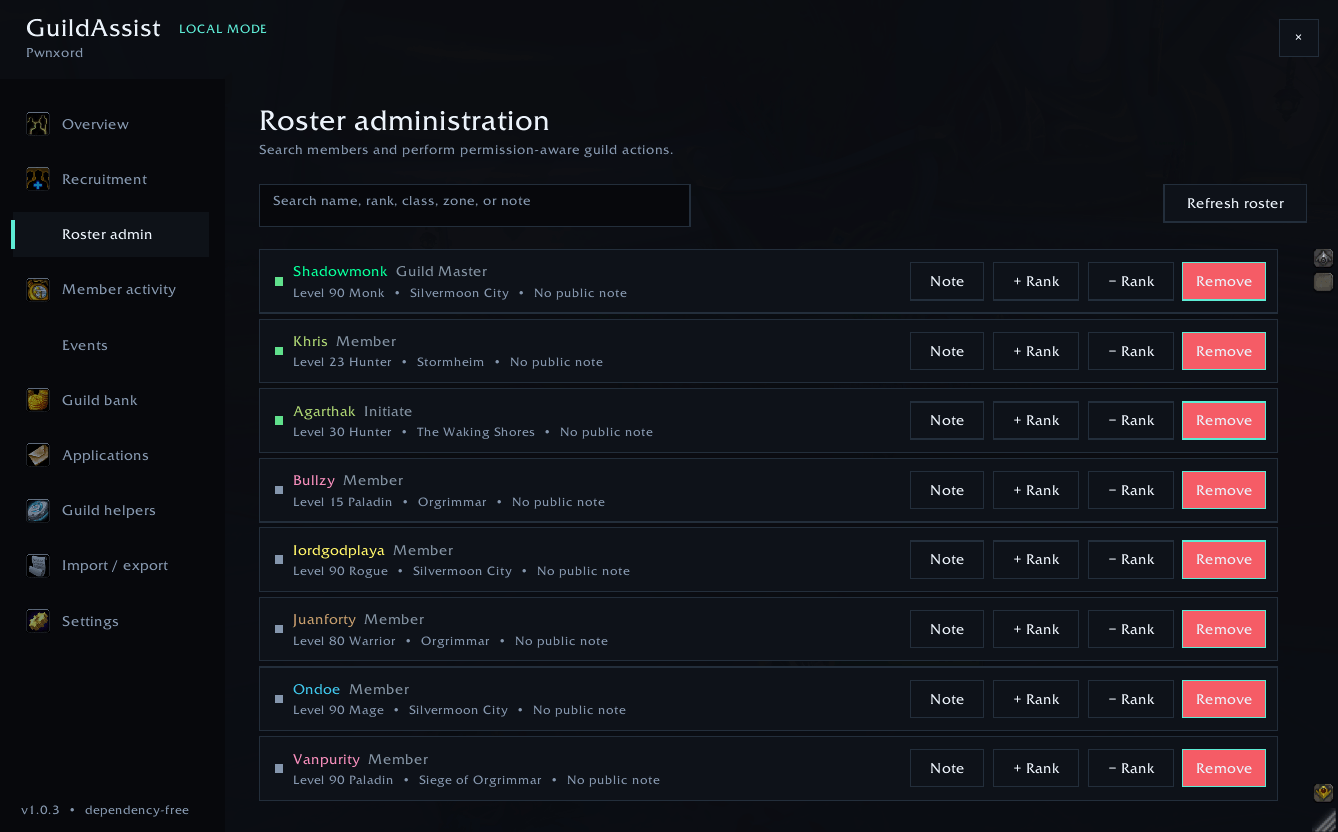
The Roster page displays the current guild roster, including offline members when World of Warcraft exposes them.
You can:
- Search member names and available roster information.
- Review rank, class, level, online state, zone, and guild notes.
- Refresh the roster.
- Promote or demote authorized members.
- Remove a member after confirmation.
- Left-click Note to edit the public guild note.
- Right-click Note to edit the officer note when permitted.
GuildAssist resolves the current roster record again immediately before an action. This reduces the risk of acting on a stale row after the roster changes.
Guild permissions and Blizzard's protected-action rules still determine whether an operation is allowed. GuildAssist also blocks self-removal and checks relevant combat restrictions.
Member Activity
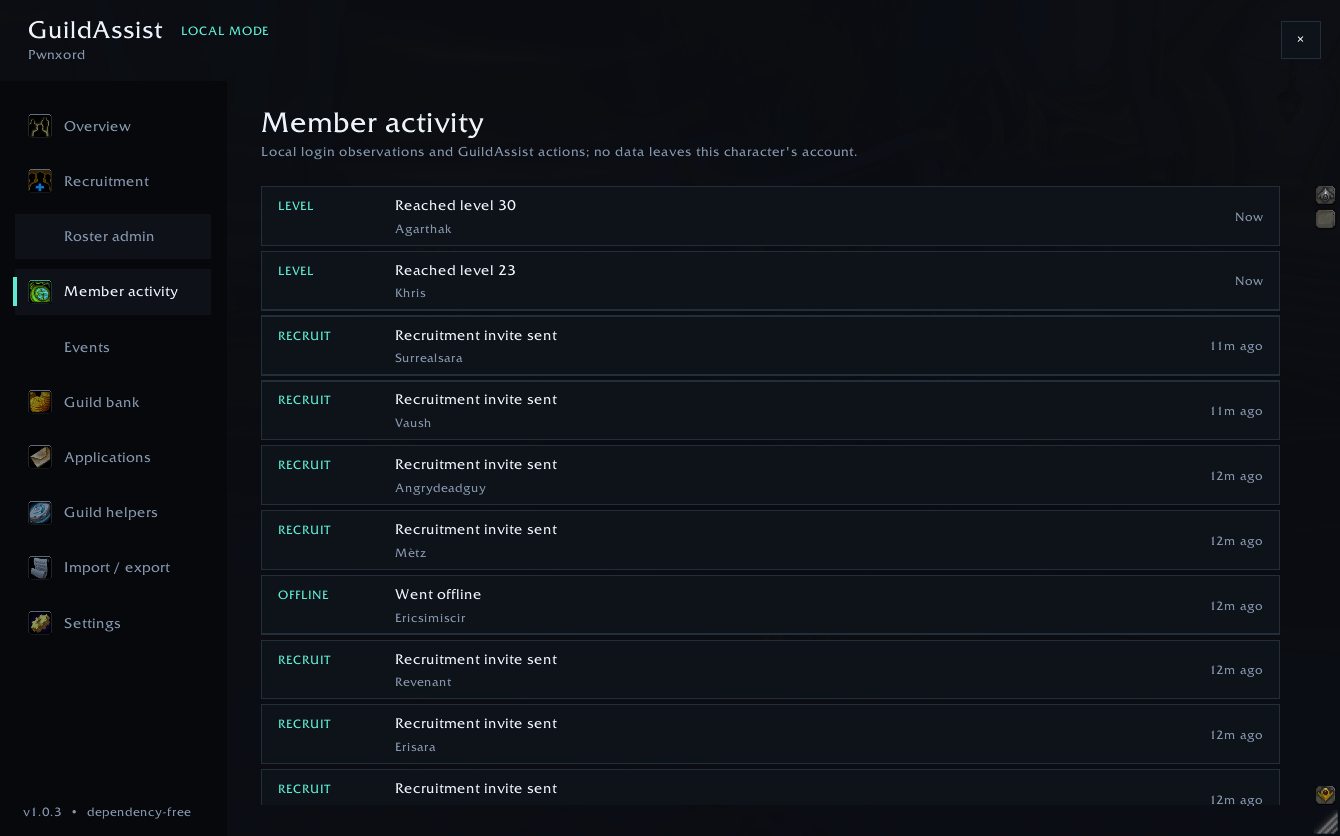
GuildAssist records locally observable roster changes and actions performed through the addon. The activity feed may include:
- Newly observed members.
- Confirmed departures.
- Online and offline changes.
- Rank and level changes.
- Public and officer-note changes.
- Recruitment contacts and invitations.
- Applications, events, announcements, welcomes, profiles, and administrative actions.
Departure detection uses repeated stable roster observations to reduce false reports from incomplete roster responses.
Activity records are local observations, not an authoritative Blizzard audit log. Events that occur while your installation is offline may be unavailable or inferred from the next stable roster snapshot.
Events
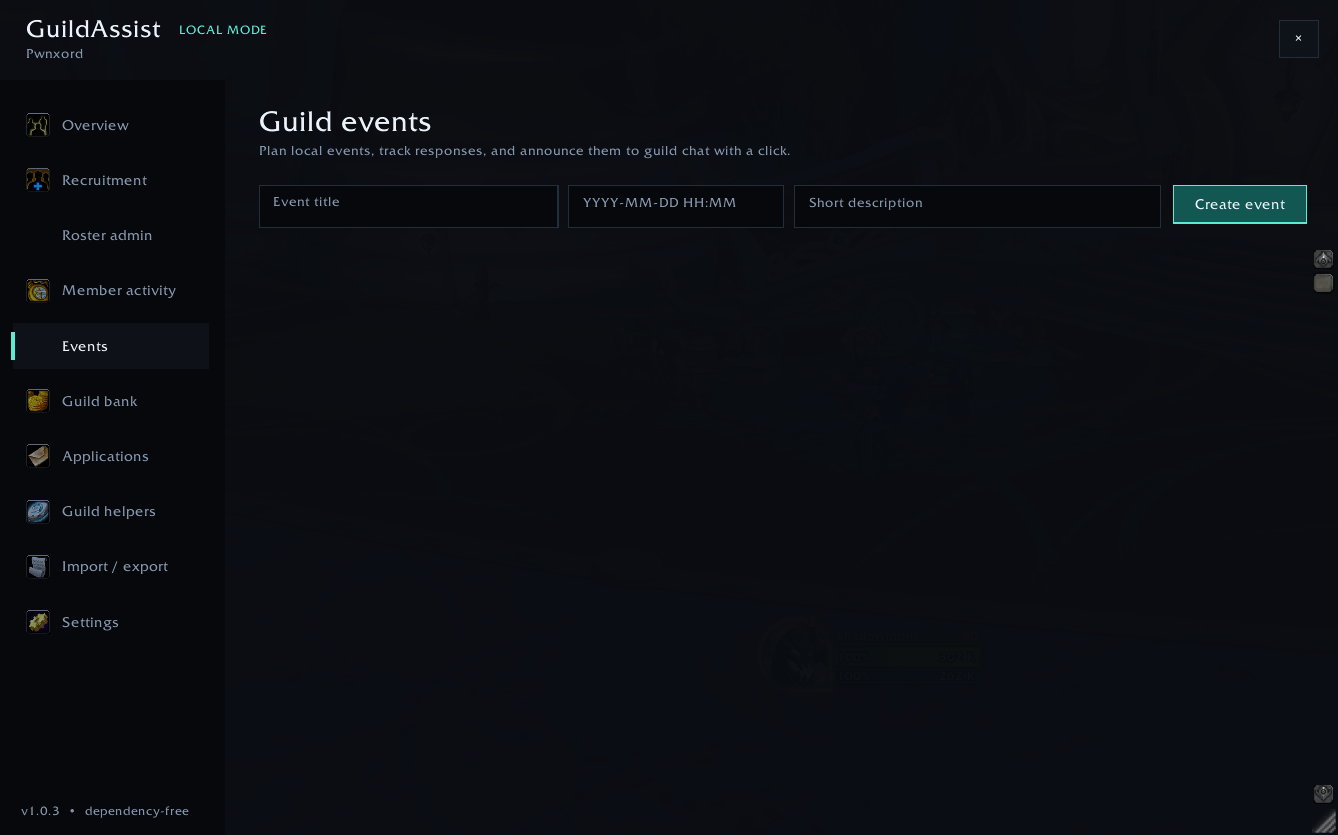
The Events page stores local event reminders that can be announced to guild chat.
Create an event with:
- A title.
- A local date and time.
- A short description.
The required date format is:
YYYY-MM-DD HH:MMExample:
2026-08-21 20:30GuildAssist rejects impossible dates, invalid leap days, hour 24, and normalized overflow values. Select Announce to post a shortened event message to guild chat, or Delete to remove the local event after confirmation.
These are GuildAssist-local events; they do not create entries in Blizzard's guild calendar.
Guild Bank
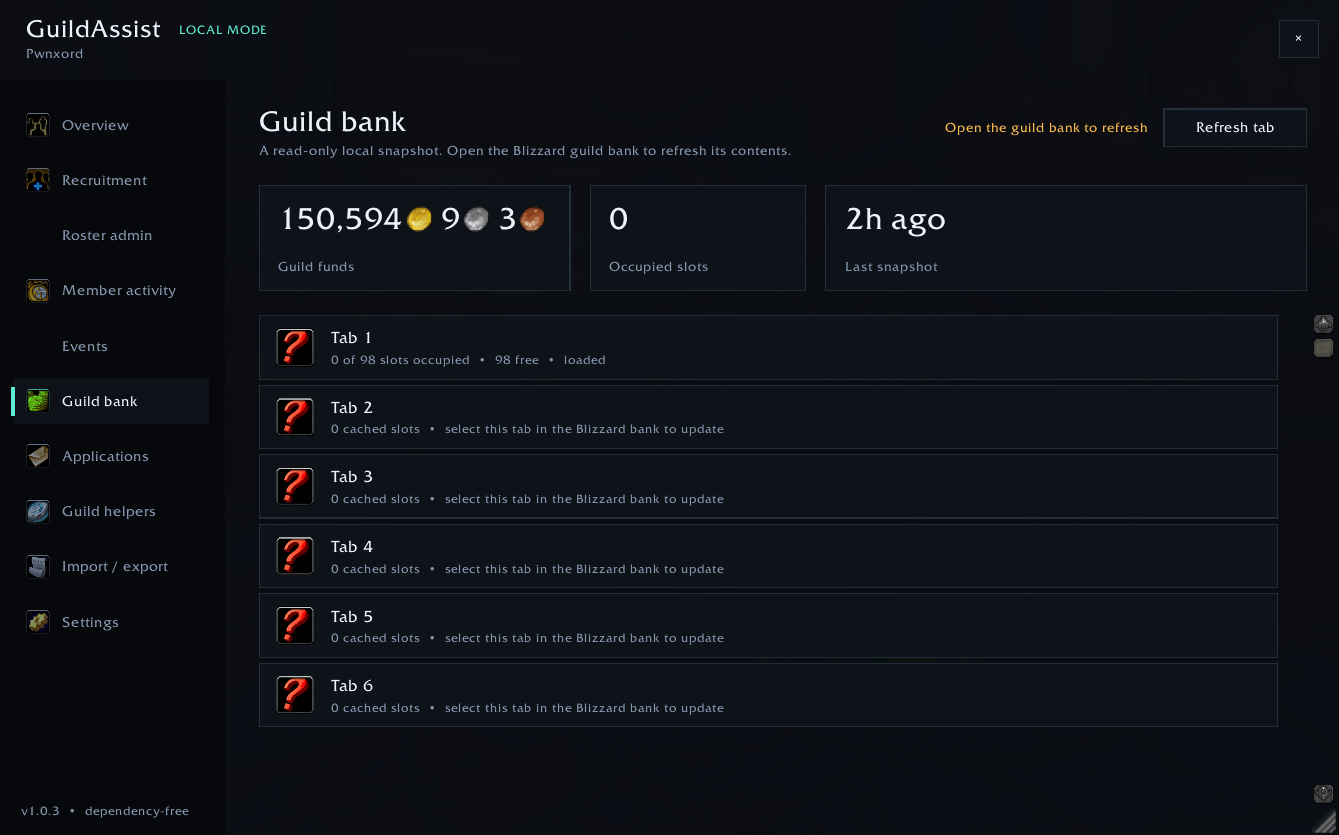
The Guild Bank page provides read-only local snapshots. GuildAssist never moves, deposits, withdraws, or deletes bank items.
The page shows:
- Guild funds from the latest available snapshot.
- Total occupied slots across cached tabs.
- Snapshot age.
- Per-tab view permission, loaded state, occupied slots, and cached slot totals.
- Live connection and loading status.
Refreshing a tab
- Open Blizzard's guild bank.
- Select the desired bank tab.
- Wait for World of Warcraft to expose its contents.
- Open GuildAssist → Guild Bank.
- Select Refresh tab if another request is needed.
World of Warcraft only exposes fresh guild-bank contents during a valid bank interaction. GuildAssist preserves previously cached tabs instead of incorrectly replacing an unloaded tab with an empty snapshot.
Applications
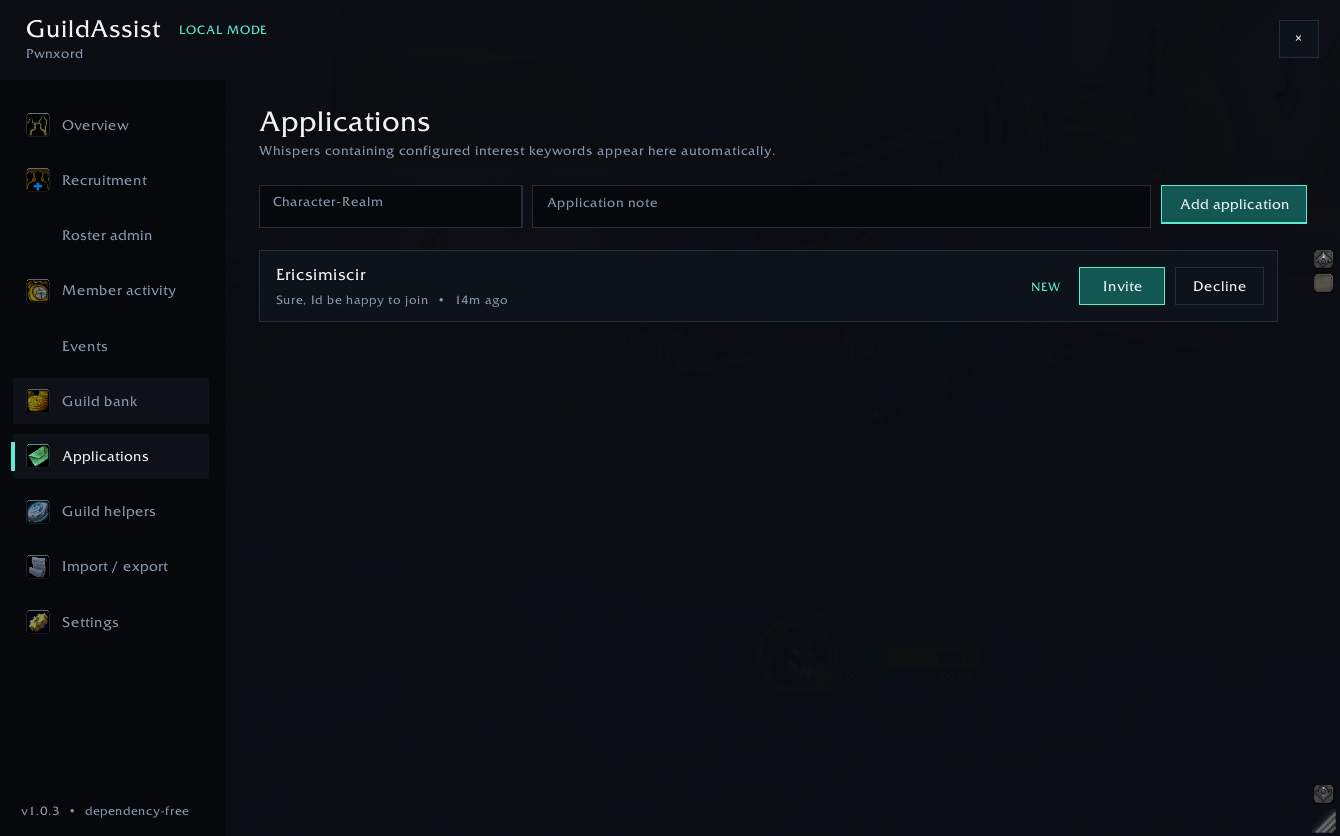
Applications can be created manually or from incoming whispers containing configured whole-term application keywords.
You can:
- Add a character and application note manually.
- Review the latest message and current status.
- Invite a new applicant with one click.
- Decline an application.
The Invite action on an application sends the guild invitation directly; it does not send the general outbound recruitment message first. An application is marked accepted only after GuildAssist successfully requests the invitation.
Application records remain local and are included in full backups.
Guild Helpers
Guild health
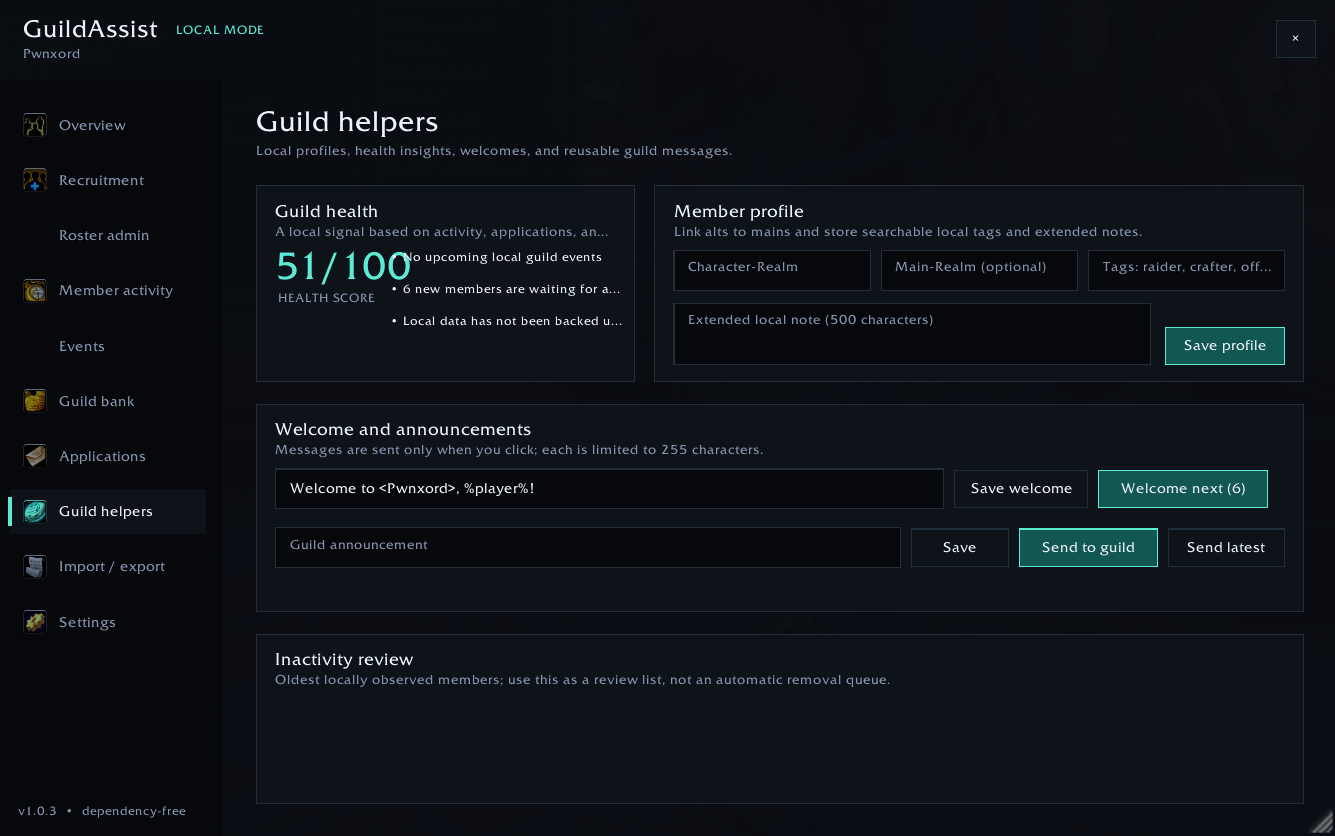
GuildAssist calculates a lightweight local health signal using available roster activity, inactivity, open applications, upcoming local events, welcome-queue entries, and backup age.
The score and action list are organizational prompts—not an external ranking or judgment of guild quality.
Member profiles
Local profiles can store:
- A character-to-main link.
- Searchable tags up to 120 characters.
- An extended local note up to 500 characters.
These fields do not alter Blizzard's public or officer guild notes.
Welcome queue
When GuildAssist confirms a newly joined member, it adds that character to a local welcome queue.
- Save a welcome message up to 255 characters.
- Use
%player%for personalization. - Select Welcome next to send one guild-chat welcome.
- The queue entry is removed only after the message request succeeds.
Announcements
Write a message up to 255 characters, then:
- Select Save to retain it locally.
- Select Send to guild to send the current message.
- Select Send latest to send the most recently saved announcement.
Announcements are never posted automatically on a repeating timer.
Inactivity review
GuildAssist lists the oldest locally observed offline members using the threshold configured in Settings. This is a review aid only. It never removes inactive members automatically.
Import and Export
Full backup
A full GUILDASSIST2 backup can contain:
- Supported settings.
- Candidates, pending invite state, contacts, and blacklist records.
- Locally observed member history.
- Applications.
- Local event records.
- Announcements and the welcome queue.
- Profiles, tags, notes, and alt/main links.
- Activity history.
Backups use a checksum so incomplete or modified text can be rejected before import.
Import workflow
- Paste a complete GuildAssist backup into the Import field.
- Select Validate.
- Review the record count and guild name.
- Select Merge or Replace.
Import modes:
- Merge adds compatible records and retains newer local map records where timestamps are available.
- Replace replaces supported GuildAssist collections after confirmation.
Create a fresh backup before using Replace. Imported data is limited to known record types, validated, type-repaired, size-limited to 1 MB, and capped at 10,000 records. Imports never execute Lua code.
Wingman and exact-keyword invite-request handling are disabled after every import.
Other exports
- Roster CSV provides a spreadsheet-friendly roster with current and local profile information.
- Guild report generates a concise Markdown health summary suitable for Discord, forums, or leadership notes.
Nothing is transmitted automatically. You decide whether and where to copy exported text.
Settings
Recruitment safety
| Setting | Purpose | Default |
|---|---|---|
| Queue matching invite requests | Converts exact incoming keywords into queued invitations | Off |
| Message + immediate invite | Sends the saved whisper and guild invite from one click | On |
| Wingman minimum / maximum | Randomized delay between successful Wingman steps | 12–20 seconds |
| Minimum between whispers | Minimum spacing between recruitment messages | 15 seconds |
| Whispers per hour | Rolling hourly recruitment-message cap | 20 |
| Days before recontact | Per-character duplicate-contact cooldown | 30 days |
Scanning and local history
- Minimum and maximum
/wholevels. - Activity-retention period.
- Inactivity-review threshold.
- Application-detection keywords.
Select Save settings to validate and store changes. Reset window restores the main window position without deleting guild records.
Interface and Navigation
GuildAssist uses a custom dark interface with dedicated pages for each management area.
- Open or close it with
/gaor the minimap launcher. - Select a page from the left sidebar.
- Drag the header to move the window.
- Drag the lower-right resize handle to change its dimensions.
- Use
/ga resetif the saved position becomes inconvenient. - Window position and dimensions are saved locally.
- On displays smaller than the logical 960 × 700 layout, GuildAssist scales the complete window to remain on-screen.
- Large roster and history lists create only the visible rows to reduce interface overhead.
- Inputs, buttons, cards, scrollbars, and bounded row text use consistent spacing to reduce overlap.
GuildAssist uses World of Warcraft's standard fonts, tooltips, confirmation dialogs, and key-binding system where appropriate. Visual results can still vary with unusual UI scales, resolutions, font replacements, and other addons that modify shared Blizzard UI elements.
Commands and Key Binding
| Command | Description |
|---|---|
/ga |
Open or close GuildAssist. |
/ga help |
Print the command summary. |
/ga scan |
Start one background /who search. |
/ga invite Character-Realm |
Add and immediately process one candidate using the configured recruitment mode. |
/ga wingman |
Enable or disable Wingman when permitted. |
/ga export |
Open GuildAssist directly to Import / Export. |
/ga reset |
Restore the main-window position. |
Every command also accepts the full /guildassist prefix.
You can assign Run next Wingman action under World of Warcraft's Key Bindings → AddOns → GuildAssist section.
How Recruitment Works
With the default Message + immediate invite setting, one Recruit action follows this sequence:
- Normalize and validate the character name.
- Reject blacklisted candidates.
- Check chat lockdown, minimum message spacing, the rolling hourly cap, and the per-character recontact cooldown.
- Personalize and send the supported recruitment whisper.
- Record the message attempt in persistent safety history.
- Immediately request one guild invitation from the same player click.
- Store contact and activity history and remove a successfully processed candidate from the active queue.
If the message is sent but the invitation API is unavailable, GuildAssist stores a pending invite state. The next click begins at step 6 and cannot repeat the whisper.
When Message + immediate invite is disabled, Recruit actions send the guild invitation without the general recruitment whisper.
Privacy and Data Storage
GuildAssist is local-first:
- No external account.
- No companion application.
- No telemetry or analytics.
- No advertising.
- No automatic uploads.
- No cloud database.
- No automatic officer synchronization.
- No Ace, LibStub, or other addon-library dependency.
Records are stored in the account-level GuildAssistDB SavedVariables table and separated into guild-scoped datasets. Characters in different guilds do not share the same active guild-management records.
Another officer running GuildAssist has a separate local database. Use exported backups when you intentionally want to transfer records.
Safety and Blizzard Restrictions
GuildAssist assists with organization and player-initiated actions. It does not attempt to bypass protected functions, chat lockdown, permissions, or server throttling.
Important limitations:
- Guild invitations and
/whosearches may require direct hardware input. - Wingman performs no recruitment work when the player stops clicking.
- One Wingman click advances at most one recruitment or search step.
- Guild permissions remain authoritative.
- Some guild actions are unavailable during combat.
- Restricted instances can disable addon chat messaging and hide incoming whisper values.
- Server-side chat and
/whothrottles are controlled by Blizzard. - Other players can still report messages they consider unwanted.
The built-in limits reduce accidental bursts and duplicate outreach, but they cannot guarantee that messages will be delivered or that recruitment activity will never receive reports or enforcement. Configure conservative limits and follow Blizzard's current policies and your realm community's expectations.
GuildAssist never performs unattended bulk removals, automatic inactivity removals, bank mutations, repeating public-channel advertisements, or executable imports.
Troubleshooting
GuildAssist does not appear in the addon list
- Confirm you installed the folder under
_retail_/Interface/AddOns/. - Confirm
GuildAssist.tocis directly inside theGuildAssistfolder. - Confirm the addon is enabled for the character.
- Restart World of Warcraft after changing addon files.
Wingman says it is locked
Blizzard has activated chat-messaging lockdown in the current content. GuildAssist disables Wingman and preserves the queue. Leave the restricted content and enable Wingman again when the restriction ends.
Wingman says it is armed
The click-through layer could not be prepared safely during combat. It will start when combat ends. Enter /ga wingman again to cancel it.
A candidate was not messaged
Check whether:
- The recruitment message is empty.
- The minimum whisper interval is still active.
- The rolling hourly cap has been reached.
- The character was contacted within the configured recontact period.
- The character is blacklisted.
- Chat messaging is restricted in the current content.
A candidate was messaged but not invited
Check whether:
- You are currently in a guild.
- Your guild rank can invite members.
- The full character and realm name are correct.
- Blizzard blocked or delayed the protected action.
GuildAssist retains a message-sent candidate as a pending invite when it can detect that the invite API is unavailable. The next Recruit or Wingman step retries only the invitation.
/who timed out or opened the Social window
World of Warcraft throttles /who requests. Wait and try again. Another addon or the Blizzard UI may also be issuing searches or opening the Social frame.
Guild-bank tabs are missing or stale
Open Blizzard's guild bank and select each tab you want to refresh. GuildAssist cannot read fresh contents for a tab that World of Warcraft has not exposed during the current bank visit.
An incoming application was not detected
- Confirm the sender and message were visible to addons.
- Review the comma-separated application keywords.
- Keywords match normalized whole terms, not arbitrary text fragments.
- Restricted content may expose incoming chat values as secret.
An import was rejected
Select Validate and review the reported checksum, schema, size, record-count, or formatting error. Recopy the complete backup if its checksum does not match.
The window is off-screen
/ga resetThis restores the window position without deleting GuildAssist records.
Lua errors appear after updating
- Confirm the old addon folder was fully replaced with the current release.
- Disable other guild or recruitment addons temporarily to test for conflicts.
- Enable Lua error details with:
/console scriptErrors 1- Reload the interface and retain the complete first error for a bug report.
Frequently Asked Questions
Does GuildAssist require a candidate to reply before inviting them?
No. With Message + immediate invite enabled, GuildAssist sends the recruitment whisper and immediately requests the guild invitation from the same player click.
Does Wingman recruit while I am away?
No. Wingman only advances when it receives real player input and its configured timing and safety checks permit a step.
Does GuildAssist automatically invite from an incoming chat event?
No. An exact matching keyword creates a queued invite request. A later player click sends the protected invitation.
Does it automatically remove inactive members?
No. Inactivity is a review list only. Removal requires an authorized action and confirmation.
Can it read the guild bank from anywhere?
No. Fresh bank data is available only while interacting with Blizzard's guild bank. GuildAssist retains read-only local snapshots afterward.
Does it replace Blizzard's guild calendar?
No. GuildAssist events are local reminders with a click-to-announce action.
Do multiple officers share data automatically?
No. Every installation has separate local data. Full backups can be copied manually when desired.
Are imported backups executable?
No. Imports use a constrained record format and never call load, loadstring, or execute embedded Lua.
Can one installation manage characters in different guilds?
Yes. GuildAssist separates active data by faction, realm, and guild.
Does it require Ace3 or another addon?
No. GuildAssist is dependency-free.
Who Is GuildAssist For?
GuildAssist is built for:
- Guild masters managing an active community.
- Officers handling roster administration.
- Recruiters building and processing candidate queues.
- Event organizers maintaining local reminders and announcements.
- Social guilds welcoming and organizing members.
- Progression guilds reviewing roster changes and activity.
- Communities that prefer private, local-first tools.
- Anyone who wants one focused guild workspace instead of several disconnected addons.
Final Notes
GuildAssist's goal is simple: reduce repetitive administration and give guild leadership one organized place to recruit members, manage the roster, review activity, maintain local events and applications, monitor guild-bank snapshots, and protect important records.
Recruit with purpose. Lead with clarity. Keep your guild moving forward.
The GuildAssist Team