


Guild Control Forever
1.png
2.png
3.png
4.png
Description
Description
Summary
Complete guild management: members, roster, Raid-Helper style raid sign-ups, achievements, professions, warnings and blacklist.
Description
GuildControl
GuildControl brings everything your guild needs to stay organized into a single window. Open it with /gct.
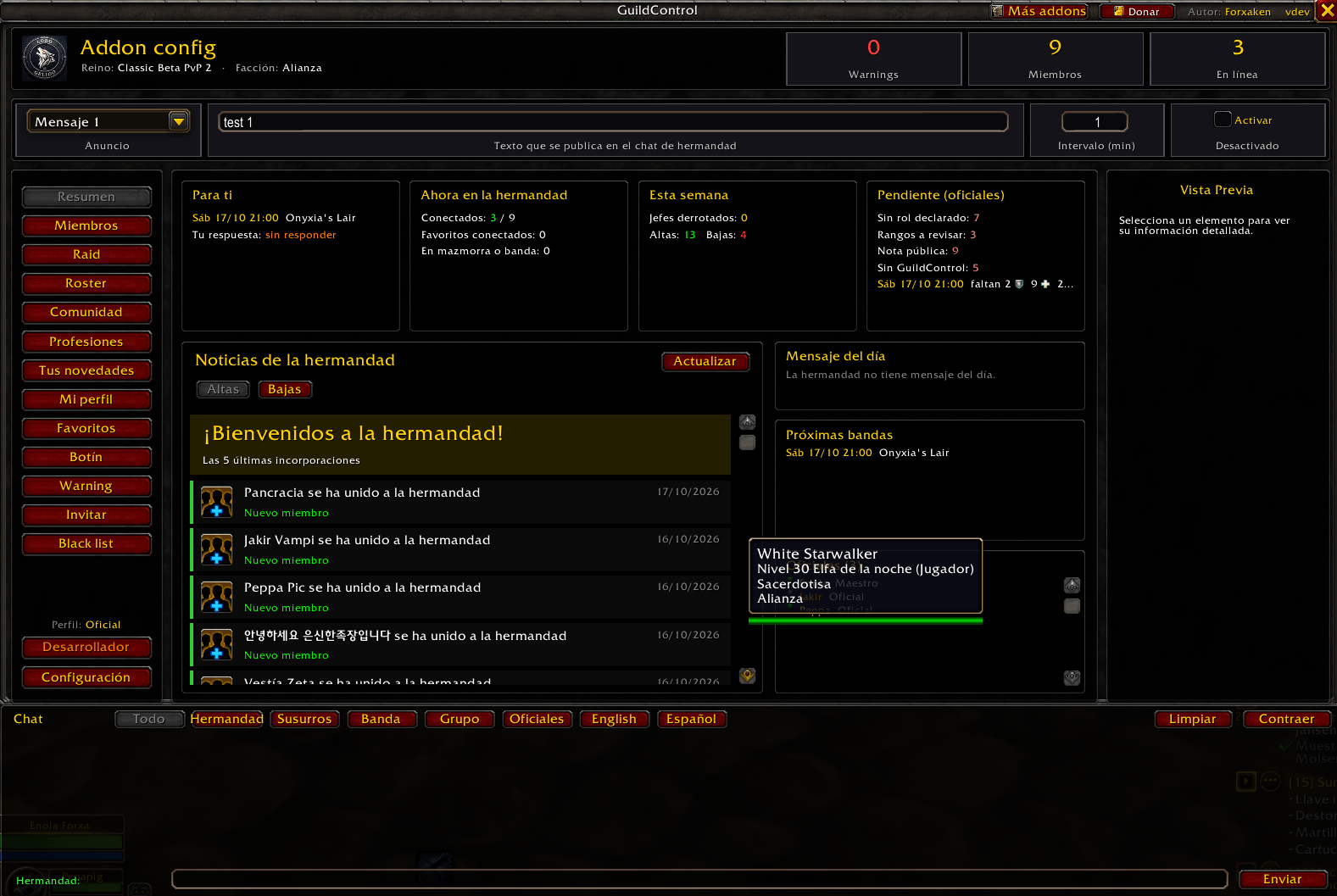
📰 Guild overview
A news feed grouped by week:
Achievements earned by members and by the guild, with a button that jumps to the achievement’s details.
Boss kills and loot, with item level and the raid or boss it drops from.
Members who joined or left.
Message of the day, upcoming raids, rosters and the list of officers.
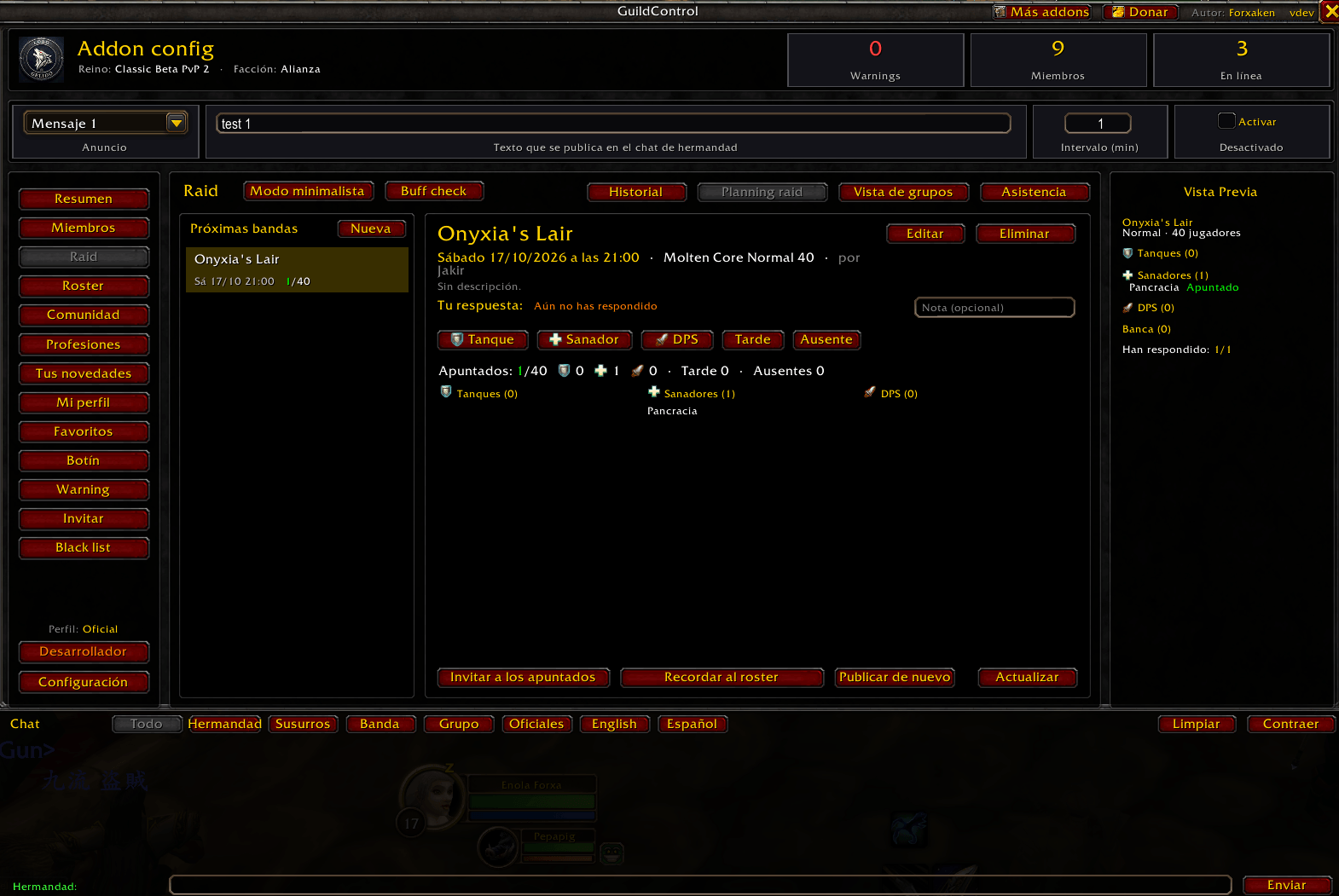
⚔️ Raid-Helper style raid sign-ups
- Officers create the raid: instance, difficulty, size, date, time and description.
- Each player signs up as Tank, Healer or DPS, or marks themselves as late, tentative, bench or absent.
- Group view: sort sign-ups into the 8 raid groups and apply them to your raid with one click.
- Invite everyone who signed up and remind players who haven’t answered yet.
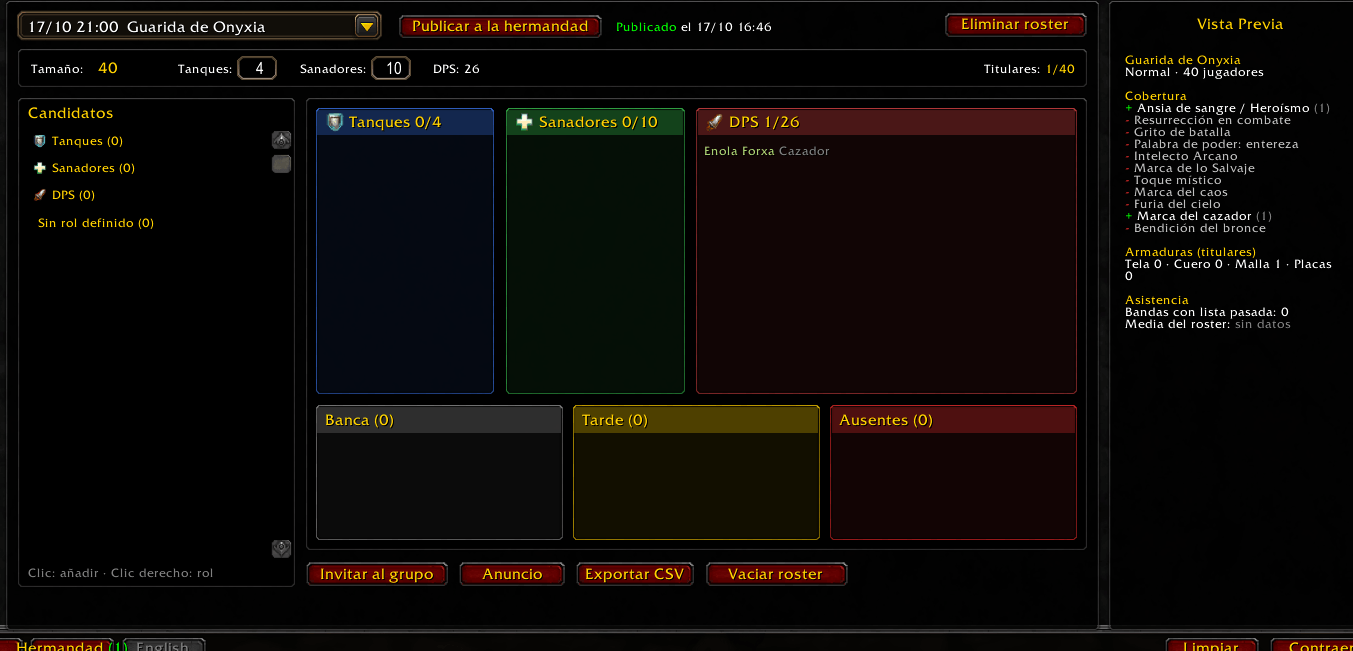
🛡️ Roster
- The list of players your guild counts on, organized by role.
- Raid utility coverage by class (Bloodlust, battle res, raid buffs) and armor type breakdown.
- Raid dates and attendance with a percentage per player.
- Share it so every player can see which rosters they’re in.
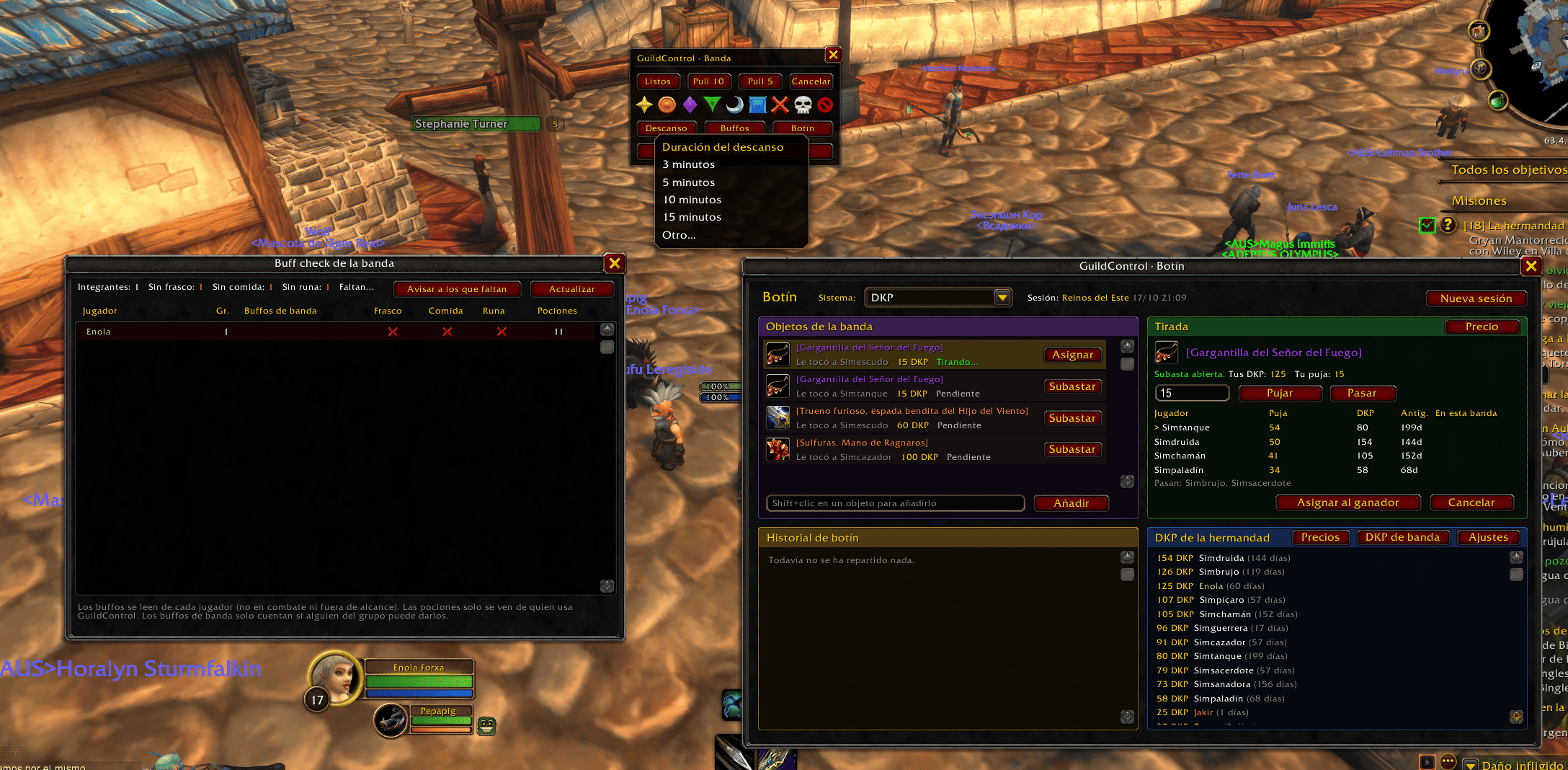
🎁DKP and +1 Loot Systems
- DKP System with Fixed Price or Auction
🤖Radi Assistant
- Minimalist mode with many features
- Enemy Marking, Rest Mode, Pulls, Buff Checker, and Ready Check.
🎭Favorites System
- Allows you to add friends to your favorites, with sound alerts and a dedicated interface.
📋Invite System
- Automatic and manual modes
- Edit recruitment messages with icons.
👤 My profile
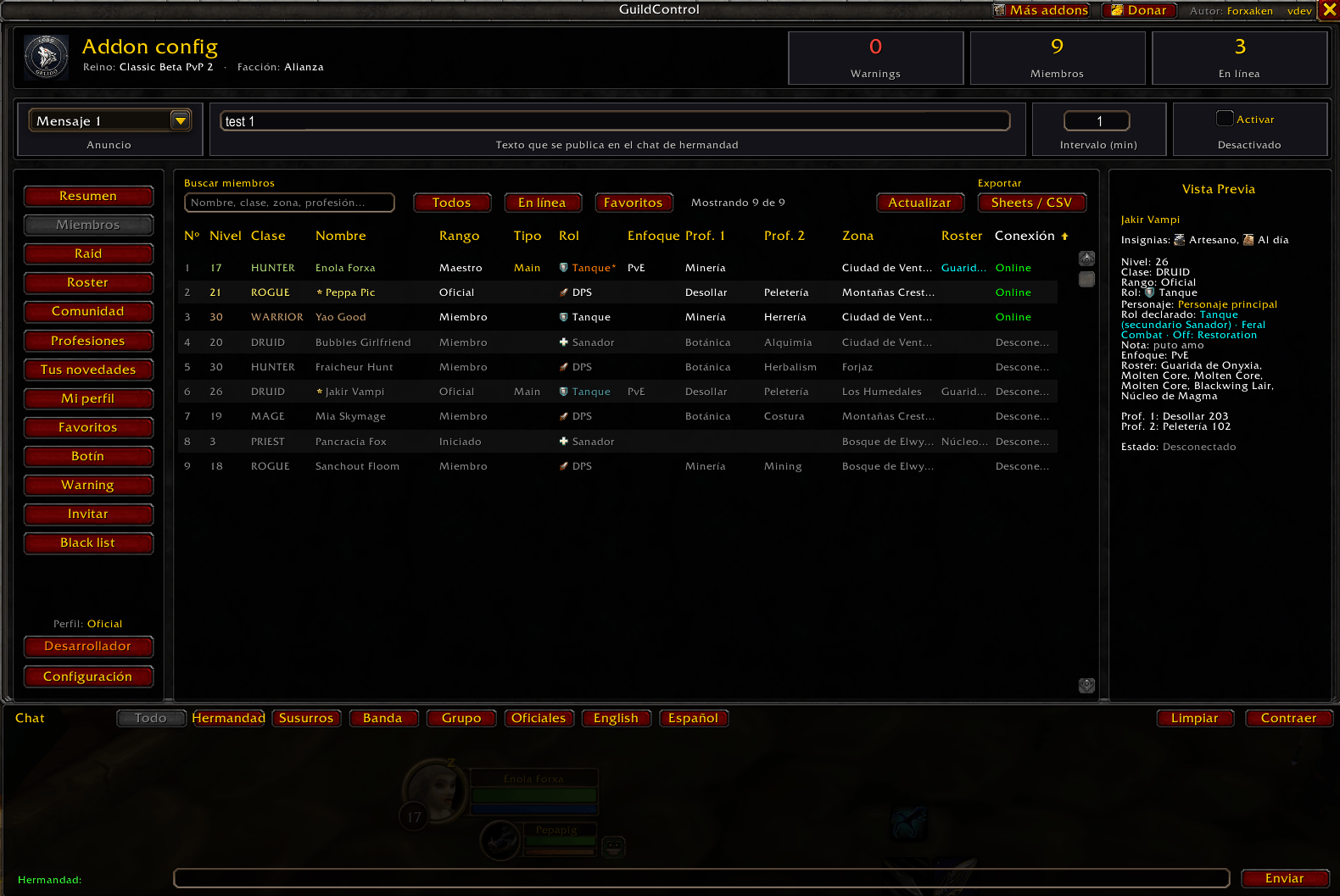
Each player sets, from inside the game:
- Main and secondary role.
- Specialization and off-spec, picked from their own class.
- Focus: PvE, PvP or Social.
- Whether this is their main or an alt.
Officers receive it automatically and see it in the member list.
🔥Internal Group Search
- Simple and easy to use.
- Request to join groups.
- Role-Based System
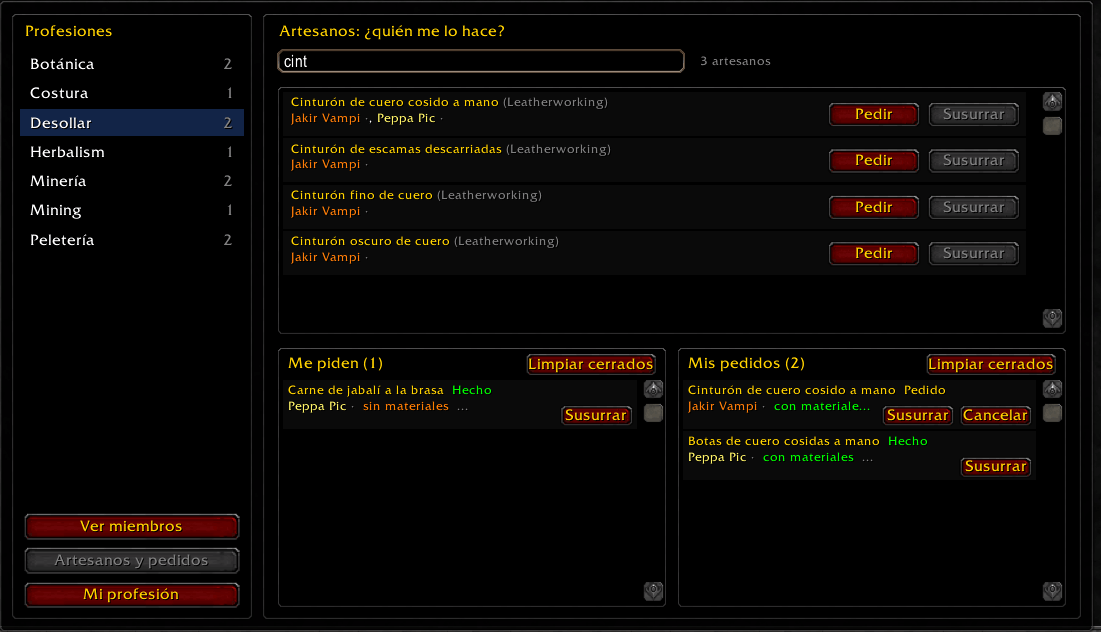
🛠️ Professions
- The Guild internal Artisan Ordering System.
- View the recipes owned by fellow members who have the add-on.
⚠️ Officer tools
- Warnings: inactive members, members without a declared role, orphaned alts, low attendance, ranks to review and public notes.
- Blacklist for ninjas, toxic players and the like. You get an alert when one joins the guild or your group, they’re flagged in their tooltip, and inviting them is blocked.
- Recruitment: editable recruitment messages, plus single or mass guild invites.
- Recurring guild chat announcements and CSV export for Google Sheets.
💬 And more
- Collapsible guild chat panel with per-person tabs.
- Optional auto-greet for members who just logged in (off by default).
- Officer and player profiles: everyone sees the tabs that matter to them.
Commands
| Comando | Acción |
|---|---|
/gct o /gctc |
Open or close the window |
/gct csv |
export panel |
/gct bajas |
History of members who left |
ℹ️ Good to know
- Shared data (roles, rosters, raids, keystones and the blacklist) only reaches players who also have GuildControl installed.
- if you find a bug, please leave a comment explaining what you were doing. An addon like BugSack helps you copy the full error.
Resumen en Español
Gestión completa de tu hermandad: miembros, roster, bandas con inscripciones al estilo Raid-Helper, logros, profesiones, Míticas+, avisos y lista negra.
Description
GuildControl LB
GuildControl reúne en una sola ventana todo lo que una hermandad necesita para organizarse. Ábrela con /gct.
📰 Resumen de la hermandad
Un tablón de noticias agrupado por semanas:
- Jefes derrotados y botín, con el nivel del objeto y de qué banda o jefe sale.
- Altas y bajas de miembros.
- Mensaje del día, próximas bandas, rosters y la lista de oficiales.
⚔️ Bandas al estilo Raid-Helper
- Los oficiales crean la banda: instancia, dificultad, tamaño, fecha, hora y descripción.
- Cada jugador se apunta como Tanque, Sanador o DPS, o indica si llega tarde o falta.
- Vista de grupos: reparte a los apuntados en los 8 grupos y aplícalos en la banda con un clic.
- Invita a todos los apuntados y avisa a quien aún no ha respondido.
🛡️ Roster
- La lista de jugadores con los que cuenta la hermandad, organizada por rol.
- Cobertura de utilidades por clase (Ansia de sangre, resurrección en combate, beneficios de banda) y reparto de armaduras.
- Fechas y asistencia con porcentaje por jugador.
- Compártelo para que cada jugador vea en qué rosters está.
🎁Sitemas de Loot DKP y +1
- Sistema DKP con precio Fijo o por subasta
🤖Ayudante de Raid
- Modo minimalista con muchas funcionalidades
- Marcado de Enemigos, modo descanso, pulls, Revisor de Buffos y ready check.
🎭Sistema de Favoritos
- Te permite añadir a favoritos a tus amigos, con avisos sonoros interfaz dedicada.
📋Sistema de invites
- modo automatico y manual
- edicion de mensajes de reclutamiendo con iconos.
👤 Mi perfil
Cada jugador indica desde el juego:
- Rol principal y secundario.
- Especialización y especialización off, elegidas entre las de su clase.
- Enfoque: PvE, PvP o Social.
- Si es su principal o un alter.
Los oficiales lo reciben solo y lo ven en la lista de miembros.
🔥Buscador de Grupos Interno
- Sencillo y facil de usar.
- Peticion de union a grupos.
- Sistema por Roles
🛠️ Profesiones
- Sistema Artesano de Pedidos interno de la hermandad.
- Vez las recetas que tienen los compañeros que tengan el addon.
⚠️ Herramientas para oficiales
- Warning: miembros inactivos, sin rol declarado, alters sin principal, baja asistencia, rangos a revisar y notas públicas.
- Lista negra: ninjas, tóxicos y similares. Avisa si entran en la hermandad o en tu grupo, los marca en el tooltip y bloquea invitarlos.
- Invitar: mensajes de reclutamiento editables e invitación individual o masiva.
- Anuncios periódicos en el chat de hermandad y exportación a CSV para Google Sheets.
💬 Además
- Chat de hermandad contraíble, con pestañas por persona,banda,grupo.
- Saludo automático opcional para quien acaba de conectarse (desactivado por defecto).
- Perfil de oficial y de jugador: cada uno ve las pestañas que le corresponden.
Comandos
| Comando | Acción |
|---|---|
/gct o /gctc |
Abre o cierra la ventana |
/gct csv |
Panel de exportación a CSV |
/gct bajas |
Historial de bajas |
ℹ️ Importante
- Lo que se comparte entre jugadores (roles, rosters, bandas, lista negra) solo llega a quien también tiene GuildControl instalado.
- Si encuentras un error, déjalo en los comentarios con lo que estabas haciendo. Un addon como BugSack ayuda a copiar el error completo.
Guild Control Forever Team
