
Guild Bazaar
- By
Guild Bazaar
A peer-to-peer guild material board, trade hub, and raid organizer for Burning Crusade Classic (2.5.x / Anniversary).
Stop scrolling back through /g to find out who needs what. Post it on the board and the whole guild can see it. No website, no login, no server: boards sync between guildmates who run the addon, over the in-game addon channel.
Heads-up — this is a work in progress. The Home dashboard, raids, guild needs, and the enchant/gem tracker are built and usable now. The Guild AH (Marketplace) is still being built out and gets a cleaner, icon-based redesign in a later update.
What it does
- Home dashboard — opens on a quick view of your next raid, the enchants and gems you've flagged, and your open requests. Click a card to jump to its tab.
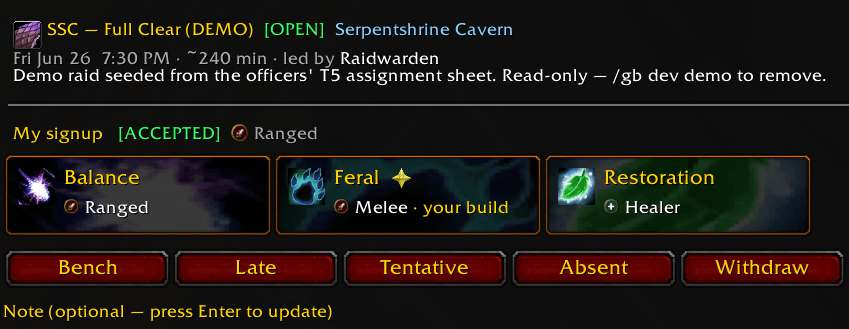
- Raid ops — a raid calendar, role and spec signups, per-boss assignment sheets, MRT-note export, a one-click "Copy roster for Discord," and a raid-night invite that pulls every accepted signup into the group.
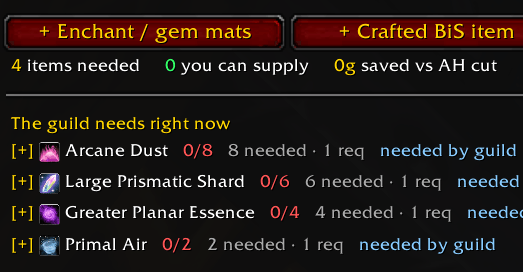
- Guild needs board — members post the mats, enchants, and gems they want, and the guild reads one pooled list of who needs what.
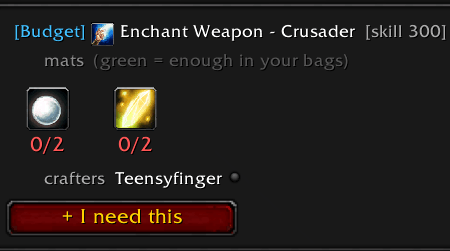
- Profession and recommendation browser — an Atlas-style list of TBC enchants and gem cuts. One-tap "I need this," best and budget picks per spec, and the guildmates who can make each one.
- Crafted BiS picker — flag the crafted gear you want and turn it into a material request.
- CoD assistant — pre-fills the mail and tags it for verification, so cash-on-delivery trades go through cleanly.
- Officer guild-bank fulfillment — officers review member requests, approve them, and mail the mats from the guild bank in a few clicks.
- Chat triggers — an optional scanner that spots lockbox and gem-cut requests in chat and points you at whoever can help. Mute anyone you'd rather not hear about.
- AH match alerts — slot an item at the Auction House and the addon flags it if a guildmate has a buy order out for it (and that a CoD trade skips the AH cut).
- Wears your guild's colors — the window and Home screen show your own guild's name automatically, so it feels like your guild's tool. Officers can set a custom display name.
- Guild AH / Trade board (work in progress) — buy, sell, craft, and service listings with prices. It works today, but the listing screens are still text-heavy; a cleaner, icon-based pass is coming in a later update.
No server, no website
Your data lives in your SavedVariables and syncs only with other addon users in your guild. Nothing to host, no account to make. Under the hood it's an append-only event log that reconciles with a weekly checksum, so everyone running the addon lands on the same boards. Solo, you'll see what's stored locally until another guildmate comes online to sync with. Guildmates who don't run the addon yet aren't shut out either: /gb share posts a needs-and-listings summary to guild chat.
Install
- Download and unzip into
World of Warcraft\_anniversary_\Interface\AddOns\. - Check that the folder is
Interface\AddOns\GuildBazaar, with the.tocdirectly inside it. - Restart the game, or enable it from the AddOns list at the character screen.
Commands
/gbor/guildbazaar— open the main window/gb needs,/gb requests,/gb browse— jump to a tab/gb share— post a needs-and-listings summary to guild chat (for guildmates without the addon)/gb sync— sync status (ledger size, peers, protocol version)/gb help— every command
Built on the Ace3 library suite (bundled). MIT licensed. Bug reports and suggestions are welcome.
Guild Bazaar Team
