Guild Bank Organizer
- By
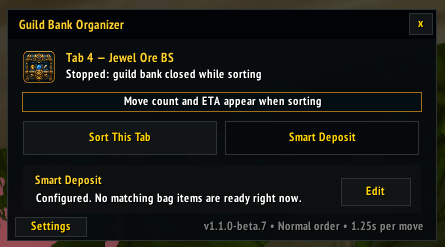
Main /GBO screen - auto opens with the guild bank.
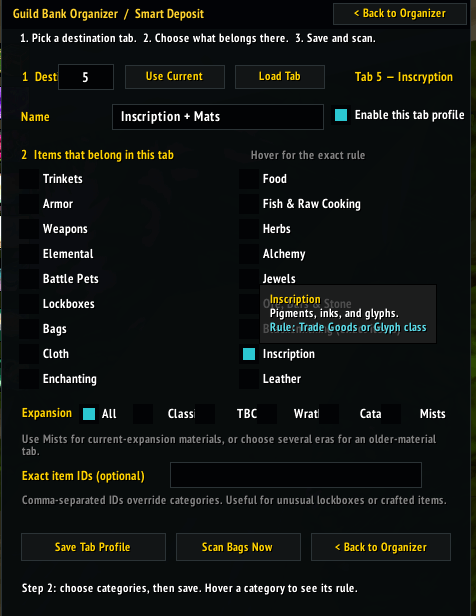
Assign multiple professions and expansion eras to each guild-bank tab.
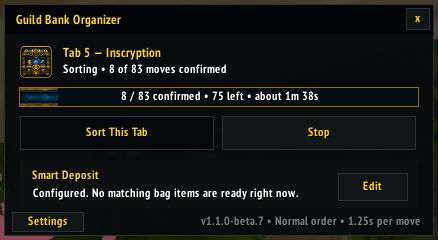
GBO will tell you how many steps are left and how long it will take to complete the sorting process.
Description
Guild-bank sorting and Smart Deposit for MoP Classic
Guild Bank Organizer helps keep your guild bank tidy with a compact panel beside World of Warcraft: Mists of Pandaria Classic's guild bank. Stack and sort the tab you are viewing, or deposit eligible items from your bags into the tabs you have configured. No required libraries or ElvUI dependency.
Organize the selected tab
Click Sort This Tab to combine matching partial stacks, close gaps, and sort items using familiar bag-style priorities such as quality, item type, equipment slot, item level, value, and name. Normal and reverse directions are available.
The panel shows confirmed moves, estimated work remaining, and an approximate completion time. Sorting respects MoP Classic's guild-bank movement limits and checks each move before continuing. Large jobs take time; progress stays visible through preparation, sorting, and final verification.
Send items to the right tabs
Smart Deposit lets you create a profile for each guild-bank tab. Pick multiple categories, filter them by expansion, and add exact item IDs for special cases. For example, assign Cloth and Enchanting to one tab, or Herbs, Alchemy, and Inscription to another.
Categories include equipment, basic materials, profession supplies, recipes, bandages, archaeology keystones, and Shared Crafting Reagents. Expansion filters cover Classic, The Burning Crusade, Wrath, Cataclysm, and Mists.
- Deposit This Tab moves eligible items assigned to the tab you are viewing.
- Deposit All Tabs routes eligible items to all enabled destination profiles.
- Nothing moves until you click a deposit action.
Scanning is visible as soon as the bank opens. The addon checks destinations needed by the items in your bags and can reuse a recent, unchanged preview when you click Deposit, reducing the wait before the first move.
Valid profile edits save automatically and survive /reload. Exact item IDs
take priority over category rules; expansion-specific routes take priority over
an All Expansions fallback. If two equally specific routes conflict, the addon
names the tabs and leaves the affected items in your bags.
Know what is happening
The organizer shows scanning, preparation, movement, waiting, and verification states. If you move a planned stack in your bags, it stops with an explanation while allowing any already-issued deposit to settle. Temporary locks or lack of space show a waiting status. Stop prevents further queued deposits and retries.
Operations check observed item state and tab permissions. Interrupted or unverifiable work is reported as incomplete rather than silently counted as done. For reliable results, leave your bags and bank alone during an operation and avoid having another player edit the same destinations.
Advanced → Category Reference lets you search classifications, look up exact item IDs, read category rules, and browse Shared Crafting Reagents. Copy Report provides troubleshooting details, even before the first run. Check Again rechecks the last operation from the current login session without moving items.
Getting started
- Install the addon and fully restart WoW after an update.
- Open your guild bank. Select a tab and click Sort This Tab to organize it.
- For deposits, open Set Up under Smart Deposit, choose a destination tab, select categories and expansion filters, and enable the profile.
- Return to the organizer, let the preview finish, then choose Deposit This Tab or Deposit All Tabs.
Existing Smart Deposit profiles are preserved when updating to 1.2.1.
Useful commands
/gbo— open the organizer/gbo sort— sort the selected tab/gbo deposits— open Smart Deposit setup/gbo scan— refresh bank and deposit information/gbo stop— stop the active operation/gbo report— open the copyable report/gbo verify— recheck the last operation without moving items/gbo help— show all commands
Compatibility and support
For Mists of Pandaria Classic 5.5.4 (Interface 50504). Other WoW clients are not currently supported. No required dependencies; ElvUI is optional.
Source and release downloads · Report an issue
When reporting a problem, include the addon version, what you were doing, and a Copy Report if available. Review reports for character or guild details before posting them publicly.
Guild Bank Organizer is an independent addon and is not affiliated with or endorsed by Blizzard Entertainment, ElvUI, Overwolf, or CurseForge.
Guild Bank Organizer Team