Gryphon.fm (Retail)
- By
Flight path radio: take off and 101.5 Gryphon.fm plays your hold music, a new song rolled for every listener.
GryphonFM-logo-text.png
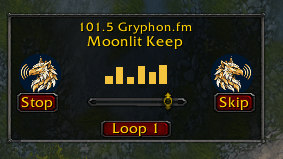
player.PNG
menu.PNG
minimap.PNG
Description
Gryphon.fm — Flight Path Radio
==============================
Your flight is important to us. Please hold.
Gryphon.fm turns every flight path into a radio station. Hop on a gryphon
and your playlist starts. Each flight feels like a cinematic experience —
the world rolling by underneath you, scored like a movie, with your own
songs as the soundtrack. Each listener gets a random starting song,
then it plays IN ORDER from there like a proper station — so everybody
eventually hears the whole rotation, not just the first few songs.
FEATURES
- Random start per listener, rolled once: your first song might be
track 3, 7, or 10 — then it plays in order and wraps back around
- Plays your music in order from your start (slots 1-10), then wraps
- Remembers your place: log out on track 4, and your next flight
continues the rotation — so over time you hear every song
- A little radio pops up while you fly: station dial (101.5 Gryphon.fm)
up top, the song title under it, animated EQ bars with a gryphon on
each side, Start/Stop, Skip, a volume slider, and a Loop 1 button
for the song you never want to end. Drag it anywhere — it
remembers where you put it
- A gryphon button rides your minimap too: click for the menu, drag
it around the ring like a dial
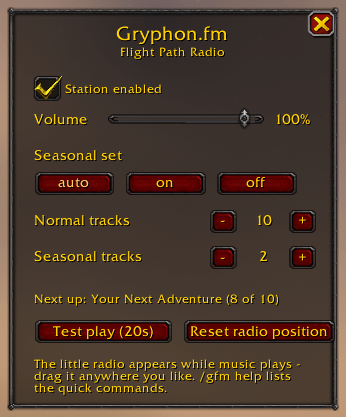
- Simple menu (/gfm): on/off, volume, seasonal mode, track counts,
Start/Stop, and a test play — version shown in the corner
- Seasonal set: holiday tracks JOIN the rotation at the end during
Winter Veil (or force them in anytime) — they never take over
- Music starts when your flight starts and stops when you land
- Every track boards with its own airline one-liner — no two songs
announced the same way
- Lightweight: just music, a little radio, and one small menu
HOW PLAYBACK WORKS
Your flight starts the next track in your rotation. When a song ends
mid-flight, the station rolls straight into the next one, so a long
flight plays through the set like a real station. Short hop? Your
place is saved — the next flight picks the rotation up where it
left off.
COMMANDS (/gryphonfm opens the menu; /gryphon or /gfm for quick commands)
on / off ............ enable or disable the station
next ................ skip to the next track mid-flight
test ................ preview the next track for 20 seconds
season on/off/auto .. seasonal set control
count N ............. how many tracks are in the normal set
scount N ............ how many tracks are in the seasonal set
ADD YOUR OWN MUSIC
Download your songs as MP3 and drop them into:
Interface/AddOns/GryphonFM/Music
named track01.mp3 ... track10.mp3 (seasonal: season01.mp3 ...).
No conversion needed — WoW plays MP3 directly.
Restart the game after adding files — WoW only registers music files
that exist when it launches.
Royalty-free music credits are listed in the Music folder README.
If Gryphon.fm makes your flights feel shorter, tips are appreciated —
see the support button on this page. Safe flights!
Gryphon.fm (Retail) Team