


GroupBuddy
- By
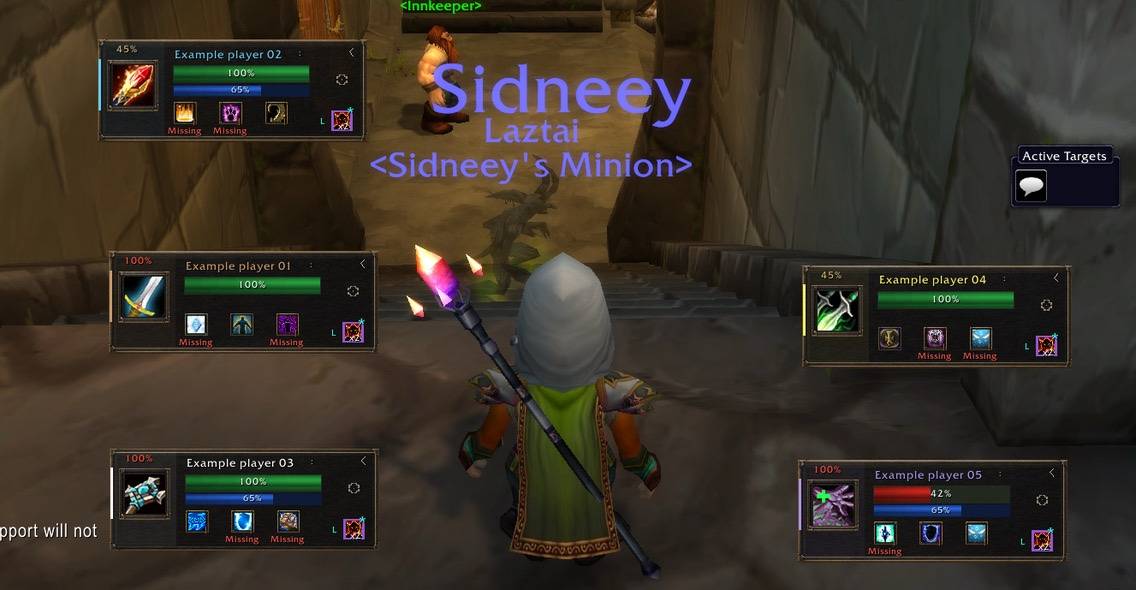
Detach every single group member and place them on the screen where ever you want
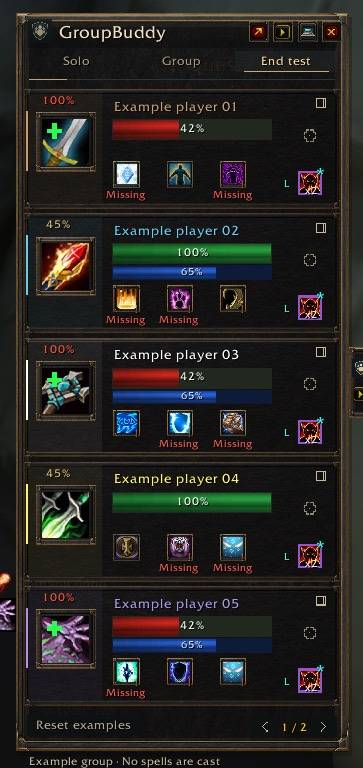
List of people with missing buffs, healing and decursive
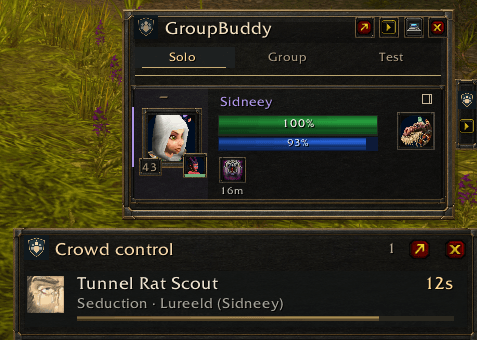
Overview of crowd controlled mobs
Description
GroupBuddy
Buffs, healing, dispels and dungeon teamwork—together in a compact Classic Era interface.
GroupBuddy keeps useful group information and actions close at hand: player portraits, missing buffs, click-healing, pet support, crowd control and preparation reminders.
Use it for real self-buffs while playing solo, or let it switch automatically to your group when you join a party or raid. Matching dark-metal and bronze panels, native WoW icons and adjustable layouts keep everything visually consistent.
Buffs at a glance
- See missing buffs marked in red.
- Click supported buffs you have learned to cast them on the row’s player.
- See a possible provider when a missing buff comes from another group member.
- Choose which buffs to display and which classes should receive them.
- See remaining buff duration when the client provides it.
- Use built-in class and spell data—no imports required for supported actions.
Group views show buffs available through your current group. Self-only buffs are identified and remain limited to their caster. Another player’s class and level indicate a possible provider, not proof that they have learned a particular spell.
Portrait healing and resurrection
Configure supported healing spells for five mouse buttons, with separate Shift, Ctrl and Alt assignments and supported rank choices.
Low-health portraits can flash and display a green healing cross when a configured heal is usable. Healing choices include supported direct heals, shields and class abilities such as Lay on Hands, Holy Shock and Swiftmend.
Left-click a dead group member’s portrait to attempt your highest learned resurrection. Supported spells include Resurrection, Redemption, Ancestral Spirit and Rebirth. Ordinary resurrection requires being out of combat; Rebirth retains its normal cooldown and reagent requirements.
Player rows show dead, ghost, offline and AFK states. Rows dim when the client confirms that your left-click heal or resurrection is out of range. Unknown range is not treated as out of range.
Buffing and portrait healing do not require changing your selected target.
Your pets belong in the group
Small pet portraits and health bars appear beside their owners.
- Hunters can use Mend Pet on their own pet.
- Warlocks can use Health Funnel on their own pet.
- Supported friendly heal and shield bindings also work on group pet portraits, including modifiers and fixed ranks.
Pet health, identity and spell requirements are checked separately from the owner. Owner-only pet spells stay limited to your own pet.
One compact dispel indicator
Each player has a single debuff marker, keeping the sidebar tidy.
- See observed debuffs and whether you have a suitable dispel.
- Set priorities between debuff types.
- Ignore selected observed debuffs.
- Enable an optional notification sound.
- Follow the displayed left- or right-click indicator when different dispel spells are needed.
Ignoring a debuff hides its reminder; it does not prevent a prepared spell from removing it.
Interrupts and crowd control
Set an interrupt order for up to eight players and see the next assignment beside your target’s castbar. Confirmed interrupts advance the order, including supported pet interrupts credited to their owner.
Your own readiness uses client information. Other players’ cooldowns require fresh reports through optional group synchronization; missing or outdated reports remain unknown.
Assign players and supported CC spells to raid markers. The relevant assignment appears when you select that marked target.
The compact CC tracker follows supported effects including Polymorph, Sap, Banish, Seduction and Freezing Trap, showing targets, casters and remaining duration when available. Optional sounds highlight detected breaks, while uncertain causes remain clearly identified.
Assignments are reminders. Cast interrupts and crowd control through your normal controls.
Ready checks and pull countdowns
Keep ready and pull controls available in a persistent compact bar:
- Start a ready check.
- Choose your pull duration.
- Start or cancel a countdown.
- See ready results and countdown progress directly in the bar.
Attach it to the sidebar or position it independently. Visibility, placement, scale and duration are saved per profile. Closing the bar keeps it closed until you reopen it.
Group permissions still apply.
Preparation reminders
A small icon-and-count tab expands into a compact checklist. Missing preparations use a red count, and full details are available on hover.
Track:
- Soulstone protection: observed recipients, remaining duration and caster information when available.
- Soulstone availability: carried stones and actual item cooldowns, with fresh addon reports required for remote availability.
- Temporary weapon enchants: observed main-hand and off-hand enchants, including remaining time when available.
- Selected consumables: 15 built-in Classic consumables with observed effect status and carried item counts.
Choose which reminders matter to your character. Consumable reminders start disabled, and no items are applied automatically.
Make the interface yours
Dock the sidebar to either screen edge and collapse it into a small tab. Adjust scale, opacity and row count, reduce animation, and place favorite players first.
Detach up to five player frames and position them independently. Their saved positions follow the player within your profile, and detached frames continue updating while the main sidebar is folded.
Player rows include health and mana bars, threat information when available, and a clickable portrait of the player’s current target.
English and Danish menus, saved profiles and profile import/export are included. Share your configuration without requiring other players to recreate every setting.
Additional tools include group notes and target marking.
Set it up while playing solo
You do not need a group to arrange the interface:
- /gb — Open settings.
- /gb intro — Open the welcome screen.
- /gb buffs solo — Show real self-buffs.
- /gb buffs test — Arrange example player frames.
- /gb buffs live — Return to the automatic live view.
- /gb cc test — Preview the crowd-control tracker.
- /gb cc live — Return to live crowd-control tracking.
- /gb encounters — Reopen the ready/pull bar.
- /gb doctor — Open a copyable diagnostic report.
Dungeon tools, preparation reminders and ready/pull also have previews in their settings. Preview controls do not cast spells or start real checks and countdowns.
Combat behavior
Prepared buff, heal and dispel clicks remain available in combat. Health, buffs, debuffs and target portraits continue updating.
Protected spell assignments and layout changes wait until combat ends. An outdated action is visibly marked. When two dispel spells are prepared, the indicator shows which mouse click matches the highlighted debuff.
GroupBuddy does not cast spells automatically. Every cast requires your input.
The GroupBuddy Team
