Group Scan
- By
GroupScan

Tired of forgetting which class has lust/brez or if your character would be a good fit for a mythic+ group?
GroupScan analyzes M+ group compositions in real time. Hover applicants to see their utility. Browsing groups? See if you fill a gap or bring redundant utility. Always shows your party's coverage and what's missing.
The Panel
The panel appears whenever the Group Finder is open and hides when you close it. It can be dragged anywhere on screen and remembers its position between sessions.
The panel has three views that switch automatically based on what you're doing:
| View | When it shows |
|---|---|
| My Party | Default — your current group's utility coverage |
| Group Preview | Hovering or clicking a listing in Browse Groups |
| Applicant View | Hovering an applicant on your own listing |
My Party
Shows your current group's utility coverage at all times.
Coverage score — e.g. 5/6 covered 3/5 members shows how many of the six tracked utilities your group has and how many players are in the group.
COVERED — lists each utility your group has and which members provide it. An amber ~ prefix means the ability requires a specific talent and may not always be present.
MISSING — lists utilities nobody covers, with color-coded class suggestions for each gap.
Tracked Utilities
| Utility | What it covers |
|---|---|
| Bloodlust | Heroism/Lust (Shaman, Mage, Evoker, BM Hunter) |
| Battle Rez | In-combat resurrection (Druid, Warlock, Death Knight, Paladin†) |
| Crowd Ctrl | Hard CC for mob control |
| Defensives | External defensive cooldowns |
| Buffs | Persistent group stat buffs |
| Utility | Class-specific M+ utility (grips, gates, immunities, etc.) |
† Paladin Battle Rez requires the Intercession talent — shown with
~
Group Preview
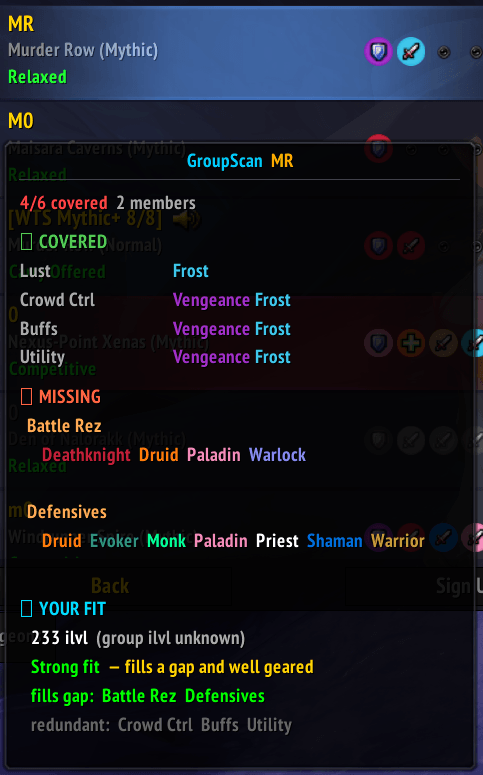
Shown when hovering or clicking any listing in the Browse Groups tab. Displays that group's composition and utility coverage, then shows a YOUR FIT section below it.
YOUR FIT
Item level
- Green — at or above the group's requirement
- Amber — within 10 ilvl below
- Red — more than 10 ilvl below
- If no requirement is set, your raw ilvl is shown
Verdict
| Verdict | Meaning |
|---|---|
Strong fit |
Fills a missing utility and gear is solid |
Risky fit |
Fills a missing utility but gear is below requirement |
Decent fit |
No new utility but gear is solid |
Redundant |
Utility already covered, gear is solid |
Weak fit |
No new utility and gear is below requirement |
fills gap — utilities you bring that the group is missing (green = guaranteed, amber = talent-dependent)
redundant — utilities you bring that the group already has (grey)
Applicant View
Shown when hovering an applicant on your own group listing.
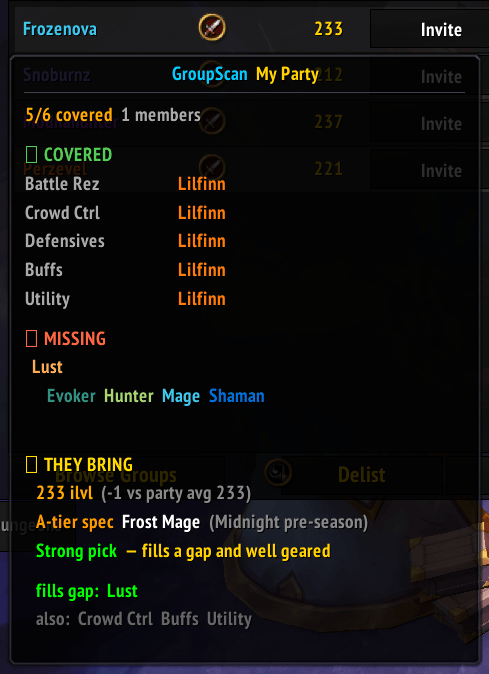
THEY BRING
Item level — applicant's ilvl vs your party average, color-coded green/amber/red.
Verdict
| Verdict | Meaning |
|---|---|
Strong pick |
Fills a gap and well geared |
Risky pick |
Fills a gap but undergeared |
Decent backup |
No new utility but solid gear |
Weak pick |
No gap filled and undergeared |
fills gap — utilities the applicant brings that your group is missing (green = guaranteed, amber = talent-dependent)
also — utilities they bring that your group already has (grey)
Slash Commands
| Command | Description |
|---|---|
/gs or /groupscan |
Toggle the panel manually |
Notes
- Talent-dependent abilities are marked
~throughout. These require a specific talent choice and may not be present even if the class can provide them. - Party member specs are only known for your own character — others show as conditional for spec-gated abilities.
Group Scan Team