


Grisalvo CD Assistant
- By
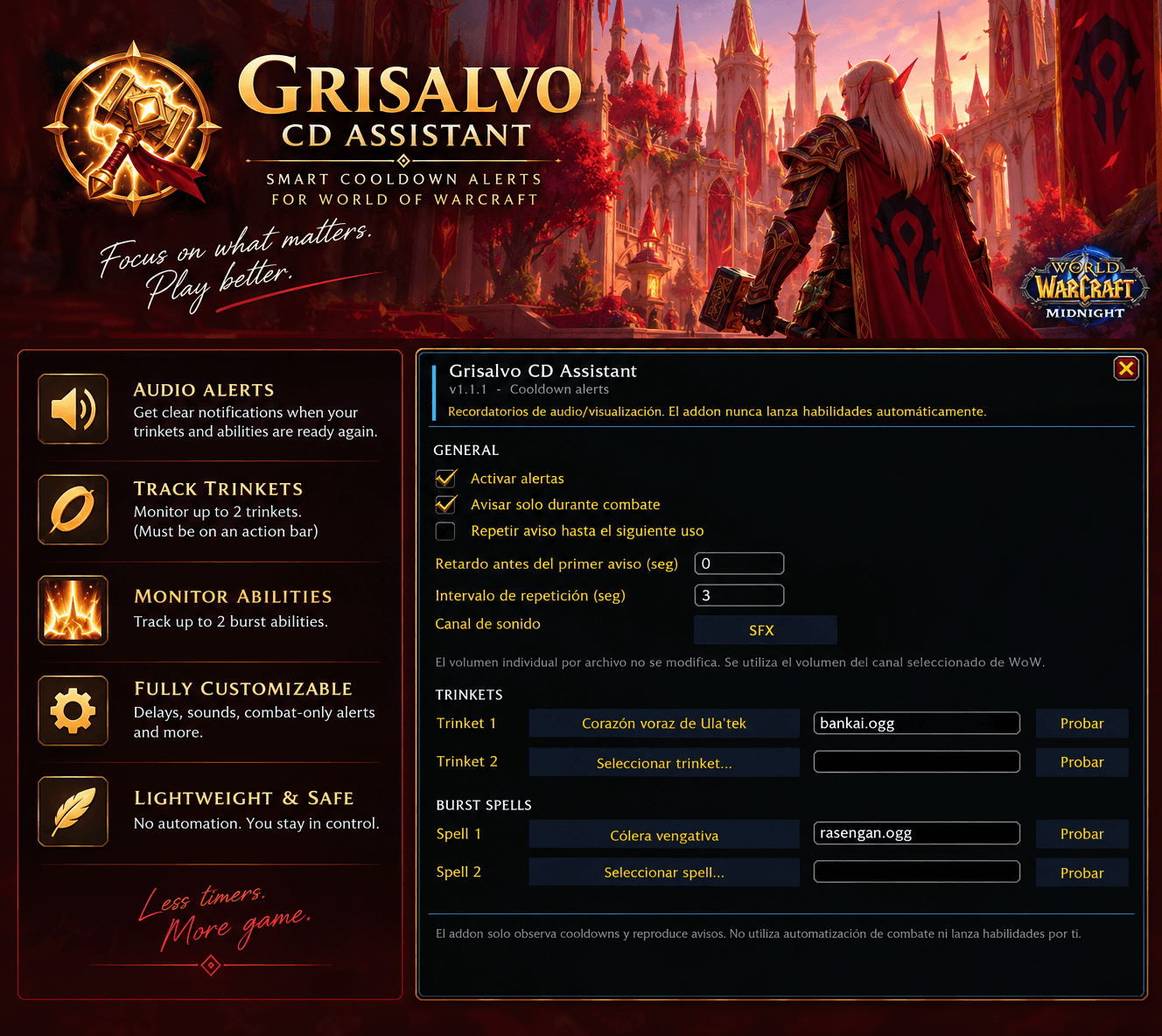
imagen para addon.png
Description
⚔️ Grisalvo CD Assistant
Smart cooldown alerts for World of Warcraft — Midnight
Grisalvo CD Assistant is a lightweight and customizable World of Warcraft addon designed to help you keep track of important trinket and burst ability cooldowns during combat.
Instead of constantly checking your action bars or cooldown timers, the addon gives you a clear audio notification when an important cooldown becomes available again, allowing you to focus more on your rotation, positioning and the encounter.
The addon is designed to be simple, unobtrusive and completely player-controlled.
🔔 Smart Cooldown Alerts
Configure the cooldowns that matter most to you and let Grisalvo CD Assistant notify you when they are ready.
You can configure:
- 🧿 Up to 2 trinkets
- ✨ Up to 2 burst abilities
- 🔊 Individual sounds for every configured cooldown
- ⏱️ A configurable notification delay
- 🔁 Optional repeated notifications
- 🎚️ Configurable sound channel
The addon only monitors cooldowns and provides notifications. It never casts spells, uses items or performs actions for the player.
🧿 Trinket Tracking
Grisalvo CD Assistant provides dedicated monitoring for your configured trinkets.
To ensure reliable cooldown detection, monitored trinkets must be placed on an Action Bar as an item.
The addon uses the trinket's actual action-bar cooldown rather than relying on unrelated spell cooldown information. This allows it to correctly handle trinkets being used multiple times during the same combat encounter.
⚠️ Important: Place any trinket you want to monitor on an Action Bar. The addon needs the item's action-bar cooldown to track it reliably.
✨ Burst Ability Tracking
You can also configure up to two important burst abilities.
This is particularly useful for abilities you want to synchronize with your trinkets, major offensive cooldowns or specific encounter mechanics.
When the configured ability becomes available again, Grisalvo CD Assistant can play your selected notification sound.
🎵 Custom Sounds
Choose a different sound for each monitored cooldown.
The addon supports:
- Built-in sound options
- Custom
.oggfiles - Custom
.mp3files - Individual sounds for each trinket and ability
- Configurable sound channel
- Sound testing directly from the configuration
You can therefore use anything from subtle notification sounds to much more distinctive audio cues.
⚙️ Simple Configuration
Open the configuration with:
/griscd
The interface allows you to configure the addon without editing Lua files.
You can control:
- Addon enabled/disabled
- Combat-only notifications
- Notification delay
- Repeated alerts
- Repeat interval
- Sound channel
- Trinkets
- Burst abilities
- Individual sounds
- Minimap access
A minimap button is also available for quick access to the configuration.
🛡️ Lightweight & Player Controlled
Grisalvo CD Assistant is intentionally designed to stay lightweight and unobtrusive.
The addon:
- Does not cast spells
- Does not use items
- Does not automate gameplay
- Does not make combat decisions
- Only monitors configured cooldowns and provides notifications
You remain completely in control of your character.
🌙 Built for Midnight
The addon is designed around the current cooldown API restrictions introduced in World of Warcraft Midnight, avoiding direct manipulation or calculations of protected cooldown timing values where required.
Cooldown monitoring uses Blizzard's supported cooldown mechanisms while keeping the addon focused on its primary purpose:
Tell you when an important cooldown is ready.
📦 Installation
- Install the addon through CurseForge or manually extract it into your WoW AddOns folder.
- Make sure the folder is named:
GrisalvoADON - Restart World of Warcraft or reload the UI.
- Type
/griscdto open the configuration. - Configure your trinkets and abilities.
- Place monitored trinkets on an Action Bar.
That's it.
⚔️ Designed for Players Who Want Less UI Clutter
You don't need another large cooldown tracker covering your screen.
Grisalvo CD Assistant takes a different approach:
Configure the cooldowns that matter → play your character → listen for the alert.
Less time watching timers.
More time focusing on the fight.
Grisalvo CD Assistant
Track less. Play more.
The Grisalvo CD Assistant Team
