GRIP-EMS Actionbutton Override
- By
Adds Actionbar Override and Drag and Drop Keybinding Functionality
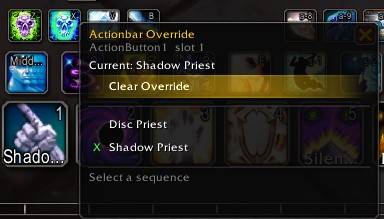
Right-Click Action button Override Context Menu
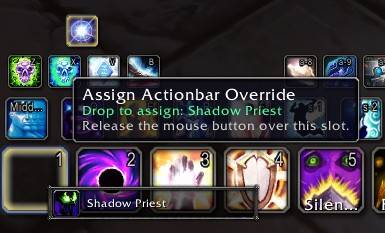
Drag and Drop Sequence Directly from GRIP-EMS Sequence List
Description
GRIP-EMS Actionbar Overrides
GRIP-EMS Actionbar Overrides is a plugin addon for GRIP-EMS v2.3.19+ that lets you assign GRIP-EMS sequences directly to empty actionbar slots.
Instead of creating and dragging a macro for every sequence, you can right-click an empty actionbar slot and choose a sequence from a compact flyout, or drag a sequence from the GRIP-EMS sequence list onto an actionbar slot.
Requirements
- GRIP-EMS v2.3.19 or newer
World of Warcraft Version 12.1, 12.07, 12.05
This addon is a separate plugin and does not replace or modify the GRIP-EMS addon files.
Features
Actionbar Sequence Assignment
- Right-click an empty actionbar slot to assign a GRIP-EMS sequence.
- Drag a sequence from the GRIP-EMS sequence list onto an empty actionbar slot.
- Replace or clear existing overrides from the flyout menu.
- Assignment changes are protected from combat lockdown and are applied safely out of combat.
Native-Style Actionbar Buttons
Overridden slots are styled to blend in with normal actionbar buttons:
- Uses the native action button icon region when available.
- Preserves the normal button border/skin.
- Shows a macro-style sequence label.
- Supports current-step, next-step, or fixed sequence icons.
- Adds cooldown swipe, global cooldown display, usability dimming, range tint, and pressed glow.
Profiles
Override assignments can be saved by:
- Global profile
- Specialization profile
- Saved talent loadout profile
This lets the same actionbar slot run different sequences depending on your current spec or loadout.
Tooltips and Flyout UI
- Hovering an overridden button shows assignment details, current/next step information, keybind information, and usage hints.
- The right-click sequence picker uses a compact flyout menu anchored to the actionbar button.
- The flyout closes when the cursor leaves it, matching normal context-menu behavior.
Options and Commands
Open the full options panel with:
/gems abo optionsBasic settings are also available through the GRIP-EMS plugin settings area in:
/gems optionsUseful commands:
/gems abo status
/gems abo options
/gems abo repair
/gems abo debug
/gems abo clearall
/gems abo edit on
/gems abo edit off
The older standalone command alias is still available:
/gemsabo optionsDiagnostics and Repair
The plugin includes tools to help recover from stale buttons or bindings:
- Print diagnostics
- Repair overrides
- Clear stale bindings
- Reset visuals
- Clear all overrides
SavedVariables
Settings are stored per character under:
GRIPEMS_ABO_CHAR.actionBarOverridesOlder prototype settings from early in-core builds are migrated from:
GRIP_EMS_CHAR.actionBarOverridesNew settings remain plugin-owned.
Notes
- Overrides should be assigned or changed out of combat.
- Existing overrides continue to work while edit mode is locked.
- Edit mode can be locked to prevent accidental right-click or drag/drop changes.
- Some low-level secure routing requires a small compatibility bridge because GRIP-EMS does not currently expose public Plugin API write access to secure action buttons or keybind execution.
Credits
Author: Daxomault
Development note: Some AI assistance was used for development alongside human programming and in-game testing.
GRIP-EMS Actionbutton Override Team