
Grimoire Tracker
- By
Screenshot 2026-03-21 151412.png
Screenshot 2026-03-19 164833.png
Screenshot 2026-03-19 164902.png
Description
Grimoire Tracker
A Warlock-only addon for TBC Anniversary that tracks grimoire ranks across all your demon pets, tells you exactly what you're missing, and makes buying upgrades at the demon trainer painless.
The Problem
If you've played a Warlock in TBC, you know the drill. You hit a new level, maybe you trained a couple new spells for yourself, and then… did you remember to check if any of your pets have new grimoires available? Which pet was it? Was it Firebolt Rank 7 or Rank 8? Did you already buy that one last time? And the Felhunter — when was the last time you even summoned that thing to check?
There are 83 grimoires spread across five demons. Some spells have seven ranks. Some have one. They unlock at different levels, they cost different amounts, and the demon trainer sells all of them in one long, undifferentiated list. Nobody keeps track of this in their head. You just visit the trainer, squint at the list, try to remember what you already bought, and hope you didn't miss anything.
Grimoire Tracker fixes all of that.
The Main Window
Type /gt or /grimoire and the main window opens.
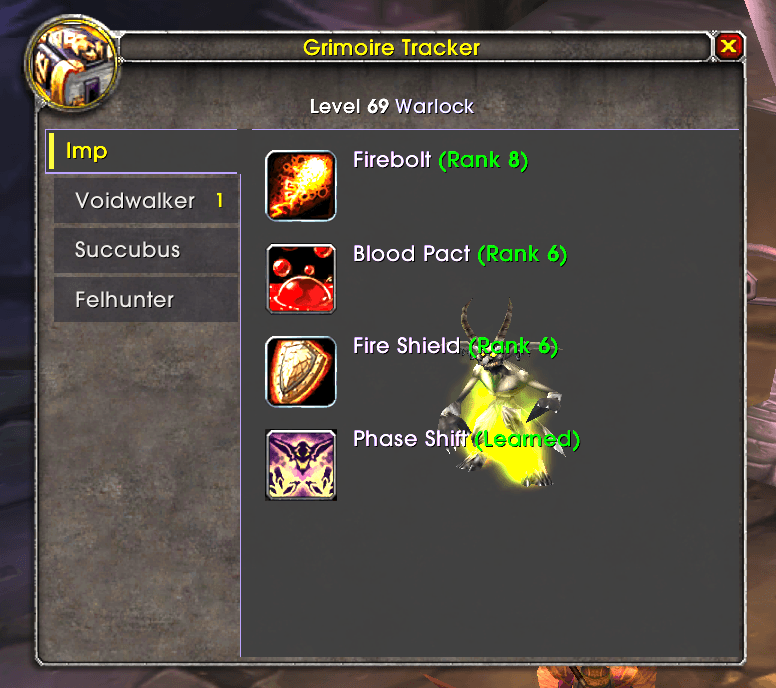
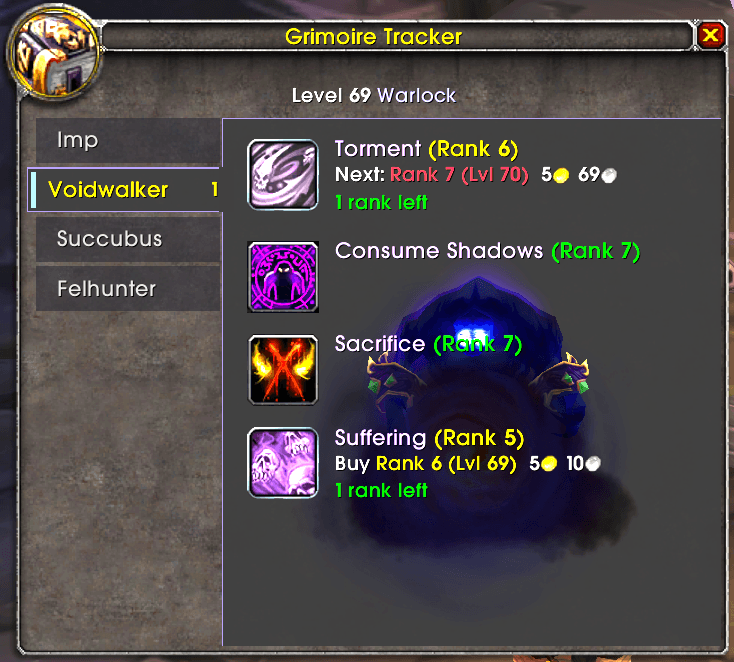
On the left side, you get vertical tabs for each demon you've learned to summon. If you only know Imp and Voidwalker, those are the only tabs that show. Learn Succubus later? The tab appears automatically. Tabs you haven't scanned yet (meaning you haven't summoned that pet since installing the addon) get a strikethrough on the name so you know at a glance which ones still need attention.
The active tab shows every spell for that pet. Each spell entry shows:
- The spell name and your current rank
- Whether the next rank is available to buy right now, or what level you need to reach first
- How much the next rank costs (in gold/silver/copper, with the actual coin icons)
- How many total ranks you still have left to go
That last line — "3 ranks left" or "1 rank left" — is hoverable. Mouse over it and you get a tooltip listing every remaining rank, the level it requires, and its cost. Green rows are ones you can buy now, red ones are still locked by level.
Spells you've fully maxed out show in green. Spells with available upgrades show in yellow. Spells locked behind a future level show in red. You can scan the whole list in a couple seconds and know exactly where you stand.
Behind the spell list, a 3D model of the selected demon renders in the content area. It's purely cosmetic but it looks nice. Each demon also has its own accent color on the active tab — fiery orange for Imp, shadow blue for Voidwalker, magenta for Succubus, teal for Felhunter, dark red for Felguard.
Hovering over any spell block gives it a dark background so the text is easy to read over the model.
The Vendor Popup
This is where the addon really earns its keep.
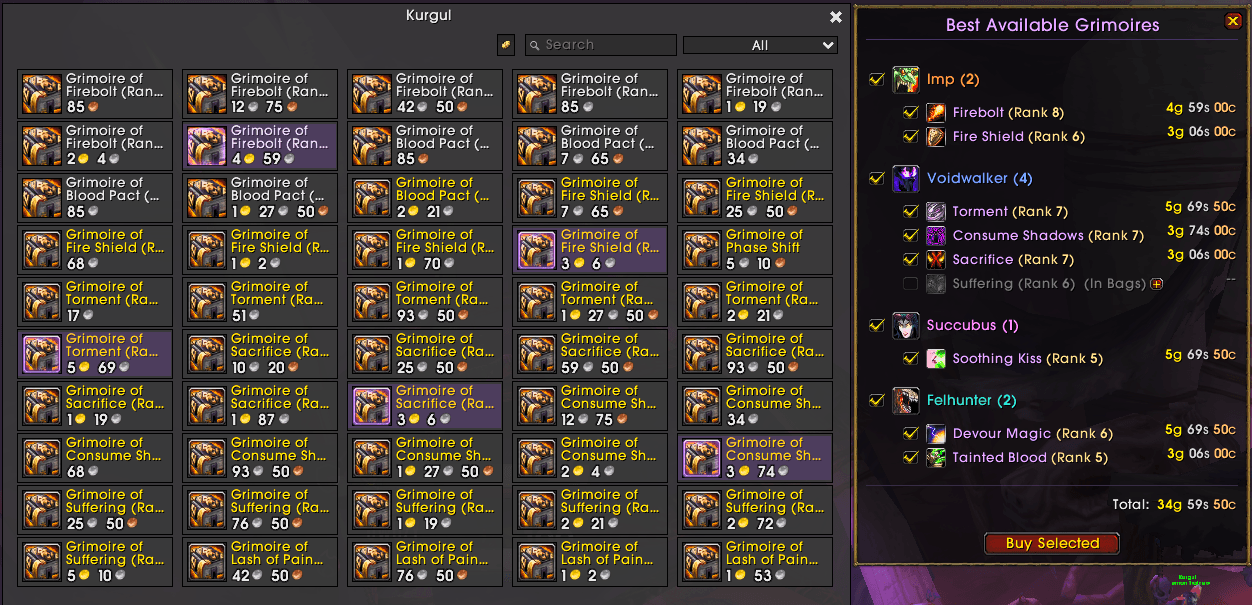
When you open a demon trainer's merchant window, Grimoire Tracker scans every item the vendor sells, parses the tooltips to figure out which pet and spell each grimoire belongs to, cross-references it against what you've already learned, and builds a popup showing you exactly what you should buy.
The popup appears to the right of the merchant window. It groups grimoires by pet, with checkboxes next to each one. Every spell shows the selected rank, cost, and a pet-colored header. If a spell has multiple ranks available (say you skipped a few levels and now Ranks 5, 6, and 7 are all purchasable), there's a +/- button next to it that expands inline radio buttons so you can pick which rank you want. By default it selects the highest available rank, because that's almost always what you want, but the option is there.
The corresponding items on the merchant frame get highlighted with a pulsing lavender border and tinted row, so you can see exactly which merchant slots match your selections.
At the bottom of the popup, you get a running total of the cost for everything you've checked, and a "Buy All" / "Buy Selected" button. Click it and the addon purchases every checked grimoire in one shot. No more clicking through the merchant list one by one, squinting at names, trying to figure out which Grimoire of Firebolt is Rank 7 vs Rank 8.
After you buy, the popup updates live. Grimoires that land in your bags show up greyed out and disabled — the checkbox, icon, and text all go dim with an "(In Bags)" label, and the merchant highlight for that item disappears. You can see at a glance what you just bought vs. what's still available. The popup preserves your checkbox and radio selections between refreshes, so buying one grimoire doesn't reset your choices for everything else.
If you open the popup and some tooltip data hasn't loaded from the server yet (which happens sometimes on the first merchant open), the popup shows a pulsing "Scanning grimoires…" message while it waits, then fills in the content once everything has resolved. Usually takes about a second.
You can drag the popup to reposition it. Drag it back close to the merchant window and it snaps back to its default position.
Tooltip Integration
Once you've visited a demon trainer at least once (so the addon has cached the prices), Grimoire Tracker injects a line into your pet spell tooltips — both in the pet spellbook and on the pet action bar.
The format is compact. For a maxed spell you'll see something like 7/7 in green. For a spell with an available upgrade: 6/7 · Available · 85s. For a spell locked behind a higher level: 5/7 · Next at 60 · 1g 20s. If you haven't scanned that pet yet, it just says ?/7 · Summon pet to scan.
It's a small thing, but it means you don't have to open the main window just to check if a spell is up to date. Hover over it on your pet bar and you know.
Level-Up Notifications
When you level up, the addon checks whether any new grimoire ranks just became available. If so, you get a chat message listing every newly unlocked grimoire — spell name, rank, colored and formatted — along with a little treasure-ding sound effect. It's a gentle nudge that says "hey, next time you're near a trainer, there's something to buy."
Spellbook Scanning
The addon scans your pet spellbook whenever you summon a pet, change pets, zone in, or level up. It stores what it finds per-character in saved variables, so it remembers your data between sessions. If you've scanned your Imp once, it knows your Imp's ranks permanently (until you reset).
Pets you haven't summoned yet show a "not scanned" state with a question mark icon and a message telling you to summon the pet. This is deliberate — the addon can only read ranks from the pet spellbook, which requires the pet to be active.
Slash Commands
/gtor/grimoire— toggles the main window/gt reset— wipes all saved data and rescans the current pet/gt dump— if you have a merchant window open, dumps every grimoire the vendor sells into a copyable text frame with full details (pet, spell, rank, required level, cost). Mostly a development/debugging tool, but it's there if you want it.
Position Saving
The main window remembers where you put it. Drag it somewhere, close it, reopen it — same spot. It also remembers which tab you had selected. Saved per-character.
What It Doesn't Do
It doesn't auto-use grimoires from your bags. I tried. Oh man, did I try. TBC Anniversary blocks programmatic item use through secure action buttons, and there's no reliable workaround. You still have to right-click the books yourself after buying them. It's a limitation of the client, not the addon. Yell at Blizzard (or is that Activision?).
It also doesn't have a minimap button. If that bothers you, sorry — /gt is three keystrokes.
I originally wrote this because I kept showing up at the demon trainer and blanking on which grimoires I still needed. I figured it'd be a small convenience for my Warlock, a nice-to-have. Turns out I just about depend on the thing. Funny how that works with small QOL improvements — you don't realize how annoying something was until you don't have to deal with it anymore.
The Grimoire Tracker Team
