GreenWall GuildRoster Classic
- By
Combined roster window for GreenWall confederations — see every co-guild's members in one native-style list.
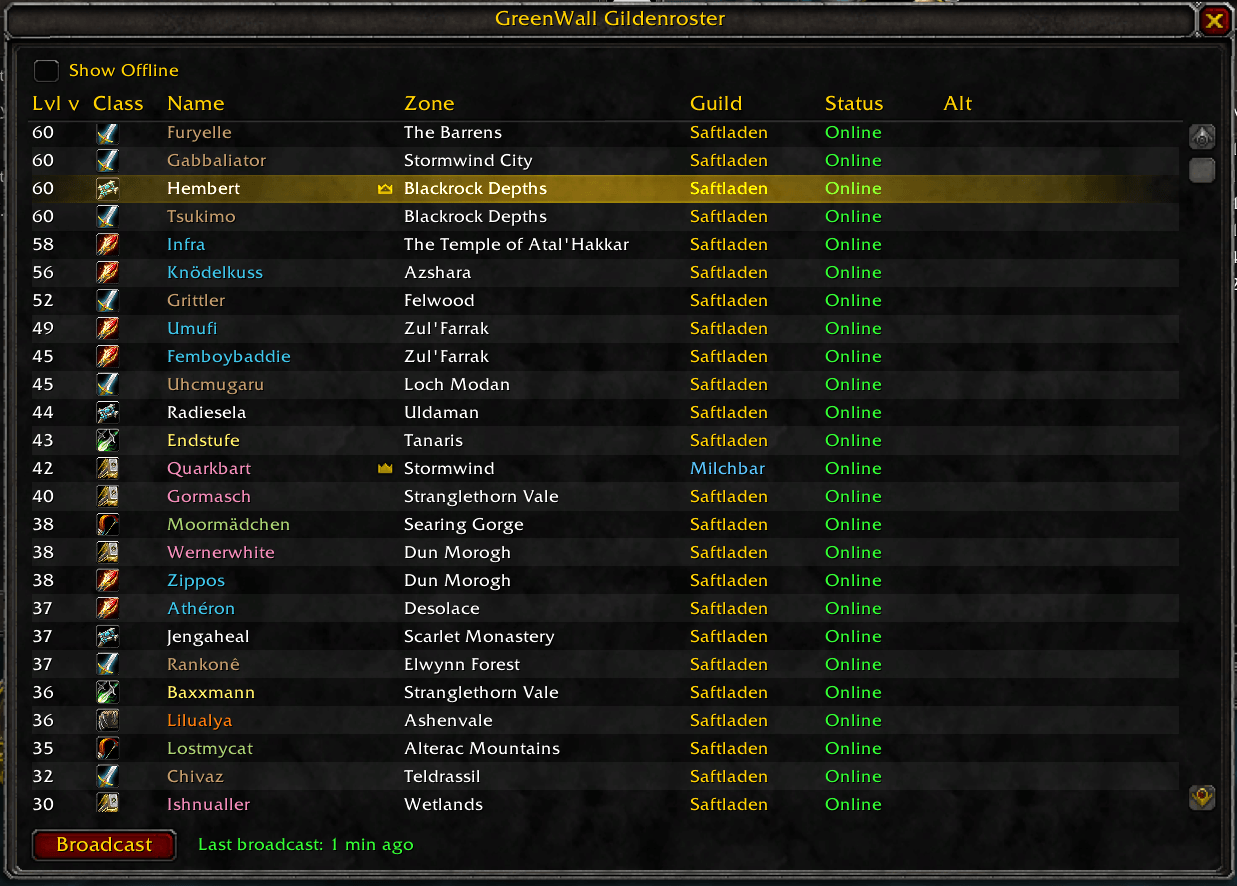
Members from multiple co-guilds (Saftladen, Milchbar) shown together in one sortable list, with level, class, zone, guild, and online status at a glance.
Description
GreenWall GuildRoster
A companion addon for GreenWall that shows a combined roster window for all co-guilds in your confederation — like the native guild roster, but with every alt guild's members mixed into one list.

Why
GreenWall bridges your guild chat, but each co-guild's roster still only shows its own members. If your confederation is split across multiple guilds for the member cap, you have no easy way to see who's online, what level/class they are, or find someone across the whole confederation. This addon fixes that.
Features
- Native-style roster window — Level, Class icon, Name, Zone, Guild, Status, Alt, just like the built-in guild frame
- All co-guilds mixed into one sortable list — click any column header to sort, click again to reverse
- Guild column color-codes your own guild vs. the other co-guild(s) at a glance
- Guild Master / Officer crowns next to names, same as the native frame
- Show/hide offline members toggle
- Right-click a name to whisper, invite, or copy their name — even across guilds
- Self-declared alt links (
/gwgr setmain <name>) so a twink in another co-guild shows as "Alt of X" - Minimap button — drag to reposition, left-click opens the window, right-click sends a broadcast
- Tracks and shows how long ago you last shared your roster, so you know when it's getting stale
- Zone names are translated for the reader's own client language, not the sender's
- Traffic-aware background sync — own-guild targets are excluded, duplicate transfers are suppressed, and all automatic chunks are paced through ChatThrottleLib
- Update reminder learned from other GuildRoster clients, without web requests or an automatic downloader
Setup
- Have GreenWall (v1.12+) already set up and working between your co-guilds.
- That's it —
/reload. No extra channel or password to configure; this addon rides GreenWall's own confederation channel via its publicGreenWallAPI.
Usage
/gwgr— open/close the roster window/gwgr broadcast— share a fresh online-roster snapshot with the other co-guilds and establish first contact/gwgr setmain <name>— mark the character you're on as an alt of<name>/gwgr status— check GreenWallAPI, peer, queue, transfer, failure, fan-out, and suppression state/gwgr minimap— show or hide the minimap button/gwgr debug— toggle addon-message logging for troubleshooting
Click Broadcast once (button, minimap right-click, or /gwgr broadcast) to introduce your guild to the others — recent WoW clients block addons from silently automating chat/channel messages, so this first step needs a deliberate click. After that, a background whisper-based sync keeps everyone's data current automatically, no further clicks needed. The window shows how long ago you last broadcast, as a reminder in case the automatic sync ever needs a nudge.
How it works
Two transports: a manual one over GreenWall's own confederation channel for first contact (a snapshot of members currently reported online), and a presence-confirmed background exchange between reachable GuildRoster clients for ongoing updates. Own-guild players are never treated as cross-guild whisper targets. HELLO messages are paced, one successful exchange is shared locally, fresh peer-guild data suppresses redundant acknowledgements, and duplicate fan-outs are discarded. See the README for the full technical breakdown.
Current limitation
Remote snapshots contain up to 200 members currently reported online. Previously known members remain visible when they later go offline, but the addon cannot export every remote character that has never been observed online.
Contributing a translation
Play on a language other than English/German and want zone names translated correctly? See TRANSLATING.md - a two-minute in-game export for outdoor zones, plus automatic background collection of dungeon names as you play. No research needed either way.
Source
The GreenWall GuildRoster Classic Team