GoomiMediaAssets
- By
Register custom textures, sounds, and fonts with LibSharedMedia without editing Lua
Screenshot 2026-03-26 180959.png
Screenshot 2026-03-26 181143.png
Description
Goomi Media Assets
Register your own textures, sounds, and fonts with LibSharedMedia through a simple in-game UI — no Lua editing required.
What It Does
Any addon that uses LibSharedMedia (Plater, ElvUI, Details, WeakAuras, and hundreds more) lets you pick from a shared pool of textures, sounds, and fonts. Goomi Media Assets gives you two things:
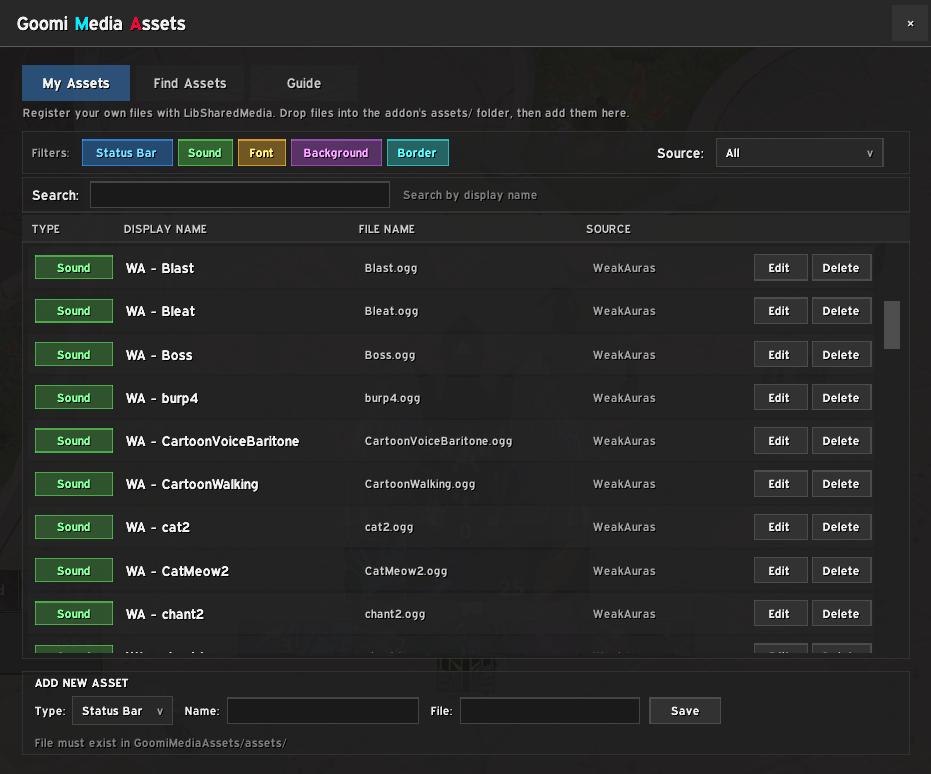
1. Register your own files — Drop a texture, sound, or font into the addon's assets/ folder, fill out a quick form in-game, and it's instantly available everywhere.
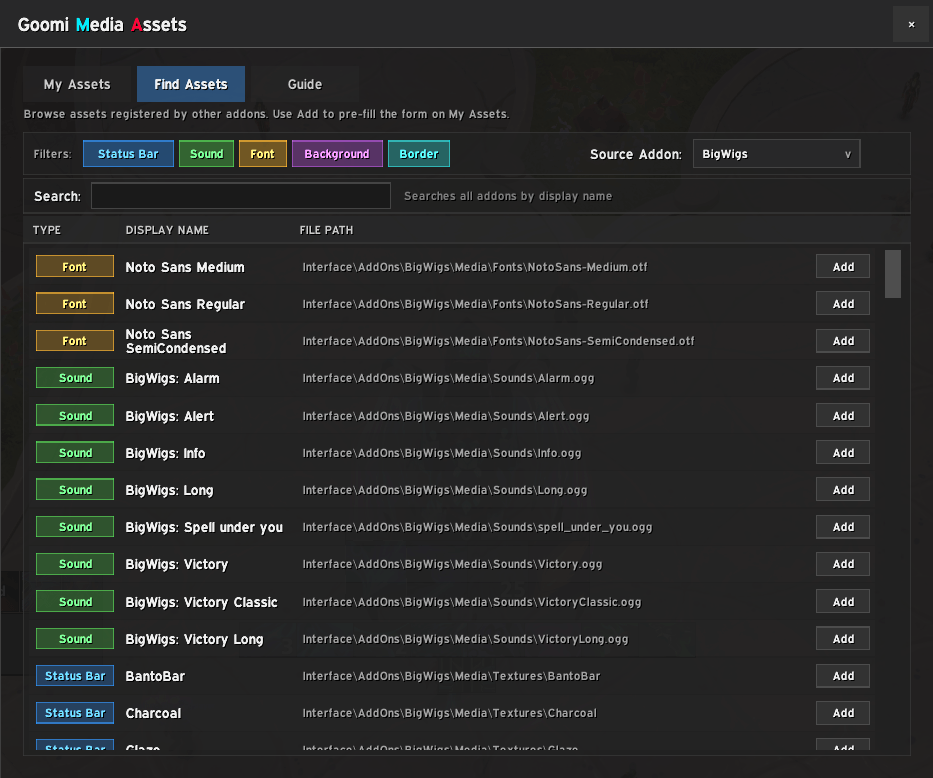
2. Browse and save assets from other addons — Found a statusbar texture in Plater you love? A sound from a SharedMedia pack? Use the Find Assets browser to see what's registered, add it to your collection, copy the file, and uninstall the original addon. No more keeping five SharedMedia packs installed for a handful of textures.
Getting Started
Type /gma in-game to open the settings window.
Adding Your Own Files
- Place your file (
.tga,.blp,.ogg,.mp3,.ttf) intoWorld of Warcraft/_retail_/Interface/AddOns/GoomiMediaAssets/assets/ - Open
/gma, go to the My Assets tab, and fill out the form at the bottom — pick a type, give it a display name, and enter the exact filename - Click Save — the asset is immediately available in any addon that uses LibSharedMedia
Note: Sounds and fonts require the file extension (e.g. MySound.ogg, MyFont.ttf). Textures work with or without it.
Grabbing Assets From Other Addons
- Open
/gmaand go to the Find Assets tab - Select a source addon from the dropdown — you'll see every asset that addon has registered with LibSharedMedia
- Find one you like and click Add — the form on My Assets will be pre-filled
- Review the name, then click Save
- Copy the original file from that addon's folder into
GoomiMediaAssets/assets/ - You can now uninstall the original addon and keep the asset
The Find Assets tab only shows addons that register their media through LibSharedMedia. Most popular addons do this, but if an addon has files you want that aren't listed, you can still add them manually using the steps above.
Supported Media Types
- Status Bar — bar textures used by unit frames, nameplates, damage meters, etc.
- Sound — audio files for alerts and notifications (
.ogg,.mp3) - Font — custom fonts for any addon that supports font selection (
.ttf) - Background — panel and frame background textures
- Border — frame border textures
Bonus: WeakAuras Sound Presets
With WeakAuras no longer supported on retail, you may be missing access to the sound effects you used to rely on. Goomi Media Assets can bring them back.
Type /gma wasounds to populate 100+ WeakAuras sound presets into your asset list. Then copy the .ogg files from your old WeakAuras install into GoomiMediaAssets/assets/ to activate them.
WeakAuras sounds can be found in two locations:
WeakAuras/Media/SoundsWeakAuras/PowerAurasMedia/Sounds
Commands
/gma— Open the settings window/gma wasounds— Add WeakAuras sound presets
Features
- Standalone addon — works on its own, no other addons required (LibSharedMedia is bundled)
- Filter assets by type, source, or search by display name
- Browse every LibSharedMedia asset registered by your installed addons
- Assets register with LSM immediately on save, no reload neede
No Textures/Fonts/Sounds/etc are included with this addon.
GoomiMediaAssets Team