


GoNext1.png
GoNext2.png
Description
GoNext
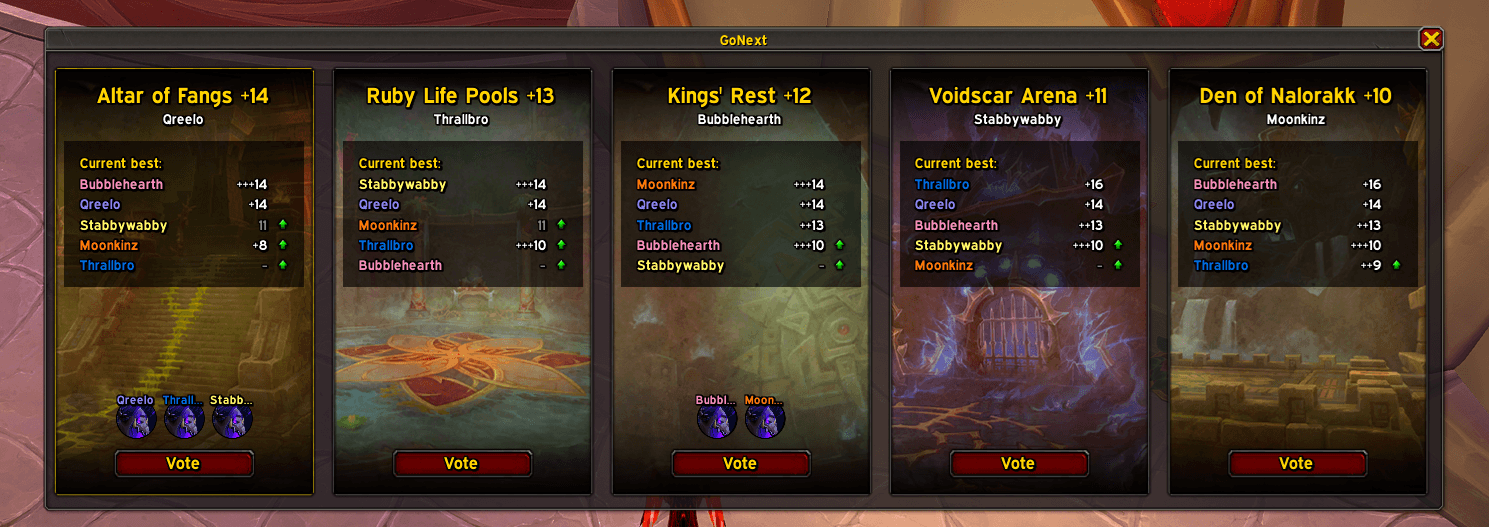
GoNext lets your party vote on which keystone to run next. Type /gn, and everyone's key appears side by side. Next to each key you can see how everyone has done in that dungeon, so you can pick the key that's worth the most to your group.
How it works
- Start a vote. Anyone in the party types
/gonext(or/gn). - Everyone's keys appear. Each party member with GoNext sends their keystone automatically, and each key gets its own panel, highest key first, with the dungeon's artwork.
- Vote. Click Vote on the key you want to run.
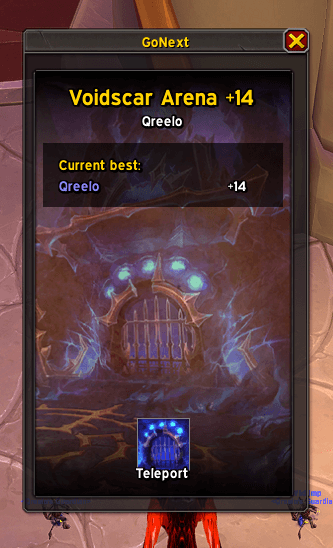
- Go. Once everyone has voted, the key with the most votes wins, and you can teleport to the dungeon (if you have the portal unlocked).
Features
- Current bests for the whole party. Each key's panel lists every party member's best run of that dungeon this season:
+13,++13, and+++13show 1, 2, or 3 chests.- A grey level means that run was depleted.
- A green arrow means this key would be an upgrade for that player.
- Live votes. See who voted for what as it happens.
- One-click teleport. When the vote is decided, the result window has a button that casts the dungeon's teleport, with its cooldown, if you've learned it. GoNext finds the teleport by itself, so it keeps working in new seasons and in any client language.
Commands
| Command | What it does |
|---|---|
/gn or /gonext |
Start a vote. If a vote is already running, this reopens its window. |
/gn cancel |
Cancel the vote in progress. |
Good to know
- Only party members with GoNext take part. Party members without GoNext can't show their key or vote, so for the best results, everyone should install it.
- Blizzard blocks addon messages during keys and boss fights. Start the vote between runs.
- The window waits for combat to end. The teleport button can't be changed in combat, so the window opens or updates as soon as combat ends.
Feedback
Found a bug or have an idea? Leave a comment!
The GoNext Team

