Goldsmith - Crafting Profit Planner
- By
Shows you which crafts make the most gold, which character should make them, and how to get the materials, then tracks what you actually earned.
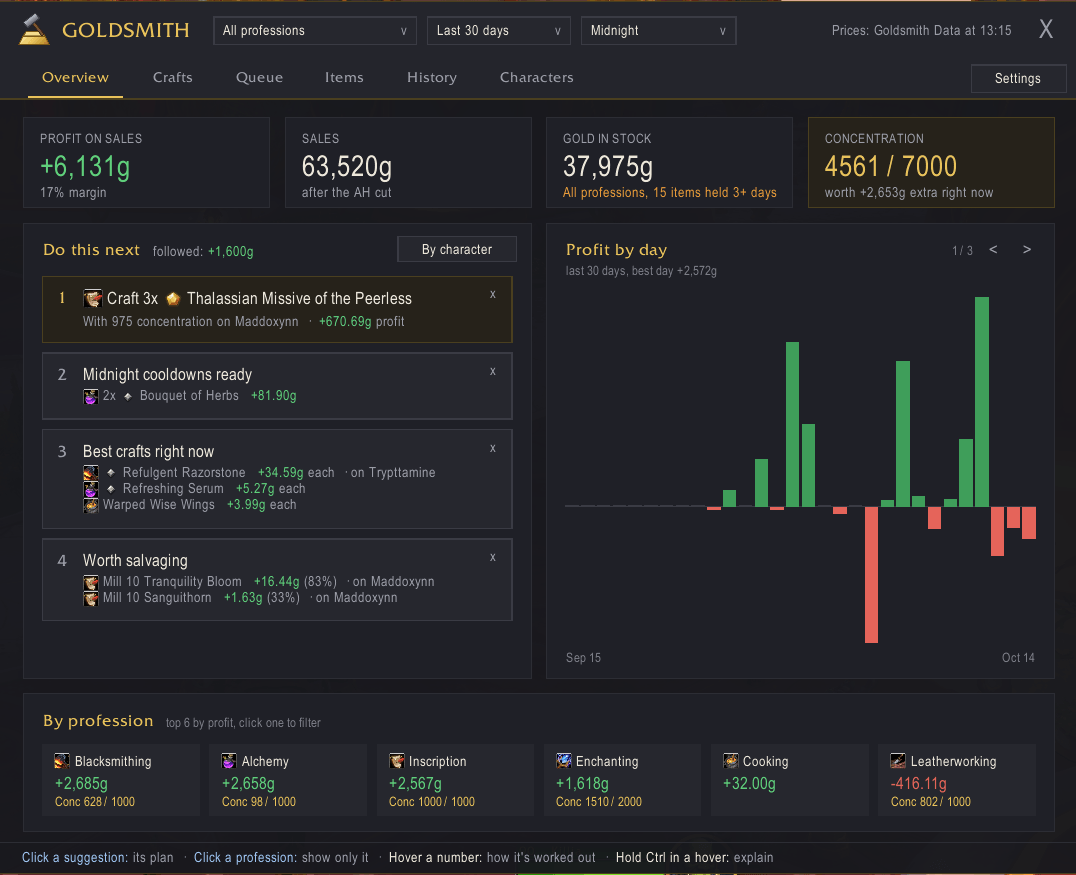
Do this next: the best crafts right now, which character should make them, where to spend concentration, cooldowns ready to use and salvage worth doing. Profit, sales and concentration at a glance.
Description

Goldsmith is free. If it makes you gold and you'd like to say thanks, buy the goldsmith a lightfused mana potion.
Goldsmith
Goldsmith tells you what to craft for gold, on which character, and how to get the materials, then tracks what you actually earned.
Most players don't want to study the auction house. Goldsmith turns your recipes, your characters' stats and current AH prices into a short list: Do this next.
Features
Do this next
- The best crafts to make right now, ranked by profit
- Where to spend your concentration for the most gold
- Craft cooldowns ready to use, salvage worth doing, and materials currently selling cheap
- Only solid bets: a craft has to make a profit and actually sell before it's suggested
- How many to make follows how fast your own batches sell: more when they sell out quickly, fewer when they slow down
Crafts
- Every recipe your characters know, in one list, costed with each character's own stats (multicraft, resourcefulness, ingenuity)
- Works out the cheapest mix of material qualities for each quality tier, with and without concentration
- Show: Recommended, Profitable, All crafts, or Not learned yet: recipes you haven't learned, with what they'd earn and where to learn them
- Hide gear (or show only gear), search, or ignore items you never want to see
- Every craft shows how well it sells: Sells, Slow or Hardly sells
Planner
- For any craft, shows whether to buy, craft, mill or prospect each material
- Builds a shopping list and sends it to Auctionator
- Shopping lists cover the unlucky case, so one trip to the AH is always enough
- A Craft button walks you through every step
Queue
- Queue crafts on each character and shop for all of them at once
- Press Craft next (or its key binding) to work through the queue in order: mill, make the materials, then craft
Salvage
- Milling, prospecting and crushing shown as profit rows, based on the yields you actually get
- The planner shows whether salvaging beats buying
Characters
- A to-do list for each alt, with their professions, concentration and craft cooldowns
Items and History
- Prices and price history for every item
- Your stock across bags, banks and the warband bank
- Every sale, purchase and deposit, with real profit after the AH cut
- Total gold over time, and where it is: each character and the warband bank
Hovers that explain themselves
- Hovers stay short: just the numbers
- Hold Ctrl over one to see what each number means and how it's worked out
Requirements
- English game client (other languages aren't supported yet)
- Goldsmith Data (installed with Goldsmith): region-wide AH prices for US, EU, KR and TW, refreshed daily, and how well each item sells
Recommended
- Auctionator (free, not required), for live prices when you buy and sell, and for Goldsmith's shopping lists.
If you already use TSM
Not needed: Goldsmith Data covers prices and how well each item sells. If TradeSkillMaster and its desktop app are installed anyway, Goldsmith uses TSM's region sales per day and sale rates instead of Goldsmith Data's Sells / Slow / Hardly sells, plus prices between your Auctionator scans and a check on listings far from the usual price.
Getting started
- Install Goldsmith (Goldsmith Data comes with it) and Auctionator, then log in.
- Open each of your professions once so Goldsmith can load your recipes.
- For live prices, run a full Auctionator scan at the auction house. Until then, Goldsmith Data's prices fill in.
- Type
/gsmor click the minimap button. The Overview shows a checklist until you're set up.
Repeat step 2 on each alt with professions.
Commands
/gsm– show or hide the window/gsm help– list every command/gsm setup– show the getting started checklist again/gsm report– copy a bug report to paste into a comment
You can also set keys for opening Goldsmith and for Craft next under Key Bindings → AddOns.
Good to know
- Goldsmith never crafts, buys or posts on its own. Every craft is one press of a button or key.
- Posting your crafts on the AH is up to you. TSM and Auctionator both do that well.
Support and feedback
- Found a bug or have an idea? Leave a comment here (Comments tab), or open an issue on GitHub if you use it. In game, Settings → Support and feedback has both links and a Copy bug report button that gathers the details for you.
- This is a beta. Goldsmith works on my own characters every day, but it hasn't met many other accounts yet. Reports of anything odd help a lot.
Goldsmith - Crafting Profit Planner Team