GoFarm
- By
Kill Counter + Gold & Item Loot Totals w/Filtering + Blacklisted Item Destruction + Instance Lockout Tracking
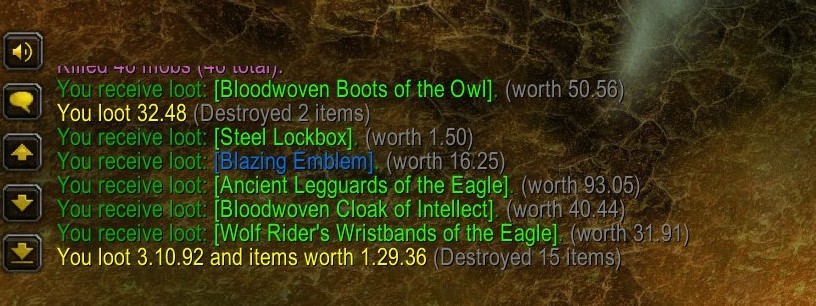
GoFarm filters gray/white and money loot messages. After you're done looting, GoFarm prints the total amount looted from those corpses. If you've enabled automatic destruction of blacklisted items, it also tells you how many items were destroyed.
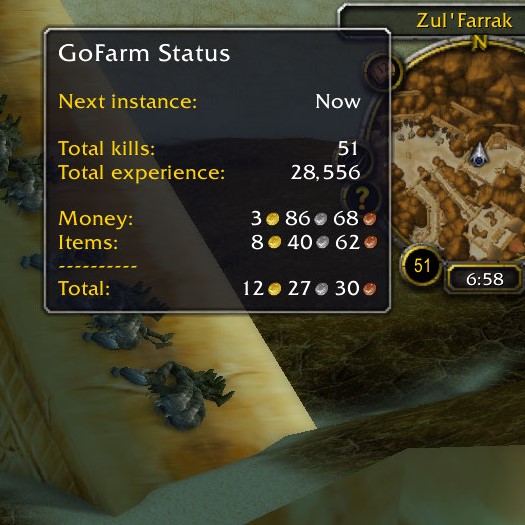
The kill tracker is by the minimap. Mouse over it to see running totals of XP and money & items looted, and when you can enter your next instance. Click it to reset the counters.
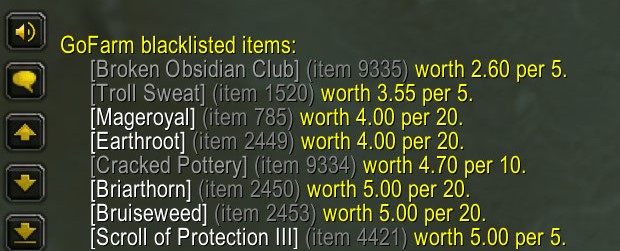
Save bag space by blacklisting low-value items, saving space (and trips to the vendor) for better stuff. GoFarm can destroy them for as they are looted, or you can do it manually with "/gf trash".
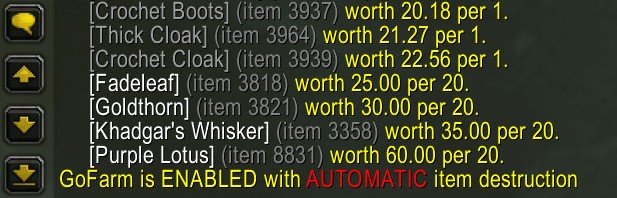
By default, GoFarm remembers blacklisted items and lets you destroy them manually, when you're ready, with "/gf trash". Instead, you can make it automatic with "/gf auto" and GoFarm will destroy them as they are looted.
Description
GoFarm helps you keep score when farming for XP, items or gold.
Perfect for AOE xp/gold farms like SM Cath, ZF graveyard, and Mara purple!
Loot Message Filtering
GoFarm filters messages about money and gray/white items looted.  After you're done looting a group of corpses, it prints only totals for money and items just looted.
> Use  "/gf verbose"  to print separate totals for money looted, gray/white items looted, and items destroyed, after looting each group of mobs
> Use  "/gf terse"  (the default) to print one message with all three totals, after looting each group
> Use  "/gf silent"  to print none of these messages
NOTE: GoFarm always prints messages about green or better items looted, along with their vendor value.

Destruction of Blacklisted Items
You can blacklist low-value items to save bag space, so you make fewer trips to the vendor and spend that time farming higher-value items and XP.
By default, you destroy them manually, when you're ready, with "/gf trash".
Instead, you can tell GoFarm to do it automatically as the items are looted, with "/gf auto".
> Use  "/gf <item-link>"  to add an item to the blacklist
> Use  "/gf save <item-link>"  to remove an item from the blacklist
> Use  "/gf list"  to see the blacklist, sorted by vendor value of a maximum stack
> Use  "/gf clear"  to clear the blacklist, so nothing can be destroyed
> Use  "/gf auto"  to make GoFarm destroy blacklisted items as they are looted
> Use  "/gf manual"  to choose manual destruction (the default), and "/gf trash" when you want to destroy blacklisted items
NOTE:  Only gray (poor) and white (common) items can be blacklisted, for safety.
Kill Tracking
The kill tracker is a round button by the mini-map, next to the game clock.
Mouse-over it to see the GoFarm tooltip.
> Use  "/gf zero"  to reset all counters - kills, money, items, and XP (or click the button)

XP and Loot Totals
Mouse-over the kill tracker to see XP and money & item loot totals.
NOTE:  GoFarm uses vendor values for items - it's lightweight, and a good minimum value that avoids uncertainty about future auction results.

Instance Lockout Timer
Mouse-over the kill tracker to see the time when you can enter your next instance.
> Use  "/gf instances"  to see your history of recent instances.
NOTE:  You must be the party leader and resetting your own instances for this to be accurate (i.e. no tricks with an alt).

Master Switch
> Use  "/gf on"  to enable all GoFarm features (the default)
> Use  "/gf off"  to completely disable GoFarm
GoFarm Team