


Screenshot 2026-10-12 160439.png
Description
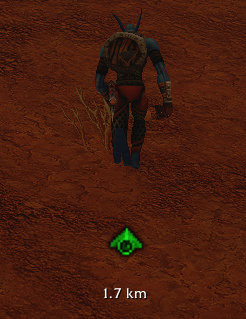
Go Straight Arrow is a super lightweight addon that shows a small arrow on your screen that points to your target and tells you exactly how many degrees you need to turn and how far away you are. Line up with the target, and the arrow turns green and the degrees disappear. From then on, just hold W and run.
Created by Tudorutu
Buy Me A Coffee:
https://buymeacoffee.com/tudorutu
How it works
- 🔵 Blue arrow + degrees: you are off course. Example:
23° Rmeans turn right 23 degrees,12° Lmeans turn left 12 degrees. - 🟢 Green arrow, no degrees: you are facing your target. Run straight forward.
- 📏 Distance: the distance to your target is always shown under the arrow, in meters / km or feet / miles. Switch between Metric and US with
/gsa unitsor by right-clicking the arrow. - The arrow hides when you have no target or when you are inside an instance.
No more zig-zagging while checking the map: turn until the arrow is green, then run.
What it points to
- Map pins: place a pin on the map and select it.
- Quests: click a quest to track it. Click it again to stop.
- Anything you can place a pin on.
- TomTom waypoints: if you use TomTom, its waypoint is followed too.
- Your own coordinates: with the
/gsa setcommand (see below).
If you have Questie installed, the arrow uses its quest locations and points to the nearest objective. The newest thing you select wins, so switching between a pin and a quest is instant.
Commands
Type /gsa in game to see the list.
/gsa set 45.2 67.8: point the arrow at coordinates on your current map/gsa quest <questID>: follow a specific quest by its ID/gsa clear: remove manual and quest targets/gsa units: switch between Metric (m / km) and US (ft / mi). You can also use/gsa units usor/gsa units metric/gsa distance: turn the distance display on or off/gsa tol <degrees>: set how close to straight counts as green (default: 3)/gsa scale <number>: change the arrow size, for example/gsa scale 1.5/gsa lockand/gsa unlock: lock the arrow in place or allow dragging/gsa reset: reset the arrow position and size/gsa debug: print diagnostic info (useful for bug reports)
If you don’t use TomTom, /way 45.2 67.8 also works as a shortcut for /gsa set.
Moving the arrow
Click and drag the arrow to place it wherever you like. The position is saved between sessions. Right-click the arrow (while it is unlocked) to switch between Metric and US units. Use /gsa lock once you are happy with it.
Installation
- Download and unzip the file.
- Put the
GoStraightArrowfolder in yourInterface/AddOns/folder. - Restart the game or write “/reload” in chat.
If the addon shows as out of date, tick “Load out of date AddOns” on the character select screen.
Notes
- The arrow and the distance are straight-line guides. They do not avoid walls, cliffs or water, so adjust when you hit an obstacle.
- Works inside zones and between zones on the same continent.
Feedback and bugs
Found a problem or have a suggestion? Leave a comment on the project page. If something isn’t working, include the output of /gsa debug.
Go Straight Arrow by Tudorutu
Buy Me A Coffee:
https://buymeacoffee.com/tudorutu
Go Straight Arrow Team
