
capture-1794954044226-2894e537-91f2-42c8-ba8a-4c3eb32edf46.png
Description
GFX Settings
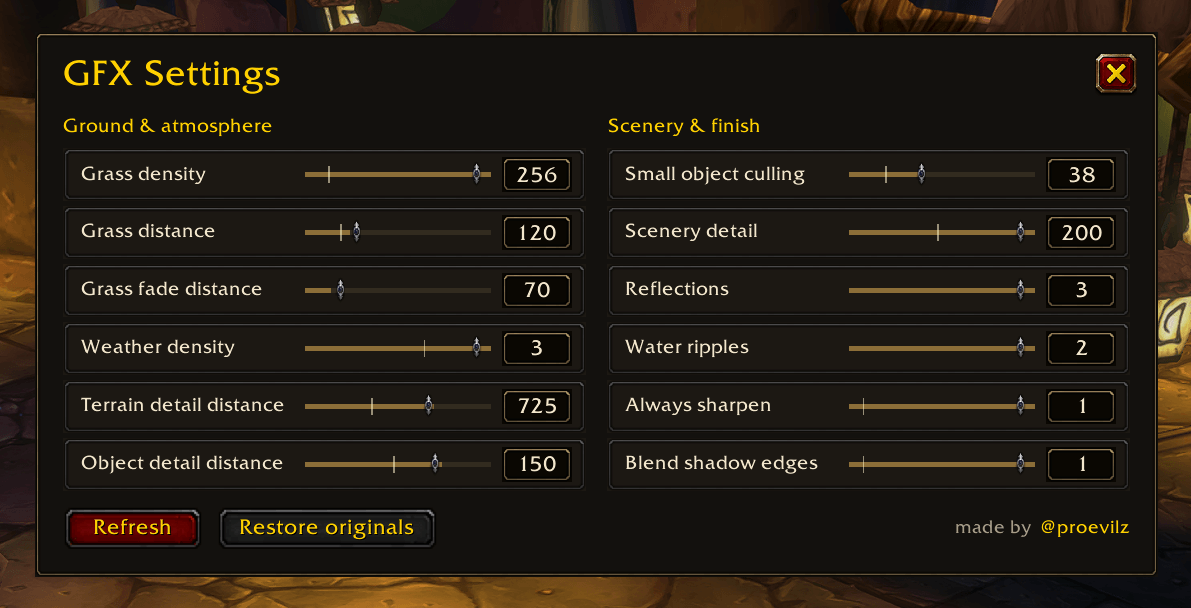
Adjust twelve graphics settings in WoW Forever from one compact panel. Tune your view distance, scenery, weather, water effects, and more without typing console commands.
Features
- Ground and atmosphere: grass density, grass distance, grass fade distance, weather density, and terrain detail distance.
- Scenery: object detail distance, small-object culling, and scenery detail.
- Finishing touches: reflections, water ripples, sharpening, and shadow-edge blending.
- Drag sliders or enter exact values. Changes apply immediately.
- Hover over a slider for an explanation and its console variable.
- Default-value markers appear where the client provides a supported default.
- Restore the values saved before your first changes through the addon, even after reloading.
How to use
Type /gfx or /graphicscontrols to open the panel. Drag the title to move it, or press Escape to close it.
Refresh reads your current settings. Restore originals returns settings to their saved original values.
Compatibility
Built for WoW Forever. Available effects depend on your client and hardware. Higher settings may reduce performance, and game presets can override individual values. Make changes outside combat.
Made by @proevilz · Source code and issues
GFX Settings Team
