GentleEmoteBubbles
- By
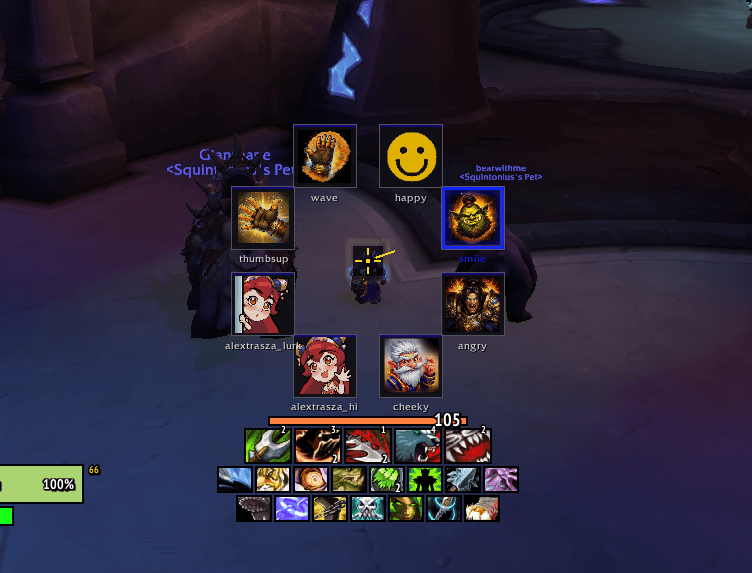
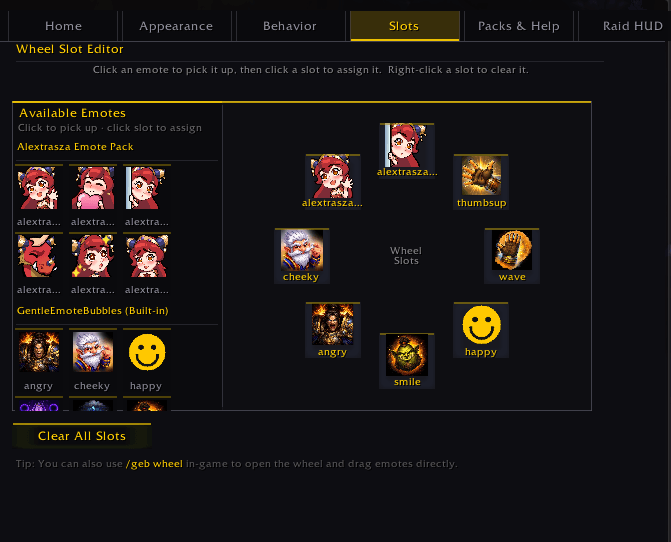
Edit what emotes appear in the wheel from your installed emote packs!
Description
GentleEmoteBubbles — Express Yourself in Style!
Transform your roleplay and social interactions with beautiful animated emote bubbles that appear above your character's head. Share emotions, reactions, and personality with nearby players using a sleek, customizable emote wheel.
Youtube Video : https://youtu.be/W2a_v08as90
NEW in v1.2.0: In-Raid Emote HUD!
Emotes now work inside raids, dungeons, and battlegrounds! Since WoW patch 7.2, Blizzard forbids addons from touching chat bubbles inside instances. The new In-Raid Emote HUD renders stunning Talking Head-style cards directly on your screen, bypassing the restriction entirely.
\> 7 gorgeous HUD themes — Dark Gold, Arcane Blue, Nature Green, Shadow Dark, War Red, Neon Pink, or create your own
\> Full customization — card size, scale, fade timing, 3D player portraits, stack direction
\> Drag to reposition — place the HUD anywhere on your screen
\> Live preview — test your settings before heading into battle
✨ Key Features
Gorgeous Visual Themes
\> 8 stunning pre-built themes (Classic Gold, Arcane Blue, Nature Green, Shadow Dark, Neon Cyberpunk, Glass Elegant, War Red, or make your own!)
\> Smooth animations and fluid transitions
\> Fully customizable colors, glows, borders, and effects
\> Live preview of all visual settings
Powerful Emote Wheel
\> Slot editor — drag and drop your favorite emotes
\> Multiple activation modes: click, hold-to-select, or both
\> Circular, semicircular, or custom layouts
\> Configurable keybinds and hotkeys
\> Smooth animations with ripple, spiral, and bounce effects
Expandable Emote System
\> Install unlimited emote packs from CurseForge that others have made!
\> Create and share your own custom emote packs
\> Support for static images and animated sprite sheets
\> Easy-to-use pack creation templates included
Smart Bubble System
\> Emotes appear above chat bubbles automatically in the open world
\> In-Raid HUD for instances (raids, dungeons, battlegrounds)
\> Works with all nearby users that also have GentleEmoteBubbles installed!
\> Cooldown system prevents spam
\> Per-emote customization (scale, duration, animations)
Professional Settings Panel
\> Tabbed interface: Home, Appearance, Behavior, Emote Slots, Emote Packs, In-Raid HUD
\> Step-by-step guides for creating themes and emote packs
\> Live changelog showing what's new in each version
Quick Start
1. Install GentleEmoteBubbles
2. Set a keybind: /geb settings → Home tab
3. Open the emote wheel with your keybind or /geb wheel
4. Assign emotes to slots in the Emote Slots tab
5. Choose a visual theme in the Appearance tab
6. Customize the In-Raid HUD for instanced content
7. Start expressing yourself in Azeroth!
Recommended Emote Packs
\> GEB_AlextraszaEmotePack — Dragon-themed reactions with stunning art by tofusenshi (https://www.twitch.tv/tofusenshi)
\> GEB_ExampleEmotePack — Template for building your own pack!
\> More packs available on CurseForge — search "GEB_"
\> Creators: Please use the "GEB_" prefix when publishing your packs!
Create Your Own Content
Full tutorials included in the settings panel! Learn to:
\> Design custom visual themes with your favorite colors
\> Build emote packs with your own images and animations
\> Export and share on CurseForge
\> Optimize for performance and compatibility
Slash Commands
/geb wheel — Open/close the emote wheel/geb settings — Open the settings panel/geb \<emotename\> — Send a specific emote (e.g. /geb happy)/geb hud — Show a test HUD card/geb hud move — Toggle the HUD drag handle/geb list — List all available emotes/geb help — See all commands
Community & Support
\> YouTube: youtube.com/@gentlemanquint
\> Twitch: twitch.tv/gentlemanquint
\> Discord: discord.gg/52X3C3DrjZ
Made with ❤️ by GentlemanQuint
Perfect for roleplayers, social guilds, and anyone who wants to add personality to their WoW experience. Works in raids, dungeons, open world, and everywhere in between!
Enjoy expressing yourself in Azeroth! ✨
GentleEmoteBubbles Team