GearSight
- By
Shows enchants, item level and durability on your character panel and when inspecting others.
Discord_4qTQDVgJZa.png
Wow_uXAzyYOcje.png
Description
GearSight
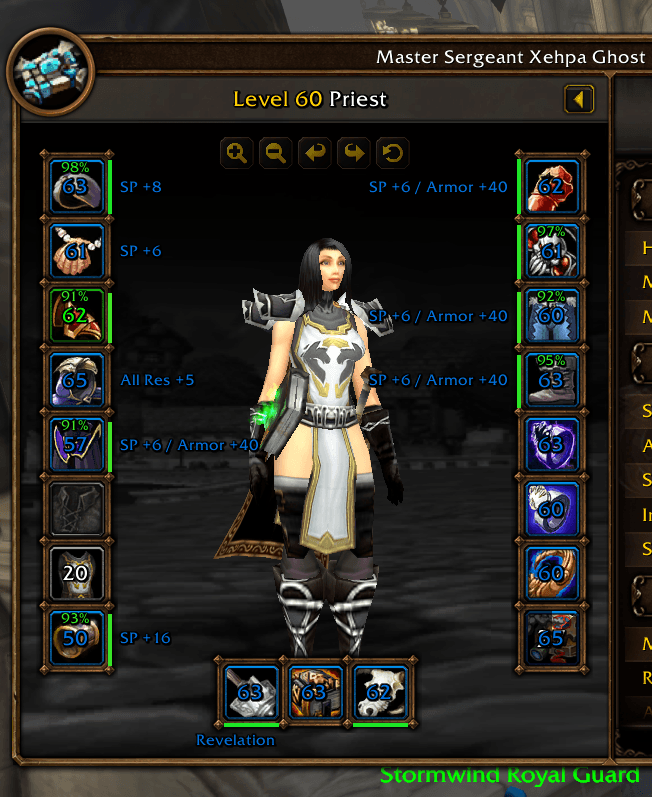
See enchants, item level and durability right on your character panel. Inspect another player and you get their enchants and item levels too. Inspired by DejaClassicStats.
Features
- Enchants next to your gear: every enchanted item shows what its enchant does, not just its name.
- Coloured by rarity: the text matches the item. White gear gets white text, green gets green, blue gets blue, epics get purple.
- Short and readable: enchants are abbreviated to the stat and amount. You can switch to the full wording in the settings.
- Works with new Forever enchants: the text is read from the item itself, so new enchants and armor kits show up without an update.
- Item level: shown on each icon in the item's rarity colour.
- Durability bar: a thin bar on each item that goes from green to yellow to red as it wears, with the percentage shown once the item is damaged.
- Inspect: enchants and item levels for the player you're inspecting.
How to use
- Open your character panel. Enchants, item levels and durability appear next to each slot.
- Inspect another player to see their enchants and item levels.
- Type
/gearsightto turn parts on or off and change the text size.
Settings
| Setting | Choices |
|---|---|
| Enchant text | On or off, shortened or in full |
| Item level | On or off |
| Durability bar | On or off |
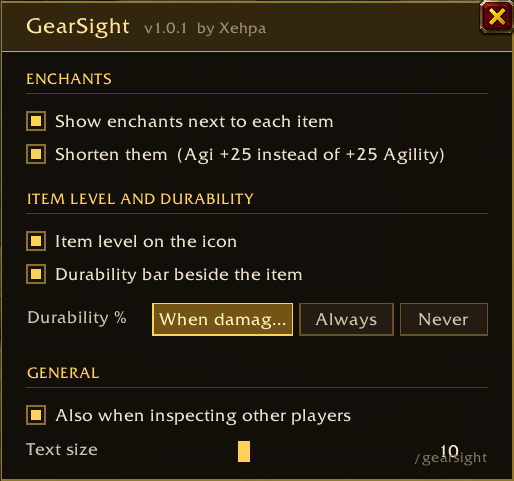
| Durability percent | When damaged, always, never |
| Inspect | On or off |
| Text size | Adjustable |
Slash commands
| Command | What it does |
|---|---|
/gearsight |
Open the settings |
/gearsight test |
Show what the game reports for each of your enchants |
/gearsight refresh |
Read every item again |
GearSight Team