GearPath Upgrade Planner
- By
gearpath-character_1.png
gearpath-route_1.png
gearpath-browse.png
Description
GearPath Upgrade Planner
The best gear for every slot, and a route to go get it. GearPath finds the upgrades you can actually get at your level in WoW: Forever, tells you where each one comes from, and puts a map pin on it.
Needs QuestieDB. GearPath reads QuestieDB, the quest, drop and vendor database Questie uses. The CurseForge app installs it for you. Questie itself is optional.
Why GearPath
- A route, not just a list. Every upgrade you can get right now, grouped by zone and dungeon (or by slot), with a map pin on the exact spot.
- Your weights, your way. Click your spec at the top of the window to change what each stat is worth to you, or make your own custom sets and switch between them like specs.
- Never out of date. It reads QuestieDB while you play, so when the database updates, GearPath does too.
- Learns as you play. Quest rewards, loot and vendor gear you come across are remembered and shared with every other GearPath player, so new Forever gear shows up even before the database has it.
- Dungeon loot and checklist. Walk into a dungeon and a small panel shows what drops there for you, by boss, with the dungeon's quests too. Bosses you kill and gear you loot get ticked off. Scarlet Monastery is split by wing.
- Help at the roll. A line under the item on the Need/Greed window says whether it's an upgrade for you, or for your other spec.
- Rare watch. An icon and a sound the moment a rare that drops an upgrade for you comes into view.
- Weights you can trust. Every class and spec, tanks and healers included, ordered by Forever's class guides and checked against simulator numbers.
- Looks like it belongs. Matches the game's own UI, DaylightUI or EllesmereUI.
What it does
Find your upgrades
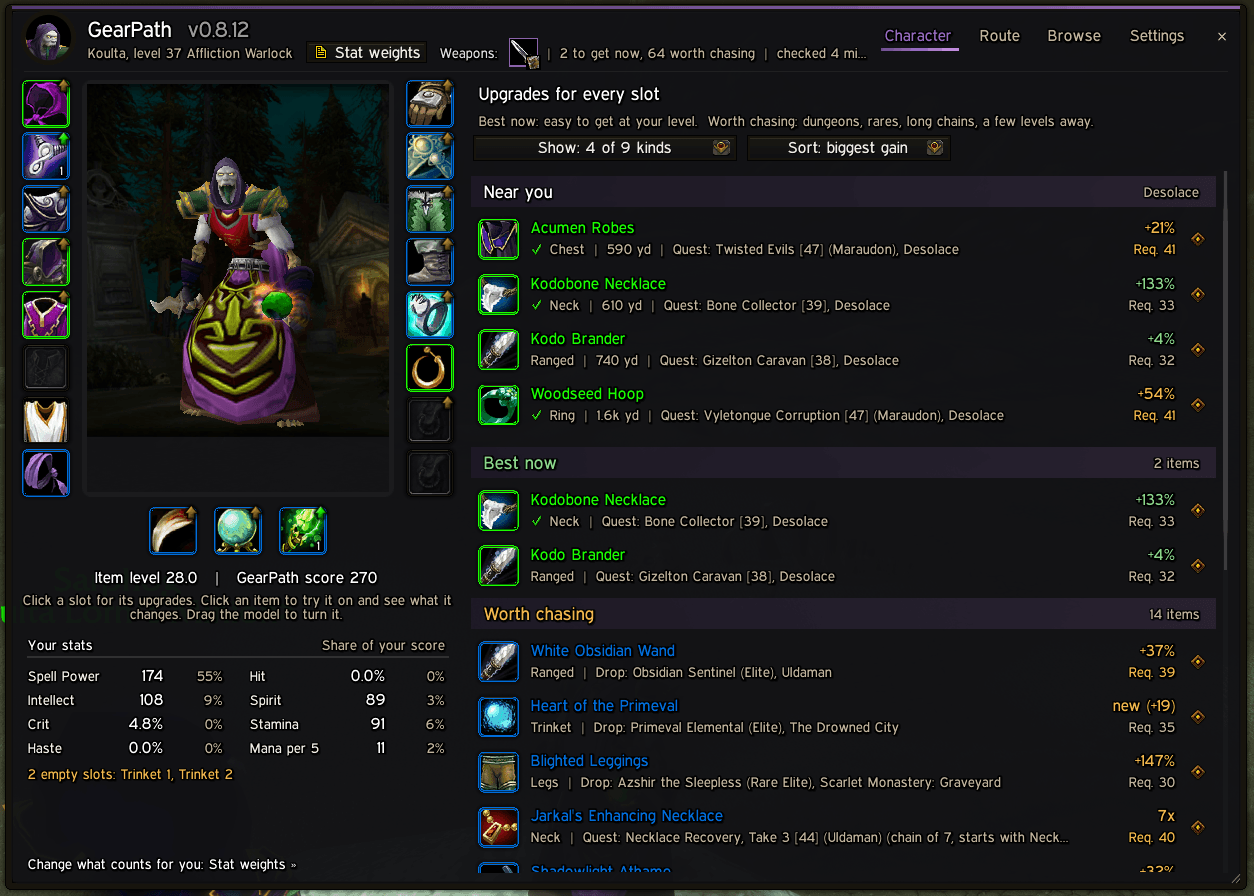
- Character tab: your slots around a model. A green arrow means an upgrade you can get now; gold means one worth chasing. Click an item to try it on and see how your stats would change.
- Near you: upgrades in the zone you're in, closest first, with the distance to each.
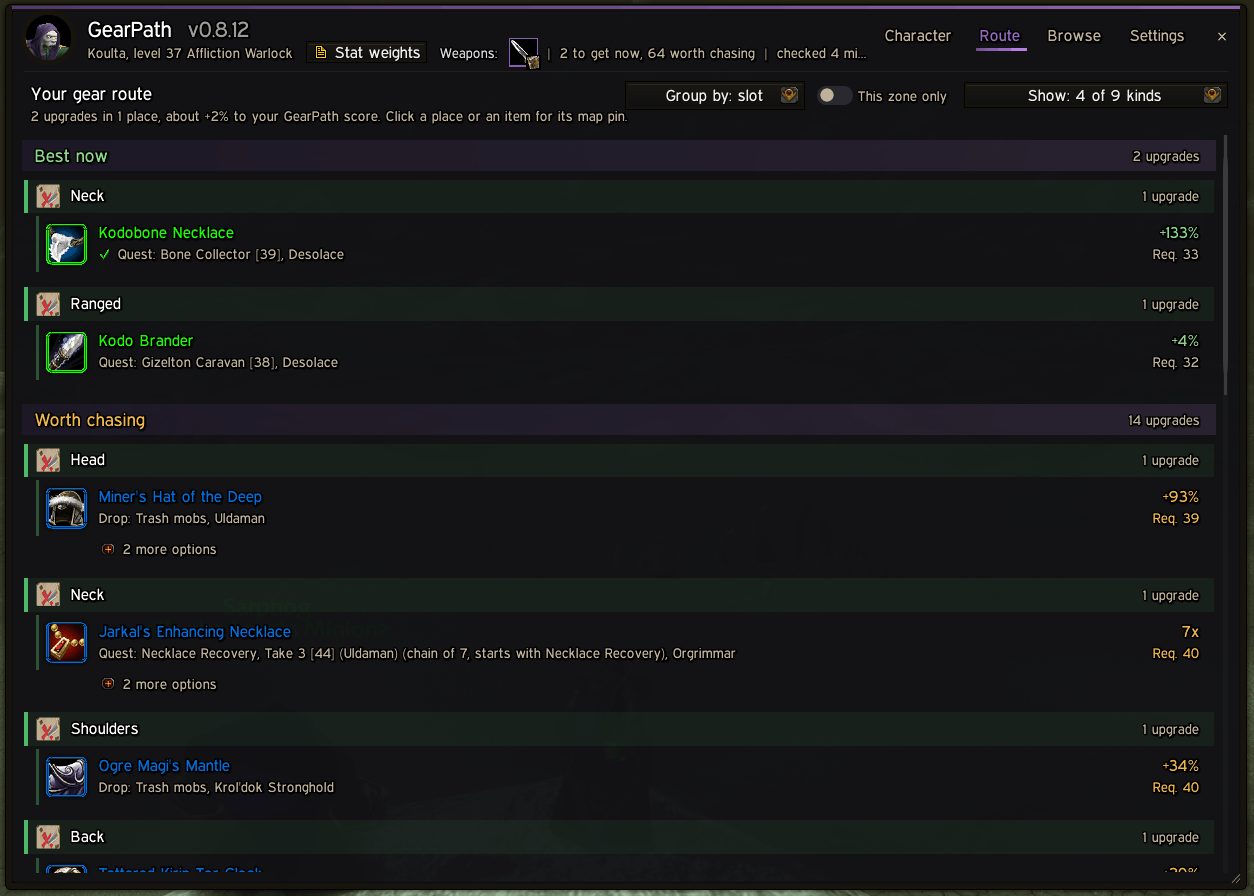
- Route: the best upgrade for every slot, grouped by zone and dungeon, or by slot. Tick This zone only for what you can get where you are. Click one and the map pin goes to the dungeon entrance, quest giver or vendor.
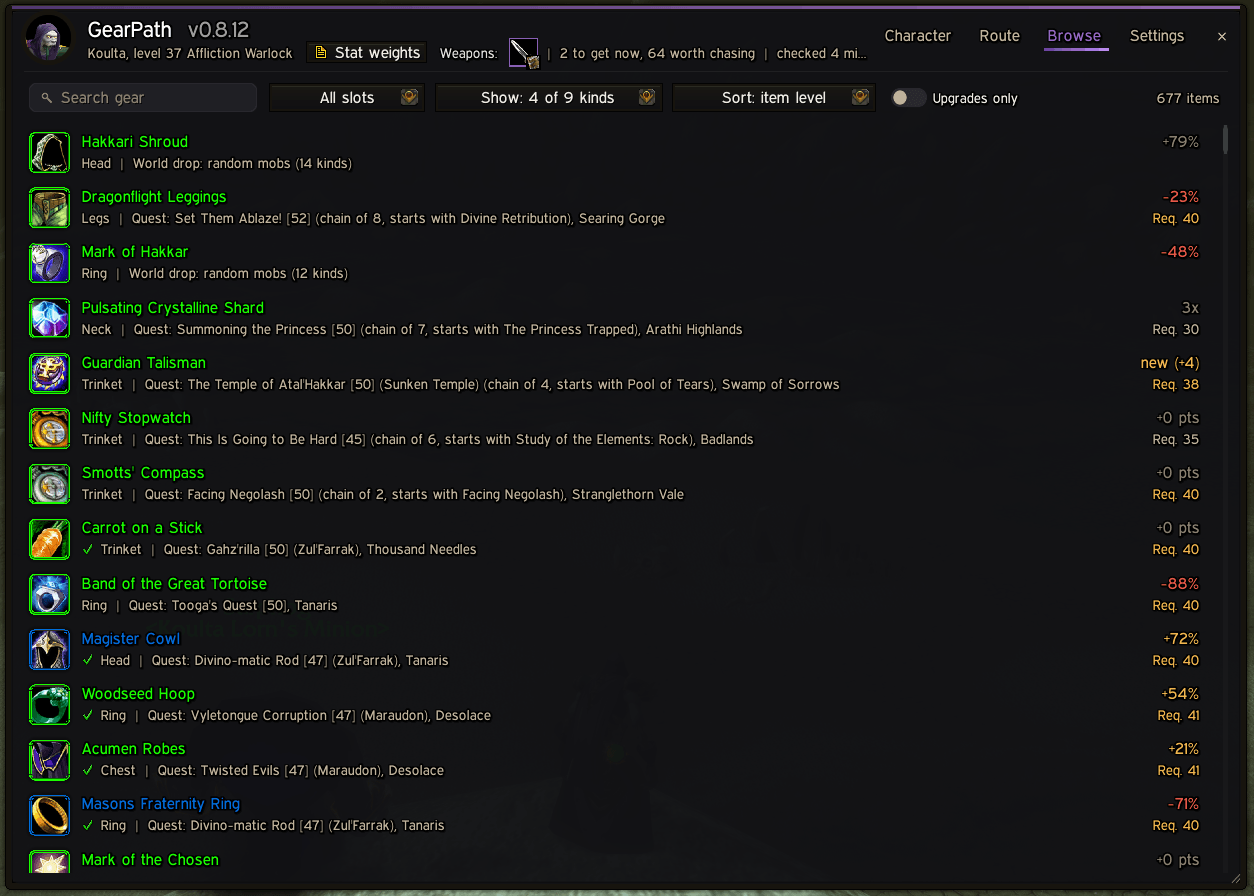
- Browse: every piece of gear for your class near your level. Search, filter and sort it.
While you play
- Tooltips: every piece of gear says how much better it is and where to get it. Mobs and NPCs list the upgrades they drop or sell.
- Quest reward pick: shows which reward to take, or the one that sells for most if none is an upgrade.
- Rare watch: in dungeons and out in the world, an alert when a rare with an upgrade for you is close.
- Put it on: wear an upgrade from your bags in one click (it warns you first if it binds).
- Upgrade notes: a note when you loot an upgrade, and a chat line when a vendor sells one or a level-up puts new upgrades on your Route.
- Safe to sell: a small coin on bag gear that isn't an upgrade for any of your specs.
Built for your class
- Every spec: pick yours, and GearPath weighs gear for it, including tanks, healers and Forever's melee Survival hunters. Weapon speed and type follow the spec too.
- Crafted gear: the gear your professions can make joins your lists, with the trainer or vendor that has the recipe. From your profession window and trainers, or every recipe at once with ProfessionDB.
- Weapon training: found a great staff but never learned Staves? GearPath says so and puts the weapon master on your route.
- Your weights: click your spec at the top of the window to change any stat weight (each shows its default), make up to 8 custom sets, and share yours with a short string other players of your class can paste.
Fits your setup
- Your call: untick what you don't do (PvP rank, reputation, dungeons…), or right-click an item to hide it or the vendor it's from.
- Item levels on the game's own Character window, a minimap button and a key binding.
- Controller support, including ConsolePort.
- Reads items in every WoW client language. The window is also translated (drafts made by machine; corrections welcome).
How it sorts gear
- Best now: easy to get at your level, like a quest or a vendor out in the world.
- Worth chasing: a dungeon, an elite or rare, a long quest chain, or a few levels away.
- Needs something first: a PvP rank, reputation or profession you don't have yet.
Healer gear is left out for classes that don't heal.
Works with
- QuestieDB (required): quests, drops, vendors and where they are.
- Questie (optional): works happily alongside GearPath.
- Dungeon Journal (optional): boss loot, dungeon quests and entrances, including Forever's new dungeons.
- DaylightUI or EllesmereUI (optional): GearPath matches their look. EllesmereUI's and DaylightUI's bags (and Baganator) also get upgrade arrows and safe-to-sell coins.
- TomTom (optional): an arrow for map pins.
- ProfessionDB (optional): every piece of gear your professions can make, and where to learn each recipe.
GearPath reads these addons while you play. It doesn't include any of their code or data.
Sharing
Every GearPath player helps fill in the map. GearPath shares where gear comes from with every other GearPath player online, through your guild, your group and a hidden GearPath chat channel: only item, quest, NPC and map numbers. A source the database doesn't know only shows once more than one player reports it (or one in your guild or group), and it's labeled "reported by other players". To share with only your guild and group, turn off "Use the GearPath channel" in Settings; all sharing can be turned off there too.
Commands
/gp: open or close GearPath/gp spec: list or switch your spec/gp weight: list or change your stat weights/gp report: one line to paste into a bug report
Early days
This is a first release. GearPath was played through the beta (which stopped at level 30) and tested offline on every class and spec from level 10 to 60. If something looks wrong, leave a comment with the item name and the line /gp report gives you, and it'll get fixed.
Credits
- The Questie team for QuestieDB, the database GearPath reads: code by Logonz, data by Muehe, TheCrux (BreakBB), Drejjmit, Dyaxler, Cheeq, TechnoHunter, Yttrium and everyone else who contributes to Questie.
- TheCrux (BreakBB), Questie's lead, for answering my questions on Discord and giving the go-ahead to build on QuestieDB.
- Supersharpie for Sharpie's Gear Judge (MIT), which GearPath's stat weights were checked against.
- Pimptasty for LibProfessionDB (ProfessionDB, MIT), the recipe database behind crafted gear.
License
Free and open source under GPL-3.0.
GearPath Upgrade Planner Team