
GearGuardian
- By
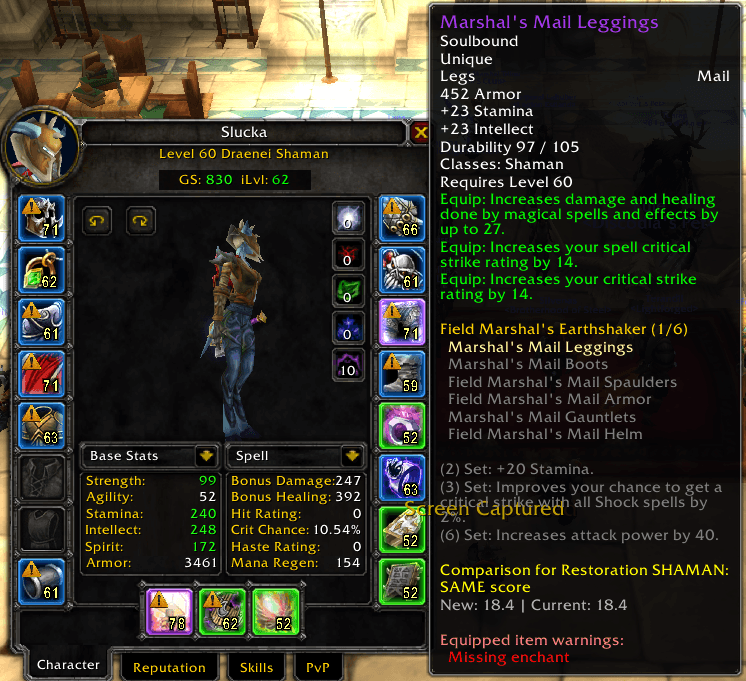
screenshot.png
Description
GearGuardian - Your Ultimate TBC Classic Gear Management Companion
Version 2.9 - Inspect Summary + Enchant Sources + Color Customization + Major Bug Fixes!
=== WHAT'S NEW IN 2.9 ===
Inspect Quick Summary Panel
New compact summary box at the top of the Inspect Frame shows gear readiness at a glance. See enchanted/gemmed/socket bonus counts, missing items by name, and GearScore + iLvl in one view. Color-coded: green (100%), yellow (75-99%), orange (50-74%), red (<50%). Perfect for raid leaders checking recruits. Toggle on/off in config panel — enabled by default.
Enchant Source Lookup
Enchant suggestions now show WHERE to get each enchant with color-coded sources: Yellow = profession (Enchanting 350), Blue = reputation (Kirin Tor Exalted), Green = vendor, Purple = quest. No more guessing where to find "Arcanum of Burning Mysteries." Toggle on/off in config panel — enabled by default.
Color Customization
Customize GS/iLevel frame background and label colors via /gg colors command. Store your preferred color scheme in SavedVariables. Toggle on/off in config panel — disabled by default to keep the classic look.
=== BUG FIXES IN 2.9 ===
Critical fixes:
- Fixed gem color classification: Noble Topaz now correctly orange (was yellow) — fixes meta gem and socket bonus calculations
- Fixed enchant detection: was reading gem data instead of enchant ID due to off-by-one index error
- Fixed gem socket parsing across all modules: standardized to correct indices (3-6)
- Fixed meta gem warning tooltip recursion (no more chain-wrapping OnEnter/OnLeave)
- Fixed inspect frame double-update (4 update passes reduced to 2)
Performance improvements:
- Consolidated 4 separate tooltip scanners into 1 shared instance
- Fixed spec cache from 1-second to 5-minute interval (was rescanning every second!)
- Standardized all itemLink parsing through shared helper functions
=== CORE FEATURES ===
Universal GearScore & Item Level
Hover over ANY player to see their GearScore and average item level instantly — no need to open the inspect frame. Perfect for raid leaders checking recruits or evaluating your team.
Color-coded tiers: gray / white / green / blue / purple / orange
Shift+Click to drag the GS and iLevel displays anywhere you want. Positions are saved between sessions. Use /gg reset to snap back to defaults.
Inspect Quick Summary Panel (NEW!)
Compact box on inspect frame showing: Enchanted X/Y (with missing slot names), Gems X/Y (with empty socket counts), Socket Bonus X/Y active, GearScore and iLvl. Color-coded by readiness percentage. One glance tells you everything.
Enchant & Gem Warnings
Yellow warning icons (⚠️) appear on items missing enchants or with empty gem sockets. Works on your character AND inspected players.
Detects all TBC enchants: Head (Arcanum), Shoulders (Inscriptions), Legs (Leg Armor), Cloak, Chest, Boots, Bracers, Gloves, Weapons (Mongoose, Executioner, etc.), and Scopes.
✓ Gem socket detection fully functional and tested in TBC!
Socket Bonus Indicator
Warning icon when socket bonus is inactive on items with gem sockets. Shows the bonus stat and which colors are missing. Supports all TBC socket types: red, yellow, blue, meta, and prismatic.
Temporary Enchant Detection
Detects sharpening stones, wizard oil, mana oil on weapons. Shows remaining charges and expiration time. Essential for raiders who want max DPS but keep forgetting consumables.
Enchant Suggestions with Source Lookup (IMPROVED!)
Spec-appropriate enchant recommendations in tooltips with color-coded source types. Numbered list for easy reading. Shows profession, reputation, vendor, or quest source for each enchant.
Color Customization (NEW!)
Customize GS/iLevel frame appearance. Set background and label colors via /gg colors command. Colors persist between sessions.
Export Gear String
Use /gg export to copy a formatted text summary with your GearScore, iLevel, and any issues (missing enchants, empty sockets). Perfect for recruitment applications, Discord sharing, or guild requirement checks.
Minimap Button
Quick access button on your minimap. Left-click opens the config panel, right-click shows a quick menu with feature toggles. Drag it anywhere around the minimap edge. Use /gg minimap to hide/show it.
Item Usability Validation
No more false upgrades! The addon validates armor types (Plate/Mail/Leather/Cloth) and class restrictions. If you can't use it, the tooltip shows "Not usable by your class."
Quality Borders
Colored glowing borders around equipped items based on quality (green/blue/purple/orange). Works on both character frame and inspect frame.
Smart Gear Comparison
Automatically detects your spec and compares items based on stat weights for your class. Green tooltips = upgrade, red = downgrade.
Meta Gem Requirement Check
Detects meta gems and checks if color requirements are met. Warning icon if inactive.
Full Inspect Frame Integration
When you inspect someone, you see:
- Their GearScore and average item level (draggable!)
- Missing enchants (yellow ⚠️ icons)
- Empty gem sockets (yellow ⚠️ icons)
- Socket bonus inactive warnings (yellow ⚠️ icons)
- Item quality borders
- Item levels on each piece
=== CONFIGURATION ===
Type /gg to open the config panel, or click the minimap button!
Toggle features on/off:
- Quality Borders, Item Level Display, Gear Comparison, GearScore Display
- Enchant Check, Gem Check, Socket Bonus, Temporary Enchant Check
- Inspect Quick Summary Panel (NEW!)
- Enchant Suggestions + Source Lookup (IMPROVED!)
- Color Customization (NEW!)
- Meta Gem Requirement Check (now active, no longer "Coming soon")
Commands:
- /gg or /gg config - Open configuration panel
- /gg toggle - Enable/disable addon
- /gg reset - Reset frame positions to defaults
- /gg export - Export your gear to text
- /gg minimap - Toggle minimap button on/off
- /gg version - Check for addon updates
- /gg colors - Color customization help (NEW!)
- /gg showconfig - Show current feature settings
- /gg debug - Debug enchant/gem checking
- /gg debuggems - Debug gem detection
- /gg debugmeta - Debug meta gem requirements
- /gg debuginspect - Debug inspect target enchants
=== WHY USE THIS ADDON? ===
- Works on you AND other players (hover to see GearScore without inspecting)
- Inspect Summary Panel — one glance gear readiness check for raid leaders
- Color-coded enchant sources — know exactly where to get each enchant
- Spec-aware enchant suggestions directly in tooltips
- Essential for raid leaders checking team readiness
- Export gear status for recruitment applications
- Compares gear based on YOUR spec, not generic stats
- Customizable GS/iLevel frame colors
- Lightweight and fast — optimized caching and shared tooltip
- Built specifically for TBC Classic
=== PERFECT FOR ===
- Raid leaders checking if raiders are enchanted/gemmed/socket-bonused
- Guild officers enforcing minimum gear standards
- Recruiters evaluating applicants
- New/returning players finding where to get enchants
- Anyone who wants to quickly assess gear quality
- Players who want to customize their UI colors
=== TECHNICAL DETAILS ===
- Uses LibClassicInspector for reliable player inspection
- Shared tooltip scanner (4 → 1 instance, reduced memory usage)
- Standardized itemLink parsing via shared helper functions
- Smart caching system with correct 5-minute spec cache
- GUID-based lookups for accuracy
- Works with all TBC content
Download GearGuardian and never wonder if your gear is raid-ready again. 🛡️
GearGuardian Team
