Gear Info
- By
Various upgrades to the character panel for tracking item level and upgrading for gear.
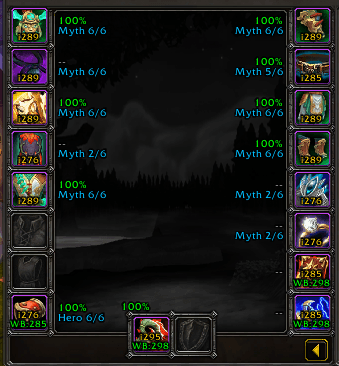
image_2026-06-12_000016316.png
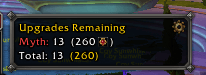
image_2026-06-12_000044378.png
Description
GearInfo adds at-a-glance item information directly onto your Character panel, so you no longer have to hover over each piece of gear to know where you stand. The original idea behind the creation was because swapping between alts (especially lower geared ones) led me to losing track of what items were at what track, and what levels I could upgrade for a reduced cost. Then, the list of features grew as I found things I was interested of keeping track of without having to search for a million different addons.
Each equipped item displays three pieces of information:
- Item Level — shown in gold, with your warband-wide high watermark appended if it differs from your current ilvl (e.g.
i276 WB:289) - Durability — color-coded percentage from green (healthy) to red (broken)
- Upgrade Track — shows your current upgrade rank and max (e.g.
Myth 2/6)
PvP items are handled separately — they display their PvP item level instead of the warband watermark (e.g. ilvl 623 (PvP 289)).
Weapon slot labels appear above the weapon icons rather than to the side.
Just outside of your Character frame there will be:
- Upgrades remaining broken out by track (Myth, Hero, Champion, Veteran, Adventurer).
- Crest cost per track, calculated per upgrade step using your character and warband watermarks to determine the correct cost (0, 10, or 20 crests per step).
- A running total of all upgrades and crests needed across your entire gear set.
- A list of every slot that can be enchanted using current expansion enchants. If it is enchanted, the name is displayed and if youre missing the enchant, it lets you know one is missing.
Other General QoL additions:
- A notification that you are wearing an item with the incorrect main stat.
- A more accurate ilvl breakdown. The average can be displayed down to 2 decimals via slider, and is displayed in (Equipped)/(Bag) format. This is also able to be colored to your class color via a checkbox in the settings.
- A warning when your average durability of worn gear is at or below 25%.
PvP items are excluded from the upgrade summary entirely.
Notes
- Crest costs reflect Midnight Season 1 pricing (20 crests per rank at full price)
- This is a passion project. I want it to work for everyone, but I don't have all the time in the world to make it work. I will read comments and do my best to fix things, and anything people want added will be genuinely considered.
The Gear Info Team