
GD-Hunter Kit
- By
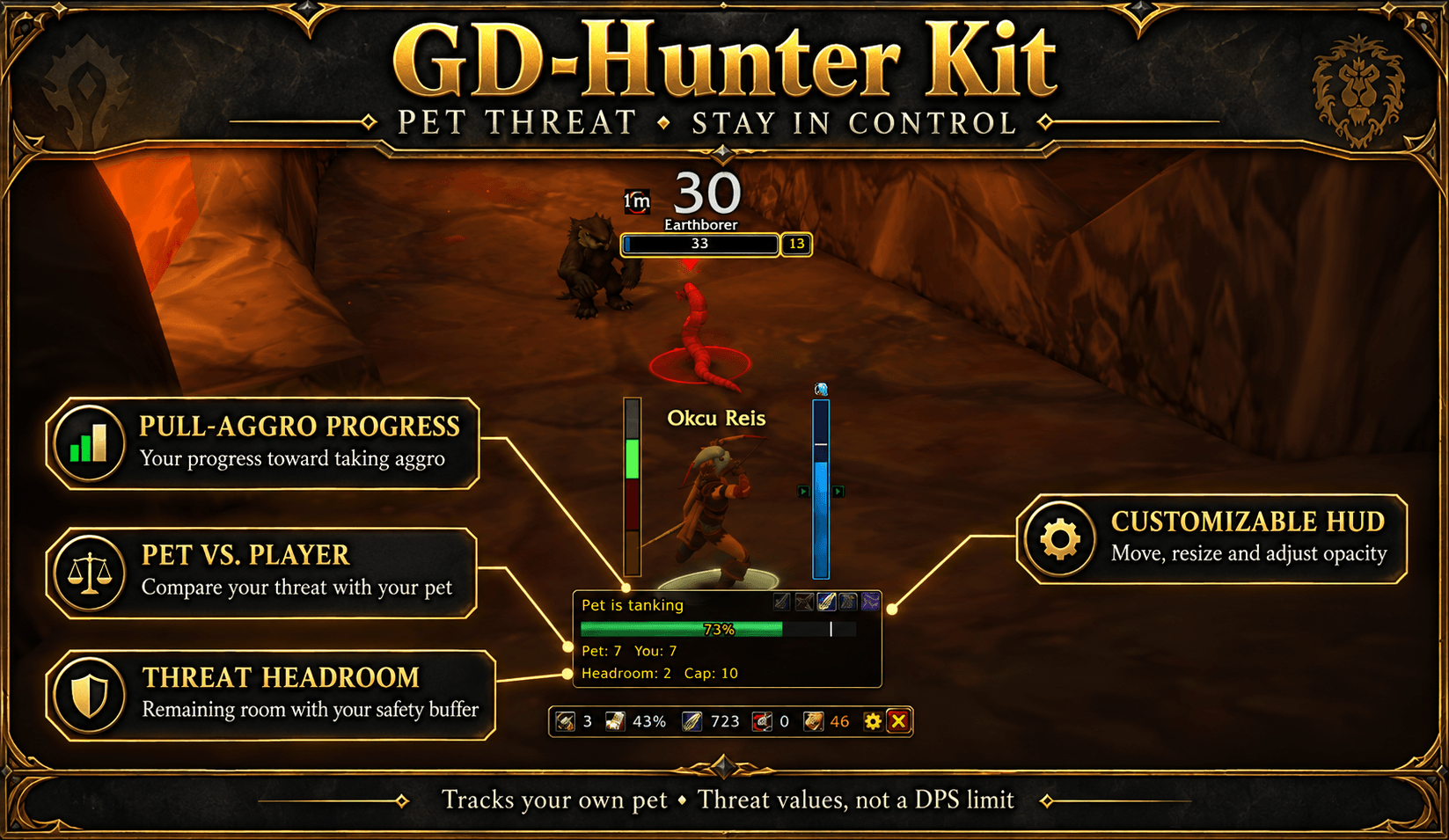
Auto Shot timing, clear range and deadzone indicators, pet threat tracking, cooldown icons, pet status and ammo—all in a compact, customizable Hunter HUD. Annotated gameplay image.
Description
GD-Hunter Kit
**Keep your eyes on the fight.**
GD-Hunter Forever is a compact Hunter HUD for World of Warcraft: Forever. Two slim vertical bars help you follow Auto Shot timing and your current target's range, while a small information panel keeps pet status, ammunition and unspent points close at hand.
Less screen clutter. Clear visual cues. Settings you can adjust without editing files.
## Auto Shot timing at a glance
The bow bar fills from bottom to top. With the default color preset, it is **blue while filling** and turns **green when the prepare-to-stop window begins**. An optional **Ready!** message appears beside it.
- Uses the client's ranged swing events to synchronize the shot cycle.
- Can synchronize with the readable expiration of Blizzard's Ranged timer when that timer is active.
- Starts with the equipped ranged weapon's interval; it does not use a fixed one-second cycle.
- Movement does not reset the progress display.
- Remains full while waiting for the next confirmed shot.
- Lets you adjust the prepare-to-stop window and early stop margin.
- Suppresses the Ready! message when range is blocked, uncertain or another cast is in progress.
The bar is a timing aid, not an automatic movement or shooting system. Latency, casts, weapon changes and beta mechanics can affect the next actual shot.
## A clear range and deadzone display
The separate range bar has four bands. From top to bottom:
| Color | State |
|---|---|
| White | Too far to shoot |
| Green | In ranged attack distance |
| Red | Confirmed deadzone |
| Orange | Melee range |
Your current band lights up while the others stay faint. On a **confirmed deadzone**, the **entire bar becomes opaque red** and an optional **Deadzone!** warning appears beside it. It returns to the normal four-band display when you leave that state.
If the client confirms that shooting is blocked at close range but cannot distinguish melee from the deadzone, the lower bands show an uncertain close-range state rather than claiming a confirmed deadzone.
The locked range bar hides when there is no valid hostile target and reappears when a valid target is selected. Unlock it to position it without a target.
**Deadzone warnings are visual only. There is no deadzone sound.**
## Pet Threat: keep your pet tanking
A separate compact window tracks **only you and your own pet** against your selected hostile NPC.
- See your progress toward the pull-aggro threshold, alongside pet and player threat.
- Check the current threat cap and remaining headroom after your safety buffer.
- Green, yellow and red states make increasing aggro risk easy to notice.
- Adjust the safety buffer (10% by default) and warning threshold (80% by default).
- Move and lock the window independently, change its width and opacity, or preview it in settings.
**Headroom is threat, not a DPS limit or a guaranteed amount of safe damage.** The panel uses the client's available threat data. When numerical data is unavailable or restricted, it does not invent a cap or headroom. No TinyThreatPlus dependency is required.
## Optional cooldown icons
Keep a compact row below the bow bar for:
- Aimed Shot
- Multi-Shot
- Arcane Shot
- Feign Death
- Freezing Trap
Toggle the complete row or individual abilities. Cooldowns use Blizzard's supported duration widgets; unlearned abilities can appear dimmed.
## A small Hunter information panel
The independently movable panel uses small icons and short numbers, with details on hover:
- **Pet happiness:** 1, 2 or 3, with a colored unhappy-pet warning when the API provides the value.
- **Pet health:** percentage, using the modern health display API when available.
- **Ammo:** arrows and bullets in your bags, or a specific ammunition item you choose by itemID.
- **Player talent points:** unspent points reported by the available talent API.
- **Pet training points:** available training points; these are not mislabeled as pet talent points.
Set a low-ammo threshold to change the count's warning color. Hide each category separately. Unavailable fields are hidden by default; you can show them as a dash instead. Missing data is never presented as zero.
Drag the panel by its background, icons or numbers when unlocked. Its gear opens settings, and its close button hides the panel. Re-enable it under **Info Window**.
## Selectable stop-warning sounds
The bow bar's stop warning can use **Raid Warning, Ready Check, Alarm 1 or Alarm 2**. Choose a sound under **Alert Sounds** and use **Test sound** to listen before enabling it.
Automatic stop audio plays once per shot cycle. Test buttons work while alerts are muted, and closing settings stops the current sound preview.
## Make the HUD your own
Open settings with **`/fh`** or the information panel's gear.
- Move and lock the bow bar, range bar and information panel independently.
- Adjust bar thickness, length and opacity.
- Adjust the information panel's scale and opacity.
- Choose the blue/ready-green preset, a bronze-to-green preset or alternative palettes.
- Toggle Ready!, Deadzone!, movement symbols and cooldown icons.
- Show the bow bar only in combat if preferred.
- Preview the bow cycle or range states, center the bars, and restore defaults.
- Switch instantly between **English and Turkish**. A bundled font supports Turkish characters.
The settings window has General, Bow Bar, Range, Pet, Ammo, Abilities, Info Window, Appearance, Alert Sounds and Pet Threat sections. Changes apply immediately and settings are saved through the client's SavedVariables system.
## Installation
1. Download and extract the ZIP.
2. Copy the **ForeverHunter** folder into `World of Warcraft/_classic_beta_/Interface/AddOns/`.
3. Confirm that the final path is `Interface/AddOns/ForeverHunter/ForeverHunter.toc`.
4. Enable **GD-Hunter Forever** in the AddOn list. Restart the client for a new installation; use `/reload` after updating existing files.
5. Type `/fh` to configure the display.
The folder remains **ForeverHunter** for compatibility with existing installations and saved settings. Replace that folder's files when updating; do not install a second copy under a different name.
## Useful commands
| Command | Purpose |
|---|---|
| `/fh` | Open or close settings |
| `/fh test` | Toggle the bow timing preview |
| `/fh diag` | Print timing and range diagnostics |
| `/fh lock` | Toggle the bow panel's movement lock |
| `/fh sound` | Toggle the stop-warning sound |
The corresponding controls are also available in the settings window.
## Compatibility and practical limits
- Built for **WoW: Forever 1.60.1**, **Interface 16001**. Other WoW client families are not claimed to be supported.
- Standalone: no required addon libraries or external addons.
- Range detection concerns your **current hostile target**. The bar is a state indicator, not an exact yard ruler or a world-space circle.
- Range does not prove line of sight or that an obstacle is absent.
- Restricted or unavailable beta API data may leave some fields or range states unknown.
- Player talent totals exclude the Forever Legacy system.
- Pet training points and pet talent points are different systems.
- This addon provides information only; it does not move your character, cast abilities or choose a rotation.
## Support development
Enjoying GD-Hunter Kit? [Buy me a coffee](https://buymeacoffee.com/gokhandede) to support future updates. The addon is free, and support is completely optional. Thank you for helping it grow!
## Feedback
Please report issues through the project's CurseForge comments or issue tracker, if enabled. Include your addon version, Forever client build, what happened, and `/fh diag` output. For Lua errors, enable `/console scriptErrors 1`, type `/reload`, and include the first error message.
*Gallery screenshots captured with v0.4.6 may show a custom color preset. Version 0.4.7 removes deadzone audio; the remaining stop-warning sound is configurable. Cover art is illustrative, not a gameplay screenshot.*
GD-Hunter Kit Team
